
- Posts: 218
- Thank you received: 6
add Product Code to Admin notification email?
- woonydanny
-
 Topic Author
- Offline
Less
More
14 years 7 months ago #38562
by woonydanny
add Product Code to Admin notification email? was created by woonydanny
How would i add the Product Code to each item in the Admin notification email?
thanks
thanks
Please Log in or Create an account to join the conversation.

14 years 7 months ago - 14 years 7 months ago #38583
by Jerome
Jerome - Obsidev.com
HikaMarket & HikaSerial developer / HikaShop core dev team.
Replied by Jerome on topic Re: add Product Code to Admin notification email?
Hi,
You can edit emails (with HikaShop business) and add the product code into.
Like:
www.hikashop.com/en/support/documentatio...shop-email-form.html
Regards,
You can edit emails (with HikaShop business) and add the product code into.
Like:
Code:
<p><?php echo $item->order_product_name . ' (' . $item->order_product_code . ')'; ?></p>
www.hikashop.com/en/support/documentatio...shop-email-form.html
Regards,
Jerome - Obsidev.com
HikaMarket & HikaSerial developer / HikaShop core dev team.
Last edit: 14 years 7 months ago by Jerome.
The following user(s) said Thank You: woonydanny, jrtoms
Please Log in or Create an account to join the conversation.
- woonydanny
-
Topic Author
- Offline
Less
More
- Posts: 218
- Thank you received: 6
14 years 7 months ago #38690
by woonydanny
Replied by woonydanny on topic Re: add Product Code to Admin notification email?
thanks, i replaced:
with
Code:
<p><?php echo $item->order_product_name; ?></p><?php
with
Code:
<p><?php echo $item->order_product_name . ' (' . $item->order_product_code . ')'; ?></p>
Please Log in or Create an account to join the conversation.
- woonydanny
-
Topic Author
- Offline
Less
More
- Posts: 218
- Thank you received: 6
14 years 7 months ago - 14 years 7 months ago #38820
by woonydanny
Replied by woonydanny on topic Re: add Product Code to Admin notification email?
The code you gave hasn't seemed to work, i noticed there was a space after the ', so should the code actually be:
<p><?php echo $item->order_product_name . '(' . $item->order_product_code . ')'; ?></p>
??
<p><?php echo $item->order_product_name . '(' . $item->order_product_code . ')'; ?></p>
??
Last edit: 14 years 7 months ago by woonydanny.
Please Log in or Create an account to join the conversation.
14 years 7 months ago #38829
by Jerome
Jerome - Obsidev.com
HikaMarket & HikaSerial developer / HikaShop core dev team.
Replied by Jerome on topic Re: add Product Code to Admin notification email?
Sorry, I do not understand your question.
Jerome - Obsidev.com
HikaMarket & HikaSerial developer / HikaShop core dev team.
Please Log in or Create an account to join the conversation.
- woonydanny
-
Topic Author
- Offline
Less
More
- Posts: 218
- Thank you received: 6
14 years 7 months ago #38898
by woonydanny
Replied by woonydanny on topic Re: add Product Code to Admin notification email?
The code you gave does not work. I am thinking there is a spelling mistake??
Please Log in or Create an account to join the conversation.
14 years 7 months ago #38996
by Jerome
Jerome - Obsidev.com
HikaMarket & HikaSerial developer / HikaShop core dev team.
Replied by Jerome on topic Re: add Product Code to Admin notification email?
Heum,
You said that you have replaced
By
So, you removed "<?php" at the end ?
You said that you have replaced
Code:
<p><?php echo $item->order_product_name; ?></p><?php
Code:
<p><?php echo $item->order_product_name . ' (' . $item->order_product_code . ')'; ?></p>
Jerome - Obsidev.com
HikaMarket & HikaSerial developer / HikaShop core dev team.
Please Log in or Create an account to join the conversation.
- woonydanny
-
Topic Author
- Offline
Less
More
- Posts: 218
- Thank you received: 6
14 years 7 months ago #39169
by woonydanny
Replied by woonydanny on topic Re: add Product Code to Admin notification email?
ah ok, it looks like i accidentally may have deleted that. I will try putting that back.
thanks
thanks
Please Log in or Create an account to join the conversation.

13 years 1 month ago #118441
by solia
Replied by solia on topic Re: add Product Code to Admin notification email?
I have exactly the same question, but I suspect there may have been some code changes since this exchange took place.
I do NOT display the product code on the product pages and do not wish to do so. However, I would like for administrative email order notifications to show the product name AND the product code.
I have tried this solution proposed in this thread with no luck. I will explain what I did. The current css in my version of Hikashop (business) is at line 100 of the php
<p><?php echo $item->order_product_name;
It goes on, but based upon the prior responses, I simply altered that to:
<p><?php echo $item->order_product_name . ' (' . $item->order_product_code . ')';
leaving all else the same.
I saved and did a test and did not see the product code in the notice email. I promise I have been looking for a more recent thread and could not locate one. THANK you for your help. Nadine at Solia.
I do NOT display the product code on the product pages and do not wish to do so. However, I would like for administrative email order notifications to show the product name AND the product code.
I have tried this solution proposed in this thread with no luck. I will explain what I did. The current css in my version of Hikashop (business) is at line 100 of the php
<p><?php echo $item->order_product_name;
It goes on, but based upon the prior responses, I simply altered that to:
<p><?php echo $item->order_product_name . ' (' . $item->order_product_code . ')';
leaving all else the same.
I saved and did a test and did not see the product code in the notice email. I promise I have been looking for a more recent thread and could not locate one. THANK you for your help. Nadine at Solia.
Please Log in or Create an account to join the conversation.

13 years 1 month ago #118462
by nicolas
Replied by nicolas on topic Re: add Product Code to Admin notification email?
That's the correct modification even with the latest version of HikaShop.
Are you sure that you edited the correct email and looked at the correct email resulting from the change ?
Are you sure that you edited the correct email and looked at the correct email resulting from the change ?
Please Log in or Create an account to join the conversation.
13 years 1 month ago #118464
by solia
Replied by solia on topic Re: add Product Code to Admin notification email?
Friends: I do not know what or why, but I worked this precise solution again and it worked FINE.
So, hopefully this will help.
I did NOT configure the product configuration to show the code on the product list and also the customer email does NOT include the product code.
But the changes above DO result in the admin email including the product code as a parenthetical.
Issue resolved.
So, hopefully this will help.
I did NOT configure the product configuration to show the code on the product list and also the customer email does NOT include the product code.
But the changes above DO result in the admin email including the product code as a parenthetical.
Issue resolved.
Please Log in or Create an account to join the conversation.
13 years 1 month ago #118465
by solia
Replied by solia on topic Re: add Product Code to Admin notification email?
Thank you Nicholas. I just posted and indicate success.
You all are wonderful. Thanks.
Nadine at Solia.
You all are wonderful. Thanks.
Nadine at Solia.
Please Log in or Create an account to join the conversation.

12 years 8 months ago #141183
by medean
Replied by medean on topic add Product Code to Admin notification email?
Hallo,
I want to add the product code in the notification Email, too, and tried to find the same text to edit but I couldnt.
I opened the "order creation notification" and could only find:
<?php
foreach($data->cart->products as $item){
$price = $item->order_product_price*$item->order_product_quantity;
echo strip_tags($item->order_product_name) . "\t" .
Am I wrong there? - How do I add the product code to the notification Email I get after an order.
thanks
regards
I want to add the product code in the notification Email, too, and tried to find the same text to edit but I couldnt.
I opened the "order creation notification" and could only find:
<?php
foreach($data->cart->products as $item){
$price = $item->order_product_price*$item->order_product_quantity;
echo strip_tags($item->order_product_name) . "\t" .
Am I wrong there? - How do I add the product code to the notification Email I get after an order.
thanks
regards
Please Log in or Create an account to join the conversation.
12 years 8 months ago #141191
by medean
Replied by medean on topic add Product Code to Admin notification email?
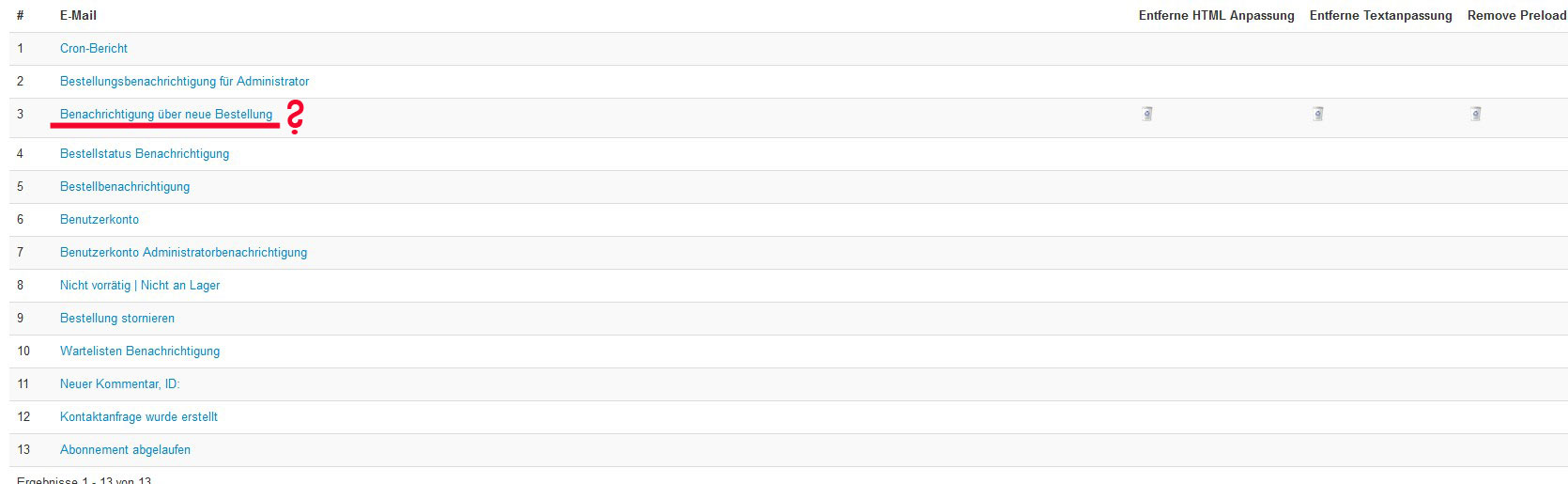
I chose the 3rd one (screenshot) in intention to add the product code to the order notification Email like that:
old version:
<?php echo JText::_('CART_PRODUCT_NAME')."\t".JText::_('CART_PRODUCT_UNIT_PRICE')."\t".JText::_('CART_PRODUCT_QUANTITY')."\t".JText::_('HIKASHOP_TOTAL');?>
new:
<?php echo JText::_('CART_PRODUCT_NAME')."\t".JText::_('ORDER_PRODUCT_CODE')."\t".JText::_('CART_PRODUCT_UNIT_PRICE')."\t".JText::_('CART_PRODUCT_QUANTITY')."\t".JText::_('HIKASHOP_TOTAL');?>
was that the right way?
old version:
<?php echo JText::_('CART_PRODUCT_NAME')."\t".JText::_('CART_PRODUCT_UNIT_PRICE')."\t".JText::_('CART_PRODUCT_QUANTITY')."\t".JText::_('HIKASHOP_TOTAL');?>
new:
<?php echo JText::_('CART_PRODUCT_NAME')."\t".JText::_('ORDER_PRODUCT_CODE')."\t".JText::_('CART_PRODUCT_UNIT_PRICE')."\t".JText::_('CART_PRODUCT_QUANTITY')."\t".JText::_('HIKASHOP_TOTAL');?>
was that the right way?
Please Log in or Create an account to join the conversation.
12 years 8 months ago #141243
by nicolas
Replied by nicolas on topic add Product Code to Admin notification email?
You're looking at the text version of the email.
Since a few versions, the HTML version of the emails uses a templating system so the code is totally different from what you have written here.
But it's even simpler. You just have to add the tag {LINEVAR:PRODUCT_CODE} after the tag {LINEVAR:PRODUCT_NAME} and you'll get the product code after the product name in the email.
Since a few versions, the HTML version of the emails uses a templating system so the code is totally different from what you have written here.
But it's even simpler. You just have to add the tag {LINEVAR:PRODUCT_CODE} after the tag {LINEVAR:PRODUCT_NAME} and you'll get the product code after the product name in the email.
Please Log in or Create an account to join the conversation.
12 years 8 months ago #141262
by medean
Replied by medean on topic add Product Code to Admin notification email?
Hi,
in the order notification email I found already that tag... (screenshot)... so it´s right?
in the order notification email I found already that tag... (screenshot)... so it´s right?
Please Log in or Create an account to join the conversation.

Less
More
- Posts: 12953
- Thank you received: 1778
12 years 8 months ago #141307
by Mohamed Thelji
Replied by Mohamed Thelji on topic add Product Code to Admin notification email?
Hi,
A solution can be to change this line :
By :
A solution can be to change this line :
Code:
{LINEVAR:PRODUCT_NAME}<!--{IF:ORDER_PRODUCT_CODE}--> {LINEVAR:PRODUCT_CODE}<!--{ENDIF:ORDER_PRODUCT_CODE}-->
Code:
{LINEVAR:PRODUCT_NAME} {LINEVAR:PRODUCT_CODE}
Please Log in or Create an account to join the conversation.
12 years 8 months ago #141413
by medean
Replied by medean on topic add Product Code to Admin notification email?
sorry, but the product code is still not seen in the Email... and I just got told that the coupon code is also not seen, only that a coupon is used.
Please Log in or Create an account to join the conversation.
12 years 8 months ago - 12 years 8 months ago #141638
by medean
Replied by medean on topic add Product Code to Admin notification email?
Hi,
the problem is still not solved and I would please need a solution.
In the notification email that I get after an order should be also seen:
the order number
the product code
and if the case - the number of the coupon
which file (a screenshot would be helpfull cause I have the german version ) do I have to edit and how? I have not enough knowledge of html or php so I am quiet helpless.
thanks
the problem is still not solved and I would please need a solution.
In the notification email that I get after an order should be also seen:
the order number
the product code
and if the case - the number of the coupon
which file (a screenshot would be helpfull cause I have the german version
) do I have to edit and how? I have not enough knowledge of html or php so I am quiet helpless.thanks
Last edit: 12 years 8 months ago by medean. Reason: wrong pic
Please Log in or Create an account to join the conversation.
Less
More
- Posts: 12953
- Thank you received: 1778
12 years 8 months ago #141725
by Mohamed Thelji
Replied by Mohamed Thelji on topic add Product Code to Admin notification email?
Hi,
Sorry for the late reply. Can you tell me in which email you're checking that the product code is displayed ? (Order creation notification/Order administrator notification/Order status notification).
Can apply the modifications that I gave you through these 3 emails and tell me if your product code is displaying ?
Sorry for the late reply. Can you tell me in which email you're checking that the product code is displayed ? (Order creation notification/Order administrator notification/Order status notification).
Can apply the modifications that I gave you through these 3 emails and tell me if your product code is displaying ?
Please Log in or Create an account to join the conversation.
Time to create page: 0.284 seconds