
Design invoice

13 years 9 months ago #87970
by gasoline
I'll keep on trying!
Design invoice was created by gasoline
I assume I have to edit:
Back-end mytemplate order invoice
for designing my invoice. But how can I preview the invoice without hassle to order a product myself?
Any idea?
Back-end mytemplate order invoice
for designing my invoice. But how can I preview the invoice without hassle to order a product myself?
Any idea?
I'll keep on trying!
Please Log in or Create an account to join the conversation.

13 years 9 months ago #87988
by Xavier
Replied by Xavier on topic Design invoice
You can create an order in the backend, then when you click to edit this order you have links in the toolbar to display he invoice.
Please Log in or Create an account to join the conversation.
13 years 9 months ago #87996
by gasoline
I'll keep on trying!
Replied by gasoline on topic Design invoice
Thanks, that helped.
I tried to edit (add some text) in Back-end - mytemplate - order - invoice but I see no changes. Am I working on right file? Is there some documentation on this? couldn't find it.
I tried to edit (add some text) in Back-end - mytemplate - order - invoice but I see no changes. Am I working on right file? Is there some documentation on this? couldn't find it.
I'll keep on trying!
Please Log in or Create an account to join the conversation.
13 years 9 months ago #88047
by Xavier
Replied by Xavier on topic Design invoice
The view "order / invoice" in backend is the good view to edit.
I just tried on my end to be sure, and I see changes.
Where do you made the changes, via HikaShop > Display > Views menu ?
I just tried on my end to be sure, and I see changes.
Where do you made the changes, via HikaShop > Display > Views menu ?
Please Log in or Create an account to join the conversation.
13 years 9 months ago #88096
by gasoline
I'll keep on trying!
Replied by gasoline on topic Design invoice
No Hikashop > display > display
Menu's I see nothing (but products)
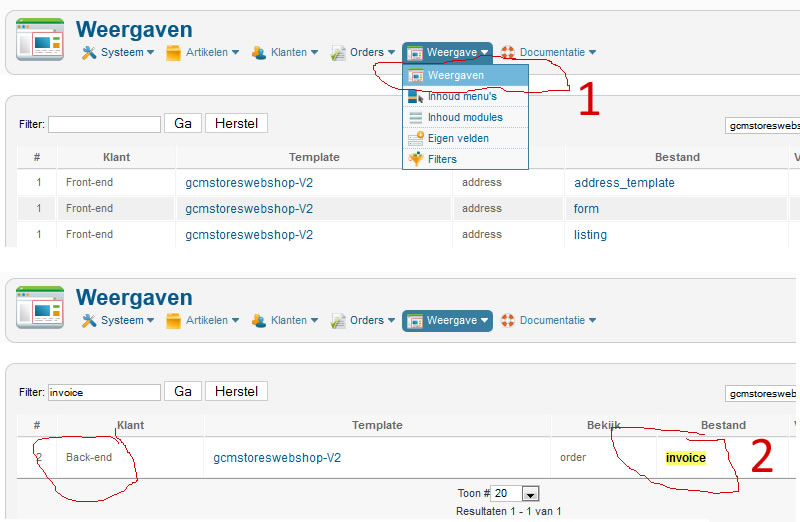
Menu's I see nothing (but products)
I'll keep on trying!
Please Log in or Create an account to join the conversation.

13 years 9 months ago #88290
by nicolas
Replied by nicolas on topic Design invoice
Please make sure that you're editing it for your backend template.
gcmstoreswebshop-v2 is not your backend template.
gcmstoreswebshop-v2 is not your backend template.
The following user(s) said Thank You: gasoline
Please Log in or Create an account to join the conversation.
13 years 9 months ago #88719
by gasoline
I'll keep on trying!
Replied by gasoline on topic Design invoice
Damn, that was obvious 
Thanks, now I see my changes.
Thanks, now I see my changes.
I'll keep on trying!
Please Log in or Create an account to join the conversation.
13 years 9 months ago #88912
by gasoline
I'll keep on trying!
Replied by gasoline on topic Design invoice
Now I have made my changes, but I see it's a difficult system. You use frontend template (made by me) backend template (Joomla) and also (via Joomla i think) system templatestyles. So I have to work on several files and hope that changes wont be eraised when Joomla is updated. Would be nuicer to have a more efficient templating system.
Now I'v finished my invoice, people can print it, but Images are not shown (logo f.e.). And I dont see because of that complex templating where and in with stylesheet or file I now have to change something.
Now I'v finished my invoice, people can print it, but Images are not shown (logo f.e.). And I dont see because of that complex templating where and in with stylesheet or file I now have to change something.
I'll keep on trying!
Please Log in or Create an account to join the conversation.
13 years 9 months ago #88984
by Xavier
Replied by Xavier on topic Design invoice
Hi,
Using FireBug can help you to find the latest css file called for an element.
www.hikashop.com/fr/support/documentation/faq.html#css
Generally you have to edit the "Front end css File" or "Backend css File" in HikaShop > Configuration > Display.
If it doesn't change the display, so it's your template which is overriding our css properties. You can use "!important" after a css property to force this rule instead of another one which could be loaded after.
(.the_class{color: black !important;})
Using FireBug can help you to find the latest css file called for an element.
www.hikashop.com/fr/support/documentation/faq.html#css
Generally you have to edit the "Front end css File" or "Backend css File" in HikaShop > Configuration > Display.
If it doesn't change the display, so it's your template which is overriding our css properties. You can use "!important" after a css property to force this rule instead of another one which could be loaded after.
(.the_class{color: black !important;})
Please Log in or Create an account to join the conversation.
Time to create page: 0.073 seconds