 |
Description
This plugin has several purposes which all revolve around geolocation.
What is geolocation ? It's a system enabling you to know approximately where someone is on the planet using his IP address.
Why is that useful ? Because it enables you to display things of your website differently based on where the user comes from.
How does it works ? When a user visits your website, this plugin will send a request to a geolocation web service with the IP that the user used to access your website. That web service will then return all the information available about that IP to the plugin. That process is done only on the first page accessed by the user and the IP information is the cached in the session of the user. Based on the configuration of the plugin, it will then perform the tasks needed.
What can the plugin do ? You can restrict the access of your website or only to some components by black listing or white listing a list of zones ( you can manage your zones via the menu System->Zones ). You can also set automatically the currency of the prices for that user by setting the currency option of your zones. Finally, you can record the geolocation information for new users and orders (that can be needed by some administrations) which will also enable you to display a heat map of your users location or your sales origins and thus, enabling you to improve your marketing.
Install the plugin
- The plugin is already installed by default with HikaShop Business.
- Go on the IPInfoDB website ( http://www.ipinfodb.com/register.php ) to create an account and receive your private key (totally free).
- Finally, don't forget to publish the plugin and enter your private key in the plugin options.
Configure the plugin
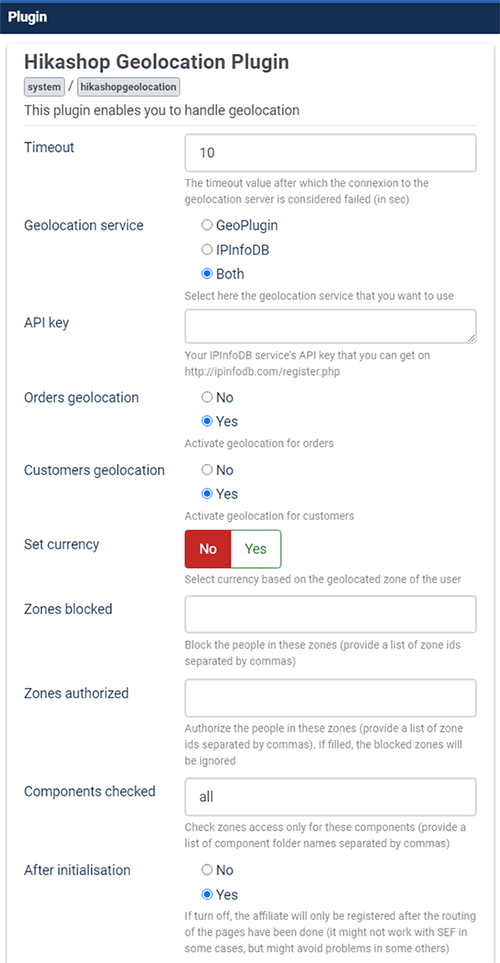
- Timeout : The number of seconds the plugin should wait for the geolocation information to come back before stopping.
- Geolocation service : The plugin can either connect to GeoPlugin or to IPInfoDB or both in order to geolocate the IP address of your users. Note that on top of that, HikaShop also supports CloudFlare's Geolocation system. If you have it activated on your website, HikaShop will use the geolocation data provided by CloudFlare and won't use the other two services as CloudFlare's service doesn't require any connection to their servers a thus is much faster than the others and doesn't have any limitations.
- API Key : Here, you can paste the API key given to your on the IPInfoDB website ( http://www.ipinfodb.com/register.php ). Note that this is only necessary if you select "Both" or "IPInfoDB" in the setting above.
- Orders geolocation : That enables you to save geolocation information along with the order
- Customers geolocation : That enables you to save geolocation information when a new customer subscribes to your website during the checkout.
- Set currency : When that option is activated, the system will choose automatically the currency of the user based on the zone of the user and the currency option of the zones that you can manage via the menu System->Zones. Please note that it will only work with country zones, so make sure that you set the currencies in the different country zones.
- Zones blocked : With this parameter you can enters ids of zones to block (you will find the ids on the listing of zones via the menu System->Zones). The ids need to be separated by a comma. For example: 72,94,54
- Zones authorized : With this parameter you can enters ids of zones to authorize (you will find the ids on the listing of zones via the menu System->Zones). Users outside that zone will be blocked. The ids need to be separated by a comma. For example: 72,94,54
- Component checked : With that option you can tell on which component the zones white/black listing should be done. If, for example, you would like your users to be able to use your store only if they are located in France but that you still want to enable anyone to access the rest of your website, you could replace the "all" value by "com_hikashop". You can get that parameter by looking at the folders in the folder components of your website. If you have several components name, you can separate them by a comma.
- After initialisation : If turn off, the affiliate will only be registered after the routing of the pages have been done (it might not work with SEF in some cases, but might avoid problems in some others)
Restricted ressource template
- When a user is blocked, he will see a blank page with just that message:

- If you wan to change that text, you can edit its translation via the interface in the configuration of HikaShop under the tab Languages.
- If you want to customize that page further, you can get the file plugins/system/hikashopgeolocation_restricted.php and copy it into the folder templates/YOUR_TEMPLATE/system/ (create that folder if it doesn't exists). Then, you can modify that copy of the file which will take precedence over the original. That will allow you to safely update HikaShop without loosing your modifications.
Potential issues
- Outgoing connections might be blocked by your hosting for security reasons. This would prevent the geolocation plugin from contacting the geolocation servers
- Make sure that your DNS is properly configured. For example, make sure that you've setup a DMARC entry in it as geolocation services might check it in order to reduce abuse.