Please be aware that this payment method is now deprecated
|
|

Description
This screen enables you to edit the AlphaUserPoints payment method options but also the points earning settings of the AUP integration. Payment methods will be filtered on checkout based on the zone you set for them, if any. Then, they will be displayed to the user for him to choose which payment method he prefers for his order.
This plugin requires that you first install the extension AlphaUserPoints on your website.
The plugin is only available in our commercial editions.
Toolbar
- Save : Save the AlphaUserPoints payment method options and return to the payment methods Management screen.
- Apply : Apply the modifications to the AlphaUserPoints payment method and stay on the same screen.
- Cancel : Return to the previous screen without saving the modifications.
- Help : This button enables you to turn ON/OFF the help section, this screen will appear or disappear.
Main Information
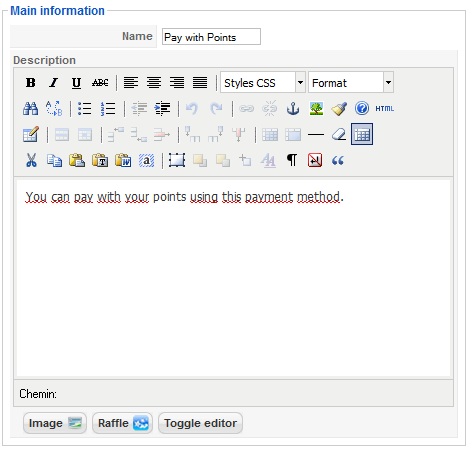
If you use one of our commercial versions, you will be able to enter the name and description in different languages. This feature requires to have joomfish installed and can be activated in the configuration page, in the display tab. The languages available will be the ones in joomfish. If you don't enter something for a translation, it will just use the default information in the Main information tab instead. After you click on save or apply an additional publish icon will appear next to the fields where you entered something in the languages tabs so that you can easily enable or disable them. The default publish status can also be changed in the configuration page of HikaShop.
Payment Options
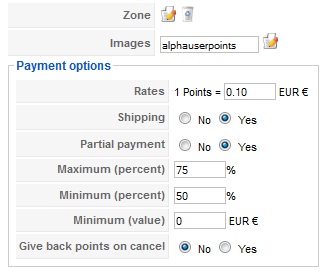
- In this part, you will be able to set the payment options of the AlphaUserPoints plugin. When a customer doesn't have enough points to respect one of these rules, the payment method will not be visible:
- Zone : You can restrict the AlphaUserPoints payment method to a zone. By clicking on the edit icon, a popup will open enabling you to select a zone. You can also remove this limitation by clicking on the delete icon.
- Images : You can click on the edit icon to select one or several images to display next to the name of the AlphaUserPoints payment method during the checkout process. Those images are stored in the folder media/com_hikashop/images/payment so you can easily add more of them by uploading your images to this folder via FTP.
- Shipping method : With this option you can select the shipping method for which this payment method will be available. For example, if you choose UPS, this payment method will only be usable if UPS is selected as shipping method. If an other shipping method is selected, this payment method will not be displayed. Note: if you selected "None" or don't select any shipping method, this payment method will always be available.
- Rates: You can define here the monetary value of a point. When a customer will pay, each point will allow him to pay the defined value.
- Group points by : With that option, you can force users to only be able to use their points by packs of X points.
- Maximum points : When you want to limit the maximum number of points users can use, enter the value here.
- Shipping: Allow or not the shipping fees payment with points. In this case, the shipping fees will be payed with another payment method and a coupon will be generated for the points.
- Partial payment: Allow or not the partial payment of an order. If the partial payment is active, you are able to set a Maximum percentage of the order payable with points. When a partial payment is made, a coupon is generated for the order and the user will have to pay with another payment method the remaining amount.
- Minimum percentage: Define the minimum percentage of the order which have to be paid with points.
- Minimum value: Define the minimum amount of an order which have to be reached to pay with points.
- Give back points on cancel: You can choose here whether to give back or not the points which have been used to pay an order when the order is cancelled. (Note: when an order is cancelled, points which have been earned by the user are ALWAYS deleted).
- Give points on statuses : With that option, you can override the statuses for which the points are given to users.
- Use virtual points : If you turn on that option, the points which would be earned by the user when finishing the order can directly be used (along with the points already on the user's account) to pay/get a discount on the current cart.
- Use virtual coupons : When that option is activated, instead of using an auto generated coupon during the checkout in order to use the points, the points will be added as an additional line before the final total. That means that users can use at the same time points and a coupon.
- Group points: Warning level : This option is used when the "Group points by" option is set. It allows you to display a message to the user when he doesn't have enough points to use his points because it didn't reach the minimum required points based on that "Group points by" option.
Points Earning Options
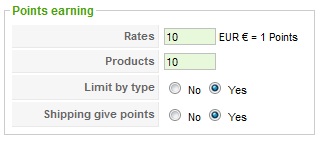
- Here you can define how points are given after an order, the titles of this sections are green:
- Rates: This basic rule define the rate between points and your currency so that the user will be given points based on the amount of his order.
- Products: Here you can choose to give a certain number of points for each product in an order.
- Limit by type: If you activate this option, the defined points above will be given only once for each kind of product. Else, each product will give the defined number of points (for example, 4 T-shirt will give here 40 points).
- Shipping gives points: If this option is activated, the number of points earned will be calculated on the final order price (with shipping).
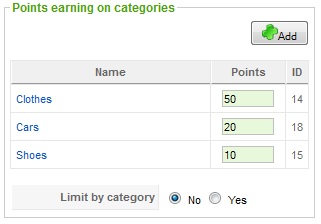
- This section gives you the possibility to define a specific number of point for each category of products:
- Just click on the "Add" button to select a category and set a specific number of points earned when customers buy a product of this category. This tool is really helpful if you want to make some products more attractive.
- Limit by category: You can also choose to limit the number of points earned to one category. If a product is in many categories, the most interesting one will be chosen.
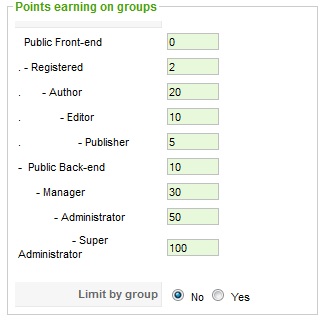
- This section allows you to give a specific number of points to users according to their group:
- Just set a number of point for your users and they will automatically earn these points when they make an order.
- Limit by group: You can also choose to limit the number of points earned to one group (if one of your customer is in many groups, the most interesting will be chosen) or to sum all the points of all the groups the user is in ( you can only have several groups for a user in Joomla 1.6 ).