

- Posts: 2
- Thank you received: 0
HikaShop credit card payment plugin
15 years 1 month ago #25008
by nemiux
HikaShop credit card payment plugin was created by nemiux
Hey everyone,
I'm really new at e-commerce, but there is a thing i want to do, and just don't really know how. I want, that people who buy products from me could checkout with credit card, so I use HikaShop credit card payment plugin. However, when I tried to test it, I saw that people have to enter a credit card number, expiration date and CVV code. How do I get the money, once I got that information from a costumer?
Thank you
I'm really new at e-commerce, but there is a thing i want to do, and just don't really know how. I want, that people who buy products from me could checkout with credit card, so I use HikaShop credit card payment plugin. However, when I tried to test it, I saw that people have to enter a credit card number, expiration date and CVV code. How do I get the money, once I got that information from a costumer?
Thank you
Please Log in or Create an account to join the conversation.

15 years 1 month ago #25013
by nicolas
Replied by nicolas on topic Re: HikaShop credit card payment plugin
Hi,
The credit card payment plugin is there for merchants to collect credit card information in order to process the transactions manually with their own terminal provided by their bank. That plugin does not do any money transfer.
If you want to have the money go to your bank account, you will need to contract with a payment gateway. For example, you can create an account with paypal www.paypal.com/en/mrb/pal=SXL9FKNKGAEM8 to accept credit cards on your shop using one of the paypal plugins we have. The payments of your customers will be credited on your paypal account and you will then be able to transfer the money to your bank account.
The credit card payment plugin is there for merchants to collect credit card information in order to process the transactions manually with their own terminal provided by their bank. That plugin does not do any money transfer.
If you want to have the money go to your bank account, you will need to contract with a payment gateway. For example, you can create an account with paypal www.paypal.com/en/mrb/pal=SXL9FKNKGAEM8 to accept credit cards on your shop using one of the paypal plugins we have. The payments of your customers will be credited on your paypal account and you will then be able to transfer the money to your bank account.
Please Log in or Create an account to join the conversation.
15 years 1 month ago #25065
by nemiux
Replied by nemiux on topic Re: HikaShop credit card payment plugin
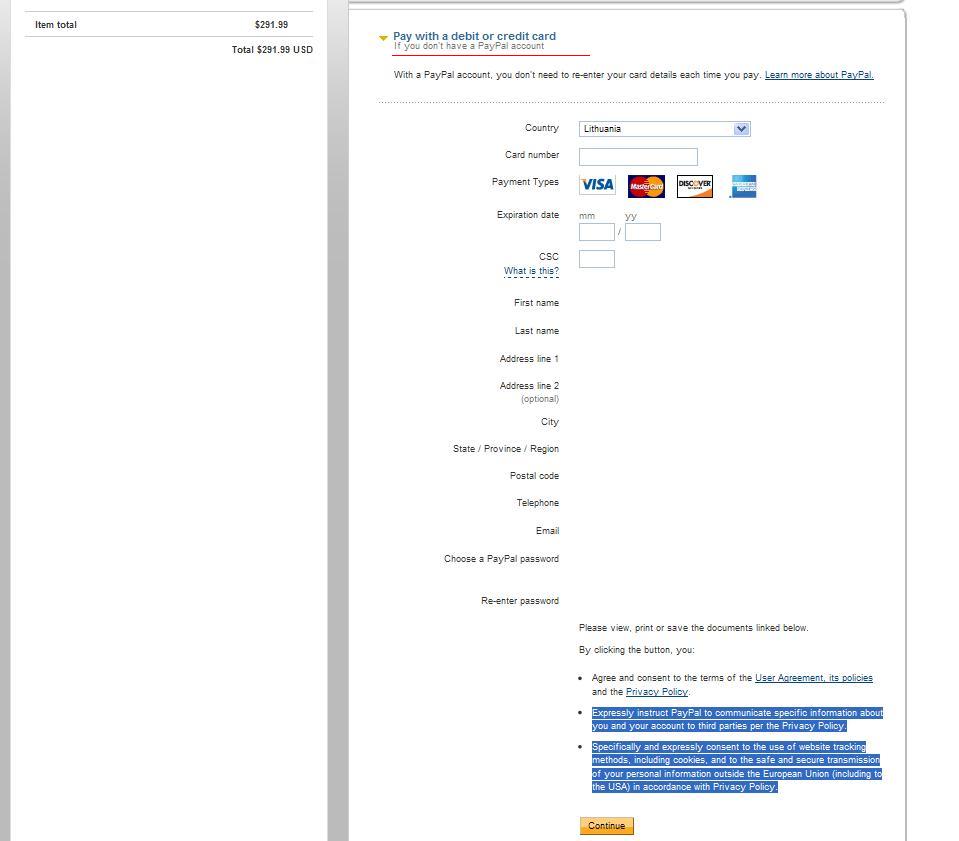
Well, I found the option to pay with credit or debit card, but you see, When I select that option instead of login to paypal account, the customer HAS to create a paypal account anyway. What do I have to do, so a person wouldn't need to create the account?
Please Log in or Create an account to join the conversation.
15 years 1 month ago #25067
by nicolas
Replied by nicolas on topic Re: HikaShop credit card payment plugin
It's probably because you don't have a Business account in paypal. In that case, you would have to upgrade your account.
Alternatively, you could use paypal pro. That way, people won't have to go to paypal at all and will enter their credit card information directly on your website. In that case, we strongly encourage you to setup a SSL certificate on your website to secure the transactions (you can ask your hosting company about that if you want).
Alternatively, you could use paypal pro. That way, people won't have to go to paypal at all and will enter their credit card information directly on your website. In that case, we strongly encourage you to setup a SSL certificate on your website to secure the transactions (you can ask your hosting company about that if you want).
Please Log in or Create an account to join the conversation.
14 years 5 months ago #48602
by pina
Sorry for digging this thread, but I think it's better that way than to start another one... So are you stating that when using a paypal busniess account, people can pay directly by credit card without needing to have a paypal account? Because I' looking for some kind of way that people can pay by credit card directly on my webshop
Replied by pina on topic Re: HikaShop credit card payment plugin
nicolas wrote: It's probably because you don't have a Business account in paypal. In that case, you would have to upgrade your account.
Alternatively, you could use paypal pro. That way, people won't have to go to paypal at all and will enter their credit card information directly on your website. In that case, we strongly encourage you to setup a SSL certificate on your website to secure the transactions (you can ask your hosting company about that if you want).
Sorry for digging this thread, but I think it's better that way than to start another one... So are you stating that when using a paypal busniess account, people can pay directly by credit card without needing to have a paypal account? Because I' looking for some kind of way that people can pay by credit card directly on my webshop
Please Log in or Create an account to join the conversation.
14 years 5 months ago #48676
by nicolas
Replied by nicolas on topic Re: HikaShop credit card payment plugin
Yes, with a PayPal Business account, your users can pay ON PAYPAL'S WEBSITE without a PayPal account.
But if you want to have your users pay directly on your website you would have to use instead PayPal Pro, or another payment gateway allowing that like authorize.net in the USA, or CardSave.
But if you want to have your users pay directly on your website you would have to use instead PayPal Pro, or another payment gateway allowing that like authorize.net in the USA, or CardSave.
Please Log in or Create an account to join the conversation.

14 years 4 months ago #52598
by darada
Replied by darada on topic Re: HikaShop credit card payment plugin
My question is related: our customer already entered his card information via Credit Card payment option on our website (Hika SHOP). Now, how do I proceed to retrieve the money he sent? We have Business account with PayPal, but I cannot see any option how do I proceed with the payment. All I have done is changed order status on website to Confirmed and changed payment method to PayPal, but there is no any movements of payment... Please, can you help?
Please Log in or Create an account to join the conversation.
14 years 4 months ago #52673
by nicolas
Replied by nicolas on topic Re: HikaShop credit card payment plugin
If you're using a commercial edition of HikaShop, you should :
note the credit card info on a paper
change the order status to "created"
change the user of the order to yourself
log on your front end and go to the hikashop user control panel, and click on the "pay now" button (you need to have the option "Payment of orders not paid immediately" of the Checkout tab of the configuration activated)
that will allow you to pay the order on PayPal for the user. The order will be confirmed by PayPal
then, all you need to do is to change again the order's user to your client
trash the credit card info appropriately
If you're not using a commercial edition of HikaShop:
note the credit card info on a paper
create a new order on your front end and order the same thing
use the credit card info on PayPal to pay for your client
trash the credit card info appropriately
(that second is less nice as the transaction on PayPal is not linked to the correct order but it's better than nothing...)
note the credit card info on a paper
change the order status to "created"
change the user of the order to yourself
log on your front end and go to the hikashop user control panel, and click on the "pay now" button (you need to have the option "Payment of orders not paid immediately" of the Checkout tab of the configuration activated)
that will allow you to pay the order on PayPal for the user. The order will be confirmed by PayPal
then, all you need to do is to change again the order's user to your client
trash the credit card info appropriately
If you're not using a commercial edition of HikaShop:
note the credit card info on a paper
create a new order on your front end and order the same thing
use the credit card info on PayPal to pay for your client
trash the credit card info appropriately
(that second is less nice as the transaction on PayPal is not linked to the correct order but it's better than nothing...)
Please Log in or Create an account to join the conversation.
Less
More
- Posts: 159
- Thank you received: 0
13 years 2 months ago #119893
by Shafan Hameed
Replied by Shafan Hameed on topic Re: HikaShop credit card payment plugin
Sorry for interfering in the topic. But as the Topic is about HikaShop credit card payment plugin and i want to know something.
The replies i read in this topic is to integrate Paypal in it but what about the countries don't have these facilities ? Like me.
I live in Pakistan and Paypal doesn't support Pakistan in it country dealings. Talking about money bookers they either don't deal in PKR but they do deal in USD. Most of the money-bookers doesn't support Pakistan as well as for my information some of them like Skrill MoneyBookers support Pakistan but not the Pakistani currency PKR. and as the stock rate fluctuates in Pakistan and it is our big loss on daily basis.
For example if we purchase a product of price PKR 5000 and the dollar price is PKR:100 = USD:10. with the ratio of calculation we will get the product in USD:500/- Per product a the purchasing date. After 2 or 3 days we sold that product in PKR:6000 as it is the market price and we also have to be informatic in price issue to compete with the market.
When we connect with moneybookers thier comission is likely about 18% to 31% for pakistan.
If we calculate things the product of worth 500USD we are purchsing it in 590USD. means after a product we are getting only USD10 ? and we also have to include transportation in it then what will we get with this business ?
Kindly make the Credit card module to be linked with our bank and with some verified portal if possible. HikaShop can place a payment limit to this module that a specific amount can be transferred or can have a percentage like money-bookers for starter users and for the business users they can have it limited like 10%.
Kindly solve this issue because in Pakistan we don't have the money-bookers nor paypal support.
The replies i read in this topic is to integrate Paypal in it but what about the countries don't have these facilities ? Like me.
I live in Pakistan and Paypal doesn't support Pakistan in it country dealings. Talking about money bookers they either don't deal in PKR but they do deal in USD. Most of the money-bookers doesn't support Pakistan as well as for my information some of them like Skrill MoneyBookers support Pakistan but not the Pakistani currency PKR. and as the stock rate fluctuates in Pakistan and it is our big loss on daily basis.
For example if we purchase a product of price PKR 5000 and the dollar price is PKR:100 = USD:10. with the ratio of calculation we will get the product in USD:500/- Per product a the purchasing date. After 2 or 3 days we sold that product in PKR:6000 as it is the market price and we also have to be informatic in price issue to compete with the market.
When we connect with moneybookers thier comission is likely about 18% to 31% for pakistan.
If we calculate things the product of worth 500USD we are purchsing it in 590USD. means after a product we are getting only USD10 ? and we also have to include transportation in it then what will we get with this business ?
Kindly make the Credit card module to be linked with our bank and with some verified portal if possible. HikaShop can place a payment limit to this module that a specific amount can be transferred or can have a percentage like money-bookers for starter users and for the business users they can have it limited like 10%.
Kindly solve this issue because in Pakistan we don't have the money-bookers nor paypal support.
Please Log in or Create an account to join the conversation.
13 years 2 months ago #119919
by nicolas
Replied by nicolas on topic Re: HikaShop credit card payment plugin
Hi,
There are already more than 60 payment plugins for HikaShop. Why focus yourself on PayPal and moneybookers only ?
For example, here is a potentially solution:
planetauthorize.net/multicurrency.html
That payment gateway supports your currency directly for payments and they provide a gateway emulator ( planetauthorize.net/gatewayemulator.html ) which should allow you to integrate HikaShop with them by using one of the 60 payment plugins already available for HikaShop.
There are already more than 60 payment plugins for HikaShop. Why focus yourself on PayPal and moneybookers only ?
For example, here is a potentially solution:
planetauthorize.net/multicurrency.html
That payment gateway supports your currency directly for payments and they provide a gateway emulator ( planetauthorize.net/gatewayemulator.html ) which should allow you to integrate HikaShop with them by using one of the 60 payment plugins already available for HikaShop.
Please Log in or Create an account to join the conversation.
12 years 9 months ago #140720
by onyc
Replied by onyc on topic HikaShop credit card payment plugin
I am using Authorize payment with AIM method, but it can't check CVV right, when I put a wrong CVV, the order still is processed. What's wrong. And when I use SIM method, Authorize doesn't redirect to my site after making the payment. Can you help? I can pay you for this. Thanks
Please Log in or Create an account to join the conversation.
Less
More
- Posts: 1
- Thank you received: 0
10 years 10 months ago - 10 years 10 months ago #223609
by rolanddionedadiaz
Replied by rolanddionedadiaz on topic Re: HikaShop credit card payment plugin
Hello nicolas, kindly elaborate to me the process of credit card plug-in, because now i wan to buy a credit card and debit card terminal machine or processor., how do i process the online hikashop in the order list with the captured initial card details? do i still need a terminal for processing or i shall contact the bank to charge my customer account. kindly lead me in this way on how do i use my teminal machine to hikashop plug-in if possible.
Thanks and waiting for your brilliant answer regarding this credit card plugin.
Thanks and waiting for your brilliant answer regarding this credit card plugin.
Last edit: 10 years 10 months ago by rolanddionedadiaz.
Please Log in or Create an account to join the conversation.
10 years 10 months ago #223636
by nicolas
Replied by nicolas on topic Re: HikaShop credit card payment plugin
Hi,
The credit card payment plugin just stores half of the credit card data in the order details page and the other half is sent to you in the order admin notification email.
You need to enter that credit card information along with the amount in your terminal so that the payment can be processed by your bank and and up in your bank account. So that's a manual process. You can also phone your bank to process it manually if they offer that capability.
But if you want something automated, that's what you want:
The credit card payment plugin just stores half of the credit card data in the order details page and the other half is sent to you in the order admin notification email.
You need to enter that credit card information along with the amount in your terminal so that the payment can be processed by your bank and and up in your bank account. So that's a manual process. You can also phone your bank to process it manually if they offer that capability.
But if you want something automated, that's what you want:
If you want to have the money go to your bank account, you will need to contract with a payment gateway. For example, you can create an account with paypal www.paypal.com/en/mrb/pal=SXL9FKNKGAEM8 to accept credit cards on your shop using one of the paypal plugins we have. The payments of your customers will be credited on your paypal account and you will then be able to transfer the money to your bank account.
Please Log in or Create an account to join the conversation.
Time to create page: 0.422 seconds