
- Posts: 2
- Thank you received: 0
Hide prices when not logged in
- CableCompany
-
 Topic Author
- Offline
Less
More
15 years 8 months ago - 15 years 8 months ago #7105
by CableCompany
Hide prices when not logged in was created by CableCompany
Is it possible with Hikashop to hide prices for users not signed in? Prices should only appear when registered users are signed in. I found out this is not possible with the Basic free version. I searched this forum, but could not find the answer.
Thank you for the swift reply.
Thank you for the swift reply.
Last edit: 15 years 8 months ago by CableCompany.
Please Log in or Create an account to join the conversation.

15 years 8 months ago #7106
by nicolas
Replied by nicolas on topic Re: Hide prices when nog logged in
It's possible with the Business version with which you can restrict prices to groups of users. That way you could restrict all the prices to all the groups except the not registered group. Then, all the products will be displayed as "Free" for non logged in users. Then, you can go in the config under the tab languages and override the "Free" translation to something else like "Please login onto the website" or something like that.
Please Log in or Create an account to join the conversation.
- CableCompany
-
Topic Author
- Offline
Less
More
- Posts: 2
- Thank you received: 0
15 years 8 months ago #7107
by CableCompany
Replied by CableCompany on topic Re: Hide prices when nog logged in
Thanks!
Please Log in or Create an account to join the conversation.
Less
More
- Posts: 22
- Thank you received: 0
15 years 6 months ago #13058
by Nikajoloem
Replied by Nikajoloem on topic Re: Hide prices when nog logged in
Hi,
I'm using the business version of Hikashop, and have a related question.
How can you setup the standard price access level in Hikashop, without manually editing each product settings?
Purpose is that all user-levels (exept the non-logged) can see the prices.
I'm using the business version of Hikashop, and have a related question.
How can you setup the standard price access level in Hikashop, without manually editing each product settings?
Purpose is that all user-levels (exept the non-logged) can see the prices.
Please Log in or Create an account to join the conversation.
15 years 6 months ago #13061
by nicolas
Replied by nicolas on topic Re: Hide prices when nog logged in
There is only one option. It's to set them via a CSV import.
You need to look at the price_access column value in an entry of the table hikashop_price for which you already set your access levels in order to get the value to use. Then, you can go in the CSV import and import a file like that:
price_value,price_access,product_code
10,",29,30,",prod1
20,",29,30,",prod2
In that file the ,29,30, text correspond to the ids of the 2 joomla user groups to which you want to assign the price.
You need to look at the price_access column value in an entry of the table hikashop_price for which you already set your access levels in order to get the value to use. Then, you can go in the CSV import and import a file like that:
price_value,price_access,product_code
10,",29,30,",prod1
20,",29,30,",prod2
In that file the ,29,30, text correspond to the ids of the 2 joomla user groups to which you want to assign the price.
Please Log in or Create an account to join the conversation.
15 years 2 months ago #21267
by icronje
Replied by icronje on topic Re: Hide prices when nog logged in
Nicolas,
This solution works perfectly if you have the system configured to display prices.
If I configure my system to not display the pricing and only display the prices to a group, the price is displayed without the discounted amount being indicated.
For my web site I want to have a product overview page without indicating a price and the have options to display the different product prices. I therefore do not have a price associated with the overview. What now happens is that the "Free"text is displayed where it should actually not be displayed.
I hope you understand. An example can be viewed at www.lesswatts.co.za/asteria-mr16-spot-li...a-v1-mr16-spot-light
Regards
Ignatius Cronjé.
This solution works perfectly if you have the system configured to display prices.
If I configure my system to not display the pricing and only display the prices to a group, the price is displayed without the discounted amount being indicated.
For my web site I want to have a product overview page without indicating a price and the have options to display the different product prices. I therefore do not have a price associated with the overview. What now happens is that the "Free"text is displayed where it should actually not be displayed.
I hope you understand. An example can be viewed at www.lesswatts.co.za/asteria-mr16-spot-li...a-v1-mr16-spot-light
Regards
Ignatius Cronjé.
Please Log in or Create an account to join the conversation.
15 years 2 months ago #21288
by nicolas
Replied by nicolas on topic Re: Hide prices when nog logged in
I don't understand your problem. Could you do some screenshots to explain the problem please ?
Please Log in or Create an account to join the conversation.
15 years 2 months ago #21542
by icronje
Replied by icronje on topic Re: Hide prices when nog logged in
1. I configure Hikashop throught Configuration -> Display not to display prices for products.
2. I configure each product with a price and allow a certain group to view the prices (Joomla 1.5)
3. When I now view the products through the frontend, the pricing is displayed only to the logged in users as specified, but the discount is not indicated.
Screenshots here:
This attachment is hidden for guests.
2. I configure each product with a price and allow a certain group to view the prices (Joomla 1.5)
3. When I now view the products through the frontend, the pricing is displayed only to the logged in users as specified, but the discount is not indicated.
Screenshots here:
This attachment is hidden for guests.
Please log in or register to see it.
Please Log in or Create an account to join the conversation.
15 years 2 months ago #21551
by nicolas
Replied by nicolas on topic Re: Hide prices when nog logged in
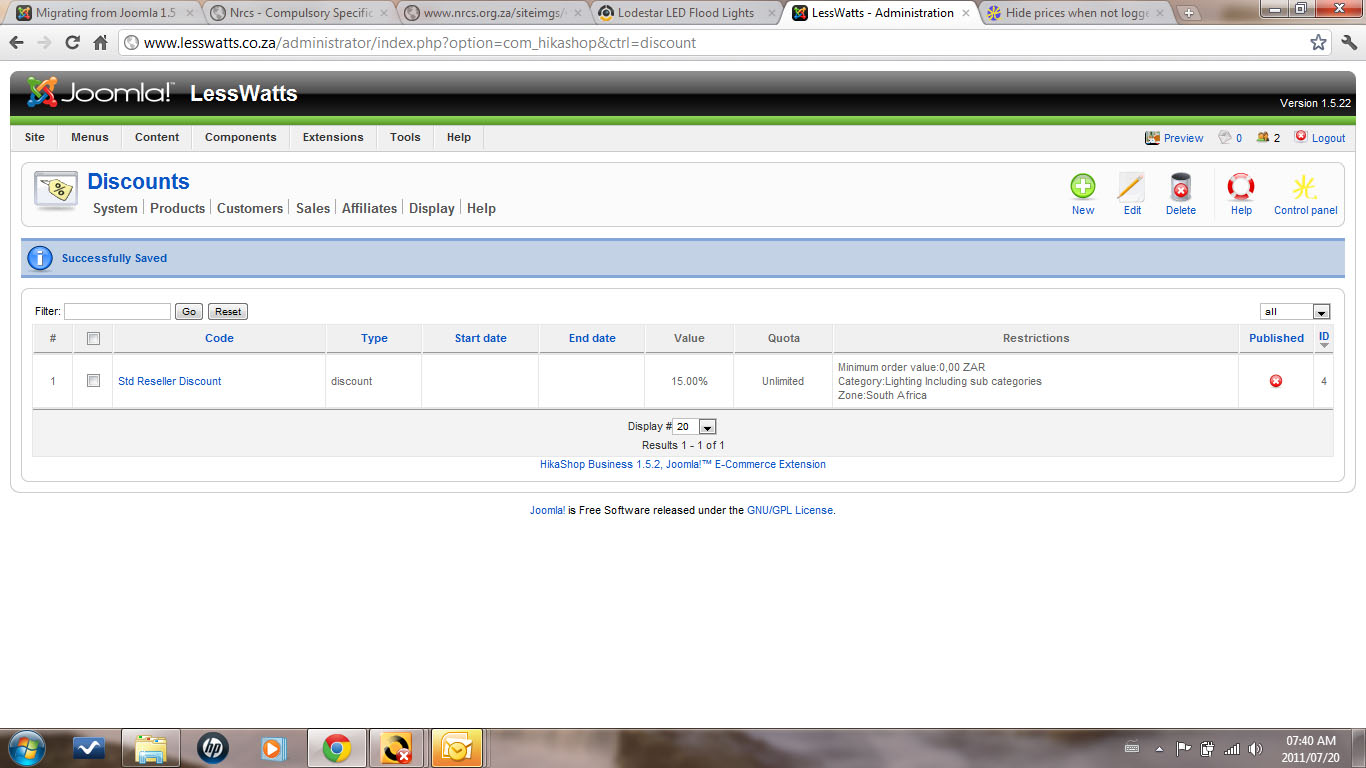
If the discount is not applied, the problem must come from the discount configuration. Could you do a screenshot of the options of your discount ?
Please Log in or Create an account to join the conversation.
15 years 2 months ago - 15 years 2 months ago #21618
by icronje
Replied by icronje on topic Re: Hide prices when nog logged in
Included is the screenshot as requested. I will also be upgrading the web site to Joomla 1.6 during this week. So maybe the outcome will be different then. I will keep you all informed.
Last edit: 15 years 2 months ago by icronje.
Please Log in or Create an account to join the conversation.
15 years 2 months ago #21636
by nicolas
Replied by nicolas on topic Re: Hide prices when nog logged in
Your discount is unpublished. Only published discounts will be applied to products prices.
Please Log in or Create an account to join the conversation.
Less
More
- Posts: 86
- Thank you received: 3
11 years 3 months ago #205465
by magickarle
Replied by magickarle on topic Hide prices when not logged in
Sorry to jump on an old thread but I would like to know if this is possible:
Hide prices for not registered users.
For a first step registration, only email adress is asked to show prices.
then to order at checkout ask for adresse, phone, ... (what ever infos is required).
Thanks.
Hide prices for not registered users.
For a first step registration, only email adress is asked to show prices.
then to order at checkout ask for adresse, phone, ... (what ever infos is required).
Thanks.
Please Log in or Create an account to join the conversation.
11 years 3 months ago #205755
by nicolas
Replied by nicolas on topic Hide prices when not logged in
Hi,
Yes, that's possible. When you edit your products, you can configure different prices with different user groups for each.
That way, guest users won't see the prices. Instead, they'll see the text "free" that you can customize with a translation override in order to lead them to the Joomla registration form (which doesn't ask for the address data):
hikashop.com/download/languages.html#modify
Yes, that's possible. When you edit your products, you can configure different prices with different user groups for each.
That way, guest users won't see the prices. Instead, they'll see the text "free" that you can customize with a translation override in order to lead them to the Joomla registration form (which doesn't ask for the address data):
hikashop.com/download/languages.html#modify
Please Log in or Create an account to join the conversation.
Less
More
- Posts: 86
- Thank you received: 3
11 years 3 months ago #205777
by magickarle
Replied by magickarle on topic Hide prices when not logged in
Thank you.
I know your support is only covering hikashop product, but ...
Can you point (so someone else) me to how to customise the joomla registration form:
I would like to have username formated as an email adress.
And remove the default confirm email and password field.
Thanks
I know your support is only covering hikashop product, but ...
Can you point (so someone else) me to how to customise the joomla registration form:
I would like to have username formated as an email adress.
And remove the default confirm email and password field.
Thanks
Please Log in or Create an account to join the conversation.
11 years 3 months ago #205803
by nicolas
Replied by nicolas on topic Hide prices when not logged in
Hi,
Well, I've actually never done it so I won't be able to help much. We're specialized in HikaShop stuff
I've searched on google and found this tutorial which explains how to customize the Joomla registration form:
www.templatemonster.com/help/joomla-3-x-...gistration-page.html
That should already help a lot. And for further customizing for the form, I would recommend asking directly on forum.joomla.org where you'll find people knowing a lot more about that than us.
Well, I've actually never done it so I won't be able to help much. We're specialized in HikaShop stuff
I've searched on google and found this tutorial which explains how to customize the Joomla registration form:
www.templatemonster.com/help/joomla-3-x-...gistration-page.html
That should already help a lot. And for further customizing for the form, I would recommend asking directly on forum.joomla.org where you'll find people knowing a lot more about that than us.
Please Log in or Create an account to join the conversation.
9 years 5 months ago #268055
by arsham
Replied by arsham on topic Re: Hide prices when nog logged in
how exactly can I do that?
Please Log in or Create an account to join the conversation.

9 years 5 months ago #268058
by Jerome
Jerome - Obsidev.com
HikaMarket & HikaSerial developer / HikaShop core dev team.
Replied by Jerome on topic Re: Hide prices when nog logged in
Hello,
As Nicolas explained, we are providing support of HikaShop.
Please read the Nicolas message, read the webpage he linked and if you have more questions about Joomla customization ; please use the Joomla support forum.
Regards,
As Nicolas explained, we are providing support of HikaShop.
Please read the Nicolas message, read the webpage he linked and if you have more questions about Joomla customization ; please use the Joomla support forum.
Regards,
Jerome - Obsidev.com
HikaMarket & HikaSerial developer / HikaShop core dev team.
Please Log in or Create an account to join the conversation.
Time to create page: 0.274 seconds