
- Posts: 223
- Thank you received: 1
Limit short description to specif category(s)
- plumbingdeals
-
 Topic Author
- Offline
Less
More
13 years 1 week ago #129917
by plumbingdeals
Limit short description to specif category(s) was created by plumbingdeals
From the forums I have figured out how to add a short description for the category pages(s), however I don't want the short description on all category pages. Is there a way to limit the short description to specific category pages?
Please Log in or Create an account to join the conversation.

Less
More
- Posts: 12953
- Thank you received: 1778
13 years 1 week ago #129991
by Mohamed Thelji
Replied by Mohamed Thelji on topic Limit short description to specif category(s)
Hi,
Can you give us more information about what your really want to do, like some screenshots and links of where you want and where your don't want your category description to show ?
Thank you .
.
Can you give us more information about what your really want to do, like some screenshots and links of where you want and where your don't want your category description to show ?
Thank you
. Please Log in or Create an account to join the conversation.
- plumbingdeals
-
Topic Author
- Offline
Less
More
- Posts: 223
- Thank you received: 1
13 years 6 days ago #130316
by plumbingdeals
Replied by plumbingdeals on topic Limit short description to specif category(s)
Read more for this this category (as you can see...)
www.plumbingdeals.net/index.php/sauna-st...-mr-steam-generators
But not for this category....
www.plumbingdeals.net/index.php/sauna-st...thermasol-generators
www.plumbingdeals.net/index.php/sauna-st...-mr-steam-generators
But not for this category....
www.plumbingdeals.net/index.php/sauna-st...thermasol-generators
Please Log in or Create an account to join the conversation.

13 years 6 days ago #130373
by Xavier
Replied by Xavier on topic Limit short description to specif category(s)
Hi,
Sorry but I don't understand.
Have you solved your problem, so in one place the "read more" text is displayed and in the other place the description is shown, or you want the read more at any place ?
Sorry but I don't understand.
Have you solved your problem, so in one place the "read more" text is displayed and in the other place the description is shown, or you want the read more at any place ?
Please Log in or Create an account to join the conversation.
- plumbingdeals
-
Topic Author
- Offline
Less
More
- Posts: 223
- Thank you received: 1
13 years 6 days ago #130411
by plumbingdeals
Replied by plumbingdeals on topic Limit short description to specif category(s)
the first link shows a category view with read more
for the second link, i want just a normal category view without ANY description, just the normal image and title with add to cart button
for the second link, i want just a normal category view without ANY description, just the normal image and title with add to cart button
Please Log in or Create an account to join the conversation.
13 years 5 days ago #130445
by Xavier
Replied by Xavier on topic Limit short description to specif category(s)
Hi,
I think that you just have to edit the parameters of the associated module of your menu "thermasol", to display a "listing_img_title" instead of "listing_img_desc".
I think that you just have to edit the parameters of the associated module of your menu "thermasol", to display a "listing_img_title" instead of "listing_img_desc".
Please Log in or Create an account to join the conversation.
- plumbingdeals
-
Topic Author
- Offline
Less
More
- Posts: 223
- Thank you received: 1
13 years 5 days ago #130454
by plumbingdeals
Replied by plumbingdeals on topic Limit short description to specif category(s)
Thermasol was already set to image....
The settings you say do not exsist...here are the choices...
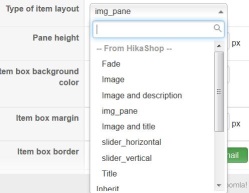
The settings you say do not exsist...here are the choices...
Please Log in or Create an account to join the conversation.
13 years 2 days ago #130798
by Xavier
Replied by Xavier on topic Limit short description to specif category(s)
Hi,
I was respectively talking about "Image and title" and "Image and Description".
I was respectively talking about "Image and title" and "Image and Description".
Please Log in or Create an account to join the conversation.
- plumbingdeals
-
Topic Author
- Offline
Less
More
- Posts: 223
- Thank you received: 1
13 years 1 day ago #130881
by plumbingdeals
Replied by plumbingdeals on topic Limit short description to specif category(s)
makes no difference...still doesn't work
Please Log in or Create an account to join the conversation.
13 years 1 day ago #130915
by Xavier
Replied by Xavier on topic Limit short description to specif category(s)
You had the readmore button ok for the "Mr Steam" menu, right ?
And for the menu "ThermaSol" you just want a classic image and title display, still right ?
Actually, I see that you have changed the "Mr Steam" display" and you have an image and title display instead of having the "Readmore" text.
And you still have the complete description for the "ThermaSol" listing, so I think that you have changed the type of layout fot the wrong menu.
And if you don't see changes, be sure that you are editing the correct module or menu.
And for the menu "ThermaSol" you just want a classic image and title display, still right ?
Actually, I see that you have changed the "Mr Steam" display" and you have an image and title display instead of having the "Readmore" text.
And you still have the complete description for the "ThermaSol" listing, so I think that you have changed the type of layout fot the wrong menu.
And if you don't see changes, be sure that you are editing the correct module or menu.
Please Log in or Create an account to join the conversation.
- plumbingdeals
-
Topic Author
- Offline
Less
More
- Posts: 223
- Thank you received: 1
13 years 1 day ago #130920
by plumbingdeals
Replied by plumbingdeals on topic Limit short description to specif category(s)
if you follow the mr steam link, you will see that under the add to cart button it says "read more", this is how it should be.
again, for thermasol i want just the classic image and title
i have changed nothing from what i started with
no matter what layout i chose for thermasol it does not change
i will be happy to provide backend access if you like
again, for thermasol i want just the classic image and title
i have changed nothing from what i started with
no matter what layout i chose for thermasol it does not change
i will be happy to provide backend access if you like
Please Log in or Create an account to join the conversation.
13 years 1 day ago #130944
by Xavier
Replied by Xavier on topic Limit short description to specif category(s)
Yes, thanks to give me backend access through MP 
Please Log in or Create an account to join the conversation.
13 years 1 day ago #131017
by Xavier
Replied by Xavier on topic Limit short description to specif category(s)
Hi,
The problem is: You have used the display "Image and Title" for both categories, so when you have edited the view to add your "Read more" it has edited the "ThermaSol" listing too.
What you had to do is, select "Image and description" listing type for the "Mr Steam" associated module, edit this listing to hide the description and display the "Read more" and use the "Image and title" display for "ThermaSol".
Or you can edit again the view "product / listing_img_title" to improve your changes and not display the description in the listing.
The problem is: You have used the display "Image and Title" for both categories, so when you have edited the view to add your "Read more" it has edited the "ThermaSol" listing too.
What you had to do is, select "Image and description" listing type for the "Mr Steam" associated module, edit this listing to hide the description and display the "Read more" and use the "Image and title" display for "ThermaSol".
Or you can edit again the view "product / listing_img_title" to improve your changes and not display the description in the listing.
Please Log in or Create an account to join the conversation.
- plumbingdeals
-
Topic Author
- Offline
Less
More
- Posts: 223
- Thank you received: 1
13 years 21 hours ago #131067
by plumbingdeals
Replied by plumbingdeals on topic Limit short description to specif category(s)
I'm sorry, but you still don't seem to understand, so let me try again....
This page is fine..."read more" is below "add to cart button".....
www.plumbingdeals.dreamhosters.com/index...-mr-steam-generators
This how how this page should look...
www.plumbingdeals.dreamhosters.com/index...auna-steam/thermasol
This page should show ONLY image, title, price and cart button...NO description or read more...
www.plumbingdeals.dreamhosters.com/index...thermasol-generators
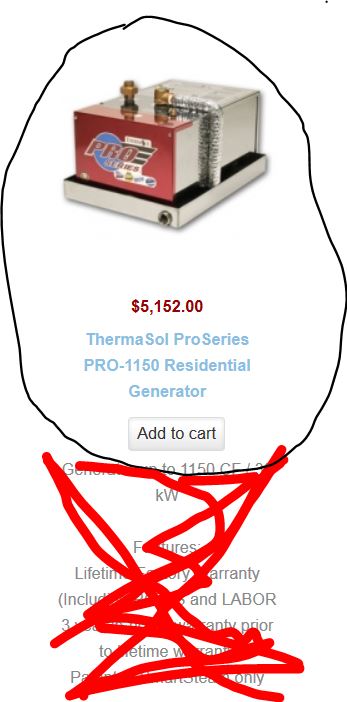
This page is fine..."read more" is below "add to cart button".....
www.plumbingdeals.dreamhosters.com/index...-mr-steam-generators
This how how this page should look...
www.plumbingdeals.dreamhosters.com/index...auna-steam/thermasol
This page should show ONLY image, title, price and cart button...NO description or read more...
www.plumbingdeals.dreamhosters.com/index...thermasol-generators
Please Log in or Create an account to join the conversation.
13 years 21 hours ago #131074
by Xavier
Replied by Xavier on topic Limit short description to specif category(s)
I had understood the problem, and the solution I gave was the correct one.
To have a different display, you have to use different layout.
One with description, and the other one without. Then edit the one with the description to display a read more instead.
By this way you have one listing with "read more" and the other one image and title without any modifications.
Actually I have edited you view (which was the option n°2) to not use the added code for the ThermaSol menu.
The code added is:
To have a different display, you have to use different layout.
One with description, and the other one without. Then edit the one with the description to display a read more instead.
By this way you have one listing with "read more" and the other one image and title without any modifications.
Actually I have edited you view (which was the option n°2) to not use the added code for the ThermaSol menu.
The code added is:
Code:
$app = JFactory::getApplication();
$menu = $app->getMenu();
$activeId = $menu->getActive()->id;
echo $activeId;
if($activeId != '186')
echo preg_replace('#<hr *id="system-readmore" */>.*#is','',$this->row->product_description);
Please Log in or Create an account to join the conversation.
- plumbingdeals
-
Topic Author
- Offline
Less
More
- Posts: 223
- Thank you received: 1
13 years 21 hours ago #131077
by plumbingdeals
Replied by plumbingdeals on topic Limit short description to specif category(s)
Thank you, that's fine but does not answer or solve my original question.
mr steam and thermasol were the examples. i have several dozen categories and want read more in some but not others...
for example, this category should not have description or read more...
www.plumbingdeals.net/index.php/brizo/ca...ry/127-dream-kitchen
mr steam and thermasol were the examples. i have several dozen categories and want read more in some but not others...
for example, this category should not have description or read more...
www.plumbingdeals.net/index.php/brizo/ca...ry/127-dream-kitchen
Please Log in or Create an account to join the conversation.
13 years 20 hours ago #131083
by Xavier
Replied by Xavier on topic Limit short description to specif category(s)
So you can manage by categories with the code:
And in the array, replace "xx", "yy" with you categories id, and you can add as many entries as desired
Code:
$readMoreCat = array('xx','yy');
$currentCatId = hikashop_getCid('category');
if(in_array($currentCatId,$readMoreCat))
echo preg_replace('#<hr *id="system-readmore" */>.*#is','',$this->row->product_description);
And in the array, replace "xx", "yy" with you categories id, and you can add as many entries as desired
Please Log in or Create an account to join the conversation.
- plumbingdeals
-
Topic Author
- Offline
Less
More
- Posts: 223
- Thank you received: 1
13 years 20 hours ago #131089
by plumbingdeals
Replied by plumbingdeals on topic Limit short description to specif category(s)
in which view
Please Log in or Create an account to join the conversation.
13 years 19 hours ago #131099
by Xavier
Replied by Xavier on topic Limit short description to specif category(s)
In the view "product / listing_img_title", the view that you had already edited.
Replace your code:
By:
Replace your code:
Code:
echo preg_replace('#<hr *id="system-readmore" */>.*#is','',$this->row->product_description);
Code:
$readMoreCat = array('xx','yy');
$currentCatId = hikashop_getCid('category');
if(in_array($currentCatId,$readMoreCat))
echo preg_replace('#<hr *id="system-readmore" */>.*#is','',$this->row->product_description);
The following user(s) said Thank You: plumbingdeals
Please Log in or Create an account to join the conversation.
- plumbingdeals
-
Topic Author
- Offline
Less
More
- Posts: 223
- Thank you received: 1
12 years 11 months ago #131836
by plumbingdeals
Replied by plumbingdeals on topic Limit short description to specif category(s)
finally had a chance to get back to this...
that piece of code was the fix i was looking for...now working perfect
thank you
that piece of code was the fix i was looking for...now working perfect
thank you
Please Log in or Create an account to join the conversation.
Time to create page: 0.113 seconds