






|
The configuration of HikaSerial does not have a lot of parameters for the moment.
|
 |
Main
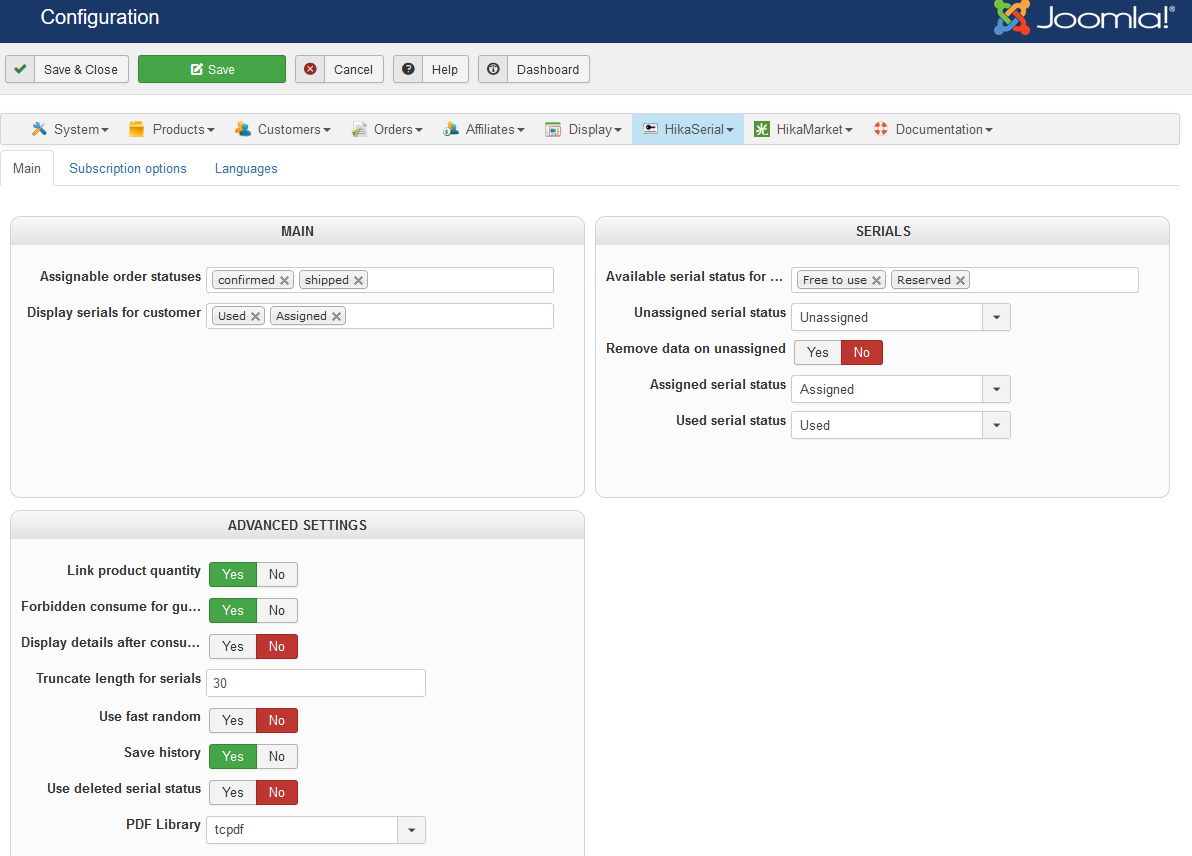
Main settings
Assignable order statuses
When a HikaShop order is validated (and there is a product which use an HikaSerial pack), HikaSerial will assign some serials to this order.
You have to specify all orders status which allow to have a serial.
The default configuration is "confirmed,shipped".
So when an order would be confirmed (example: his status changed from "created" to "confirmed"), HikaSerial would assign serials.
If the order changed to "shipped" after that, the serial would stay.
It is important to notice that if "shipped" is not present in the list and an order change his status to "shipped", the serials would be unassigned by HikaSerial.
Display serials for customer
You can select the serials statuses which would be display for customers.
Default value is "Used" but recommended value is "Assigned,Used".
Activate serial features (HikaSubsciption only)
With HikaSubscription you can deactivate that setting in order to hide the elements related to the serials and packs so you will only see subscription features.
Serials settings
Available serial status for assignation
That setting list the serial status which are considered as available for an assignation when HikaSerial need to pickup a serial in the database.
By default the values are "Free to use" and "Reserved". But you can potentially add the status "Unassigned" if you want that an assigned serial can be re-assigned to the same customer afterwards.
Unassigned serial status
When an order change his status to an non assignable status, HikaSerial would unassigned the serials.
Example : an order change his status from "confirmed" to "refund".
You can choose the new status for the previously used serial.
The default configuration is "Unassigned" but you may want that a serial could be reused and then use "free".
If you select "Used", the serial would stay attached to the order, it means that an assigned serial can't be unassigned.
Remove data on unassigned
When a serial is unassigned, his assigned data is not removed. So you can see to which order (and user) it was assigned.
If you use serial-licence, it could be useful if you want to ban the serial key.
If you want that serial could be reused, you have to activate this option. Even if a serial is "free" it can't be assigned to an order if he as already one.
But a "free" serial which have already assigned data work as a filter.
Assigned serial status
HikaSerial might become more flexible on serial status but for the moment the list is fixed.
The default configuration is "Assigned" and we highly recommend to use it.
Used serial status
HikaSerial might become more flexible on serial status but for the moment the list is fixed.
The default configuration is "Used" and we highly recommend to use it.
Advanced settings
Link product quantity
You can link the product quantity to the quantity of serials.
HikaSerial would modify the quantity for HikaShop product depending "pack" affectations.
If the pack does not have a plugin generator, HikaSerial would count the "serials" stock and change the product quantity depending his link.
So if an HikaShop product is attached to "software licence" pack with a quantity of 2 (when you buy the product, two serial would be assigned to the order) and there is 15 free serials in the database, the HikaShop product would have a quantity of 7 (15 / 2 = 7.5)
But if the pack have a generator configured ; the stock of the pack will be virtually unlimited so the products with the assigned pack will be set with an unlimited quantity.
Forbidden consume for guests
You can forbidden guest users to consume serials. At this moment they should be log-in if they want to consume a serial.
Display details after consuming
When consuming a serial, the "thank you" does not display a lot of information. Thanks to this option you can display more details about the serial which have been consumed.
This option is really useful when selling e-tickets with the plugin ":group filter consume"
Truncate length for serials
You can truncate serials displaying in the backend. If you have big serials, you might want to display the 30 first characters.
If you don't want to truncate serials in the backend, you can enter "0".
Use fast random
In Joomla 1.6 and higher, a new random generator has been implemented for the password generation.
HikaSerial would use by default this generator but it is possible to use another random generator, which would is faster.
Save history
Thanks to this option, HikaSerial would save the history every time a serial is modified.
You would be able to see when a serial has been create, assigned, used, update.
Use deleted status
HikaSerial allow you to delete serials. But thanks to this option, when you would delete a serial, the first time, his status would change to "deleted" and the second time it would be remove from the database.
This option works like a "trash", creating a two step deletion.
PDF Library
Depending your needs, you can choose between TCPDF and FPDF librairies.
Both libraries are include in HikaSerial packages but the extra fonts are not (due to their file size). Each library have its pros and cons, but generally TCPDF is better to handle UTF8 content.
General display settings
Display serial in user dashboard
Via that setting you can control if you want to display an icon "Serials" in the HikaShop user dashboard.
Display subscription in user dashboard (HikaSubsciption only)
Via that setting you can control if you want to display an icon "Subscriptions" in the HikaShop user dashboard.
Display downloads in user dashboard (HikaSubsciption only)
Via that setting you can control if you want to display an icon "Subscription downloads" in the HikaShop user dashboard.
Subscriptions options
Subscription Main settings
Authorize renew before expiration
You can authorize or not your customer to perform a renew in the HikaSubscription interface before the subscription comes to the end.
Renew before expiration period
If you authorize the renewal before expiration, you can then indicate in that setting what is the authorized period of time.
Authorize renew after expiration
You can authorize or not your customer to perform a renew in the HikaSubscription interface once the subscription has expired.
Please not that a closed subscription cannot be renewed.
Renew after expiration period
If you authorize the renewal after expiration, you can then indicate in that setting what is the authorized period of time.
Subscription advanced settings
Make recurring optional
By default HikaSerial Subscription will ask for recurring plugins when the cart contains a recurring subscription product ("create and renew" / "renew" / "renew or create").
With that option, you can authorize classical payment plugin to be listed in the checkout. The customer could pay with them but he will have to renew manually afterwards.
Cron subscription batch size
During the cron task, HikaSubscription will check the expired and closed subscriptions and changed their status.
Since an expiration (or a closure) will call the subscriber plugins to perform action (remove the customer from Joomla user groups, etc), these actions can be time consuming and if your server have an execution time limit, big batchs might not be processed correctly.
With that setting, you can tweek the maximum number of subscription that can be processed in one batch.
Cron email batch size
During the cron task, HikaSubscription can send emails to the users to notice about subscription expirations.
Like the subscription batch, sending email can be time consuming and if your server have an execution time limit, big batchs might not be processed correctly.
With that setting, you can tweek the maximum number of emails that can be processed in one batch.
Renewal emails
In the interface you can configure renewal emails by indicating the emails that you want to send to users before a subscription expiration.
Languages
Like in HikaShop, you can manage your HikaSerial language file in that interface.
It allows you to modify the default language file but also to edit the common language override file (which is shared with HikaShop and others).

