







|
|

Description
This screen enables you to edit the custom override of HikaShop views. As you may know, HikaShop is an Open Source software thus all the code can be modified by the end-user. Moreover, it uses the standard Joomla MCV which means that you can override any view of HikaShop within your template. The big advantage of that over directly modifying HikaShop's code is that when you update HikaShop you won't loose any of your modifications and you won't have to reapply them. You can know more about that procedure on the joomla documentation wiki: http://docs.joomla.org/How_to_override_the_output_from_the_Joomla!_core
We decided to go on step further and provide you with an interface to customize HikaShop's views so that it becomes even more easy for you to customize HikaShop to your needs.
Toolbar

- Save : Save the custom view and return to the custom views Management screen.
- Apply : Apply the modifications to the custom view and stay on the same screen.
- Cancel : Return to the previous screen without saving the modifications.
- Help : This button enables you to turn ON/OFF the help section, this screen will appear or disappear.
View
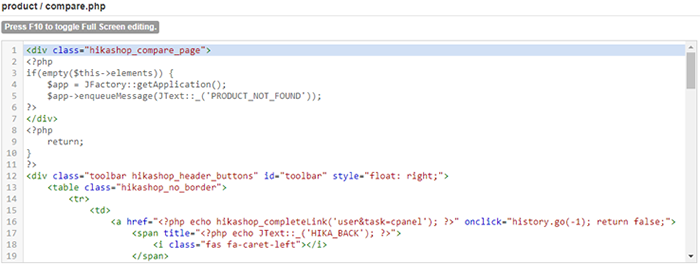
You will be able to edit the code of the view in this text area. Depending on the view, you will have a lot of HTML or a lot of PHP or a mix of both. You might also have some javascript or some CSS here and there. Note that once you save the view, even without changing anything in the code, the override file will be created. You will be able to easily remove it by clicking on the delete button on the listing of views under the "remove customization" column.
Below, you can see the code for one of the address template. The address templates are quite special as they use a mix of tags and PHP. That will enable yo to easily define a different look for the addresses of your shop without being too difficult to modify but in the same time allowing you a lot of flexibility.
Furthermore, for some view files, you'll find an input box at the top where you can change the name of the file. This will allow you to create new layouts (for example for the product page layout selector) by simply changing the name and saving the file.
Finally, if you get an error when saving a view file, the problem probably comes from a security extension of your website or of your hosting. You'll have to conect the developers of that extension or your hosting company so that they can provide a fix. And as an alternative, you can use the Joomla template view override interface
Tutorial
As you'll see, there are many view files you can customize and it can be overwhelming when you first arrive here. So that's why we've written a tutorial to guide you on what file to edit based on what you want to change. You'll find it on this page

