

- Posts: 15
- Thank you received: 0
Здесь вы можете свободно общаться на русском языке. Просим отнестись с пониманием к тому, что мы не разговариваем на этом языке и не можем осуществлять поддержку на нем.
Вопрос по всплывающему окну
14 years 7 months ago #38532
by someone83
Вопрос по всплывающему окну was created by someone83
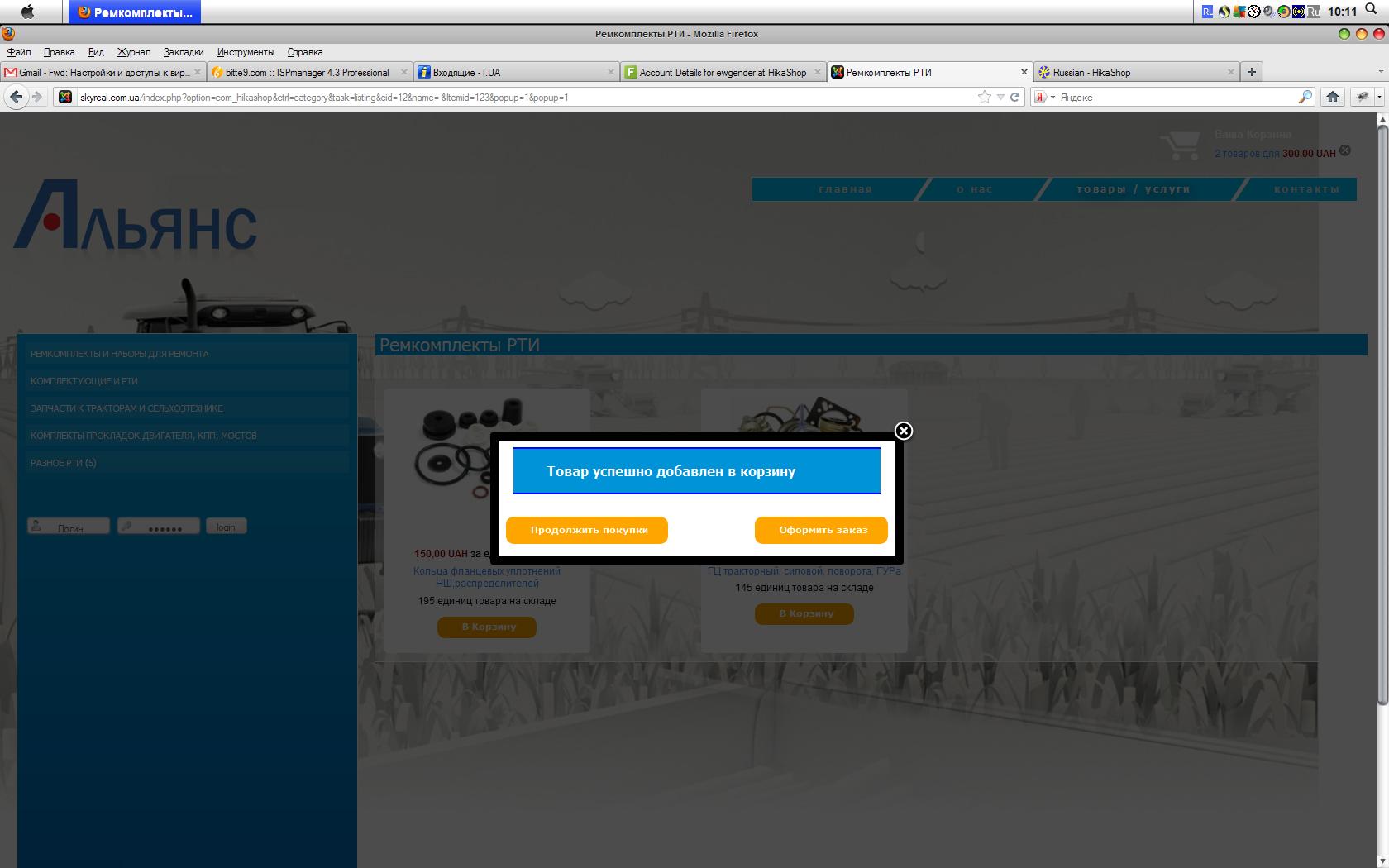
Привет! Хотелось бы узнать такую вещь - можно ли во всплывающее окошко, которое сообщает, что товар добавлен тв корзину поместить и содержимое корзины с кнопками удалить\обновить количество?
Ну, для этого надо будет задать максимальное время вывода этого попапа, просто не пойму какой кусок кода куда вставлять...
[attachment:1]Безымянный.JPG[/attachment]
Ну, для этого надо будет задать максимальное время вывода этого попапа, просто не пойму какой кусок кода куда вставлять...
[attachment:1]Безымянный.JPG[/attachment]
Please Log in or Create an account to join the conversation.
14 years 7 months ago #38533
by someone83
Replied by someone83 on topic Re: Вопрос по всплывающему окну
Вот вложение, там не прикрепилось
Please Log in or Create an account to join the conversation.
14 years 7 months ago #38534
by someone83
Replied by someone83 on topic Re: Вопрос по всплывающему окну
Please Log in or Create an account to join the conversation.

14 years 7 months ago #38655
by nicolas
Replied by nicolas on topic Re: Вопрос по всплывающему окну
Hi,
I'd like to help but unfortunately I didn't understand your question. Could you try to post in english ?
I'd like to help but unfortunately I didn't understand your question. Could you try to post in english ?
Please Log in or Create an account to join the conversation.
- progreccor
-

- Offline
- SEO, webdesign
14 years 7 months ago #38699
by progreccor
Я не явлюсь официальной службой поддержки!
Я здесь добровольно!
Хочешь получить купон на скидку Hikashop? Спроси меня как!
Replied by progreccor on topic Re: Вопрос по всплывающему окну
he is ask about possibility to add to the popup window content of the cart. And also add buttons with possibility to add or remove products in that cart. All that in popup window that appears when you add product to cart.
He is ask where can he found this code.
He is ask where can he found this code.
Я не явлюсь официальной службой поддержки!
Я здесь добровольно!
Хочешь получить купон на скидку Hikashop? Спроси меня как!
Please Log in or Create an account to join the conversation.
14 years 7 months ago #38729
by nicolas
Replied by nicolas on topic Re: Вопрос по всплывающему окну
In that case, you will have to use the extension Modules Anywhere and add a tag for your cart module in the file "notice" of the view "checkout" via the menu Display->Views.
Please Log in or Create an account to join the conversation.
- progreccor
-
- Offline
- SEO, webdesign
14 years 7 months ago #38736
by progreccor
Я не явлюсь официальной службой поддержки!
Я здесь добровольно!
Хочешь получить купон на скидку Hikashop? Спроси меня как!
Replied by progreccor on topic Re: Вопрос по всплывающему окну
this is translation of Nicolas message.
николас говорит что вам следует использовать Modules Anywhere (это расширение такое) и добавить соответствующий тег в модуль вашей корзины.
Найти его можно в файле notice раздела checkout (все это ищется в меню Вид-> Шаблоны)
николас говорит что вам следует использовать Modules Anywhere (это расширение такое) и добавить соответствующий тег в модуль вашей корзины.
Найти его можно в файле notice раздела checkout (все это ищется в меню Вид-> Шаблоны)
Я не явлюсь официальной службой поддержки!
Я здесь добровольно!
Хочешь получить купон на скидку Hikashop? Спроси меня как!
Please Log in or Create an account to join the conversation.
14 years 7 months ago #38803
by someone83
Replied by someone83 on topic Re: Вопрос по всплывающему окну
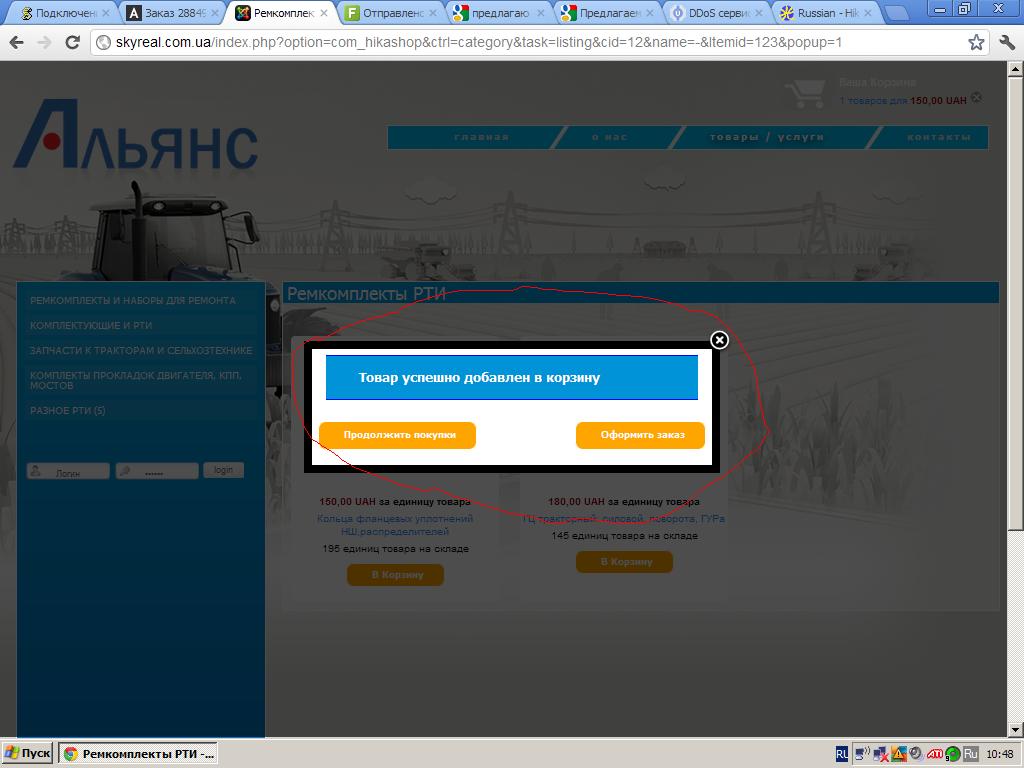
Мне же в корзину ничего добавлять не надо....
я хочу вот сюда
добавить вот это
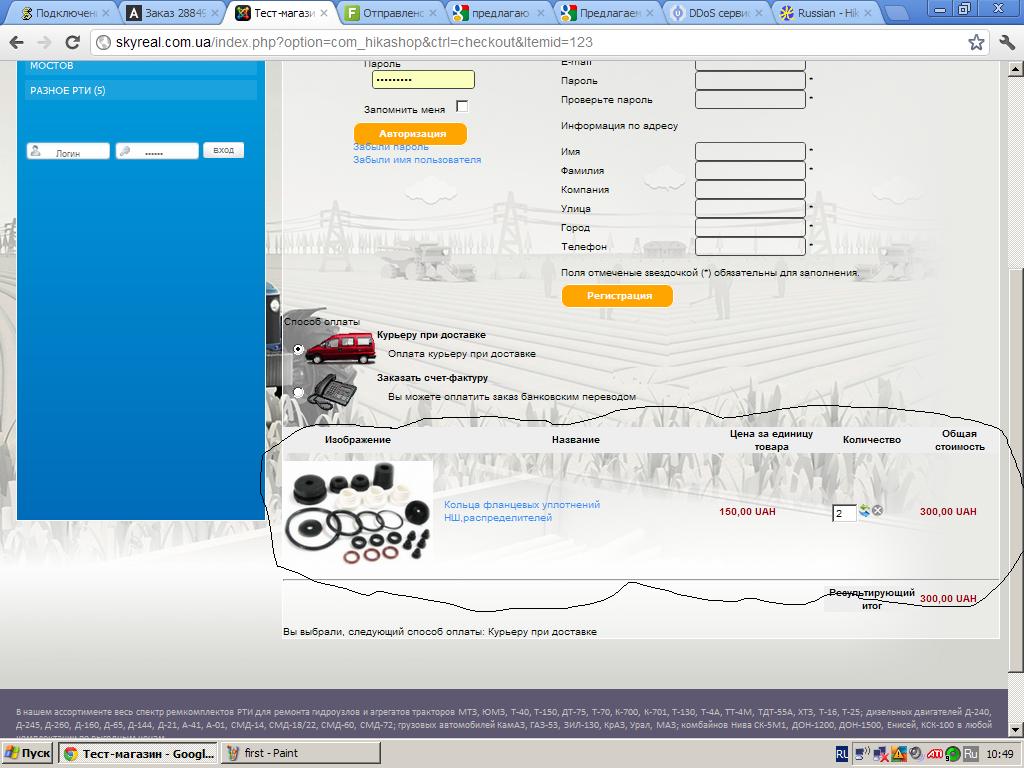
я хочу вот сюда
добавить вот это
Please Log in or Create an account to join the conversation.
- progreccor
-
- Offline
- SEO, webdesign
14 years 7 months ago #38804
by progreccor
Я не явлюсь официальной службой поддержки!
Я здесь добровольно!
Хочешь получить купон на скидку Hikashop? Спроси меня как!
Replied by progreccor on topic Re: Вопрос по всплывающему окну
может быть перечитаешь и посмотришь?
файл notice раздела checkout.
Это именно то самое место, которое выводит окошко о котором ты ведешь речь.
Добавить в это окошко другой модуль можно с помощью расширения modules anywhere.
Прежде чем плакать - вначале внимательно читай что тебе пишут.
файл notice раздела checkout.
Это именно то самое место, которое выводит окошко о котором ты ведешь речь.
Добавить в это окошко другой модуль можно с помощью расширения modules anywhere.
Прежде чем плакать - вначале внимательно читай что тебе пишут.
Я не явлюсь официальной службой поддержки!
Я здесь добровольно!
Хочешь получить купон на скидку Hikashop? Спроси меня как!
Please Log in or Create an account to join the conversation.
14 years 7 months ago #38866
by someone83
Replied by someone83 on topic Re: Вопрос по всплывающему окну
Да, спасибо, все получилось но возникла проблема:
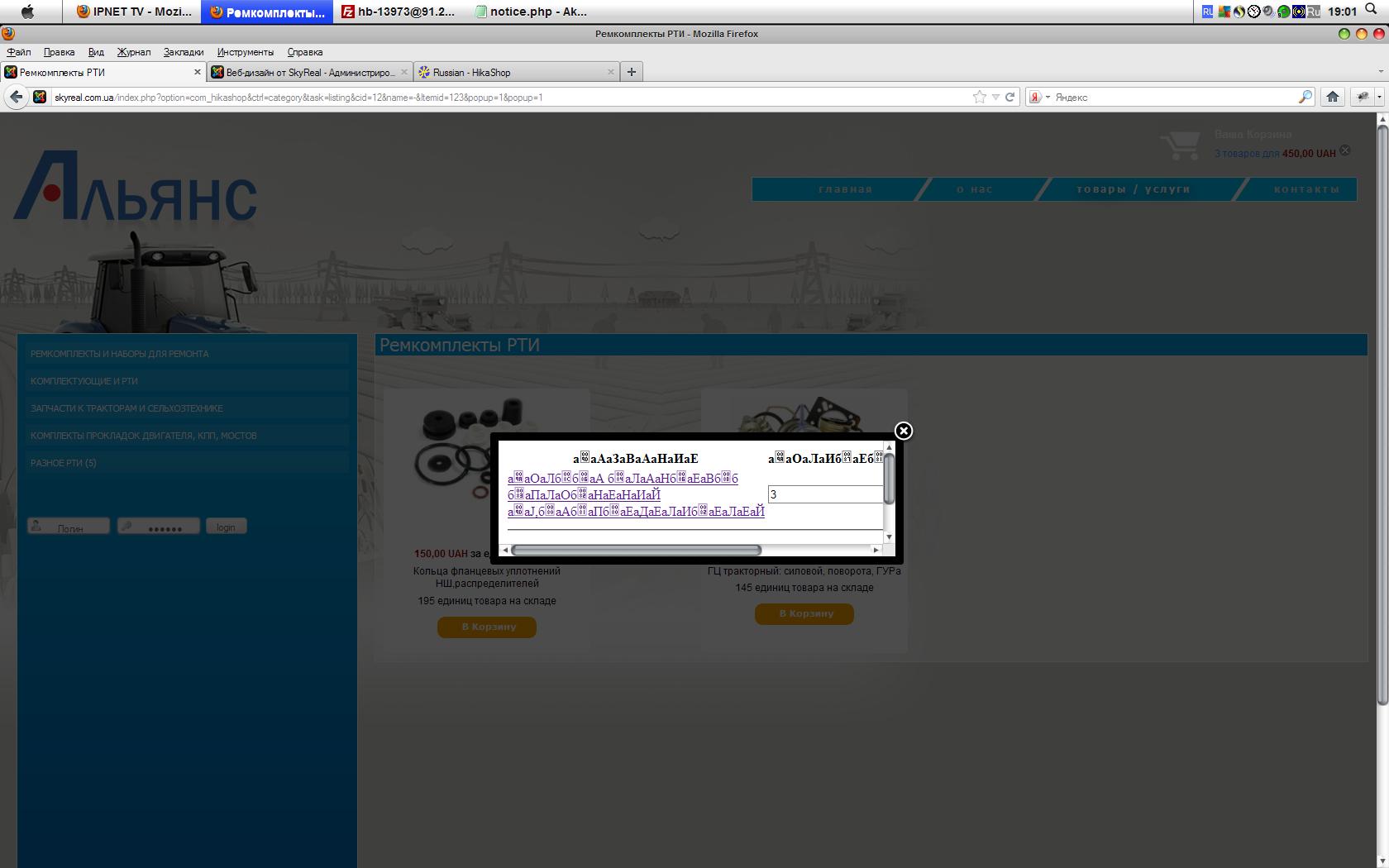
если выводить в позиции модуля корзину Хикашопа, не отображаются кнопки "Продолжить покупки" и "Оформить заказ" и кодировка модуля в попап-окне сбивается при просмотре в Мозилле, в Хроме нормально(это копия модуля козины на сайте в верхнем правом углу, тот работает корректно), может ему где default charset написать?
Кроме того, если нажать на товар в попап-окне, получается что новая страница выводится в этом же попап-окне... Где его масштабировать???
если выводить в позиции модуля корзину Хикашопа, не отображаются кнопки "Продолжить покупки" и "Оформить заказ" и кодировка модуля в попап-окне сбивается при просмотре в Мозилле, в Хроме нормально(это копия модуля козины на сайте в верхнем правом углу, тот работает корректно), может ему где default charset написать?
Кроме того, если нажать на товар в попап-окне, получается что новая страница выводится в этом же попап-окне... Где его масштабировать???
Please Log in or Create an account to join the conversation.
14 years 7 months ago #38867
by someone83
Replied by someone83 on topic Re: Вопрос по всплывающему окну
вот скрин
Please Log in or Create an account to join the conversation.
14 years 7 months ago #39147
by master_b
сайт з перекладами www.benefit.in.ua
PS. спасибо переводить Webmoney : Z207635098627 R152456839841 или ЯД 410011027999056
Replied by master_b on topic Re: Вопрос по всплывающему окну
поидее в файле отвечающем за вывод данной формы надо прописать тип кодировки
сайт з перекладами www.benefit.in.ua
PS. спасибо переводить Webmoney : Z207635098627 R152456839841 или ЯД 410011027999056
Please Log in or Create an account to join the conversation.
- progreccor
-
- Offline
- SEO, webdesign
14 years 7 months ago #39180
by progreccor
Я не явлюсь официальной службой поддержки!
Я здесь добровольно!
Хочешь получить купон на скидку Hikashop? Спроси меня как!
Replied by progreccor on topic Re: Вопрос по всплывающему окну
окно выводится в iframe. То есть это как бы отдельная страница. И там не прописана кодировка.
Только вот где исправляться я не искал. сейчас занят сильно
Только вот где исправляться я не искал. сейчас занят сильно
Я не явлюсь официальной службой поддержки!
Я здесь добровольно!
Хочешь получить купон на скидку Hikashop? Спроси меня как!
Please Log in or Create an account to join the conversation.
14 years 7 months ago #39268
by nicolas
Replied by nicolas on topic Re: Вопрос по всплывающему окну
I tried to add a product to the cart on your website and didn't had that encoding issue, and it was displaying your language characters properly.
The encoding issue might come your browser not interpreting it correctly (or you already found the problem ?).
The encoding issue might come your browser not interpreting it correctly (or you already found the problem ?).
Please Log in or Create an account to join the conversation.
14 years 7 months ago #39367
by someone83
Replied by someone83 on topic Re: Вопрос по всплывающему окну
Hi! No, problem was in Mozilla, in Chrome all good/ Sorry for my english/
And! There lost 2 buttons - @continue shopping@ and @checkout@ - without this buttons i cant close iframe! And clicking on image name open item's page in same iframe - in this little window///
And! There lost 2 buttons - @continue shopping@ and @checkout@ - without this buttons i cant close iframe! And clicking on image name open item's page in same iframe - in this little window///
Please Log in or Create an account to join the conversation.
14 years 7 months ago #39368
by someone83
Replied by someone83 on topic Re: Вопрос по всплывающему окну
Привет! Не скажете, как вставить айфрейм именно выделенный мною кусок корзины на странице "Чекаут"? Чтобы с фото. Но наджо сохранить кнопки "Продолжить покупки" и "Оформить заказ" - без них не закрывается айфрейм - только кнопкой "Закрыть" а переход к оформлению товара происходит в самом айфрейме, котрорый остается таким же маленьким...
Please Log in or Create an account to join the conversation.
14 years 7 months ago #39509
by nicolas
Replied by nicolas on topic Re: Вопрос по всплывающему окну
Hi,
I tried on firefox and don't have the problem either.
If you don't get the continue shopping and proceed to checkout buttons, that's because you must have removed them from the file "notice" of the view checkout when you added the cart module display. You should put back the code you removed in that view and it will work.
I tried on firefox and don't have the problem either.
If you don't get the continue shopping and proceed to checkout buttons, that's because you must have removed them from the file "notice" of the view checkout when you added the cart module display. You should put back the code you removed in that view and it will work.
Please Log in or Create an account to join the conversation.
14 years 7 months ago #39617
by someone83
Replied by someone83 on topic Re: Вопрос по всплывающему окну
Hi! That's my file "notice.php"
///////////////////////////////////////////
<?php
/**
* @package HikaShop for Joomla!
* @version 1.5.5
* @author hikashop.com
* @copyright (C) 2010-2011 HIKARI SOFTWARE. All rights reserved.
* @license GNU/GPLv3 www.gnu.org/licenses/gpl-3.0.html
*/
defined('_JEXEC') or die('Restricted access');
?>
<script type="text/javascript">
setTimeout( 'try{ window.top.document.getElementById(\'sbox-window\').close(); }catch(err){ window.top.SqueezeBox.close(); }', <?php echo (int)$this->config->get('popup_display_time',2000);?> );
</script>
<div>
<div id="hikashop_notice_box_message" >
<?php echo hikashop_display(JText::_('PRODUCT_SUCCESSFULLY_ADDED_TO_CART'),'success',true); ?>
</div>
<div>{modulepos cart777}</div>
<br />
<div id="hikashop_add_to_cart_continue_div">
<?php echo $this->cartClass->displayButton(JText::_('CONTINUE_SHOPPING'),'continue_shopping',$this->params,'','try{ window.top.document.getElementById(\'sbox-window\').close(); }catch(err){ window.top.SqueezeBox.close(); } return false;','id="hikashop_add_to_cart_continue_button"'); ?>
</div>
<div id="hikashop_add_to_cart_checkout_div">
<?php echo $this->cartClass->displayButton(JText::_('PROCEED_TO_CHECKOUT'),'to_checkout',$this->params,hikashop_completeLink('checkout'.$this->url_itemid),'window.top.location=\''.hikashop_completeLink('checkout'.$this->url_itemid).'\';return false;','id="hikashop_add_to_cart_checkout_button"'); ?>
<br />
</div>
</div>
////////////////////////////////////////////////
I dont remove code, but no buttons @Continue@ and @Checkout@
///////////////////////////////////////////
<?php
/**
* @package HikaShop for Joomla!
* @version 1.5.5
* @author hikashop.com
* @copyright (C) 2010-2011 HIKARI SOFTWARE. All rights reserved.
* @license GNU/GPLv3 www.gnu.org/licenses/gpl-3.0.html
*/
defined('_JEXEC') or die('Restricted access');
?>
<script type="text/javascript">
setTimeout( 'try{ window.top.document.getElementById(\'sbox-window\').close(); }catch(err){ window.top.SqueezeBox.close(); }', <?php echo (int)$this->config->get('popup_display_time',2000);?> );
</script>
<div>
<div id="hikashop_notice_box_message" >
<?php echo hikashop_display(JText::_('PRODUCT_SUCCESSFULLY_ADDED_TO_CART'),'success',true); ?>
</div>
<div>{modulepos cart777}</div>
<br />
<div id="hikashop_add_to_cart_continue_div">
<?php echo $this->cartClass->displayButton(JText::_('CONTINUE_SHOPPING'),'continue_shopping',$this->params,'','try{ window.top.document.getElementById(\'sbox-window\').close(); }catch(err){ window.top.SqueezeBox.close(); } return false;','id="hikashop_add_to_cart_continue_button"'); ?>
</div>
<div id="hikashop_add_to_cart_checkout_div">
<?php echo $this->cartClass->displayButton(JText::_('PROCEED_TO_CHECKOUT'),'to_checkout',$this->params,hikashop_completeLink('checkout'.$this->url_itemid),'window.top.location=\''.hikashop_completeLink('checkout'.$this->url_itemid).'\';return false;','id="hikashop_add_to_cart_checkout_button"'); ?>
<br />
</div>
</div>
////////////////////////////////////////////////
I dont remove code, but no buttons @Continue@ and @Checkout@
Please Log in or Create an account to join the conversation.
14 years 7 months ago #39624
by someone83
Replied by someone83 on topic Re: Вопрос по всплывающему окну
может дураком себя выставлю, но тут может быть какой-то конфликт кодов корзины и этого попапа? ну чего кпопки пропадают при внедрении туда модуля корзины? и чего в корзине в попапе не отображаются картинки?
Please Log in or Create an account to join the conversation.
14 years 7 months ago #39814
by nicolas
Replied by nicolas on topic Re: Вопрос по всплывающему окну
Hi,
So you must have the buttons below. You should see them if you use the scroll bar in the popup.
In that case, you should make the popup size bigger. For that, you need to create a file called templates/YOUR_TEMPLATE/html/hikashop_button.php
and have in it:
where x: 480, y: 140 can be changed to the size you need.
So you must have the buttons below. You should see them if you use the scroll bar in the popup.
In that case, you should make the popup size bigger. For that, you need to create a file called templates/YOUR_TEMPLATE/html/hikashop_button.php
and have in it:
Code:
<?php
function hikashop_popup_render(){
global $Itemid;
$url_itemid='';
if(!empty($Itemid)){
$url_itemid='&Itemid='.$Itemid;
}
return '<div style="display:none;"><a rel="{handler: \'iframe\',size: {x: 480, y: 140}}" id="hikashop_notice_box_trigger_link" href="'.hikashop_completeLink('checkout&task=notice'.$url_itemid,true).'"></a></div>';
}
where x: 480, y: 140 can be changed to the size you need.
The following user(s) said Thank You: tsa672
Please Log in or Create an account to join the conversation.
Moderators: progreccor
Time to create page: 0.370 seconds