

- Posts: 7
- Thank you received: 0
How to change this text?
6 years 7 months ago - 6 years 7 months ago #315463
by Aqualon
How to change this text? was created by Aqualon
-- HikaShop version -- : 4.4.2
-- HikaSerial version -- : 3.0.1
-- Joomla version -- : 3.9.15
-- PHP version -- : 7.2.27
-- Browser(s) name and version -- : Mozilla Firefox 72.0.2 (64B)
Hi,
we set up the module for serial consumtion. Everything works fine and we got a result page. There (as shown on the image) is the word "success" in the alert box. We need to change this - but even though we searched in the hikaserial language file as also in the hikashop we didn´t find it. Anyone know where to change this?
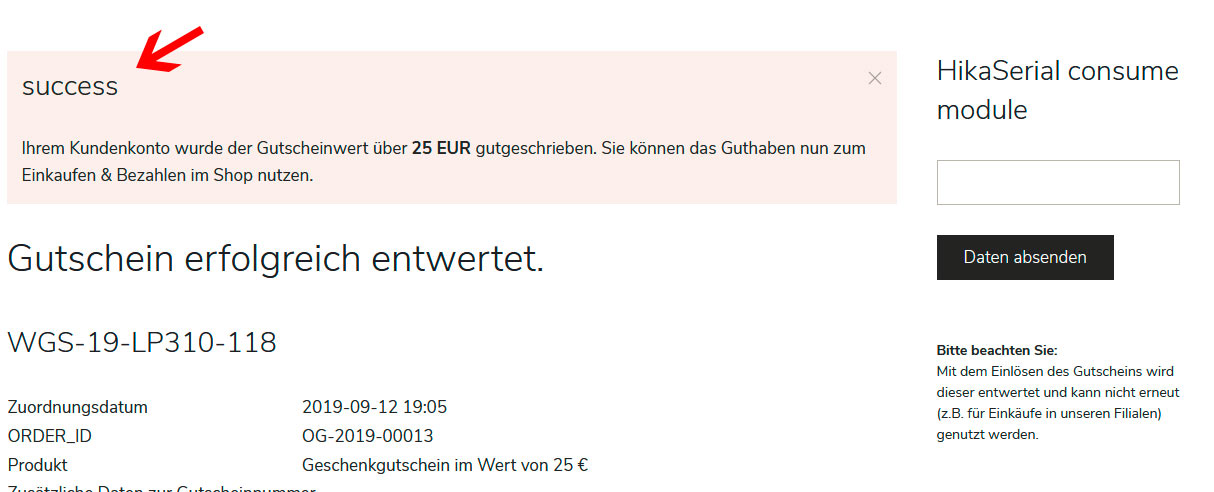
Kind regards
Alex
-- HikaSerial version -- : 3.0.1
-- Joomla version -- : 3.9.15
-- PHP version -- : 7.2.27
-- Browser(s) name and version -- : Mozilla Firefox 72.0.2 (64B)
Hi,
we set up the module for serial consumtion. Everything works fine and we got a result page. There (as shown on the image) is the word "success" in the alert box. We need to change this - but even though we searched in the hikaserial language file as also in the hikashop we didn´t find it. Anyone know where to change this?
Kind regards
Alex
Last edit: 6 years 7 months ago by Aqualon.
Please Log in or Create an account to join the conversation.

6 years 7 months ago #315485
by Jerome
Jerome - Obsidev.com
HikaMarket & HikaSerial developer / HikaShop core dev team.
Replied by Jerome on topic How to change this text?
Hello,
What is the serial consumption plugin you're using ?
The message is not in English so I don't know what is that message nor which plugin is generating it.
Regards,
What is the serial consumption plugin you're using ?
The message is not in English so I don't know what is that message nor which plugin is generating it.
Regards,
Jerome - Obsidev.com
HikaMarket & HikaSerial developer / HikaShop core dev team.
Please Log in or Create an account to join the conversation.
6 years 7 months ago #315558
by Aqualon
Replied by Aqualon on topic How to change this text?
Hi Jerome,
yes, sorry for the missing information. We customized the output allready. We use the points consumer plugin. The translated text below was in the language files, but the word "success" isn´t there at least as far as I can see.
KInd regards
Alex
yes, sorry for the missing information. We customized the output allready. We use the points consumer plugin. The translated text below was in the language files, but the word "success" isn´t there at least as far as I can see.
KInd regards
Alex
Please Log in or Create an account to join the conversation.
6 years 7 months ago #315578
by Jerome
Jerome - Obsidev.com
HikaMarket & HikaSerial developer / HikaShop core dev team.
Replied by Jerome on topic How to change this text?
Hello,
In the pointsconsumer plugin, you will the line
You can replace it with
In order to not use the type "success" ; that type is handle by Joomla backend but not by the front-end templates.
Regards,
In the pointsconsumer plugin, you will the line
Code:
$app->enqueueMessage(JText::sprintf('HIKAPOINTS_EARN_X_POINTS', $points), 'success');
Code:
$app->enqueueMessage(JText::sprintf('HIKAPOINTS_EARN_X_POINTS', $points));
Regards,
Jerome - Obsidev.com
HikaMarket & HikaSerial developer / HikaShop core dev team.
Please Log in or Create an account to join the conversation.
Moderators: Obsidev
Time to create page: 0.172 seconds