

- Posts: 306
- Thank you received: 42
[SOLVED] Unable to edit description on new vendor registration
6 years 6 months ago #316841
by trevsmiff
Unable to edit description on new vendor registration was created by trevsmiff
-- HikaShop version -- : 4.2.3
-- HikaMarket version -- : 3.0.3
-- Joomla version -- : 3.9.16
-- PHP version -- : 7.3.15
Hi
Hope you are staying well.
Using the JCE editor I am unable to enter anything in the Description field when registering as a vendor. None of the editor toolbars are displayed and I can't enter any text.
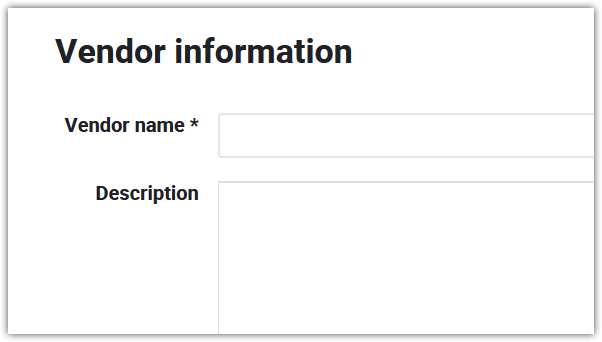
Switching the editor to TinyMCE I get the same results.
If I save the form and go back to the Vendor Edit page the editor is displayed correctly and I can edit the description.
Best regards
Trevor
-- HikaMarket version -- : 3.0.3
-- Joomla version -- : 3.9.16
-- PHP version -- : 7.3.15
Hi
Hope you are staying well.
Using the JCE editor I am unable to enter anything in the Description field when registering as a vendor. None of the editor toolbars are displayed and I can't enter any text.
Switching the editor to TinyMCE I get the same results.
If I save the form and go back to the Vendor Edit page the editor is displayed correctly and I can edit the description.
Best regards
Trevor
Please Log in or Create an account to join the conversation.

6 years 6 months ago #316850
by Jerome
Jerome - Obsidev.com
HikaMarket & HikaSerial developer / HikaShop core dev team.
Also helping the HikaShop support team when having some time or couldn't sleep.
By the way, do not send me private message, use the "contact us" form instead.
Replied by Jerome on topic Unable to edit description on new vendor registration
Hello,
I cannot reproduce your issue in the demo website :
pasteboard.co/J0Uy5sX.png
Please check that you do not have JavaScript errors in your page which could explain why the editor is not loaded.
Regards,
I cannot reproduce your issue in the demo website :
pasteboard.co/J0Uy5sX.png
Please check that you do not have JavaScript errors in your page which could explain why the editor is not loaded.
Regards,
Jerome - Obsidev.com
HikaMarket & HikaSerial developer / HikaShop core dev team.
Also helping the HikaShop support team when having some time or couldn't sleep.
By the way, do not send me private message, use the "contact us" form instead.
Please Log in or Create an account to join the conversation.
6 years 6 months ago #316854
by trevsmiff
Replied by trevsmiff on topic Unable to edit description on new vendor registration
Hi Jerome
I just set up a test site on localhst using Ampps and I get the same result as you using TinyMCE (looks like a very limited set of icons in the toolbar!). When I switch to JCE I get the blank box. Does JCE work on your site?
In the console there are a couple of warnings:
I will run some more tests [strike]tomorrow[/strike] later today.
regards
Trevor
I just set up a test site on localhst using Ampps and I get the same result as you using TinyMCE (looks like a very limited set of icons in the toolbar!). When I switch to JCE I get the blank box. Does JCE work on your site?
In the console there are a couple of warnings:
Code:
This page uses the non standard property “zoom”. Consider using calc() in the relevant property values, or using “transform” along with “transform-origin: 0 0”. vendor
JQMIGRATE: Migrate is installed with logging active, version 1.4.1 jquery-migrate.js:23:17
Use of Mutation Events is deprecated. Use MutationObserver instead.
I will run some more tests [strike]tomorrow[/strike] later today.
regards
Trevor
Please Log in or Create an account to join the conversation.
6 years 6 months ago #316859
by trevsmiff
Replied by trevsmiff on topic [SOLVED] Unable to edit description on new vendor registration
After posting my last reply I realised that I had the clue to solve the problem - I didn't have a public facing editor profile in JCE. I created a new profile with a stripped down toolbar and assigned it to the Public group and Bingo.
Best regards
Trevor
Best regards
Trevor
The following user(s) said Thank You: nicolas
Please Log in or Create an account to join the conversation.
Moderators: Obsidev
Time to create page: 0.169 seconds