
- Posts: 81
- Thank you received: 2
Custom Field Translation with Falang
- rockoladeluxe
-
 Topic Author
- Offline
Less
More
13 years 11 months ago - 13 years 11 months ago #72520
by rockoladeluxe
Custom Field Translation with Falang was created by rockoladeluxe
Hi Nicolas,
I translated my site Dutch / English and almost everthing is ok.
Translating the custom fields works, but my translated Hikashop Custom Fields do not show in the front end.
Must be a small thing I think, but I can't find the solution.
Thanks,
Roy
I translated my site Dutch / English and almost everthing is ok.
Translating the custom fields works, but my translated Hikashop Custom Fields do not show in the front end.
Must be a small thing I think, but I can't find the solution.
Thanks,
Roy
Last edit: 13 years 11 months ago by rockoladeluxe.
Please Log in or Create an account to join the conversation.

Less
More
- Posts: 12953
- Thank you received: 1778
13 years 11 months ago - 13 years 11 months ago #72779
by Mohamed Thelji
Replied by Mohamed Thelji on topic Re: Custom Field Translation with Falang
Hi Roy,
Here is the documentation of Hikashop custom fields :
Here is the documentation of Hikashop custom fields :
Hope this will help you.Label : The label of the field. You can translate it via joomfish. Note that core custom fields should be translated via the translation file of hikashop so that everyone can benefit of the translations. In the translation file, you will find them by searching for the english label which will be uppercase and spaces replaced with _. For example, you will find "Middle name" with the key MIDDLE_NAME in the translation file. You can edit the translation files of HikaShop in the configuration page of HikaShop, under the tab languages.
Last edit: 13 years 11 months ago by Mohamed Thelji.
Please Log in or Create an account to join the conversation.
- rockoladeluxe
-
Topic Author
- Offline
Less
More
- Posts: 81
- Thank you received: 2
13 years 11 months ago #72789
by rockoladeluxe
Replied by rockoladeluxe on topic Re: Custom Field Translation with Falang
Hi Mohamed,
I do not have a problem translating the custom fields,
My problem is that the translation of (only) custom fields do
not show in the frontend, while the rest of the translations of
joomla & hikashop is working ok!
I do not have a problem translating the custom fields,
My problem is that the translation of (only) custom fields do
not show in the frontend, while the rest of the translations of
joomla & hikashop is working ok!
Please Log in or Create an account to join the conversation.

13 years 11 months ago #73135
by nicolas
Replied by nicolas on topic Re: Custom Field Translation with Falang
Could you give more information on how you translated them ?
Also, if you could turn on the debug mode of the joomla configuration and give a link to the page with the custom fields that would be great in order for us to see the queries on your page.
Also, if you could turn on the debug mode of the joomla configuration and give a link to the page with the custom fields that would be great in order for us to see the queries on your page.
Please Log in or Create an account to join the conversation.
13 years 2 months ago #115687
by up2sky
Replied by up2sky on topic Re: Custom Field Translation with Falang
Please tell me how to translate custom fields value ?
custom field type - text. I use it as additional info.
I found how to translate custom fields titles, but i need to translate values.
custom field type - text. I use it as additional info.
I found how to translate custom fields titles, but i need to translate values.
Please Log in or Create an account to join the conversation.

13 years 2 months ago #115708
by Eliot
Replied by Eliot on topic Re: Custom Field Translation with Falang
Hi there,
You can simply use the Hikashop language files (in System>Configuration>Languages). Anything found in this file will be translated according to the selected language.
You can simply use the Hikashop language files (in System>Configuration>Languages). Anything found in this file will be translated according to the selected language.
Please Log in or Create an account to join the conversation.
13 years 2 months ago #115774
by up2sky
Replied by up2sky on topic Re: Custom Field Translation with Falang
Yes, I know.
I ment:
when you created custom field, for example TYPE OF A VEHICLE.
you enter : car or van or truck....
you have an option to translate "TYPE OF A VEHICLE"
but not a value :car or van or truck.
and one more question, when i set my filter, i select custom field filter, select "TYPE OF A VEHICLE", but i cant enter text VALUE- it just delete it, just numbers.. what i do wrong?
I ment:
when you created custom field, for example TYPE OF A VEHICLE.
you enter : car or van or truck....
you have an option to translate "TYPE OF A VEHICLE"
but not a value :car or van or truck.
and one more question, when i set my filter, i select custom field filter, select "TYPE OF A VEHICLE", but i cant enter text VALUE- it just delete it, just numbers.. what i do wrong?
Please Log in or Create an account to join the conversation.
13 years 2 months ago #115819
by Eliot
Replied by Eliot on topic Re: Custom Field Translation with Falang
Actually that's something we implemented in the last version of Hikashop.
So make sure you have the 2.2.0 because it should work for your values.
About the filter, could you please post a screenshot of your custom field configuration as well as a screenshot of you filter configuration?
So make sure you have the 2.2.0 because it should work for your values.
About the filter, could you please post a screenshot of your custom field configuration as well as a screenshot of you filter configuration?
Please Log in or Create an account to join the conversation.
13 years 2 months ago #115858
by up2sky
Replied by up2sky on topic Re: Custom Field Translation with Falang
unfortunately i changed alot of .php files to fit my view9 and i need to start store fast - so i cant update. In future when il have time Il try to modify minimum .php.
can you tell me : if i modify .php through display/view - will it be changed after update?
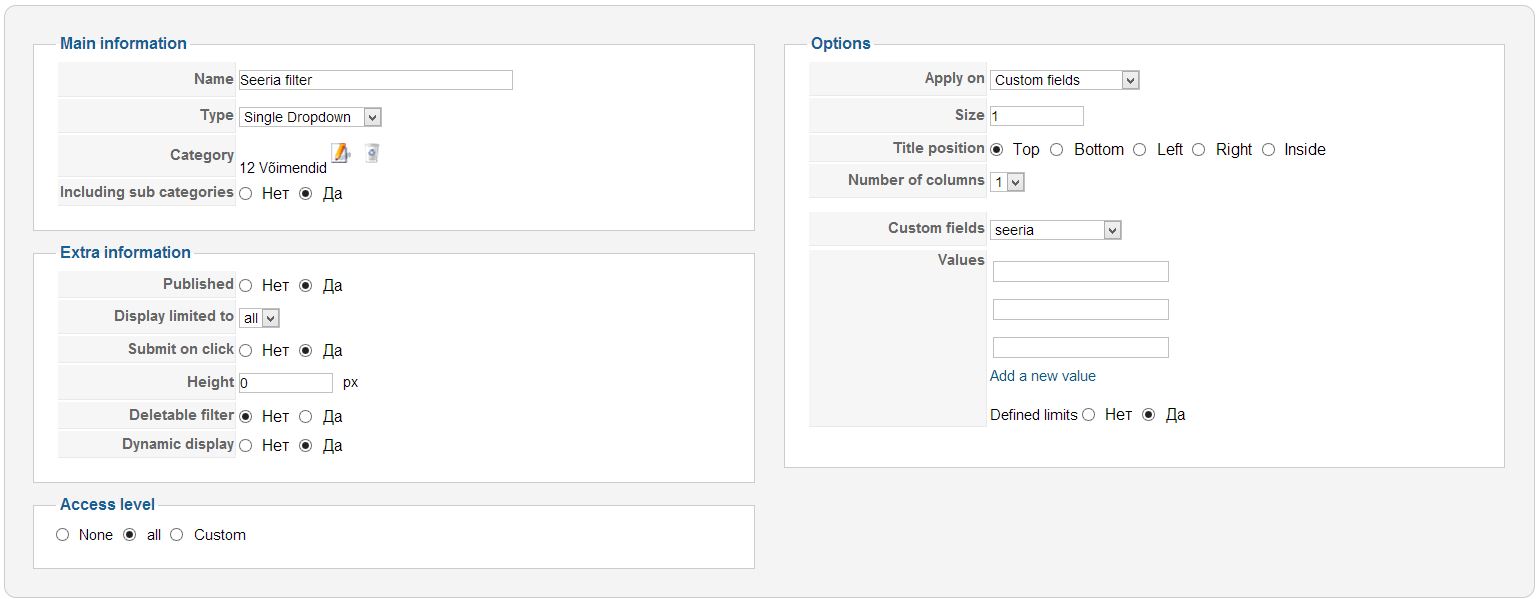
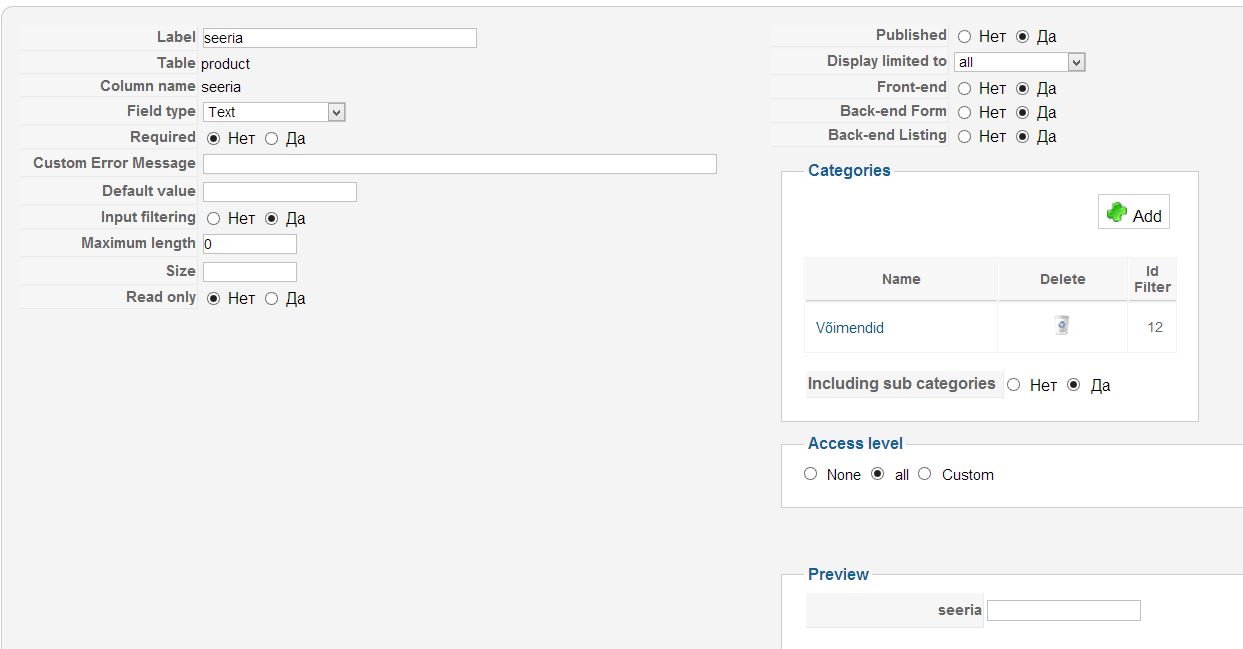
Here is Series filter. When i put filter values and press SAVE - It delete all values.
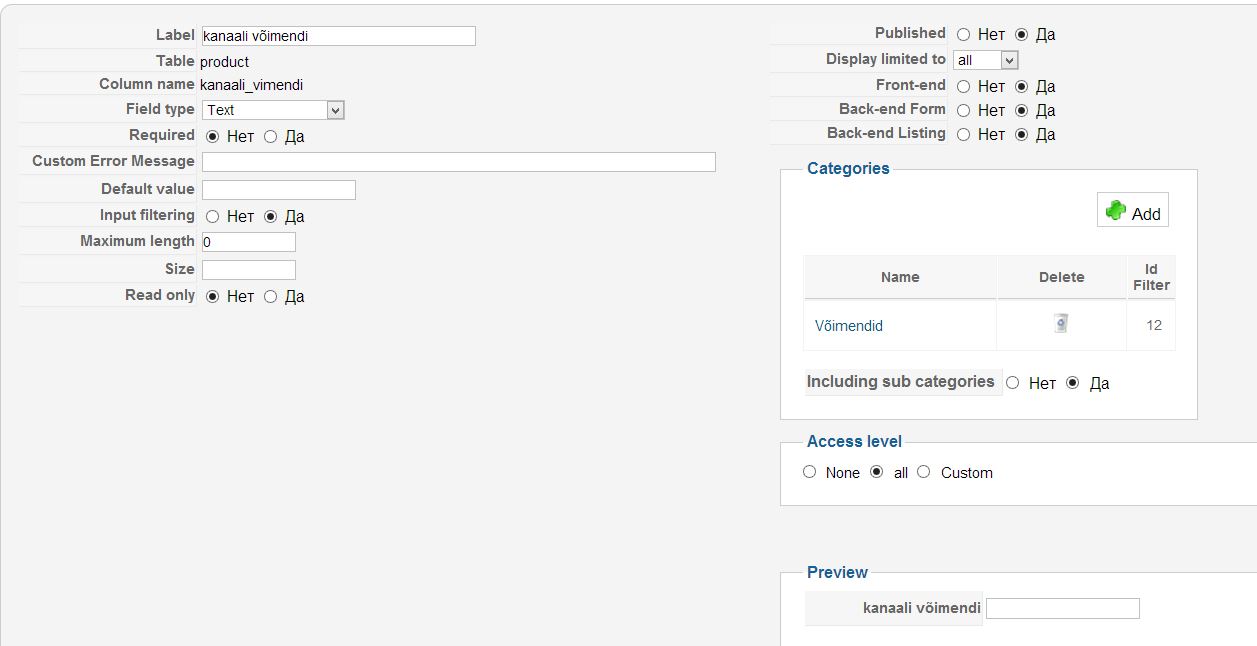
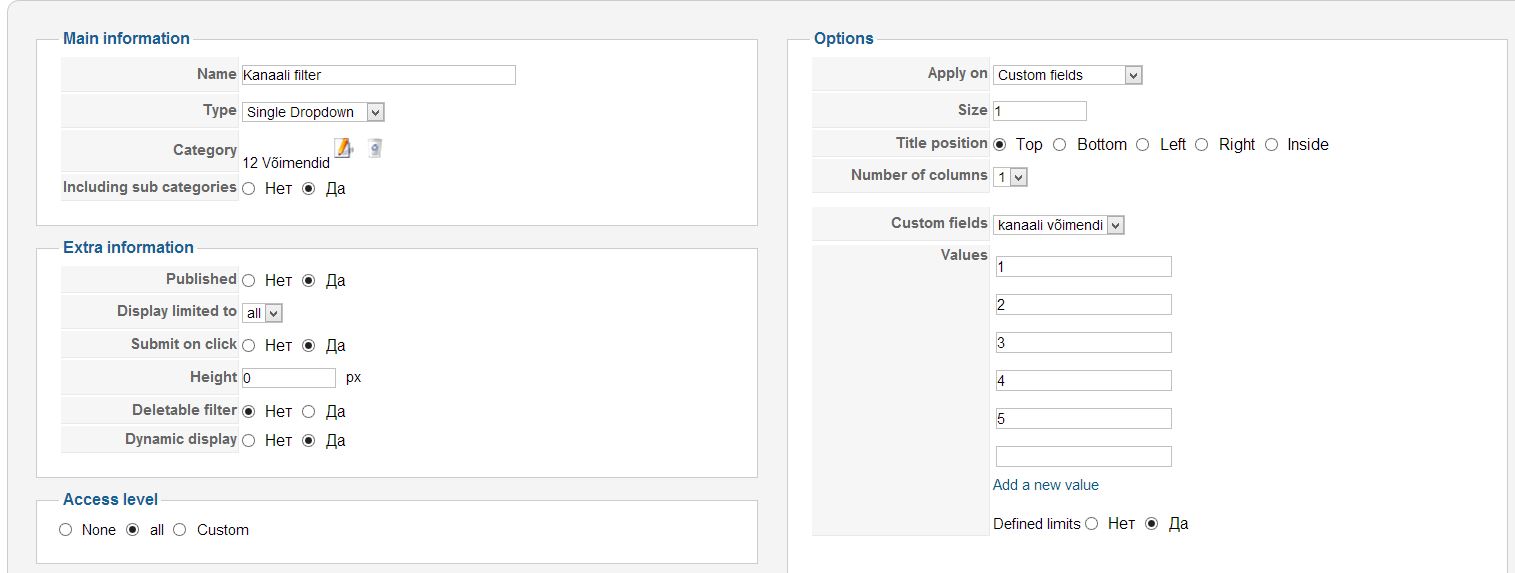
Here is chanel filter. when i enter 1, 2, 3, 4, 5 value - It shows 1 to 2, 2 to 3, 3 to 4.... I want just 1, 2, 3, 4, 5
Thanks ALOT!!
can you tell me : if i modify .php through display/view - will it be changed after update?
Here is Series filter. When i put filter values and press SAVE - It delete all values.
Here is chanel filter. when i enter 1, 2, 3, 4, 5 value - It shows 1 to 2, 2 to 3, 3 to 4.... I want just 1, 2, 3, 4, 5
Thanks ALOT!!
Please Log in or Create an account to join the conversation.
13 years 1 month ago #116657
by nicolas
Replied by nicolas on topic Re: Custom Field Translation with Falang
Hi,
If you change something via the menu Display->Views, you won't loose it when you update HikaShop as it will be stored as a template override.
Regarding your filter/custom field, you should change the type of the custom to a dropdown and enter your values in the custom field values. Then, keep the filter's values empty and it will use the custom field values automatically.
Also, note that you turned on the "dynamic display' option of your filter which means that you will only see in the filter dropdown the values which are entered for the products of the listing.
If you change something via the menu Display->Views, you won't loose it when you update HikaShop as it will be stored as a template override.
Regarding your filter/custom field, you should change the type of the custom to a dropdown and enter your values in the custom field values. Then, keep the filter's values empty and it will use the custom field values automatically.
Also, note that you turned on the "dynamic display' option of your filter which means that you will only see in the filter dropdown the values which are entered for the products of the listing.
Please Log in or Create an account to join the conversation.
13 years 1 week ago #124687
by sylv20c
Replied by sylv20c on topic Custom Field Translation with Falang
Hi,
Sorry to dig this topic but we also have problem with custom field translation...
We have created a wysiwig custom field and we can only translate the title but not the value...
We expected that when we translated a product with falang, we could translate "product description" and "custom field" value at the same place but unfortunately no...
We also created a custom field "simple list" but even if we put the translated values in a language file it doesn't work...
I hope you could help us.
Sorry to dig this topic but we also have problem with custom field translation...
We have created a wysiwig custom field and we can only translate the title but not the value...
We expected that when we translated a product with falang, we could translate "product description" and "custom field" value at the same place but unfortunately no...
We also created a custom field "simple list" but even if we put the translated values in a language file it doesn't work...
I hope you could help us.
Please Log in or Create an account to join the conversation.

13 years 1 week ago #124731
by Xavier
Replied by Xavier on topic Custom Field Translation with Falang
Hi,
The translation of custom fields is not yet implemented in HikaShop, we have it on our TODO list but we can't give a date.
The translation of custom fields is not yet implemented in HikaShop, we have it on our TODO list but we can't give a date.
Please Log in or Create an account to join the conversation.
13 years 1 week ago #124741
by sylv20c
Replied by sylv20c on topic Custom Field Translation with Falang
Ok, thank you for the answer.
But about values of a simple list ? I read something about a translation file where I could put directly the translation (I don't find anymore the topic)... please can you explain me how to do exactly ?
But about values of a simple list ? I read something about a translation file where I could put directly the translation (I don't find anymore the topic)... please can you explain me how to do exactly ?
Please Log in or Create an account to join the conversation.
13 years 1 week ago #124807
by Xavier
Replied by Xavier on topic Custom Field Translation with Falang
For the list, you just have to put the string of the value column in capital, and then add a translation override in the language file.
The language file is in Configuration > Language.
www.hikashop.com/support/faq.html#tran
The language file is in Configuration > Language.
www.hikashop.com/support/faq.html#tran
Please Log in or Create an account to join the conversation.
Less
More
- Posts: 22
- Thank you received: 1
9 years 4 months ago #268539
by valeriogiampa
Replied by valeriogiampa on topic Custom Field Translation with Falang
Hi,
i would like to know if the custom field value could be traslated in different Language for each product.
For example:
- Product: Motor A - Custom Field: Traslation - Custom Field Value: Ullimited (for English Language)
- Product: Motor B - Custom Field: Traslation - Custom Field Value: Limited to 300mm (for English Language)
- Product: Motore A - Custom Field: Traslazione - Custom Field Value: Ullimited (for Italian Language)
- Product: Motore B - Custom Field: Traslazione - Custom Field Value: Limitato a passi di 300mm (for Italian Language)
From the last update of the post, is this feature implemented???
Best Regards
Valerio
i would like to know if the custom field value could be traslated in different Language for each product.
For example:
- Product: Motor A - Custom Field: Traslation - Custom Field Value: Ullimited (for English Language)
- Product: Motor B - Custom Field: Traslation - Custom Field Value: Limited to 300mm (for English Language)
- Product: Motore A - Custom Field: Traslazione - Custom Field Value: Ullimited (for Italian Language)
- Product: Motore B - Custom Field: Traslazione - Custom Field Value: Limitato a passi di 300mm (for Italian Language)
From the last update of the post, is this feature implemented???
Best Regards
Valerio
Please Log in or Create an account to join the conversation.

9 years 4 months ago #268540
by Jerome
Jerome - Obsidev.com
HikaMarket & HikaSerial developer / HikaShop core dev team.
Replied by Jerome on topic Custom Field Translation with Falang
Hello,
The feature is implemented ; and you should be able to find more recent threads/posts talking about that feature.
Regards,
The feature is implemented ; and you should be able to find more recent threads/posts talking about that feature.
Regards,
Jerome - Obsidev.com
HikaMarket & HikaSerial developer / HikaShop core dev team.
Please Log in or Create an account to join the conversation.
Time to create page: 0.300 seconds