

- Posts: 4
- Thank you received: 0
Category listing doesn't work when SEF's turned on
13 years 10 months ago #79060
by xaze
Category listing doesn't work when SEF's turned on was created by xaze
Hi,
I installed Joomla 2.5.8 and Hikashop component v 2.0.0. I have a module with list of categories:
Category 1
Subcategory 1
Subcategory 2
When SEF is turned off, i can see products of a subcategory in the component area. But when I turn Joomla SEF on, there is an article shown instead of product list. The article has the same id as subcategory in db. It looks like a bug. Have you met this problem?
Thanks,
xaze
I installed Joomla 2.5.8 and Hikashop component v 2.0.0. I have a module with list of categories:
Category 1
Subcategory 1
Subcategory 2
When SEF is turned off, i can see products of a subcategory in the component area. But when I turn Joomla SEF on, there is an article shown instead of product list. The article has the same id as subcategory in db. It looks like a bug. Have you met this problem?
Thanks,
xaze
Please Log in or Create an account to join the conversation.

13 years 10 months ago #79081
by Jerome
Jerome - Obsidev.com
HikaMarket & HikaSerial developer / HikaShop core dev team.
Replied by Jerome on topic Category listing doesn't work when SEF's turned on
Hi,
If it is a bug, it is not a bug in HikaShop.
HikaShop can't display an article, so it means that it is Joomla which understand wrong the url and display an article.
But it could be a wrong configuration which would generate a non working url. What is your SEF configuration in HikaShop ?
Regards,
If it is a bug, it is not a bug in HikaShop.
HikaShop can't display an article, so it means that it is Joomla which understand wrong the url and display an article.
But it could be a wrong configuration which would generate a non working url. What is your SEF configuration in HikaShop ?
Regards,
Jerome - Obsidev.com
HikaMarket & HikaSerial developer / HikaShop core dev team.
Please Log in or Create an account to join the conversation.
13 years 10 months ago - 13 years 10 months ago #79105
by xaze
Replied by xaze on topic Category listing doesn't work when SEF's turned on
Here's configuration:
Simplified breadcrumbs: Yes
Activate smaller url: Yes
Category SEF name: cat
Product SEF name: prod
I,ve attached a screen.
The URL is: joomla25.com/index.php/cat/14-subcategory-1
Using this URL hikashop's route.php isn't used and joomla uses com_content component, and that's the problem.
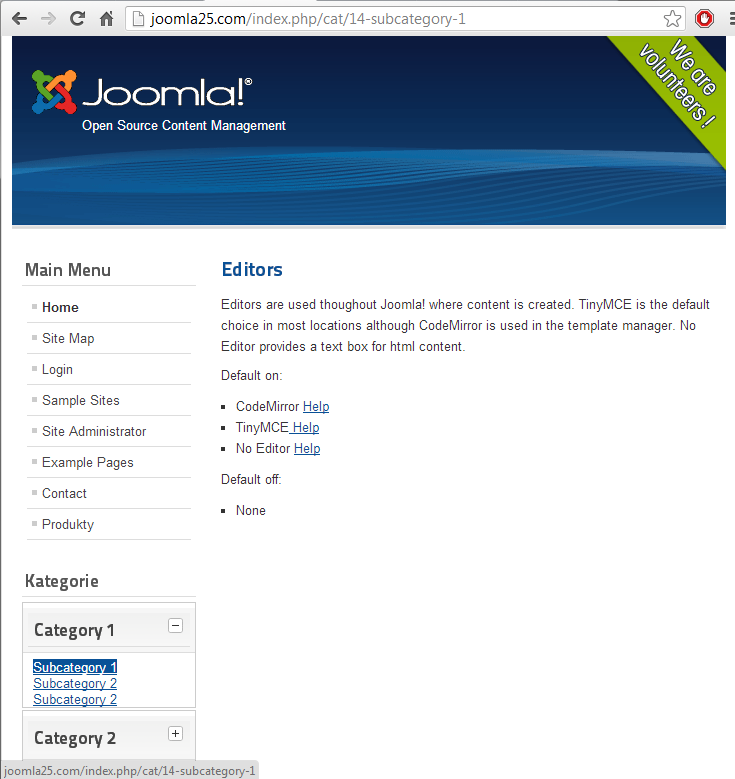
Simplified breadcrumbs: Yes
Activate smaller url: Yes
Category SEF name: cat
Product SEF name: prod
I,ve attached a screen.
The URL is: joomla25.com/index.php/cat/14-subcategory-1
Using this URL hikashop's route.php isn't used and joomla uses com_content component, and that's the problem.
Last edit: 13 years 10 months ago by xaze.
Please Log in or Create an account to join the conversation.
13 years 10 months ago #79146
by Jerome
Jerome - Obsidev.com
HikaMarket & HikaSerial developer / HikaShop core dev team.
Replied by Jerome on topic Category listing doesn't work when SEF's turned on
Hi,
Do you know that "joomla25.com" is your local website and we can't access it ?
Or it may be a test website in an webserver, but I don't think that you're the owner of the domain "joomla25.com".
Regards,
Do you know that "joomla25.com" is your local website and we can't access it ?
Or it may be a test website in an webserver, but I don't think that you're the owner of the domain "joomla25.com".
Regards,
Jerome - Obsidev.com
HikaMarket & HikaSerial developer / HikaShop core dev team.
Please Log in or Create an account to join the conversation.
13 years 10 months ago #79247
by xaze
Replied by xaze on topic Category listing doesn't work when SEF's turned on
Hi,
I wanted to present the problem that's why I attached the screen and liks were to show how it's configured.
I uploaded the site to a server.
joomla25.webwood.pl
user: test
passwd: test
You can check configuration if you want.
Thanks,
xaze
I wanted to present the problem that's why I attached the screen and liks were to show how it's configured.
I uploaded the site to a server.
joomla25.webwood.pl
user: test
passwd: test
You can check configuration if you want.
Thanks,
xaze
Please Log in or Create an account to join the conversation.
13 years 10 months ago #79295
by Jerome
Jerome - Obsidev.com
HikaMarket & HikaSerial developer / HikaShop core dev team.
Replied by Jerome on topic Category listing doesn't work when SEF's turned on
Hi,
Your links does not have "component/hikashop" at the beginning.
Real url would be : joomla25.webwood.pl/component/hikashop/cat/12-category-1
You don't have a menu which would point to hikashop so, your url should have an information in order to know that, it has to call HikaShop.
Otherwise, if you have a hikashop menu, you can use it (like "/shop/") and your url would become joomla25.webwood.pl/shop/cat/12-category-1
Regards,
Your links does not have "component/hikashop" at the beginning.
Real url would be : joomla25.webwood.pl/component/hikashop/cat/12-category-1
You don't have a menu which would point to hikashop so, your url should have an information in order to know that, it has to call HikaShop.
Otherwise, if you have a hikashop menu, you can use it (like "/shop/") and your url would become joomla25.webwood.pl/shop/cat/12-category-1
Regards,
Jerome - Obsidev.com
HikaMarket & HikaSerial developer / HikaShop core dev team.
The following user(s) said Thank You: xaze
Please Log in or Create an account to join the conversation.
13 years 10 months ago - 13 years 10 months ago #79460
by xaze
Replied by xaze on topic Category listing doesn't work when SEF's turned on
Hi,
Thanks for the answer:) I have one more question: in what situation the ablility of product adding to cart is disabled? I have products, but I can't add them to cart.
SOLVED: there was sth wrong with my CSS:S
Regards,
xaze
Thanks for the answer:) I have one more question: in what situation the ablility of product adding to cart is disabled? I have products, but I can't add them to cart.
SOLVED: there was sth wrong with my CSS:S
Regards,
xaze
Last edit: 13 years 10 months ago by xaze.
Please Log in or Create an account to join the conversation.
13 years 10 months ago #79465
by Jerome
Jerome - Obsidev.com
HikaMarket & HikaSerial developer / HikaShop core dev team.
Replied by Jerome on topic Category listing doesn't work when SEF's turned on
Hi,
You're welcome !
Regards,
You're welcome !
Regards,
Jerome - Obsidev.com
HikaMarket & HikaSerial developer / HikaShop core dev team.
Please Log in or Create an account to join the conversation.
Time to create page: 0.221 seconds