

- Posts: 29
- Thank you received: 0
Cursor filter not working
13 years 9 months ago #81016
by Abdyrai
Cursor filter not working was created by Abdyrai
Hi,
We use Joomla 2.5.8 and HikaShop Business 2.0.0, then I setup cursor filter for price and it shows no products at all, filters wrongly. Here you may see www.replicaclothingco.com/men-tees (login: guest, password: 2741001).
Also, is it possible to remove Filter button and allow AJAX to filter automatically without submitting button? As it is at www.asos.com/Men/Underwear-Socks/Cat/pge...spx?cid=4030&via=lhn
Thanks in advance,
Rai
We use Joomla 2.5.8 and HikaShop Business 2.0.0, then I setup cursor filter for price and it shows no products at all, filters wrongly. Here you may see www.replicaclothingco.com/men-tees (login: guest, password: 2741001).
Also, is it possible to remove Filter button and allow AJAX to filter automatically without submitting button? As it is at www.asos.com/Men/Underwear-Socks/Cat/pge...spx?cid=4030&via=lhn
Thanks in advance,
Rai
Please Log in or Create an account to join the conversation.

13 years 9 months ago #81158
by Xavier
Replied by Xavier on topic Cursor filter not working
Hi,
Could you give us a screenshot of your cursor filter configuration ?
You can remove the Filter button, in HikaShop > Configuration > Display, in the filter area you can find the option to hide the button.
Then to apply a filter onClick, you can set it in the filter options.
Could you give us a screenshot of your cursor filter configuration ?
You can remove the Filter button, in HikaShop > Configuration > Display, in the filter area you can find the option to hide the button.
Then to apply a filter onClick, you can set it in the filter options.
Please Log in or Create an account to join the conversation.
13 years 9 months ago #81181
by Abdyrai
Replied by Abdyrai on topic Cursor filter not working
I've attached the screenshot.
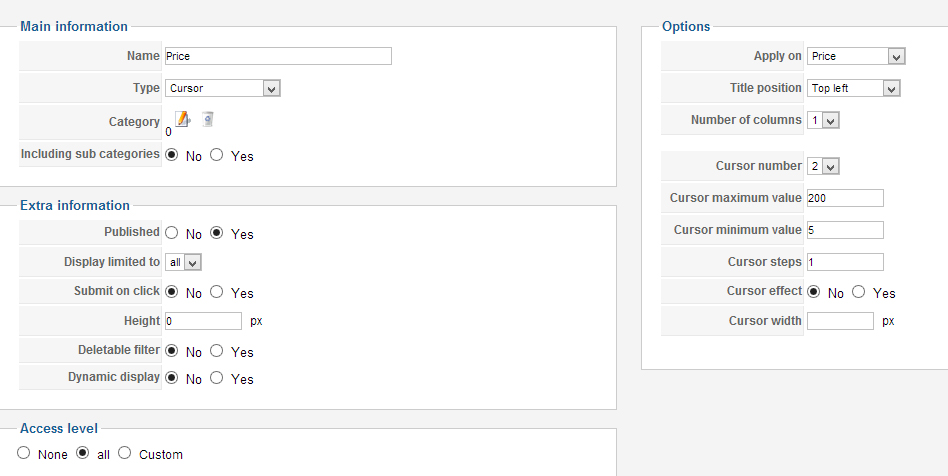
Please Log in or Create an account to join the conversation.

13 years 9 months ago #81393
by nicolas
Replied by nicolas on topic Cursor filter not working
In the options of your filter module, you need to enter the id of the products listing menu which lists all your products. There, you can also turn off the filter button for the module.
As Xavier said, you can activate the automatic filtering, you need to turn on the "submit on click" option of the filter.
As Xavier said, you can activate the automatic filtering, you need to turn on the "submit on click" option of the filter.
Please Log in or Create an account to join the conversation.
13 years 9 months ago #81612
by Abdyrai
Replied by Abdyrai on topic Cursor filter not working
OK, I did this, but anyway it doesn't seem to be working... Btw, when I try to change category in filter config (as in screenshot), it opens new page in the same window and I can't assign a category to a filter. Is it a bug? Maybe this is a reason?
Also, I turned off price filter and enabled characteristic filters - for size and color. I assigned them to my products. When I click checkboxes in a filter module they seem to be working (I mean page refreshes), but they don't filter the products too.
Here you may see www.replicaclothingco.com/men-tees (login: guest, password: 2741001).
Please help me ASAP,
Thank you!
Rai
Also, I turned off price filter and enabled characteristic filters - for size and color. I assigned them to my products. When I click checkboxes in a filter module they seem to be working (I mean page refreshes), but they don't filter the products too.
Here you may see www.replicaclothingco.com/men-tees (login: guest, password: 2741001).
Please help me ASAP,
Thank you!
Rai
Please Log in or Create an account to join the conversation.
13 years 9 months ago #81878
by nicolas
Replied by nicolas on topic Cursor filter not working
You don't need to assign the filter to a category to make it work.
The fact that the selection page opens in the same window means that there is a javascript error on your website backend. That's usually caused by a third party plugin trying to load jquery on the backend of Joomla when it is not needed, and not doing it properly.
The plugin jquery easy can usually solve such issue.
The size and color filters works well on that page as far as I can see.
When I select a value, it only displays the products of the current category with that value.
The fact that the selection page opens in the same window means that there is a javascript error on your website backend. That's usually caused by a third party plugin trying to load jquery on the backend of Joomla when it is not needed, and not doing it properly.
The plugin jquery easy can usually solve such issue.
The size and color filters works well on that page as far as I can see.
When I select a value, it only displays the products of the current category with that value.
Please Log in or Create an account to join the conversation.
13 years 9 months ago #82015
by Abdyrai
Replied by Abdyrai on topic Cursor filter not working
Oh, sorry, I forgot to enable price filter! Yes, everything else works fine. The only problem is price filter.
Please, may you take a look: www.replicaclothingco.com/men-tshirts (login: guest, passw: 2741001)
May you just give a clue how to fix it... I have no idea, tried everything
Thanks,
Rai
Please, may you take a look: www.replicaclothingco.com/men-tshirts (login: guest, passw: 2741001)
May you just give a clue how to fix it... I have no idea, tried everything
Thanks,
Rai
Please Log in or Create an account to join the conversation.
13 years 9 months ago #82165
by nicolas
Replied by nicolas on topic Cursor filter not working
You need to turn on the option "submit on click" in the price filter if you want it to refresh the page when you change it, otherwise, you would have to click on the "filter" button but that button has been removed on your module.
Please Log in or Create an account to join the conversation.
13 years 9 months ago #82198
by Abdyrai
Replied by Abdyrai on topic Cursor filter not working
But it is turned on
Please Log in or Create an account to join the conversation.
13 years 9 months ago #82491
by nicolas
Replied by nicolas on topic Cursor filter not working
Ok. Replace the file administrator/components/com_hikashop/classes/field.php with the one in the archive enclosed and try again.
Please Log in or Create an account to join the conversation.
13 years 9 months ago #83135
by Abdyrai
Replied by Abdyrai on topic Cursor filter not working
Hello, Nicolas.
Please read your PM. I've sent you a password to my website.
Thanks,
Rai
Please read your PM. I've sent you a password to my website.
Thanks,
Rai
Please Log in or Create an account to join the conversation.
13 years 8 months ago #84316
by Abdyrai
Replied by Abdyrai on topic Cursor filter not working
Hi,
I'm waiting for your answer for two weeks. Please tell me how to fix it, because it is a problem on your side as I understood, or if you can't, I may provide you with admin access (I've already sent you via PM).
Thank you,
Rai
I'm waiting for your answer for two weeks. Please tell me how to fix it, because it is a problem on your side as I understood, or if you can't, I may provide you with admin access (I've already sent you via PM).
Thank you,
Rai
Please Log in or Create an account to join the conversation.

13 years 8 months ago #84555
by Jerome
Jerome - Obsidev.com
HikaMarket & HikaSerial developer / HikaShop core dev team.
Replied by Jerome on topic Cursor filter not working
Hi,
We don't have your credentials attached to your issue.
Did you replace the file like Nicolas told you ?
Regards,
We don't have your credentials attached to your issue.
Did you replace the file like Nicolas told you ?
Regards,
Jerome - Obsidev.com
HikaMarket & HikaSerial developer / HikaShop core dev team.
Please Log in or Create an account to join the conversation.
13 years 8 months ago #84673
by Abdyrai
Replied by Abdyrai on topic Cursor filter not working
Hi, Jerome.
I've sent my credentials to your PM. Please check.
Thanks,
Rai
I've sent my credentials to your PM. Please check.
Thanks,
Rai
Please Log in or Create an account to join the conversation.
13 years 7 months ago #87910
by Abdyrai
Replied by Abdyrai on topic Cursor filter not working
Good day.
Three weeks ago I've sent the credentials to PM to Jerome and Nicolas. I still didn't get any reply regarding my issue, time is running and I can' t wait forever. Please, I need your help asap! Thanks.
Three weeks ago I've sent the credentials to PM to Jerome and Nicolas. I still didn't get any reply regarding my issue, time is running and I can' t wait forever. Please, I need your help asap! Thanks.
Please Log in or Create an account to join the conversation.
13 years 7 months ago #88139
by nicolas
Replied by nicolas on topic Cursor filter not working
Hi,
I had missed your message.
The correction I gave above already fixes that. That has also been included in HikaShop and is now in the beta version that we released a few days ago:
www.hikashop.com/en/forum/2-general-talk...kashop-210-beta.html
It will also be in the stable release that we will release in a few days.
Did you try to add the correction ?
You can alternatively try to install the beta (it is almost stable grade).
I had missed your message.
The correction I gave above already fixes that. That has also been included in HikaShop and is now in the beta version that we released a few days ago:
www.hikashop.com/en/forum/2-general-talk...kashop-210-beta.html
It will also be in the stable release that we will release in a few days.
Did you try to add the correction ?
You can alternatively try to install the beta (it is almost stable grade).
Please Log in or Create an account to join the conversation.
13 years 7 months ago #88679
by Abdyrai
Replied by Abdyrai on topic Cursor filter not working
Hi,
I re-installed it, but same result.. The file is not overwritten in my template, so that's not the reason I think. Actually this is very necessary part of e-shop. And I'm waiting for a fix and asking here for more than a month. Please fix it as soon as possible. It just can't continue like this. I have sent you my credentials, so it's not hard for you to look at my problem with cursor. Please help me Nicolas.
Regards,
Rai
I re-installed it, but same result.. The file is not overwritten in my template, so that's not the reason I think. Actually this is very necessary part of e-shop. And I'm waiting for a fix and asking here for more than a month. Please fix it as soon as possible. It just can't continue like this. I have sent you my credentials, so it's not hard for you to look at my problem with cursor. Please help me Nicolas.
Regards,
Rai
Please Log in or Create an account to join the conversation.
13 years 7 months ago #88688
by nicolas
Replied by nicolas on topic Cursor filter not working
Hi,
Unfortunately, we would need a FTP access to check the filter.php file on your end since we don't have the problem anymore on our end with that fix.
Unfortunately, we would need a FTP access to check the filter.php file on your end since we don't have the problem anymore on our end with that fix.
Please Log in or Create an account to join the conversation.
Time to create page: 0.299 seconds