
- Posts: 108
- Thank you received: 2
how to charge different price depending on location
- aimlesslady
-
 Topic Author
- Offline
Less
More
7 years 10 months ago #300530
by aimlesslady
how to charge different price depending on location was created by aimlesslady
-- HikaShop version -- : 4
-- Joomla version -- : 3.9
-- PHP version -- : 7.0.31
-- Browser(s) name and version -- : Firefox 61.0.2
We need to charge a different price for buyers from Canada. How can I set this up? Is it a variant? There already is a Zone set up for Canada. Do I use the Warehouse feature? And if so, How?
-- Joomla version -- : 3.9
-- PHP version -- : 7.0.31
-- Browser(s) name and version -- : Firefox 61.0.2
We need to charge a different price for buyers from Canada. How can I set this up? Is it a variant? There already is a Zone set up for Canada. Do I use the Warehouse feature? And if so, How?
Please Log in or Create an account to join the conversation.

7 years 10 months ago #300537
by nicolas
Replied by nicolas on topic how to charge different price depending on location
Hi,
You could have one shipping method per zone with their "shipping price per product" setting activated. Then, in each product, you would be able to configure a shipping price for each shipping method so that when the product would be in the cart, the shipping price would change based on the product and the shipping method available for the zone of the customer.
You could have one shipping method per zone with their "shipping price per product" setting activated. Then, in each product, you would be able to configure a shipping price for each shipping method so that when the product would be in the cart, the shipping price would change based on the product and the shipping method available for the zone of the customer.
Please Log in or Create an account to join the conversation.
- aimlesslady
-
Topic Author
- Offline
Less
More
- Posts: 108
- Thank you received: 2
7 years 10 months ago #300584
by aimlesslady
Replied by aimlesslady on topic how to charge different price depending on location
Apparently I am not doing this right. This is what I have done:
I have a product (subscribe to a newsletter) with 4 variants:
pdf, 1 yr
paper 1yr
pdf 2 yr method with the following settings:
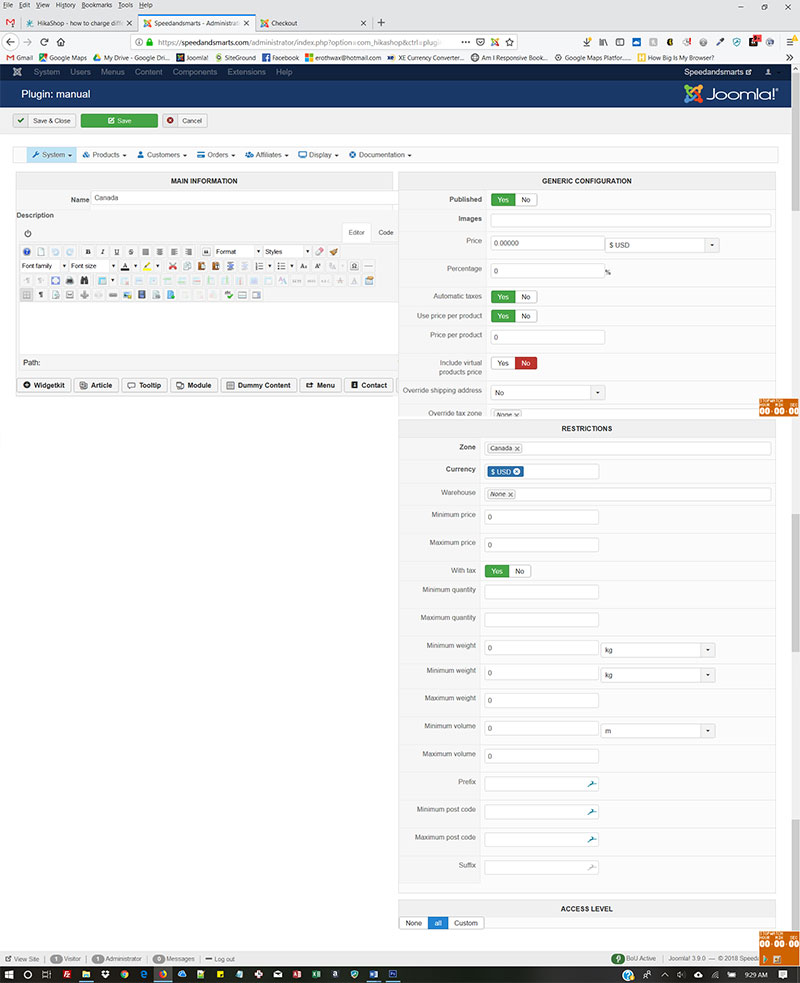
Published-yes
price=0.00 USD
Use price per product =yes
Price per product=0
Include virtual
products price=no
Override shipping address=no
Zone-Canada
Currency-USD
Warehouse-none
all other settings are default.
For the 2 paper variants, I added a shipping price (using the +) of $5 for 1 item for the 1 yr and $9 for 1 for the 2yr.
I see they show up on the main product interface as well.
I only want the extra fee charged on the paper subscriptions to customers in Canada.
What am I doing wrong?
I have a product (subscribe to a newsletter) with 4 variants:
pdf, 1 yr
paper 1yr
pdf 2 yr method with the following settings:
Published-yes
price=0.00 USD
Use price per product =yes
Price per product=0
Include virtual
products price=no
Override shipping address=no
Zone-Canada
Currency-USD
Warehouse-none
all other settings are default.
For the 2 paper variants, I added a shipping price (using the +) of $5 for 1 item for the 1 yr and $9 for 1 for the 2yr.
I see they show up on the main product interface as well.
I only want the extra fee charged on the paper subscriptions to customers in Canada.
What am I doing wrong?
Please Log in or Create an account to join the conversation.

7 years 10 months ago #300585
by Jerome
Jerome - Obsidev.com
HikaMarket & HikaSerial developer / HikaShop core dev team.
Replied by Jerome on topic how to charge different price depending on location
Hello,
I'm sorry but your current text do not allow us to understand the situation.
We do prefer screenshot if you want to share settings and configuration.
If you do want to propose a specific shipping method for Canada, please note that you will need one zone for "Canada" and another zone for "World without Canada".
So, the Canada shipping method will be display for the Canada zone and the other shipping method will be displayed for the rest of the world.
Afterwards, you can add fees into a shipping method ; via the "shipping price" or via "shipping per product" ; which mean that setting must be enabled to be used.
Regards,
I'm sorry but your current text do not allow us to understand the situation.
We do prefer screenshot if you want to share settings and configuration.
If you do want to propose a specific shipping method for Canada, please note that you will need one zone for "Canada" and another zone for "World without Canada".
So, the Canada shipping method will be display for the Canada zone and the other shipping method will be displayed for the rest of the world.
Afterwards, you can add fees into a shipping method ; via the "shipping price" or via "shipping per product" ; which mean that setting must be enabled to be used.
Regards,
Jerome - Obsidev.com
HikaMarket & HikaSerial developer / HikaShop core dev team.
Please Log in or Create an account to join the conversation.
- aimlesslady
-
Topic Author
- Offline
Less
More
- Posts: 108
- Thank you received: 2
7 years 10 months ago - 7 years 10 months ago #300622
by aimlesslady
Replied by aimlesslady on topic how to charge different price depending on location
I am including screenshots to explain better.
This is the shipping method for Canada
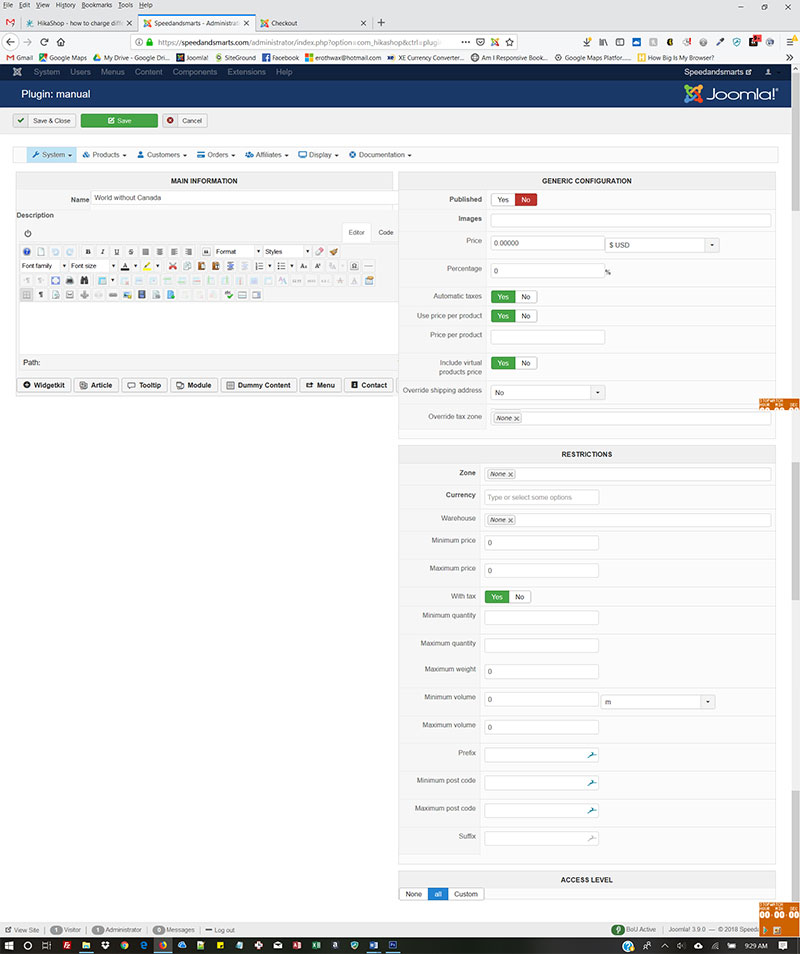
This is the shipping method for everyone else
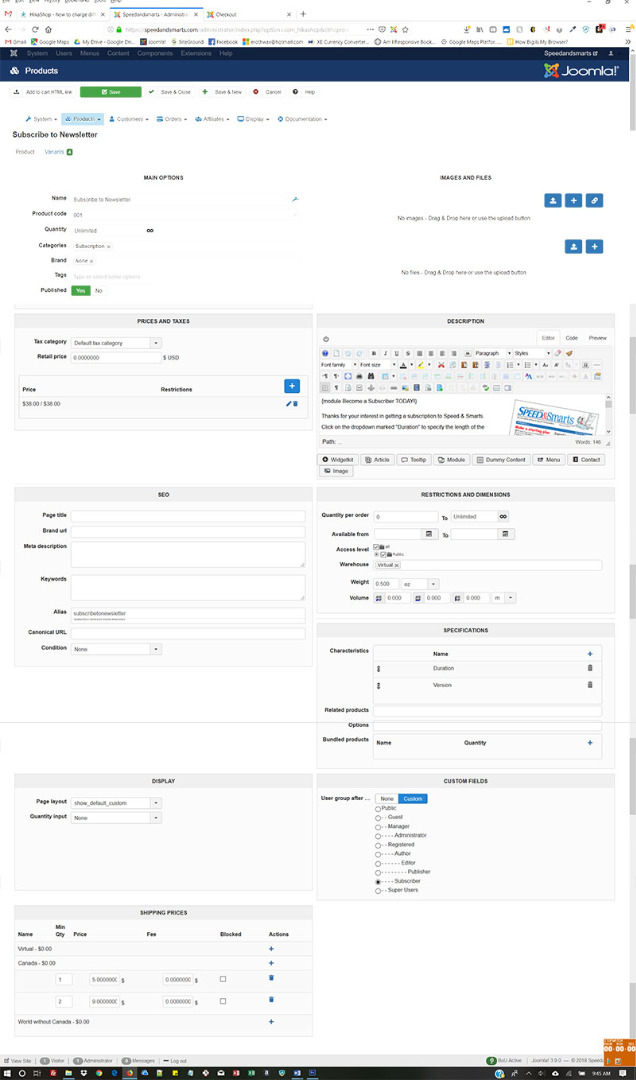
This is the Main interface for the product
This is an example to the variant. It is for the paper version (as opposed to the pdf version) for 1 year subscription.There is another paper version for 2 year subscription and 2 pdf variants for 1 and 2 year subscriptions
There should be an extra $5 charge for the 1 year paper version for Canada, and and extra $9 for a 2year subscription for Canada.
This is the cart with a 1 year subscription for papder version with a Canada address. It shows the fee of $48.00 but it should be $53.
What am I doing wrong?
Code:
attachment removed
Code:
attachment removed
Code:
attachment removed
Code:
attachment removed
There should be an extra $5 charge for the 1 year paper version for Canada, and and extra $9 for a 2year subscription for Canada.
Code:
attachment removed
What am I doing wrong?
Last edit: 7 years 10 months ago by Jerome.
Please Log in or Create an account to join the conversation.
7 years 10 months ago #300630
by Jerome
Jerome - Obsidev.com
HikaMarket & HikaSerial developer / HikaShop core dev team.
Replied by Jerome on topic how to charge different price depending on location
Hello,
I'm sorry but you put 5 times the same screenshot in your message.
Please use more text formatting so we can understand what text is for what image.
Regards,
I'm sorry but you put 5 times the same screenshot in your message.
Please use more text formatting so we can understand what text is for what image.
Regards,
Jerome - Obsidev.com
HikaMarket & HikaSerial developer / HikaShop core dev team.
Please Log in or Create an account to join the conversation.
- aimlesslady
-
Topic Author
- Offline
Less
More
- Posts: 108
- Thank you received: 2
7 years 10 months ago - 7 years 10 months ago #300646
by aimlesslady
Replied by aimlesslady on topic how to charge different price depending on location
I'm sorry, I don't know how that happened. I am attaching a zip file with the screenshots.
1.One is the shipping method for Canada
2.Another is the shipping method for everyone else
3. Another is the Main interface for the product
4. The an example to the variant. It is for the paper version (as opposed to the pdf version) for 1 year subscription.There is another paper version for 2 year subscription and 2 pdf variants for 1 and 2 year subscriptions
There should be an extra $5 charge for the 1 year paper version for Canada, and and extra $9 for a 2year subscription for Canada.
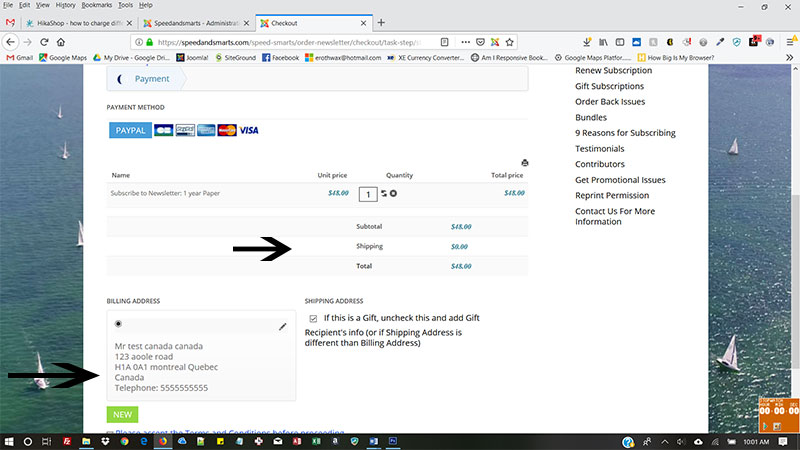
5. Last is the cart with a 1 year subscription for papder version with a Canada address. It shows the fee of $48.00 but it should be $53.
1.One is the shipping method for Canada
2.Another is the shipping method for everyone else
3. Another is the Main interface for the product
4. The an example to the variant. It is for the paper version (as opposed to the pdf version) for 1 year subscription.There is another paper version for 2 year subscription and 2 pdf variants for 1 and 2 year subscriptions
There should be an extra $5 charge for the 1 year paper version for Canada, and and extra $9 for a 2year subscription for Canada.
5. Last is the cart with a 1 year subscription for papder version with a Canada address. It shows the fee of $48.00 but it should be $53.
Last edit: 7 years 10 months ago by Jerome.
Please Log in or Create an account to join the conversation.
7 years 10 months ago #300651
by Jerome
Jerome - Obsidev.com
HikaMarket & HikaSerial developer / HikaShop core dev team.
Replied by Jerome on topic how to charge different price depending on location
Hello,
Once again, I'm afraid that it is still not possible to understand your message.
What is "1, 2, 3, 4, 5" when your screenshot have names ?!
Why did you provided two times the same zip file with the same exact screenshots ?
Why are you providing the screenshots into a zip while you already posted them in your previous message ?
Please take your time to submitted a clear message.
You also do have the possibility to edit your old message if you want to improve its content and make it more understandable.
Sorry for my message but I'm trying to help but with a big headache and some fever, I need to have clear information to give you a useful answer.
Regards,
Once again, I'm afraid that it is still not possible to understand your message.
What is "1, 2, 3, 4, 5" when your screenshot have names ?!
Why did you provided two times the same zip file with the same exact screenshots ?
Why are you providing the screenshots into a zip while you already posted them in your previous message ?
Please take your time to submitted a clear message.
You also do have the possibility to edit your old message if you want to improve its content and make it more understandable.
Sorry for my message but I'm trying to help but with a big headache and some fever, I need to have clear information to give you a useful answer.
Regards,
Jerome - Obsidev.com
HikaMarket & HikaSerial developer / HikaShop core dev team.
Please Log in or Create an account to join the conversation.
- aimlesslady
-
Topic Author
- Offline
Less
More
- Posts: 108
- Thank you received: 2
7 years 10 months ago #300702
by aimlesslady
Replied by aimlesslady on topic how to charge different price depending on location
I m very sorry my messages were so cryptic. I apologize and will try harder to be clearer. I appreciate your sticking with me!
I am going to attempt to inset the individual screenshots again, but i will also attche a zip file of the same screenshots in case the same problem occurs that did the first time.
This is the shipping method for Canada (1-canadashipping.jpg)
This is the shipping method for everyone else(2-worlddwithoutcanadashipping.jpg)
This is the Main interface for the product (30mainproduct.jpg)
4. The an example of the variant. It is for the paper version (as opposed to the pdf version) for 1 year subscription.There are also another paper version for 2 year subscription and 2 pdf variants for 1 and 2 year subscriptions.(4-varient.jpg)
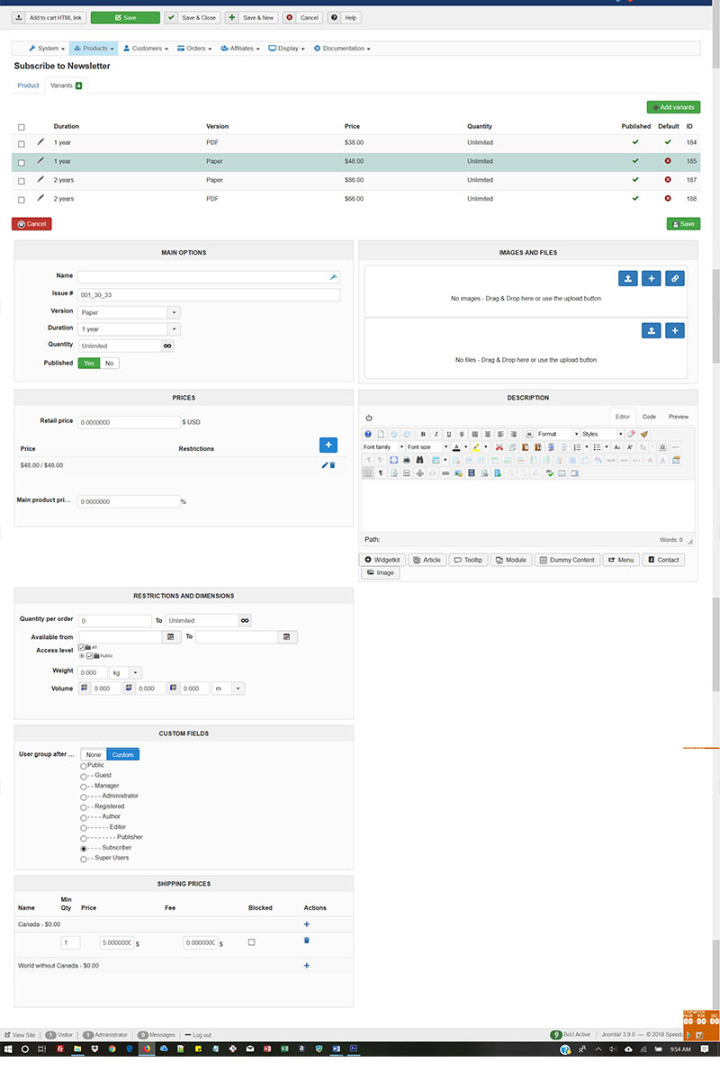
There should be an extra $5 charge for the 1 year paper version for Canada, and and extra $9 for a 2year subscription for Canada.
Last is the cart with a 1 year subscription for paper version with a Canada address. It shows the fee of $48.00 but it should be $53.(5-cartforcanadian.jpg)
.
I am going to attempt to inset the individual screenshots again, but i will also attche a zip file of the same screenshots in case the same problem occurs that did the first time.
This is the shipping method for Canada (1-canadashipping.jpg)
This is the shipping method for everyone else(2-worlddwithoutcanadashipping.jpg)
This is the Main interface for the product (30mainproduct.jpg)
4. The an example of the variant. It is for the paper version (as opposed to the pdf version) for 1 year subscription.There are also another paper version for 2 year subscription and 2 pdf variants for 1 and 2 year subscriptions.(4-varient.jpg)
There should be an extra $5 charge for the 1 year paper version for Canada, and and extra $9 for a 2year subscription for Canada.
Last is the cart with a 1 year subscription for paper version with a Canada address. It shows the fee of $48.00 but it should be $53.(5-cartforcanadian.jpg)
This attachment is hidden for guests.
Please log in or register to see it.
Please log in or register to see it.
.
Please Log in or Create an account to join the conversation.
7 years 10 months ago #300703
by Jerome
Jerome - Obsidev.com
HikaMarket & HikaSerial developer / HikaShop core dev team.
Replied by Jerome on topic how to charge different price depending on location
Hello,
Thank you for the clarification
2 - Shipping method "World without Canada".
That method is not published and do not have a zone.
As explained previously, you have to set-up a zone for that method which would a "shipping zone" including all countries except Canada. Best is to create a new shipping zone, add all countries and then, remove the Canada from the elements.
5 - Your screenshot do not indicate which shipping method is selected for the cart.
Do you have the "shipping step" into your checkout workflow ?
We can see that there is a shipping method with a "$0" price but it is not possible to see more about that shipping method nor to confirm that you right have the step in your workflow.
Please note that you're using the legacy system of the checkout, you can migrate to the new checkout system in order to have the new features (and more support since the legacy checkout won't be supported in the future).
www.hikashop.com/support/documentation/5...html#advanced_legacy
You can also use the new add to cart system, I could see that you're also using the legacy one.
Regards,
Thank you for the clarification
2 - Shipping method "World without Canada".
That method is not published and do not have a zone.
As explained previously, you have to set-up a zone for that method which would a "shipping zone" including all countries except Canada. Best is to create a new shipping zone, add all countries and then, remove the Canada from the elements.
5 - Your screenshot do not indicate which shipping method is selected for the cart.
Do you have the "shipping step" into your checkout workflow ?
We can see that there is a shipping method with a "$0" price but it is not possible to see more about that shipping method nor to confirm that you right have the step in your workflow.
Please note that you're using the legacy system of the checkout, you can migrate to the new checkout system in order to have the new features (and more support since the legacy checkout won't be supported in the future).
www.hikashop.com/support/documentation/5...html#advanced_legacy
You can also use the new add to cart system, I could see that you're also using the legacy one.
Regards,
Jerome - Obsidev.com
HikaMarket & HikaSerial developer / HikaShop core dev team.
Please Log in or Create an account to join the conversation.
- aimlesslady
-
Topic Author
- Offline
Less
More
- Posts: 108
- Thank you received: 2
7 years 10 months ago #300710
by aimlesslady
Replied by aimlesslady on topic how to charge different price depending on location
Thank you for sticking with me ! It's seems to be working now after following your instructions. Thanks SO much.
Please Log in or Create an account to join the conversation.
- aimlesslady
-
Topic Author
- Offline
Less
More
- Posts: 108
- Thank you received: 2
7 years 10 months ago #300714
by aimlesslady
Replied by aimlesslady on topic how to charge different price depending on location
I think I spoke too soon.
If I try to purchase a pdf version, it still adds the extra shipping fee. I do not have it on the pdf variant, but it shows up on the main product interface even if I try deleting it there. When I save, it reappears.
How do I stop it from applying the extra fee to some variants and not others?
If I try to purchase a pdf version, it still adds the extra shipping fee. I do not have it on the pdf variant, but it shows up on the main product interface even if I try deleting it there. When I save, it reappears.
How do I stop it from applying the extra fee to some variants and not others?
Please Log in or Create an account to join the conversation.
7 years 10 months ago #300718
by nicolas
Replied by nicolas on topic how to charge different price depending on location
Hi,
You should set a weight for variants that need to be shipped and no weight for the others (and no weight on the main product either). Then, if you have the "force shipping regardless of weight" setting turned off in the HikaShop configuration, there won't be any shipping fees for weightless variants like PDFs.
You should set a weight for variants that need to be shipped and no weight for the others (and no weight on the main product either). Then, if you have the "force shipping regardless of weight" setting turned off in the HikaShop configuration, there won't be any shipping fees for weightless variants like PDFs.
Please Log in or Create an account to join the conversation.
- aimlesslady
-
Topic Author
- Offline
Less
More
- Posts: 108
- Thank you received: 2
7 years 10 months ago #300738
by aimlesslady
Replied by aimlesslady on topic how to charge different price depending on location
I still can't get this to work. Can I private message you the log in credentials to take a look at my settings?
Please Log in or Create an account to join the conversation.
7 years 10 months ago #300739
by Jerome
Jerome - Obsidev.com
HikaMarket & HikaSerial developer / HikaShop core dev team.
Replied by Jerome on topic how to charge different price depending on location
Hello,
Please deactivate the setting "include product virtual prices" (=> no) in your shipping methods.
And, as Nicolas explained "force shipping regardless of weight" (=> no).
www.hikashop.com/support/documentation/5...ml#checkout_shipping
Then, your virtual products (product without a weight) won't be used by the shipping methods.
Regards,
Please deactivate the setting "include product virtual prices" (=> no) in your shipping methods.
And, as Nicolas explained "force shipping regardless of weight" (=> no).
www.hikashop.com/support/documentation/5...ml#checkout_shipping
Then, your virtual products (product without a weight) won't be used by the shipping methods.
Regards,
Jerome - Obsidev.com
HikaMarket & HikaSerial developer / HikaShop core dev team.
Please Log in or Create an account to join the conversation.
- aimlesslady
-
Topic Author
- Offline
Less
More
- Posts: 108
- Thank you received: 2
7 years 10 months ago #300760
by aimlesslady
Replied by aimlesslady on topic how to charge different price depending on location
I have those settings and and still have a problem:
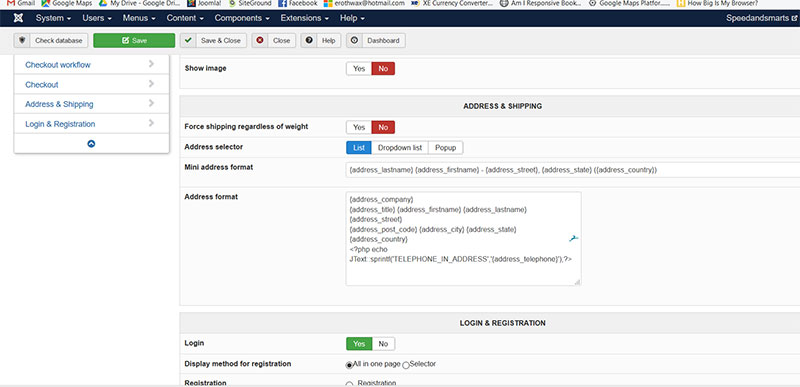
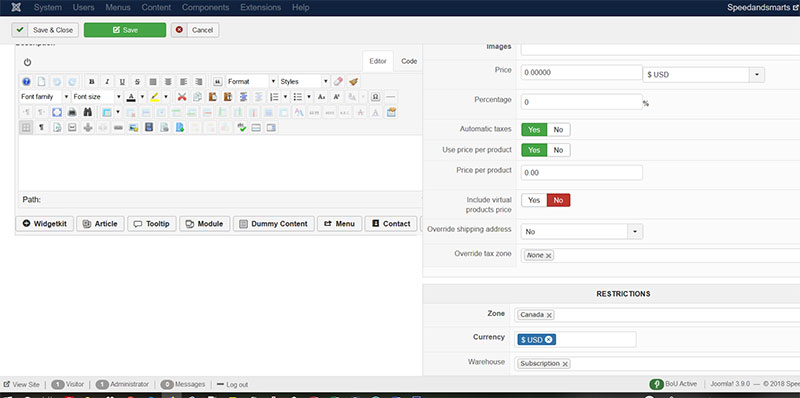
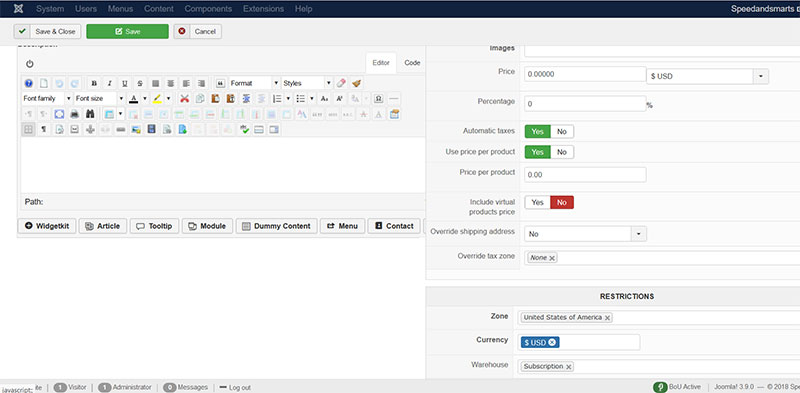
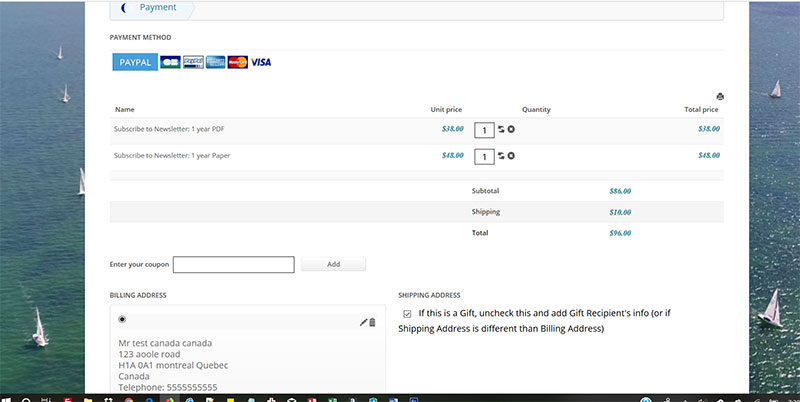
The cart should only show $5 for the paper version. If I only add the pdf version, there is not fee, but if I add both, the is double the fee.
Also, I want to add another fee for a different variant-$9 for it's product, but it won't add it--when I save it removes it. And I can't 'assign' it to the particular variant (unless I create another shipping method with a different min.weight perhaps???)
The cart should only show $5 for the paper version. If I only add the pdf version, there is not fee, but if I add both, the is double the fee.
Also, I want to add another fee for a different variant-$9 for it's product, but it won't add it--when I save it removes it. And I can't 'assign' it to the particular variant (unless I create another shipping method with a different min.weight perhaps???)
Please Log in or Create an account to join the conversation.
7 years 10 months ago #300771
by Jerome
Jerome - Obsidev.com
HikaMarket & HikaSerial developer / HikaShop core dev team.
Replied by Jerome on topic how to charge different price depending on location
Hello,
The result is unfortunately perfectly logic since you have set-up "product shipping price" on the main product.
It mean that every variant without a "product shipping price" inherit of these settings ; and the system do not need to check if a product have a weight or not ; if you set-up "product shipping price", that shipping price will be added by the algorithm.
Regards,
The result is unfortunately perfectly logic since you have set-up "product shipping price" on the main product.
It mean that every variant without a "product shipping price" inherit of these settings ; and the system do not need to check if a product have a weight or not ; if you set-up "product shipping price", that shipping price will be added by the algorithm.
Regards,
Jerome - Obsidev.com
HikaMarket & HikaSerial developer / HikaShop core dev team.
Please Log in or Create an account to join the conversation.
- aimlesslady
-
Topic Author
- Offline
Less
More
- Posts: 108
- Thank you received: 2
7 years 10 months ago #300929
by aimlesslady
Replied by aimlesslady on topic how to charge different price depending on location
So how do I accomplish what I want? I don't want to charge a fee for the main product--only 2 of the 4 variants. But the variant interface does not give me that option.
Please Log in or Create an account to join the conversation.
7 years 10 months ago #300957
by Jerome
Jerome - Obsidev.com
HikaMarket & HikaSerial developer / HikaShop core dev team.
Replied by Jerome on topic how to charge different price depending on location
Hello,
Just remove the "shipping prices" for the main product.
Only the variants (that you want to) should contains such information.
Regards,
Just remove the "shipping prices" for the main product.
Only the variants (that you want to) should contains such information.
Regards,
Jerome - Obsidev.com
HikaMarket & HikaSerial developer / HikaShop core dev team.
Please Log in or Create an account to join the conversation.
- aimlesslady
-
Topic Author
- Offline
Less
More
- Posts: 108
- Thank you received: 2
7 years 10 months ago #300962
by aimlesslady
Replied by aimlesslady on topic how to charge different price depending on location
Where on the variant interface do I add it? See screenshot.
Main product
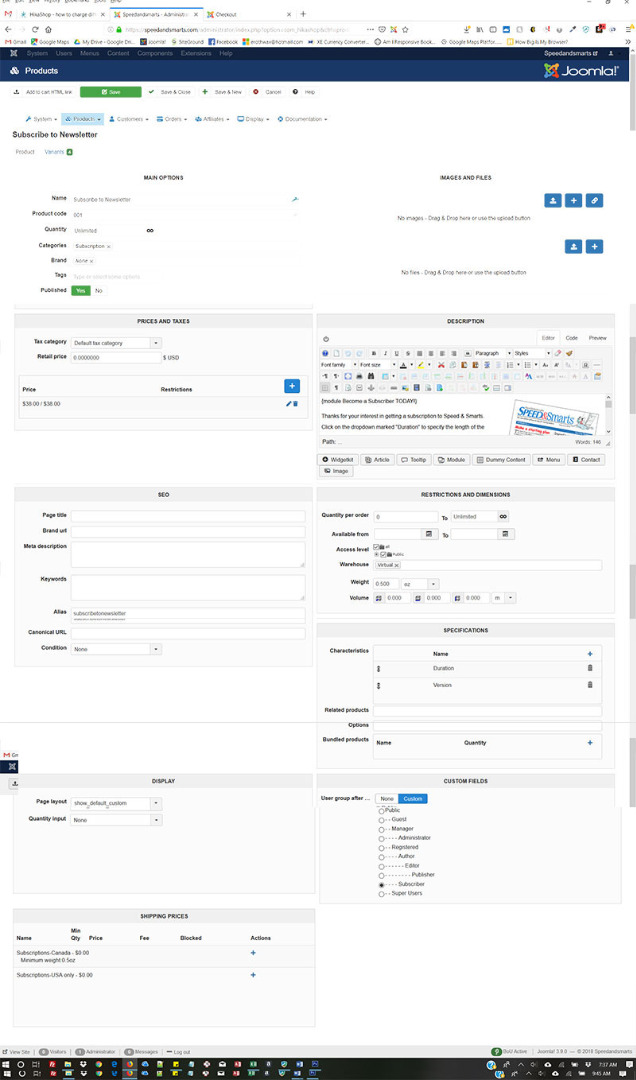
variant
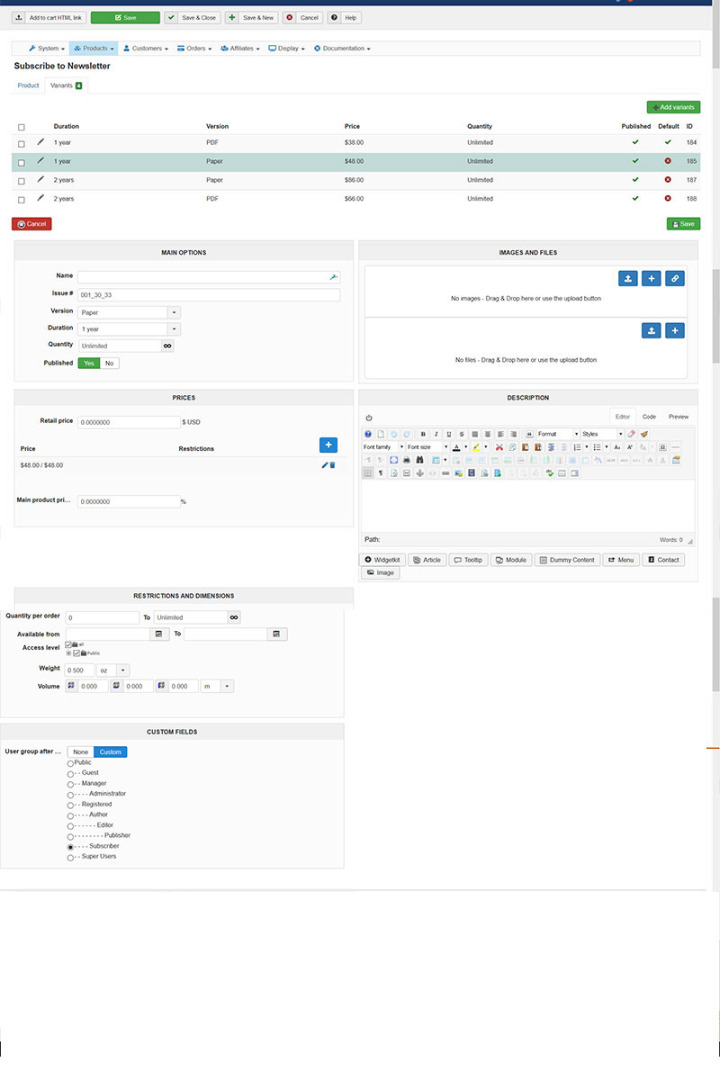
Main product
variant
Please Log in or Create an account to join the conversation.
Time to create page: 0.291 seconds