

- Posts: 214
- Thank you received: 1
Problems with Catergories
13 years 2 months ago #114728
by matps
Problems with Catergories was created by matps
Hi There,
So I'm building a website designed to sell products from different breweries, so I'll need catergories for both the type of drink and the brewery (as they will have multiple products). So if you look at this link...
www.yourround.co.uk/CraftKeg/index.php/amber-malty/amber
You can see I've created two products and assigned them to the category of Amber (as well as the categeory of the brewey, Greene King). Now they are both listed fine in the Amber catergory, but if you do a page search for Greene King, it brings up this product catergory link.
www.yourround.co.uk/CraftKeg/index.php/c...egory/48-greene-king
As you can see, even though the two drinks are assigned to the Greene King catergory, nothing is showing up in this view.
Could anyone please help and explain why this is not showing any products. Any help would be greatly appreciated.
Kind Regards,
Matthew
So I'm building a website designed to sell products from different breweries, so I'll need catergories for both the type of drink and the brewery (as they will have multiple products). So if you look at this link...
www.yourround.co.uk/CraftKeg/index.php/amber-malty/amber
You can see I've created two products and assigned them to the category of Amber (as well as the categeory of the brewey, Greene King). Now they are both listed fine in the Amber catergory, but if you do a page search for Greene King, it brings up this product catergory link.
www.yourround.co.uk/CraftKeg/index.php/c...egory/48-greene-king
As you can see, even though the two drinks are assigned to the Greene King catergory, nothing is showing up in this view.
Could anyone please help and explain why this is not showing any products. Any help would be greatly appreciated.
Kind Regards,
Matthew
Please Log in or Create an account to join the conversation.

13 years 2 months ago #114787
by nicolas
Replied by nicolas on topic Problems with Catergories
Hi,
I don't know where the link www.yourround.co.uk/CraftKeg/index.php/c...egory/48-greene-king comes from but it's not valid.
It's missing the Itemid parameter which comes from the current menu used.
If that link comes from a products listing module of hikaShop, it means that you didn't select a category listing menu item in the "menu" option of your module that you can find by editing your module via the menu Display>Content modules.
I don't know where the link www.yourround.co.uk/CraftKeg/index.php/c...egory/48-greene-king comes from but it's not valid.
It's missing the Itemid parameter which comes from the current menu used.
If that link comes from a products listing module of hikaShop, it means that you didn't select a category listing menu item in the "menu" option of your module that you can find by editing your module via the menu Display>Content modules.
Please Log in or Create an account to join the conversation.
13 years 2 months ago #114810
by matps
Replied by matps on topic Problems with Catergories
Hi Nicolas,
Thanks for your reply.
It comes from doing a search in Search field above the login, which is where people will be doing their product searches.
So I have to create a menu item first before I can have a valid catergory listing page? I'm not really following...
Thanks for your reply.
It comes from doing a search in Search field above the login, which is where people will be doing their product searches.
So I have to create a menu item first before I can have a valid catergory listing page? I'm not really following...
Please Log in or Create an account to join the conversation.
13 years 2 months ago #114820
by nicolas
Replied by nicolas on topic Problems with Catergories
Hi,
There is already a category listing page created by default.
In the options of your HikaShop product search plugin, there is an itemid (menu ?) field where you need to enter the id of a HikaShop category listing menu. If you look in the HikaShop default menus via your joomla menu manager, you will find one. Simply enter its id there.
There is already a category listing page created by default.
In the options of your HikaShop product search plugin, there is an itemid (menu ?) field where you need to enter the id of a HikaShop category listing menu. If you look in the HikaShop default menus via your joomla menu manager, you will find one. Simply enter its id there.
Please Log in or Create an account to join the conversation.
13 years 2 months ago #114862
by matps
Replied by matps on topic Problems with Catergories
Hi Nicolas,
Thank you for your reply, but I'm still not sure I'm follwing...
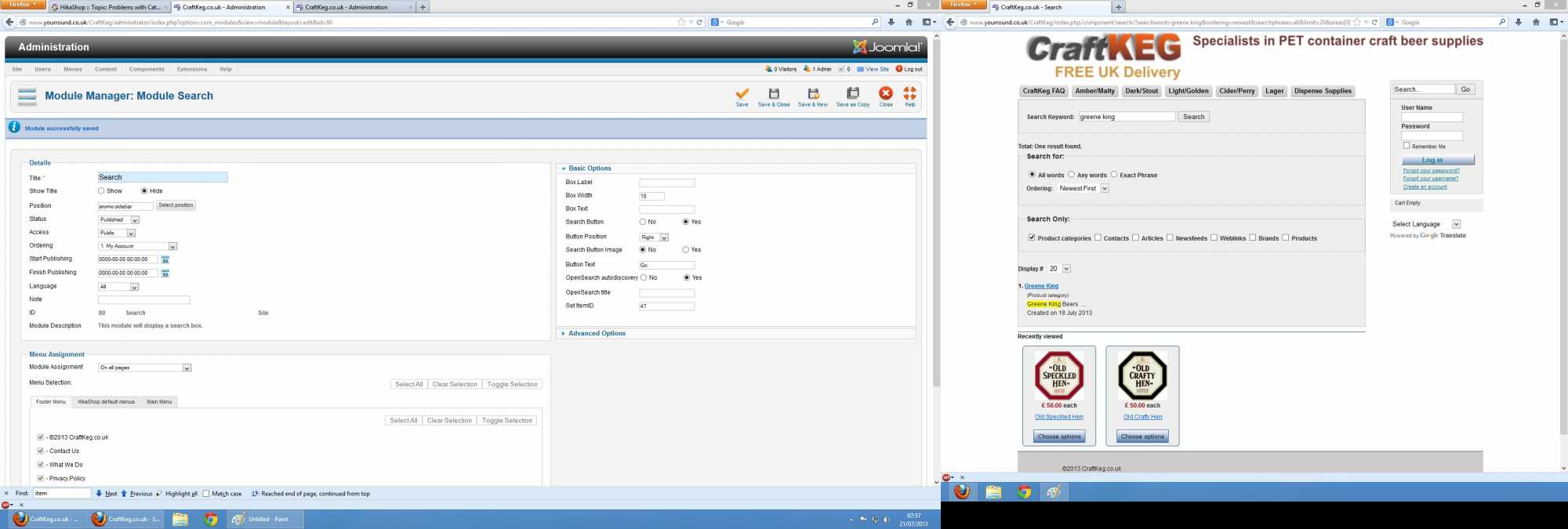
I've attached a print screen of what I'm looking at, which is the options for my search plugin, and the results for doing a Greene King search (the Greene King link goes to the page I showed you earlier which has no products on it)
Thank you for your reply, but I'm still not sure I'm follwing...
I've attached a print screen of what I'm looking at, which is the options for my search plugin, and the results for doing a Greene King search (the Greene King link goes to the page I showed you earlier which has no products on it)
Please Log in or Create an account to join the conversation.
13 years 2 months ago #114863
by matps
Replied by matps on topic Problems with Catergories
PS, please note I just entered the Set ItemID as 47, as Hikashop says my parent category is '47 Breweries', it was blank before.
Please Log in or Create an account to join the conversation.
13 years 2 months ago #114936
by nicolas
Replied by nicolas on topic Problems with Catergories
Hi,
I said that you need to edit your hikashop products search plugin to configure the itemid option, not to edit the joomla search module.
And I said that you should enter the id of a category listing menu item, not the id of a category. You can find HikaShop category listing menu items via the menu manager of joomla.
Please do that and that should fix the problem.
I said that you need to edit your hikashop products search plugin to configure the itemid option, not to edit the joomla search module.
And I said that you should enter the id of a category listing menu item, not the id of a category. You can find HikaShop category listing menu items via the menu manager of joomla.
Please do that and that should fix the problem.
Please Log in or Create an account to join the conversation.
13 years 2 months ago #115340
by matps
Replied by matps on topic Problems with Catergories
Thank you, I obviously didn't read the first message clearly as this has worked a charm.
Thanks again for your help!
Thanks again for your help!
Please Log in or Create an account to join the conversation.
Time to create page: 0.219 seconds