
- Posts: 43
- Thank you received: 1
Custom filed: date from a beginning to an end
- markespositi
-
 Topic Author
- Offline
Less
More
12 years 7 months ago #143913
by markespositi
Custom filed: date from a beginning to an end was created by markespositi
Hi.
I need a custom field which allows only date from a starting date to an end date.
ie. from 01/01/2013 to 31/12/2015.
Any suggestion? Thanks
I need a custom field which allows only date from a starting date to an end date.
ie. from 01/01/2013 to 31/12/2015.
Any suggestion? Thanks
Please Log in or Create an account to join the conversation.

12 years 7 months ago #143915
by Eliot
Replied by Eliot on topic Custom filed: date from a beginning to an end
Hi,
We have a commercial plugin for that. it's called date picker. more information here: www.hikashop.com/component/hikashop/prod...iguration-screenshot
it should do what you are looking for!
We have a commercial plugin for that. it's called date picker. more information here: www.hikashop.com/component/hikashop/prod...iguration-screenshot
it should do what you are looking for!
Please Log in or Create an account to join the conversation.
- markespositi
-
Topic Author
- Offline
Less
More
- Posts: 43
- Thank you received: 1
12 years 7 months ago - 12 years 7 months ago #143934
by markespositi
Replied by markespositi on topic Custom filed: date from a beginning to an end
OK. I've just bought it. Thanks.
Anyway, after installation I receive the following error in every "custom filed":
Field type: Warning: Missing argument 2 for plgHikashopDatepickerfield::onFieldsLoad() in /var/www/vhosts/quidline.com/httpdocs/stage/shop/plugins/hikashop/datepickerfield/datepickerfield.php on line 19
Can you help me? Thanks
Anyway, after installation I receive the following error in every "custom filed":
Field type: Warning: Missing argument 2 for plgHikashopDatepickerfield::onFieldsLoad() in /var/www/vhosts/quidline.com/httpdocs/stage/shop/plugins/hikashop/datepickerfield/datepickerfield.php on line 19
Can you help me? Thanks
Last edit: 12 years 7 months ago by markespositi.
Please Log in or Create an account to join the conversation.

12 years 7 months ago #144020
by Jerome
Jerome - Obsidev.com
HikaMarket & HikaSerial developer / HikaShop core dev team.
Replied by Jerome on topic Custom filed: date from a beginning to an end
Hi,
Which HikaShop version number are you using ?
Regards,
Which HikaShop version number are you using ?
Regards,
Jerome - Obsidev.com
HikaMarket & HikaSerial developer / HikaShop core dev team.
Please Log in or Create an account to join the conversation.
- markespositi
-
Topic Author
- Offline
Less
More
- Posts: 43
- Thank you received: 1
12 years 7 months ago - 12 years 7 months ago #144053
by markespositi
Replied by markespositi on topic Custom filed: date from a beginning to an end
The last one. Number 2.1.3
Last edit: 12 years 7 months ago by markespositi.
Please Log in or Create an account to join the conversation.
12 years 7 months ago #144063
by Jerome
Jerome - Obsidev.com
HikaMarket & HikaSerial developer / HikaShop core dev team.
Replied by Jerome on topic Custom filed: date from a beginning to an end
Hi,
The current last HikaShop version is : 2.3.0
The current stable HikaShop version is : 2.2.3
The custom field datepicker extends the options displayed during the edition of a custom field, so it require a quite recente HikaShop version in order to work properly. The 2.1.3, released in May 2013 does not handle the possibility to extend the options of custom fields ; the plugin won't be able to work properly unless to update your website.
Regards,
The current last HikaShop version is : 2.3.0
The current stable HikaShop version is : 2.2.3
The custom field datepicker extends the options displayed during the edition of a custom field, so it require a quite recente HikaShop version in order to work properly. The 2.1.3, released in May 2013 does not handle the possibility to extend the options of custom fields ; the plugin won't be able to work properly unless to update your website.
Regards,
Jerome - Obsidev.com
HikaMarket & HikaSerial developer / HikaShop core dev team.
Please Log in or Create an account to join the conversation.
- markespositi
-
Topic Author
- Offline
Less
More
- Posts: 43
- Thank you received: 1
12 years 7 months ago #145338
by markespositi
Replied by markespositi on topic Custom filed: date from a beginning to an end
I updated Hika to the 2.2.3 version.
I have also:
- Php v.5.3.2
- Zend Engine v.2.3.0
It return the same error:
Field type: Warning: Missing argument 2 for plgHikashopDatepickerfield:: ........ on line 19
Any idea? Thanks
I have also:
- Php v.5.3.2
- Zend Engine v.2.3.0
It return the same error:
Field type: Warning: Missing argument 2 for plgHikashopDatepickerfield:: ........ on line 19
Any idea? Thanks
Please Log in or Create an account to join the conversation.
12 years 7 months ago #145340
by Jerome
Jerome - Obsidev.com
HikaMarket & HikaSerial developer / HikaShop core dev team.
Replied by Jerome on topic Custom filed: date from a beginning to an end
Hi,
Do you confirm that the line 19 in the datepicker is
and you have right the content
in the file "administrator/components/com_hikashop/types/field.php".
I do not see how and why this second argument is not passed.
Regards,
Do you confirm that the line 19 in the datepicker is
Code:
public function onFieldsLoad(&$fields, &$options) {
Code:
$dispatcher->trigger('onFieldsLoad', array( &$this->externalValues, &$this->externalOptions ) );
I do not see how and why this second argument is not passed.
Regards,
Jerome - Obsidev.com
HikaMarket & HikaSerial developer / HikaShop core dev team.
Please Log in or Create an account to join the conversation.
- markespositi
-
Topic Author
- Offline
Less
More
- Posts: 43
- Thank you received: 1
12 years 7 months ago #145497
by markespositi
Replied by markespositi on topic Custom filed: date from a beginning to an end
Hi.
field.php is attached here. Thanks.
field.php is attached here. Thanks.
This attachment is hidden for guests.
Please log in or register to see it.
Please log in or register to see it.
Please Log in or Create an account to join the conversation.
12 years 7 months ago #145505
by Jerome
Jerome - Obsidev.com
HikaMarket & HikaSerial developer / HikaShop core dev team.
Replied by Jerome on topic Custom filed: date from a beginning to an end
Hi,
The file is good, you have the good line.
So I really don't know why you have this error, it is the only place where this trigger is called and there are two parameters given.
Do you have a link to your website where I will be able to see the problem ?
Regards,
The file is good, you have the good line.
So I really don't know why you have this error, it is the only place where this trigger is called and there are two parameters given.
Do you have a link to your website where I will be able to see the problem ?
Regards,
Jerome - Obsidev.com
HikaMarket & HikaSerial developer / HikaShop core dev team.
Please Log in or Create an account to join the conversation.
- markespositi
-
Topic Author
- Offline
Less
More
- Posts: 43
- Thank you received: 1
12 years 7 months ago #145551
by markespositi
Replied by markespositi on topic Custom filed: date from a beginning to an end
I manged to remove the error!
Now, I have problems on labels names as you can see in the attachment.
Is the label named like you see, like "Date_picker_opt_default_today" and so on?
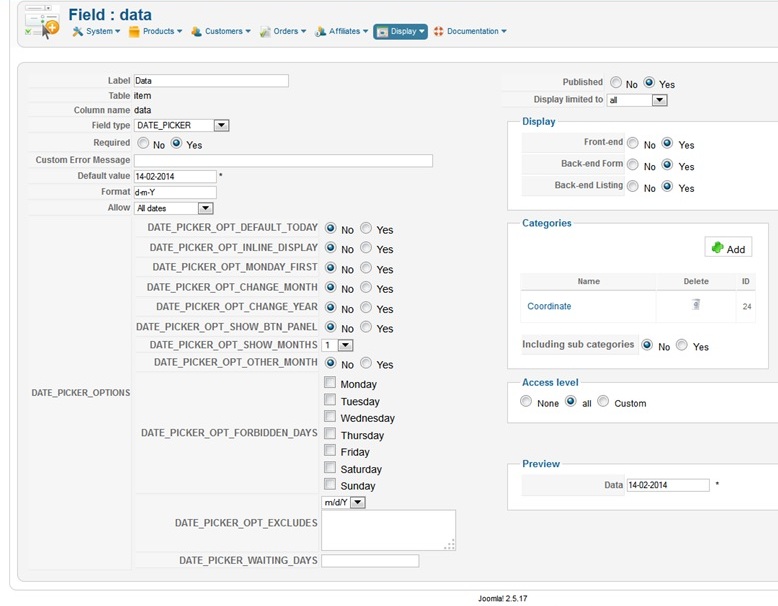
2)
I need instruction or manual or somethingh similar to understand the purpose of each fields? Have you got anythingh about it?
Thanks.
Now, I have problems on labels names as you can see in the attachment.
Is the label named like you see, like "Date_picker_opt_default_today" and so on?
2)
I need instruction or manual or somethingh similar to understand the purpose of each fields? Have you got anythingh about it?
Thanks.
Please Log in or Create an account to join the conversation.
- markespositi
-
Topic Author
- Offline
Less
More
- Posts: 43
- Thank you received: 1
12 years 7 months ago #145554
by markespositi
Replied by markespositi on topic Custom filed: date from a beginning to an end
Additionally, how to exclude a range of years. Thanks
Please Log in or Create an account to join the conversation.
12 years 7 months ago #145767
by Jerome
Jerome - Obsidev.com
HikaMarket & HikaSerial developer / HikaShop core dev team.
Replied by Jerome on topic Custom filed: date from a beginning to an end
Hi,
The datepicker comes with an english language file.
Can you please check that the file "en-GB.plg_hikashop_datepickerfield.ini" exist in your website ?
I will try to reproduce your problem, see how the language file can not be loaded correctly.
If the problem still persists, you could copy the content of this language file into the HikaShop language override. At this moment you will be sure that the language content will be loaded.
The option "excludes" allow you to exclude specific dates ( 02/25/14 ) or date ranges ( 02/25/14-02/28/14 ). To exclude several years, you have to exclude several months ( 02/14-02/16 )
Regards,
The datepicker comes with an english language file.
Can you please check that the file "en-GB.plg_hikashop_datepickerfield.ini" exist in your website ?
I will try to reproduce your problem, see how the language file can not be loaded correctly.
If the problem still persists, you could copy the content of this language file into the HikaShop language override. At this moment you will be sure that the language content will be loaded.
The option "excludes" allow you to exclude specific dates ( 02/25/14 ) or date ranges ( 02/25/14-02/28/14 ). To exclude several years, you have to exclude several months ( 02/14-02/16 )
Regards,
Jerome - Obsidev.com
HikaMarket & HikaSerial developer / HikaShop core dev team.
Please Log in or Create an account to join the conversation.
- markespositi
-
Topic Author
- Offline
Less
More
- Posts: 43
- Thank you received: 1
12 years 7 months ago #145786
by markespositi
Replied by markespositi on topic Custom filed: date from a beginning to an end
Thanks.
1) which is the path of en-GB.plg_hikashop_datepickerfield.ini ?
2) We are getting crazy with "excludes" options. We need to allow only 2013, 2014, 2015 and to exclude years before and years after. Can you suggest us what to write in the exclude options? Thanks
1) which is the path of en-GB.plg_hikashop_datepickerfield.ini ?
2) We are getting crazy with "excludes" options. We need to allow only 2013, 2014, 2015 and to exclude years before and years after. Can you suggest us what to write in the exclude options? Thanks
Please Log in or Create an account to join the conversation.
12 years 7 months ago #145805
by Jerome
Jerome - Obsidev.com
HikaMarket & HikaSerial developer / HikaShop core dev team.
Replied by Jerome on topic Custom filed: date from a beginning to an end
Hi,
You can use these translation, I am currently making some test on the plugin.
The plugin hasn't been designed for including dates, mostly for exclude some.
I have to test it in order to confirm it but you should be able to use :
Or maybe, I could see to let the calendar options "min date" and "max date" available in the plugin options. At this moment you would be able to specify the minimum and maximum available date.
Regards,
You can use these translation, I am currently making some test on the plugin.
Code:
DATE_PICKER="Datepicker"
DATE_PICKER_OPTIONS="Datepicker options"
DATE_PICKER_OPT_DEFAULT_TODAY="Default today"
DATE_PICKER_OPT_INLINE_DISPLAY="Display inline"
DATE_PICKER_OPT_MONDAY_FIRST="Monday first"
DATE_PICKER_OPT_OTHER_MONTH="Show other months"
DATE_PICKER_OPT_FORBIDDEN_DAYS="Forbidden days"
DATE_PICKER_OPT_EXCLUDES="Exclude days"
DATE_PICKER_INCORRECT_DATE_FOR="Incorrect date for: %s"
DATE_PICKER_OPT_CHANGE_MONTH="Month selector"
DATE_PICKER_OPT_CHANGE_YEAR="Year selector"
DATE_PICKER_OPT_SHOW_BTN_PANEL="Show buttons panel"
DATE_PICKER_OPT_SHOW_MONTHS="Show months"
DATE_PICKER_WAITING_DAYS="Waiting days"
The plugin hasn't been designed for including dates, mostly for exclude some.
I have to test it in order to confirm it but you should be able to use :
Code:
01/1900-12/2012
01/2016-01/2100
Regards,
Jerome - Obsidev.com
HikaMarket & HikaSerial developer / HikaShop core dev team.
Please Log in or Create an account to join the conversation.
- markespositi
-
Topic Author
- Offline
Less
More
- Posts: 43
- Thank you received: 1
12 years 7 months ago #145916
by markespositi
Replied by markespositi on topic Custom filed: date from a beginning to an end
If I use:
01/1900-12/2012
01/2016-01/2100
as you suggested, it doesn't work.
It doesn't work with:
03/2013-04/2013
It works with 01/26/2012-12/31/2012
It doesn't work with 01/25/2012-12/31/2012 (which means there is a bug in the software related to the today date)
Can you check and solve, please? Thanks a lot.
01/1900-12/2012
01/2016-01/2100
as you suggested, it doesn't work.
It doesn't work with:
03/2013-04/2013
It works with 01/26/2012-12/31/2012
It doesn't work with 01/25/2012-12/31/2012 (which means there is a bug in the software related to the today date)
Can you check and solve, please? Thanks a lot.
Please Log in or Create an account to join the conversation.
- markespositi
-
Topic Author
- Offline
Less
More
- Posts: 43
- Thank you received: 1
12 years 6 months ago #146938
by markespositi
Replied by markespositi on topic Custom filed: date from a beginning to an end
Hi. Any news on bugs solutions?
Thanks
Thanks
Please Log in or Create an account to join the conversation.
12 years 6 months ago #146996
by Jerome
Jerome - Obsidev.com
HikaMarket & HikaSerial developer / HikaShop core dev team.
Replied by Jerome on topic Custom filed: date from a beginning to an end
Hi,
I am sorry, in my previous message, the date range restriction was in 2 parts but when in 2 parts it use the "day/month" format, not the "month/year".
So you need to use a 3 parts restrictions "d/m/y" (or "m/d/y" depending the element in the configuration just before).
For the tests I made, it worked good.
The plugin convert the date into a unix timestamp so depending your platform, the timestamp can't work great before 1970.
Regards,
I am sorry, in my previous message, the date range restriction was in 2 parts but when in 2 parts it use the "day/month" format, not the "month/year".
So you need to use a 3 parts restrictions "d/m/y" (or "m/d/y" depending the element in the configuration just before).
For the tests I made, it worked good.
The plugin convert the date into a unix timestamp so depending your platform, the timestamp can't work great before 1970.
Regards,
Jerome - Obsidev.com
HikaMarket & HikaSerial developer / HikaShop core dev team.
Please Log in or Create an account to join the conversation.
- markespositi
-
Topic Author
- Offline
Less
More
- Posts: 43
- Thank you received: 1
12 years 3 months ago - 12 years 3 months ago #160959
by markespositi
Replied by markespositi on topic Custom filed: date from a beginning to an end
It works, starting from june 1970.
Anyway, after the user have selected a date, he/she can enter the field and modify it. This is not good.
To be really useful "DatePicker add-on software" would avoid that.
So, we added a READONLY attribute to the "input tag" (line 381)
Regards
Anyway, after the user have selected a date, he/she can enter the field and modify it. This is not good.
To be really useful "DatePicker add-on software" would avoid that.
So, we added a READONLY attribute to the "input tag" (line 381)
Regards
Last edit: 12 years 3 months ago by markespositi.
Please Log in or Create an account to join the conversation.
12 years 3 months ago #160975
by Jerome
Jerome - Obsidev.com
HikaMarket & HikaSerial developer / HikaShop core dev team.
Replied by Jerome on topic Custom filed: date from a beginning to an end
Hi,
Right but no.
The datepicker have some checks in JavaScript and PHP so if the user modify the date manually, the JavaScript can check it and even if the script is not running, the PHP in the plugin will reject the value as an incorrect value.
Regards,
Right but no.
The datepicker have some checks in JavaScript and PHP so if the user modify the date manually, the JavaScript can check it and even if the script is not running, the PHP in the plugin will reject the value as an incorrect value.
Regards,
Jerome - Obsidev.com
HikaMarket & HikaSerial developer / HikaShop core dev team.
Please Log in or Create an account to join the conversation.
Time to create page: 0.333 seconds