

- Posts: 29
- Thank you received: 2
Price in corelation with product weight
12 years 7 months ago - 12 years 7 months ago #146194
by sorin1z
Price in corelation with product weight was created by sorin1z
I'm building a jewelery site, and the price for jewels are conected with the price of gold. When the price o gold rises it would be great if the prices should modify themself in function of the value i imput.
Every piece of jewelry has his own weight in the product atributs.
So: price=weight in grams x price for 1gram of gold
Is it posible and what should i modify?
Every piece of jewelry has his own weight in the product atributs.
So: price=weight in grams x price for 1gram of gold
Is it posible and what should i modify?
Last edit: 12 years 7 months ago by sorin1z.
Please Log in or Create an account to join the conversation.

12 years 7 months ago #146248
by Xavier
Replied by Xavier on topic Price in corelation with product weight
Hi,
I think that the best way is to use the mass actions, in System > Mass actions, you can configure one mass action like the following screenshot:
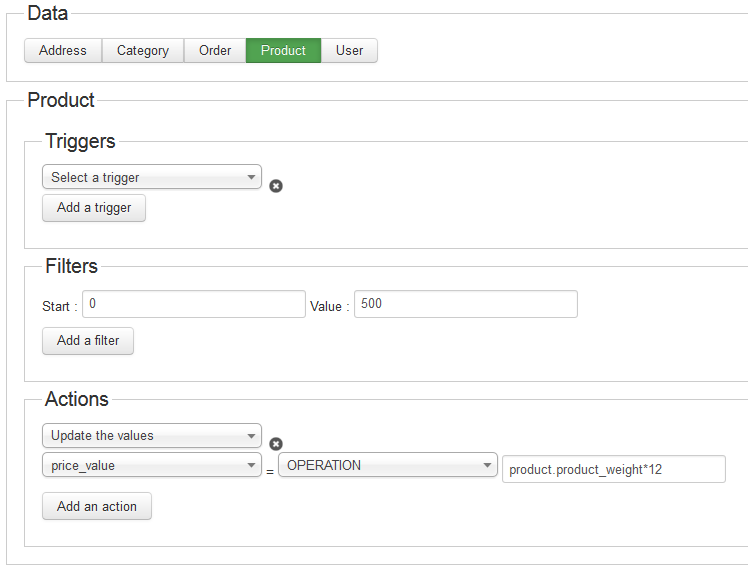
Where "12" is to replace by the current price of the gold.
This mass action will update the price of all your products, so thanks to make a backup before, any action with the mass actions is not reversible.
I think that the best way is to use the mass actions, in System > Mass actions, you can configure one mass action like the following screenshot:
Where "12" is to replace by the current price of the gold.
This mass action will update the price of all your products, so thanks to make a backup before, any action with the mass actions is not reversible.
Please Log in or Create an account to join the conversation.
12 years 7 months ago #146297
by sorin1z
Replied by sorin1z on topic Price in corelation with product weight
It didnt worked. I've sent you a pm
Please Log in or Create an account to join the conversation.
12 years 7 months ago #146304
by Xavier
Replied by Xavier on topic Price in corelation with product weight
In the "actions" part, do you have selected "Operation" ?
I just tried on my local and the price is changed.
I just tried on my local and the price is changed.
The following user(s) said Thank You: sorin1z
Please Log in or Create an account to join the conversation.
12 years 7 months ago #146317
by sorin1z
Replied by sorin1z on topic Price in corelation with product weight
I've selected operation
here is a print screen
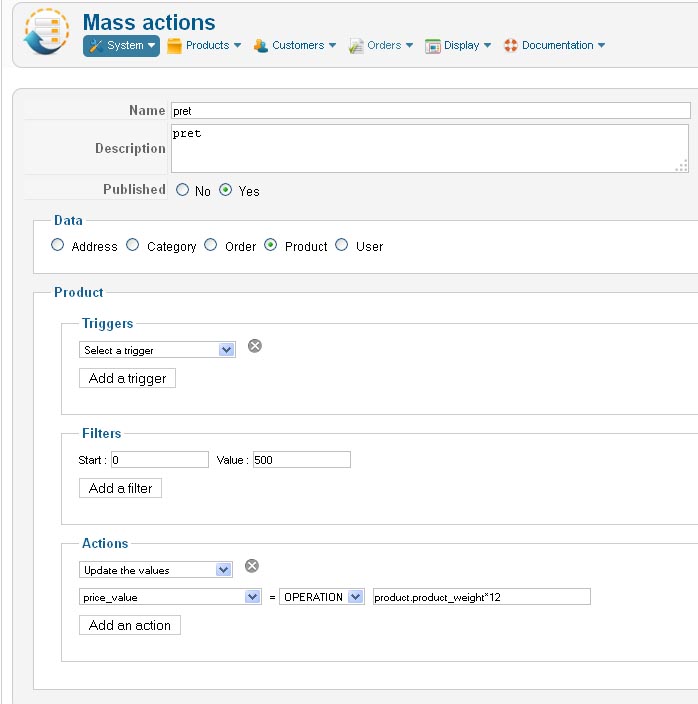
please enter and have a look yourself. i've given you my login informations
here is a print screen
please enter and have a look yourself. i've given you my login informations
Please Log in or Create an account to join the conversation.
12 years 7 months ago #146322
by sorin1z
Replied by sorin1z on topic Price in corelation with product weight
I did it. it was a easy thing.
I didnt realise that i have to press the "Preocess" button after saving. It is incredible.
I cannot believe how smart Hikashop is.
Thank a million times Xavier.
Now i will try to find a way for showing a diferent price for the promotions(price per gram is smaller) and for diamonts witch have an independent price to the price of gold
I didnt realise that i have to press the "Preocess" button after saving. It is incredible.
I cannot believe how smart Hikashop is.
Thank a million times Xavier.
Now i will try to find a way for showing a diferent price for the promotions(price per gram is smaller) and for diamonts witch have an independent price to the price of gold
The following user(s) said Thank You: Mohamed Thelji
Please Log in or Create an account to join the conversation.

Less
More
- Posts: 12953
- Thank you received: 1778
12 years 7 months ago #146348
by Mohamed Thelji
Replied by Mohamed Thelji on topic Price in corelation with product weight
Thanks for your feedback  .
.
.
The following user(s) said Thank You: sorin1z
Please Log in or Create an account to join the conversation.
12 years 7 months ago - 12 years 7 months ago #146422
by sorin1z
Replied by sorin1z on topic Price in corelation with product weight
i thought i'll manage it but i dont.
The price for the new added products does not apear when i insert them on the shop, until i Process the mass action again. This is not a problem.
The problem is that once is processed, the mass action modify the prices for the 2 categories with diferent prices.
All the categories have the same price, except 2 (one has a smaller price per gram and one has an independent price from the price of gold).
Initialy i'veinserted on the product page that i wanted not to be changed a fixed price in the field Retail Price but this happened
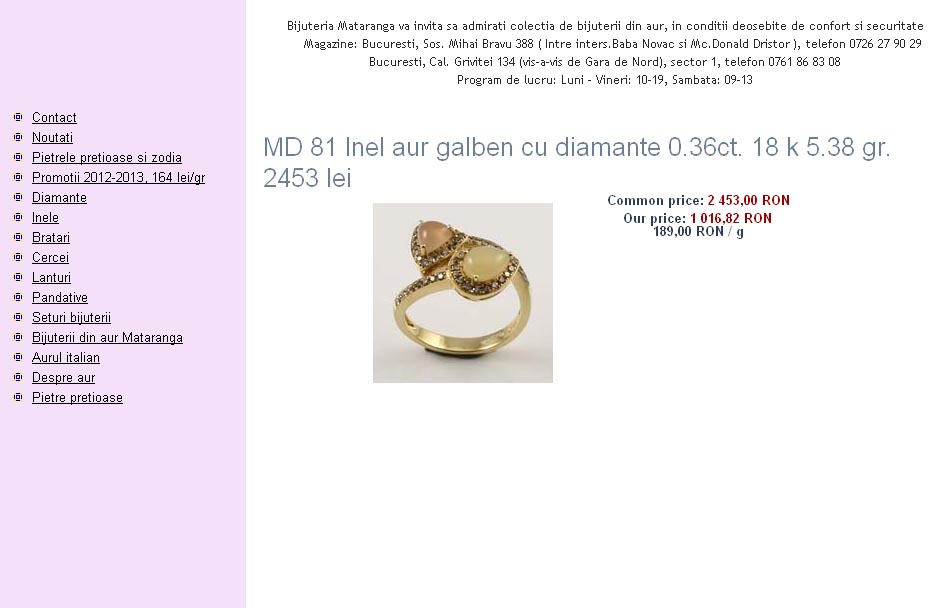
This is not what i wanted. The Retail Price apears as Common Price. Our Price is generated by the mass action
What can i do so my 2 categories remain unchanged when i process the mass action?
The price for the new added products does not apear when i insert them on the shop, until i Process the mass action again. This is not a problem.
The problem is that once is processed, the mass action modify the prices for the 2 categories with diferent prices.
All the categories have the same price, except 2 (one has a smaller price per gram and one has an independent price from the price of gold).
Initialy i'veinserted on the product page that i wanted not to be changed a fixed price in the field Retail Price but this happened
This is not what i wanted. The Retail Price apears as Common Price. Our Price is generated by the mass action
What can i do so my 2 categories remain unchanged when i process the mass action?
Last edit: 12 years 7 months ago by sorin1z.
Please Log in or Create an account to join the conversation.

12 years 7 months ago #146484
by nicolas
Replied by nicolas on topic Price in corelation with product weight
In your mass action, you can add a filter on the category column in order to process only one or several categories.
Please Log in or Create an account to join the conversation.
12 years 7 months ago #146515
by sorin1z
Replied by sorin1z on topic Price in corelation with product weight
How do i do that exacly?
at start: category_column and at value the id of the category that the mass action modifies?
at start: category_column and at value the id of the category that the mass action modifies?
Please Log in or Create an account to join the conversation.
12 years 7 months ago #146612
by Xavier
Replied by Xavier on topic Price in corelation with product weight
Hi,
Yes you have to select category column, then category_id or name or something else to apply the filter, and select the desired value to apply the mass action only on the selected categories.
Yes you have to select category column, then category_id or name or something else to apply the filter, and select the desired value to apply the mass action only on the selected categories.
Please Log in or Create an account to join the conversation.
12 years 7 months ago #146630
by sorin1z
Replied by sorin1z on topic Price in corelation with product weight
Can you please elaborate a little more. It's a mass action and every time i imput the wrong data some big part of my site go crazy and defective.
I've tried a few thing and fucked up 2 categories. I have to undo them
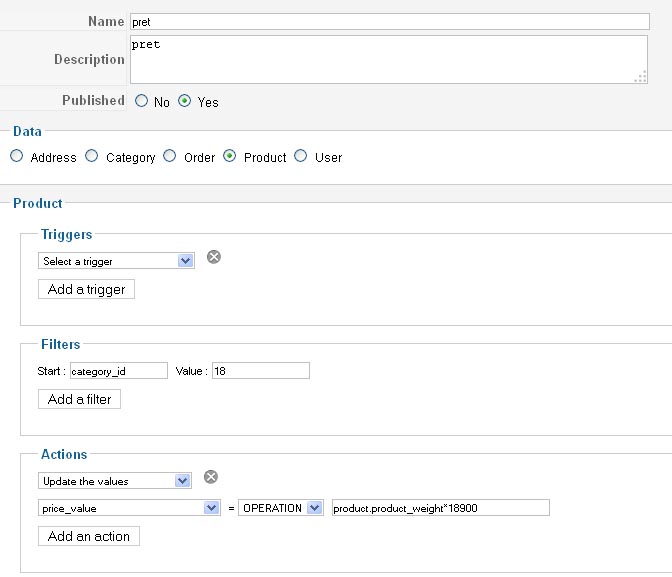
18 is the category id in my admin
this didn,t work and distroyed the product listing layout in my category page.
I've tried a few thing and fucked up 2 categories. I have to undo them
18 is the category id in my admin
this didn,t work and distroyed the product listing layout in my category page.
Please Log in or Create an account to join the conversation.
12 years 7 months ago #146666
by Xavier
Replied by Xavier on topic Price in corelation with product weight
Hi,
The problem come from the filters.
The filled one is for the number of elements to manage, so it has to be numeric values.
For example Start: 0 Value:500 will manage the first 500 results of the next filter, or of all the elements if you don't add other filter.
In your case, you have to click on "Add a filter" and then select "Category column", "Category_id" and set the id "18".
When using the mass actions, have a backup is always a good thing.
Hope this will help you.
The problem come from the filters.
The filled one is for the number of elements to manage, so it has to be numeric values.
For example Start: 0 Value:500 will manage the first 500 results of the next filter, or of all the elements if you don't add other filter.
In your case, you have to click on "Add a filter" and then select "Category column", "Category_id" and set the id "18".
When using the mass actions, have a backup is always a good thing.
Hope this will help you.
Please Log in or Create an account to join the conversation.
12 years 7 months ago #146682
by sorin1z
Replied by sorin1z on topic Price in corelation with product weight
It work. I make it change prices just for a parent category i chosen.
Now i'm trying to exclude the 2 parent categories that had to remain out of the mass action process. i've set it like in the attached image
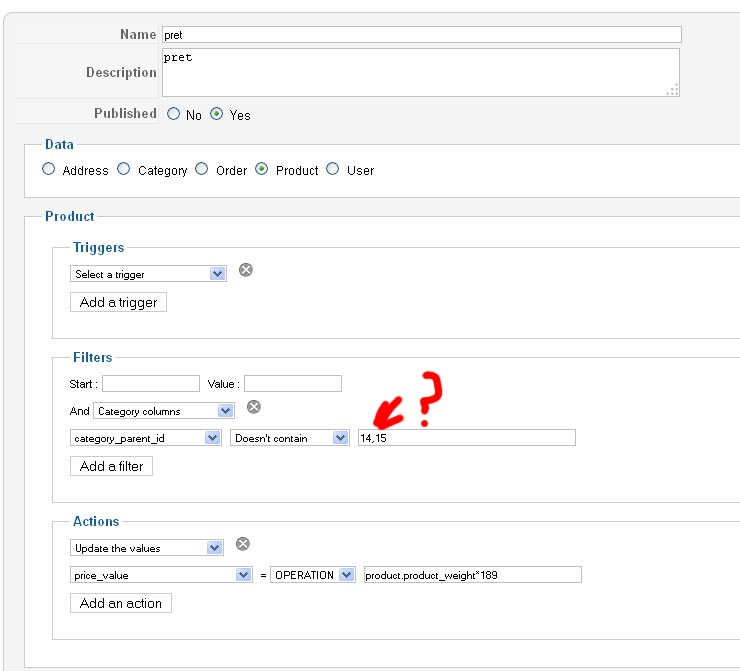
My new dilema? what must i insert between categories names in the imput field so the script will take in consideration that there are 2 not just the first
i,ve tried 14,15 ro 14.15 or 14;15 or even simpler 14 15
i uses only the first id, doesnt process thesecond.
Now i'm trying to exclude the 2 parent categories that had to remain out of the mass action process. i've set it like in the attached image
My new dilema? what must i insert between categories names in the imput field so the script will take in consideration that there are 2 not just the first
i,ve tried 14,15 ro 14.15 or 14;15 or even simpler 14 15
i uses only the first id, doesnt process thesecond.
Please Log in or Create an account to join the conversation.
12 years 6 months ago #146756
by Xavier
Replied by Xavier on topic Price in corelation with product weight
Hi,
To restrict on many categories, you have to add as many filters as categories, you can't set many ids in one filter.
It's better to fill the previous fields too, Start: 0 and Value: 5000 for example.
To exclude you can too use "!=" instead of "Doesn't contain".
To restrict on many categories, you have to add as many filters as categories, you can't set many ids in one filter.
It's better to fill the previous fields too, Start: 0 and Value: 5000 for example.
To exclude you can too use "!=" instead of "Doesn't contain".
The following user(s) said Thank You: sorin1z
Please Log in or Create an account to join the conversation.
12 years 6 months ago - 12 years 6 months ago #146801
by sorin1z
Replied by sorin1z on topic Price in corelation with product weight
If i do it like in the attached image, the mass action doesn't do enything
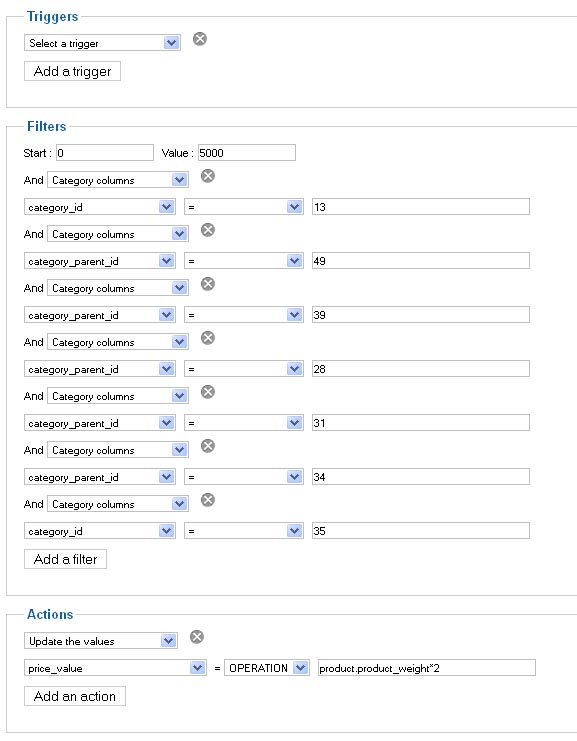
So if i only insert one filter it works but when i insert the folowing ones nothing work.
(i've inserted category_id for the categories that doesnt have subcategories and category_parent_id for the ones that do have subcategories)
It is strange that it doesnt work and i wonder why?
It seems to be a succesfull atempt the one where i excluded the to categories that i do not want to participate in the mass action.
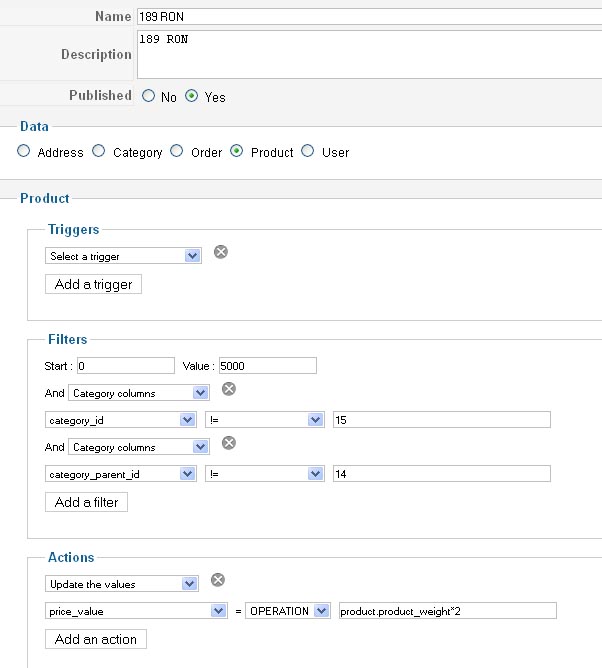
until now it seems to work right.
So if i only insert one filter it works but when i insert the folowing ones nothing work.
(i've inserted category_id for the categories that doesnt have subcategories and category_parent_id for the ones that do have subcategories)
It is strange that it doesnt work and i wonder why?
It seems to be a succesfull atempt the one where i excluded the to categories that i do not want to participate in the mass action.
until now it seems to work right.
Last edit: 12 years 6 months ago by sorin1z.
Please Log in or Create an account to join the conversation.
12 years 6 months ago #146819
by Xavier
Replied by Xavier on topic Price in corelation with product weight
Glad to know that it's working with that solution.
I will try to reproduce the problem like the first screenshot (by inclusion, not exclusion) and solve it.
I will try to reproduce the problem like the first screenshot (by inclusion, not exclusion) and solve it.
The following user(s) said Thank You: sorin1z
Please Log in or Create an account to join the conversation.
12 years 6 months ago #146827
by sorin1z
Replied by sorin1z on topic Price in corelation with product weight
If you come to a concluzion please let me know.
Please Log in or Create an account to join the conversation.

12 years 6 months ago #146848
by Eliot
Replied by Eliot on topic Price in corelation with product weight
Hi there,
The thing is that the filter of our current mass action system are added one to each other (it uses the AND condition). So you when you set it up like you did, it only look for the product in the category 1 and 2 and 3 and...
We'll probably change the and into a dropdown allowing to choose between AND and OR.
The thing is that the filter of our current mass action system are added one to each other (it uses the AND condition). So you when you set it up like you did, it only look for the product in the category 1 and 2 and 3 and...
We'll probably change the and into a dropdown allowing to choose between AND and OR.
Please Log in or Create an account to join the conversation.
12 years 6 months ago - 12 years 6 months ago #146855
by sorin1z
Replied by sorin1z on topic Price in corelation with product weight
The strange fact is that it worked in exclusion.
Last edit: 12 years 6 months ago by sorin1z.
Please Log in or Create an account to join the conversation.
Time to create page: 0.366 seconds