

- Posts: 107
- Thank you received: 0
shipping plugins
15 years 10 months ago #1272
by seb
shipping plugins was created by seb
Another question 
I''va got a special request from a customer, he woud like to manage himself the sending process : I explain myself :
He would like to divide the country in many zones and define a sending price for each zone ...
So I wanted to know if throught the shipping process :
- Can I get access to postal code from the customer ?
- Do you have any documentation about the shipping plugins ? I'd like to have a look
I''va got a special request from a customer, he woud like to manage himself the sending process : I explain myself :
He would like to divide the country in many zones and define a sending price for each zone ...
So I wanted to know if throught the shipping process :
- Can I get access to postal code from the customer ?
- Do you have any documentation about the shipping plugins ? I'd like to have a look
Please Log in or Create an account to join the conversation.

15 years 10 months ago #1273
by nicolas
Replied by nicolas on topic Re: shipping plugins
Hi,
In hikashop, you can customize the zones. If you edit the zone corresponding to your country, you should see a list of states. If that doesn't suit your needs you can of course change that list. You can also create new zones.
In the shipping methods options, you can restrict to shipping method to a zone.
If you want to reduce the number of shipping methods you can group the states with the same shipping price under a new zone and restrict one or several shipping methods to that zone.
Then let the user select his state when entering his address and then based on that state, the zone within which that state is, and the zone resitrictions on shipping methods, the shipping methods will be filtered so that your users can only use the shipping methods relevant to their state.
Thus, I think that you could already achieve what you want without even touching the code.
In any case, you can always customize the code and of course, you will be able to access all the address information in the shipping plugin. You can read our developer documentation concerning shipping plugin on that page: www.hikashop.com/fr/support/documentation/62.html
In hikashop, you can customize the zones. If you edit the zone corresponding to your country, you should see a list of states. If that doesn't suit your needs you can of course change that list. You can also create new zones.
In the shipping methods options, you can restrict to shipping method to a zone.
If you want to reduce the number of shipping methods you can group the states with the same shipping price under a new zone and restrict one or several shipping methods to that zone.
Then let the user select his state when entering his address and then based on that state, the zone within which that state is, and the zone resitrictions on shipping methods, the shipping methods will be filtered so that your users can only use the shipping methods relevant to their state.
Thus, I think that you could already achieve what you want without even touching the code.
In any case, you can always customize the code and of course, you will be able to access all the address information in the shipping plugin. You can read our developer documentation concerning shipping plugin on that page: www.hikashop.com/fr/support/documentation/62.html
Please Log in or Create an account to join the conversation.
15 years 10 months ago #1286
by seb
Replied by seb on topic Re: shipping plugins
That's great ... you thought about everything didn't you ?
So still looking around : understood the zone thing, so I guess to do what I talked about in my first post I've to choose for shipping : the manual one ...
Did so ... but when the user is going to the checkout, the amount asked for shipping doesn't show up ... manual shipping is published ... payment process is possible ...
Any clue ?
So still looking around : understood the zone thing, so I guess to do what I talked about in my first post I've to choose for shipping : the manual one ...
Did so ... but when the user is going to the checkout, the amount asked for shipping doesn't show up ... manual shipping is published ... payment process is possible ...
Any clue ?
Please Log in or Create an account to join the conversation.
15 years 10 months ago #1287
by nicolas
Replied by nicolas on topic Re: shipping plugins
Did you put a weight on the product ? Otherwise, the product will be considered as virtual and shipping won't be asked.
Please Log in or Create an account to join the conversation.
15 years 10 months ago #1291
by seb
Replied by seb on topic Re: shipping plugins
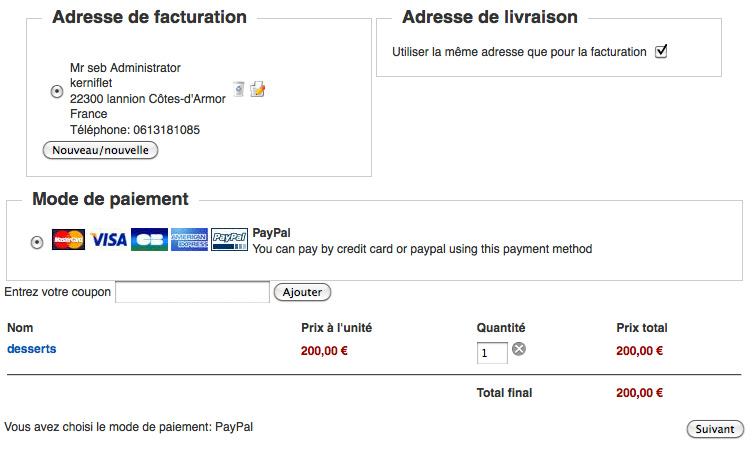
I tried that put a weight for the product but shipping is still not showing 
Please Log in or Create an account to join the conversation.
15 years 10 months ago #1292
by nicolas
Replied by nicolas on topic Re: shipping plugins
So if you see the "shipping address" part, it means that the system detected that it needs a shipping. If you click on next what happens ?
Don't you get an error message ?
If not, you should check that: www.hikashop.com/fr/support/documentation/61.html
Also, be sure that the manual shipping plugin is published and that you have a least one shipping method created (if you have restrictions on it, that may be why you don't see it, but then you should get an error message).
Don't you get an error message ?
If not, you should check that: www.hikashop.com/fr/support/documentation/61.html
Also, be sure that the manual shipping plugin is published and that you have a least one shipping method created (if you have restrictions on it, that may be why you don't see it, but then you should get an error message).
Please Log in or Create an account to join the conversation.
Time to create page: 0.273 seconds