

- Posts: 9
- Thank you received: 0
Registration and checkout wont work
15 years 10 months ago #1718
by media991
Registration and checkout wont work was created by media991
Hi There,
We are using this cart and after we have chosen a product and proceed to guest or register, we fill out register details and then nothing happens. We cannot log in or continue to payment.
Can anyone help?
Cheers,
We are using this cart and after we have chosen a product and proceed to guest or register, we fill out register details and then nothing happens. We cannot log in or continue to payment.
Can anyone help?
Cheers,
Please Log in or Create an account to join the conversation.

15 years 10 months ago #1722
by nicolas
Replied by nicolas on topic Re: Registration and checkout wont work
Hi,
That's probably because you require that the user accounts emails be validated in the joomla configuration. In such cases, after registration, HikaShop will send an a confirmation email and just display a message telling the user to check his emails. Also, if your template is missing the message include code, no message will be displayed: www.hikashop.com/en/support/documentation/61.html
So you should fix your template and if you don't want the emails to be validated, turn off that function on the joomla configuration.
That's probably because you require that the user accounts emails be validated in the joomla configuration. In such cases, after registration, HikaShop will send an a confirmation email and just display a message telling the user to check his emails. Also, if your template is missing the message include code, no message will be displayed: www.hikashop.com/en/support/documentation/61.html
So you should fix your template and if you don't want the emails to be validated, turn off that function on the joomla configuration.
Please Log in or Create an account to join the conversation.
15 years 10 months ago #1727
by media991
Replied by media991 on topic Re: Registration and checkout wont work
Hi there,
Thanks for your reply, we have disabled the verify registration, but when we use either existing registration details or create new user details it will not allow us to continue with the login and the purchase.
Do you have any other ideas?
Thanks in advance
Thanks for your reply, we have disabled the verify registration, but when we use either existing registration details or create new user details it will not allow us to continue with the login and the purchase.
Do you have any other ideas?
Thanks in advance
Please Log in or Create an account to join the conversation.
15 years 10 months ago #1731
by nicolas
Replied by nicolas on topic Re: Registration and checkout wont work
Did you try to follow the advices on the link I previously provided ?
Could you make a screenshot of the page once you register or login ?
Also, could you copy/paste the URL of the page ?
Could you make a screenshot of the page once you register or login ?
Also, could you copy/paste the URL of the page ?
Please Log in or Create an account to join the conversation.
15 years 10 months ago - 15 years 10 months ago #1938
by media991
Replied by media991 on topic Re: Registration and checkout wont work
Hi There,
The Payment methods seems to be working but the errors are showing
Warning: Invalid argument supplied for foreach() in /home/xxx/public_html/administrator/components/com_hikashop/classes/cart.php on line 333
Warning: Invalid argument supplied for foreach() in /home/xxx/public_html/administrator/components/com_hikashop/classes/cart.php on line 344
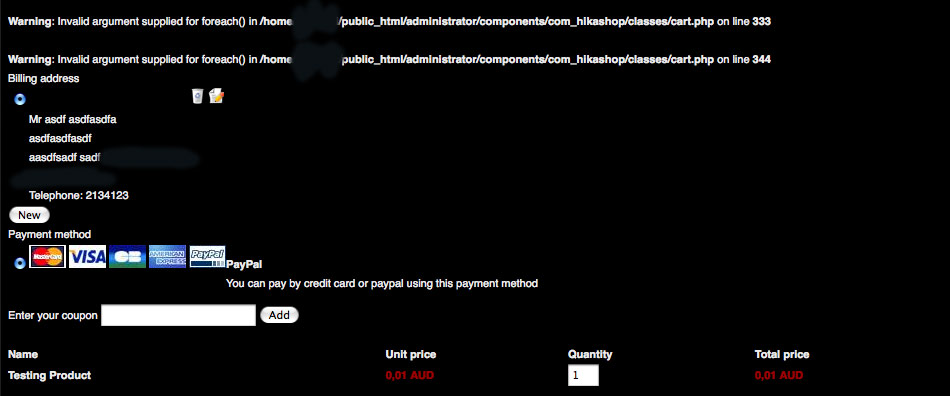
Also if you like i'm happy to give you access via pm.
Thanks
The Payment methods seems to be working but the errors are showing
Warning: Invalid argument supplied for foreach() in /home/xxx/public_html/administrator/components/com_hikashop/classes/cart.php on line 333
Warning: Invalid argument supplied for foreach() in /home/xxx/public_html/administrator/components/com_hikashop/classes/cart.php on line 344
Also if you like i'm happy to give you access via pm.
Thanks
Last edit: 15 years 10 months ago by media991.
Please Log in or Create an account to join the conversation.
15 years 10 months ago #1942
by nicolas
Replied by nicolas on topic Re: Registration and checkout wont work
Hi,
I checked the code and we don't have a foreach on line 333 and 344. That probably means that you don't have the latest version of HikaShop. Could you update and try again ?
If you still have the error, could you copy/paste the new error message (at least the line number should be different) ?
I checked the code and we don't have a foreach on line 333 and 344. That probably means that you don't have the latest version of HikaShop. Could you update and try again ?
If you still have the error, could you copy/paste the new error message (at least the line number should be different) ?
Please Log in or Create an account to join the conversation.
15 years 10 months ago #1943
by media991
Replied by media991 on topic Re: Registration and checkout wont work
Hi,
Thanks for your response we've just updated the shop and now we are having problems submitting the registration or loging in. When it does finally work we get a blank page saying product category.
Not sure whats happening now..
Thanks for your response
we've just updated the shop and now we are having problems submitting the registration or loging in. When it does finally work we get a blank page saying product category.Not sure whats happening now..
Please Log in or Create an account to join the conversation.
15 years 10 months ago #1950
by nicolas
Replied by nicolas on topic Re: Registration and checkout wont work
Hi,
Could you activate the joomla debug mode and try again ?
What do you mean about a blank page saying product category ? If the page is blank, it shouldn't be written anything
Maybe you could do a screenshot or give us a link to your website ?
Could you activate the joomla debug mode and try again ?
What do you mean about a blank page saying product category ? If the page is blank, it shouldn't be written anything
Maybe you could do a screenshot or give us a link to your website ?
Please Log in or Create an account to join the conversation.
15 years 10 months ago #1956
by media991
Replied by media991 on topic Re: Registration and checkout wont work
Hi There, I have tried again and now i cant seem to log in again. Its seems very strange.
Do you have an address that i can send you the url too?
Thanks,
Do you have an address that i can send you the url too?
Thanks,
Please Log in or Create an account to join the conversation.
15 years 10 months ago #1957
by nicolas
Replied by nicolas on topic Re: Registration and checkout wont work
you can send it to nicolas@hikashop.com
Please Log in or Create an account to join the conversation.
15 years 10 months ago #1958
by media991
Replied by media991 on topic Re: Registration and checkout wont work
Thanks i've just sent you the email
Please Log in or Create an account to join the conversation.
15 years 10 months ago #1959
by nicolas
Replied by nicolas on topic Re: Registration and checkout wont work
Hi,
I see that you have unpublished the HikaShop user plugin. Is there a reason for that ?
On some websites, when a user log in, the session data is lost and thus the cart information is lost. In order to avoid that, we have some code in the HikaShop user plugin which stores the cart information before login and restores it after login so that the cart isn't lost. But if you unpublish the plugin this doesn't work.
Which means that the system believes that the cart is empty and thus redirect to the URL in the option "URL where to redirect when the cart is empty" of the config under the tab display. However, since you didn't specify any URL there the system tries to redirect to the listing of categories and it seems that you don't have any categories under the main category. Also, an error message should be displayed to the user telling him that the cart is empty. But that will only happen if your template correctly implements the jdoc include tag for messages : www.hikashop.com/en/support/documentation/61.html
What you should do:
1/ Publish the HikaShop user plugin, that should solve the login issue.
2/ Set a proper redirection URL.
3/ Fix your template by following the instructions in the link above.
I see that you have unpublished the HikaShop user plugin. Is there a reason for that ?
On some websites, when a user log in, the session data is lost and thus the cart information is lost. In order to avoid that, we have some code in the HikaShop user plugin which stores the cart information before login and restores it after login so that the cart isn't lost. But if you unpublish the plugin this doesn't work.
Which means that the system believes that the cart is empty and thus redirect to the URL in the option "URL where to redirect when the cart is empty" of the config under the tab display. However, since you didn't specify any URL there the system tries to redirect to the listing of categories and it seems that you don't have any categories under the main category. Also, an error message should be displayed to the user telling him that the cart is empty. But that will only happen if your template correctly implements the jdoc include tag for messages : www.hikashop.com/en/support/documentation/61.html
What you should do:
1/ Publish the HikaShop user plugin, that should solve the login issue.
2/ Set a proper redirection URL.
3/ Fix your template by following the instructions in the link above.
Please Log in or Create an account to join the conversation.
15 years 10 months ago #1961
by media991
Replied by media991 on topic Re: Registration and checkout wont work
Hi There,
Thanks, i'll try these solutions and see what happens
Sorry I did have the plugin enabled earlier, however i must have turned it off by accident.
Thanks and i'll let you know how i go
Thanks, i'll try these solutions and see what happens
Sorry I did have the plugin enabled earlier, however i must have turned it off by accident.
Thanks and i'll let you know how i go
Please Log in or Create an account to join the conversation.
15 years 10 months ago #1963
by media991
Replied by media991 on topic Re: Registration and checkout wont work
Hi There,
Where do i set the redirection url? I can only find the cancel and return places and i cant find it in documentation search?
Sorry
Where do i set the redirection url? I can only find the cancel and return places and i cant find it in documentation search?
Sorry
Please Log in or Create an account to join the conversation.
15 years 10 months ago #1964
by nicolas
Replied by nicolas on topic Re: Registration and checkout wont work
It's the option "URL where to redirect when the cart is empty" of the hikashop configuration under the tab display
Please Log in or Create an account to join the conversation.
15 years 10 months ago #1965
by media991
Replied by media991 on topic Re: Registration and checkout wont work
Thanks Looks like it is working again.. i've just redirected the url to where all the products are.
Thanks again for all your help.. very appreciated!
Looks like it is working again.. i've just redirected the url to where all the products are.Thanks again for all your help.. very appreciated!
Please Log in or Create an account to join the conversation.
Time to create page: 0.281 seconds