

- Posts: 9
- Thank you received: 0
Variant display, Currency Switching & Product Code
15 years 6 months ago #9870
by Alex_CF
Variant display, Currency Switching & Product Code was created by Alex_CF
Hello.
First I will say I'm impressed with Hikashop. It's versatility, integration with Joomla and regular updates have given me the confidence to go from starter, to essential and now to the full Business package. So in general a happy customer. With that said I've recently been having several issues that I've been unable to work through on my own and with limited depth to your docs I'm hoping you can help me.
1- Product Code showing in IE8, Mozilla but not in Chrome. I don't want it to show on the Product Page.
www.opendatetickets.com/index.php?option...2&category_pathway=0
After searching your Forums I saw that you could add the following code into the template.css and did so..
.hikashop_product_code_main{
display:none;
}
This doesn't seem to have worked, is it something to do with using variants as those are the product codes that show? Wondering if you could help.
2- The Currency Switcher module is defaulting to only GBP. It was working perfectly previously, allowing the switch between currencies but now will not. Is this because I'm in the UK? Strange that it was allowing the switch before and now it won’t. All currencies are properly published.
3- My variants are set to add to the product name, but when I change between variants the price changes perfectly but the name of the product title does not update. It stays with the default variant which will be confusing for customers. I've tried to put full product names into the variants and stop the variant being added to the product name but this does not work either. Could you take a look please?
I appreciate any support you can give. It may be that the answers are simple, but I just can work them out.
Many thanks in advance.
Colin.
First I will say I'm impressed with Hikashop. It's versatility, integration with Joomla and regular updates have given me the confidence to go from starter, to essential and now to the full Business package. So in general a happy customer. With that said I've recently been having several issues that I've been unable to work through on my own and with limited depth to your docs I'm hoping you can help me.
1- Product Code showing in IE8, Mozilla but not in Chrome. I don't want it to show on the Product Page.
www.opendatetickets.com/index.php?option...2&category_pathway=0
After searching your Forums I saw that you could add the following code into the template.css and did so..
.hikashop_product_code_main{
display:none;
}
This doesn't seem to have worked, is it something to do with using variants as those are the product codes that show? Wondering if you could help.
2- The Currency Switcher module is defaulting to only GBP. It was working perfectly previously, allowing the switch between currencies but now will not. Is this because I'm in the UK? Strange that it was allowing the switch before and now it won’t. All currencies are properly published.
3- My variants are set to add to the product name, but when I change between variants the price changes perfectly but the name of the product title does not update. It stays with the default variant which will be confusing for customers. I've tried to put full product names into the variants and stop the variant being added to the product name but this does not work either. Could you take a look please?
I appreciate any support you can give. It may be that the answers are simple, but I just can work them out.
Many thanks in advance.
Colin.
Please Log in or Create an account to join the conversation.

15 years 6 months ago #9875
by nicolas
Replied by nicolas on topic Re: Variant display, Currency Switching & Product Code
Hi,
1. I recall that some other users had a problem with that. It seems that you have some error in the HTML code somewhere (template ? module ?) and that screws the parsing of the HTML for firefox and IE. The easiest will be to go in the menu Display->Views and edit the file show of the view product. There, you can just remove that code:
<span id="hikashop_product_code_main" class="hikashop_product_code_main">
<?php
echo $this->element->product_code;
?>
</span>
2. Your currencies "displayed" option need to be On. Is that the case ?
3. There is indeed a problem with the name of the product which is not updated. It might be related to problem 1. Maybe the change in 1 will solve the problem...
1. I recall that some other users had a problem with that. It seems that you have some error in the HTML code somewhere (template ? module ?) and that screws the parsing of the HTML for firefox and IE. The easiest will be to go in the menu Display->Views and edit the file show of the view product. There, you can just remove that code:
<span id="hikashop_product_code_main" class="hikashop_product_code_main">
<?php
echo $this->element->product_code;
?>
</span>
2. Your currencies "displayed" option need to be On. Is that the case ?
3. There is indeed a problem with the name of the product which is not updated. It might be related to problem 1. Maybe the change in 1 will solve the problem...
Please Log in or Create an account to join the conversation.
15 years 6 months ago #9876
by Alex_CF
Replied by Alex_CF on topic Re: Variant display, Currency Switching & Product Code
Hello. Thanks for the quick reply.
I removed the code as suggested and the product code problem has gone.
It didn't have the desired effect on either the currency switcher or on the variant being added to the product name changing/being displayed at all in the case of ..
www.opendatetickets.com/index.php?option...2&category_pathway=0
The currency 'displayed' options are enabled (as I said it used to work. I've attached the currency displayed screen to show this.
Would this have anything to do with going from Essential to Business at the end of Feb?
I also took out all of the description code in the product and that didn't solve either of the Product name issues.
Is there anything else I can do?
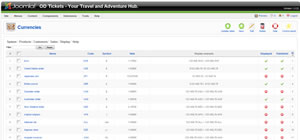
I removed the code as suggested and the product code problem has gone.
It didn't have the desired effect on either the currency switcher or on the variant being added to the product name changing/being displayed at all in the case of ..
www.opendatetickets.com/index.php?option...2&category_pathway=0
The currency 'displayed' options are enabled (as I said it used to work. I've attached the currency displayed screen to show this.
Would this have anything to do with going from Essential to Business at the end of Feb?
I also took out all of the description code in the product and that didn't solve either of the Product name issues.
Is there anything else I can do?
Please Log in or Create an account to join the conversation.
15 years 6 months ago #9879
by nicolas
Replied by nicolas on topic Re: Variant display, Currency Switching & Product Code
Normally, inside the h2 tag of the product name/code, you should have the name with a span around. However, if I look with firebug (a debug addon for firefox) I don't see the span... I'm really puzzled by that problem.
Same for the currencies. I don't understand the problem.
Could you give us an FTP and a back end access to your website so that we can look at the problem tomorrow ?
Same for the currencies. I don't understand the problem.
Could you give us an FTP and a back end access to your website so that we can look at the problem tomorrow ?
Please Log in or Create an account to join the conversation.
15 years 6 months ago #9880
by Alex_CF
Replied by Alex_CF on topic Re: Variant display, Currency Switching & Product Code
I'm happy to give you guys access. Is there a particular email to send the details to?
Please Log in or Create an account to join the conversation.
15 years 6 months ago #9882
by nicolas
Replied by nicolas on topic Re: Variant display, Currency Switching & Product Code
You can use our contact form:
www.hikashop.com/en/support/contact-us.html
Please Log in or Create an account to join the conversation.
15 years 6 months ago #9884
by Alex_CF
Replied by Alex_CF on topic Re: Variant display, Currency Switching & Product Code
I've sent the details as requested.
Thanks.
Thanks.
Please Log in or Create an account to join the conversation.
15 years 6 months ago #9963
by Alex_CF
Replied by Alex_CF on topic Re: Variant display, Currency Switching & Product Code
Can i confirm that you received my details?
Cheers, Colin
Cheers, Colin
Please Log in or Create an account to join the conversation.
15 years 6 months ago #9967
by nicolas
Replied by nicolas on topic Re: Variant display, Currency Switching & Product Code
Hi,
We received your details. We are going to look at that later on today. Sorry for the delay.
We received your details. We are going to look at that later on today. Sorry for the delay.
Please Log in or Create an account to join the conversation.
15 years 6 months ago #9978
by Alex_CF
Replied by Alex_CF on topic Re: Variant display, Currency Switching & Product Code
...have some additional information I just noticed. In one of the products
www.opendatetickets.com/index.php?option...2&category_pathway=0
I changed the name slightly taking out brackets that were at the end fixing a minor typo. I noticed that the product when viewed is still showing the same (old) product name with the typo. It hasn't updated.
I use the standard Joomla Cache, but did make sure it was empty, refreshed the product page, waited till the session was over and still the product name remained with vv at the end instead of v.v
This may be nothing to do with the issues over currency switching, variants not showing in the name or switching when different variants asre choosen, but I wanted to report anything unusual in case it was related.
Many Thanks
www.opendatetickets.com/index.php?option...2&category_pathway=0
I changed the name slightly taking out brackets that were at the end fixing a minor typo. I noticed that the product when viewed is still showing the same (old) product name with the typo. It hasn't updated.
I use the standard Joomla Cache, but did make sure it was empty, refreshed the product page, waited till the session was over and still the product name remained with vv at the end instead of v.v
This may be nothing to do with the issues over currency switching, variants not showing in the name or switching when different variants asre choosen, but I wanted to report anything unusual in case it was related.
Many Thanks
Please Log in or Create an account to join the conversation.
15 years 6 months ago #9988
by nicolas
Replied by nicolas on topic Re: Variant display, Currency Switching & Product Code
Concerning the currency switcher, the problem comes from a conflict between the geolocation default currency selector and the currency switcher module. I fixed the code of the geolocation plugin and now it's working properly.
Concerning the name switching, it comes from a bug in your template javascript ( rocket team with gantry ) which rewrite the HTML inside h2 tags and break the span inside. In order to circumvent the problem, I've changed the code displaying the product name to this:
<h2 id="hikashop_product_name_main" class="hikashop_product_name_main">
<?php
echo $this->element->product_name;
?>
</h2>
The fact that the CSS for the product code didn't work was also caused by the same bug in your template javascript.
Concerning the name switching, it comes from a bug in your template javascript ( rocket team with gantry ) which rewrite the HTML inside h2 tags and break the span inside. In order to circumvent the problem, I've changed the code displaying the product name to this:
<h2 id="hikashop_product_name_main" class="hikashop_product_name_main">
<?php
echo $this->element->product_name;
?>
</h2>
The fact that the CSS for the product code didn't work was also caused by the same bug in your template javascript.
Please Log in or Create an account to join the conversation.
15 years 6 months ago #9991
by Alex_CF
Replied by Alex_CF on topic Re: Variant display, Currency Switching & Product Code
Thanks! Appreciate the excellent support.
One question, would your adjustments be overwritten at the next update? I'll know to watch out for them if they will....
One question, would your adjustments be overwritten at the next update? I'll know to watch out for them if they will....
Please Log in or Create an account to join the conversation.
15 years 6 months ago #9992
by nicolas
Replied by nicolas on topic Re: Variant display, Currency Switching & Product Code
The fix in the geolocation plugin will be included in next release and the code change for the product name has been done via the menu Display->Views so you won't loose it when you update.
Please Log in or Create an account to join the conversation.
15 years 6 months ago #9994
by Alex_CF
Replied by Alex_CF on topic Re: Variant display, Currency Switching & Product Code
That's great, and again many thanks.
Please Log in or Create an account to join the conversation.

Less
More
- Posts: 10
- Thank you received: 0
15 years 6 months ago #10374
by tonysimpson
Replied by tonysimpson on topic Re: Variant display, Currency Switching & Product Code
Hello.
I am having a similar problem with the variant display. I have managed to fix it on the product page title, but when I add to cart it only adds the default name and not a customer have selected... My website is fwauk.com/tshirts and the issue is with the size varient.
Thanks!
I am having a similar problem with the variant display. I have managed to fix it on the product page title, but when I add to cart it only adds the default name and not a customer have selected... My website is fwauk.com/tshirts and the issue is with the size varient.
Thanks!
Please Log in or Create an account to join the conversation.
15 years 6 months ago #10386
by nicolas
Replied by nicolas on topic Re: Variant display, Currency Switching & Product Code
Your error is different. It seems that you specified a name in the variants of your product, is that the case ?
What change did you make?
What change did you make?
Please Log in or Create an account to join the conversation.
Less
More
- Posts: 10
- Thank you received: 0
15 years 6 months ago #10524
by tonysimpson
Replied by tonysimpson on topic Re: Variant display, Currency Switching & Product Code
Hi Nicholas. I made the change that you talk about above which fixed the fact that the Title of the procuct wasn't changing, but it did not fix the adding to cart issue, where not matter what I select in the varient field, only the default is added to the cart.
In an attept to fix the adding to card issue I named all of the varients but that also didn't fix it...
Thanks Nicholas. Really apprieciate your help!
In an attept to fix the adding to card issue I named all of the varients but that also didn't fix it...
Thanks Nicholas. Really apprieciate your help!
Please Log in or Create an account to join the conversation.
15 years 6 months ago #10549
by nicolas
Replied by nicolas on topic Re: Variant display, Currency Switching & Product Code
From what I can see, the good variant of the product is added to the cart (looking at the product id) but the system isn't able to load the variant name as it should...
Could you give us a back end access and FTP so that we can look at the problem and see if there really is a bug and if so correct it ?
Could you give us a back end access and FTP so that we can look at the problem and see if there really is a bug and if so correct it ?
Please Log in or Create an account to join the conversation.
15 years 6 months ago #10617
by nicolas
Replied by nicolas on topic Re: Variant display, Currency Switching & Product Code
The problem came from the fact that you customized the "show" file of the view "product" and that after you updated, you didn't get the modifications to the add to cart button preventing it from functioning correctly. I changed it and it works now.
Please Log in or Create an account to join the conversation.
15 years 5 months ago #14064
by cestor
Replied by cestor on topic Re: Variant display, Currency Switching & Product Code
I am getting a problem whereby the geolocation just doesn't seem to work at all- I'm using a template based on RocketTheme Gantry as well.
I'm wondering if it's the same cause as the issue above, and if the fix is now in the latest hikashop build?
I'm wondering if it's the same cause as the issue above, and if the fix is now in the latest hikashop build?
Please Log in or Create an account to join the conversation.
Time to create page: 0.423 seconds