

- Posts: 5
- Thank you received: 0
Field : address_state - Not Showing Values
15 years 5 months ago #14733
by geekpro
Field : address_state - Not Showing Values was created by geekpro
marilynwheeler.com/buy-book-2/checkout
When attempting to select a default value for address_state, the dropdown values are missing on the config page and the field is gone on the checkout page. This happens when a user selects USA for country, the field disappears, and on the backend there is no dropdown values for address_state. Selecting other countries sometimes brings back the 'state' field.
I've attached a screen shoot, but you can also go to the url above to see the missing field.
using IE9 and the latest release of Chrome. Backend is Joomla 1.6
screenshot here: geekpro.com/hikashop_error.jpg
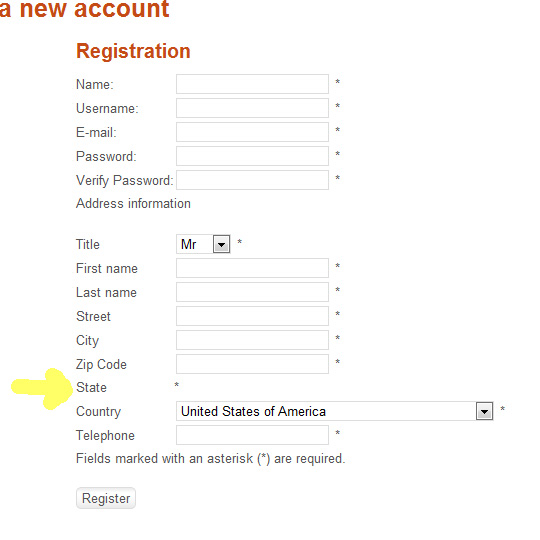
When attempting to select a default value for address_state, the dropdown values are missing on the config page and the field is gone on the checkout page. This happens when a user selects USA for country, the field disappears, and on the backend there is no dropdown values for address_state. Selecting other countries sometimes brings back the 'state' field.
I've attached a screen shoot, but you can also go to the url above to see the missing field.
using IE9 and the latest release of Chrome. Backend is Joomla 1.6
screenshot here: geekpro.com/hikashop_error.jpg
Please Log in or Create an account to join the conversation.

15 years 5 months ago #14734
by nicolas
Replied by nicolas on topic Re: Field : address_state - Not Showing Values
Could you please download again hikashop and reinstall with the new package. We just found today a problem in the query inserting the states for UK and the USA and fixed it.
Please Log in or Create an account to join the conversation.
15 years 5 months ago #14744
by geekpro
Replied by geekpro on topic Re: Field : address_state - Not Showing Values
Installed the latest package, it works !! - Thanks.
Please Log in or Create an account to join the conversation.
15 years 5 months ago #14759
by geekpro
Replied by geekpro on topic Re: Field : address_state - Not Showing Values
Apparently, Ukraine has no values for state. But since it's a required field, any buyers from Ukraine would not be able to continue with registration. I haven't tried every country. But, Ukraine is not showing any values for state. I don't think they have any states, but they have regions. Only workaround would be to make the 'state' field 'not' required.
Please Log in or Create an account to join the conversation.
15 years 5 months ago #14760
by nicolas
Replied by nicolas on topic Re: Field : address_state - Not Showing Values
Yes, we don't have a complete list of all the regions for all the countries on earth (even though it's already pretty complete). When there are no states for a country, even if the state field is required, you should still be able to proceed to the next step of the checkout.
Please Log in or Create an account to join the conversation.

15 years 5 months ago #14762
by hdracing
Replied by hdracing on topic Re: Field : address_state - Not Showing Values
Nicolas,
I have just downloaded the latest Starter version (1.4.9) and it still has the problem with USA States not displaying properly. If I try to register a new user, the state list is there (default country is USA). If I try to add a new address to an existing customer when logged in (frontend), there is no state dropdown. As geekpro suggested, changing the country dropdown to something other than USA and back seems to produce the missing state dropdown.
Regards,
Ed
I have just downloaded the latest Starter version (1.4.9) and it still has the problem with USA States not displaying properly. If I try to register a new user, the state list is there (default country is USA). If I try to add a new address to an existing customer when logged in (frontend), there is no state dropdown. As geekpro suggested, changing the country dropdown to something other than USA and back seems to produce the missing state dropdown.
Regards,
Ed
Please Log in or Create an account to join the conversation.
15 years 5 months ago #14767
by nicolas
Replied by nicolas on topic Re: Field : address_state - Not Showing Values
Then that's another problem you're having. Could you give the URL of your website so that we can check out the problem ?
Please Log in or Create an account to join the conversation.
15 years 5 months ago - 15 years 5 months ago #14774
by hdracing
Replied by hdracing on topic Re: Field : address_state - Not Showing Values
Email sent with site and admin login credentials. I just noticed that geekpro is using Joomla 1.6, but the problem I'm having is with Joomla 1.5.23.
Thanks for taking a look,
Ed
Thanks for taking a look,
Ed
Last edit: 15 years 5 months ago by hdracing. Reason: Added Joomla version info
Please Log in or Create an account to join the conversation.
15 years 5 months ago #14792
by nicolas
Replied by nicolas on topic Re: Field : address_state - Not Showing Values
When the address popup opens, you have the javascript error below :
Uncaught TypeError: Cannot read property 'child_height' of undefined
m.window.GantrySpliceMenu.init:1
returnsmootools.js:21
(anonymous function)mootools.js:21
(anonymous function)mootools.js:50
Element.Methods.Events.fireEventmootools.js:50
srcmootools.js:59
srcmootools.js:59
returnsmootools.js:21
17
modal.js:272Uncaught TypeError: Cannot read property 'x' of undefined
That seems to be a problem linked to your template. And when you have a javascript error on the page, the state field cannot be retrieved by your browser when you change your country. Thus, the fact that it is missing.
On the popup, there is some javascript code coming from the rokbox system plugin which apparently triggers the javascript error. I tried to access your plugin manager in order to see if unpublishing the plugin would fix the problem (and I think it will) but I couldn't access it because of access restrictions:
403 - An error has occurred.
Access Denied!
Uncaught TypeError: Cannot read property 'child_height' of undefined
m.window.GantrySpliceMenu.init:1
returnsmootools.js:21
(anonymous function)mootools.js:21
(anonymous function)mootools.js:50
Element.Methods.Events.fireEventmootools.js:50
srcmootools.js:59
srcmootools.js:59
returnsmootools.js:21
17
modal.js:272Uncaught TypeError: Cannot read property 'x' of undefined
That seems to be a problem linked to your template. And when you have a javascript error on the page, the state field cannot be retrieved by your browser when you change your country. Thus, the fact that it is missing.
On the popup, there is some javascript code coming from the rokbox system plugin which apparently triggers the javascript error. I tried to access your plugin manager in order to see if unpublishing the plugin would fix the problem (and I think it will) but I couldn't access it because of access restrictions:
403 - An error has occurred.
Access Denied!
Please Log in or Create an account to join the conversation.
15 years 5 months ago #14797
by hdracing
Replied by hdracing on topic Re: Field : address_state - Not Showing Values
I had Admin Tools set to only allow Super Admins access to Modules which is why you got the 403 error. I have changed your account to Super Admin if you need to take another look.
I disabled the Rockbox system and content plugins, cleaned cache and tried again, but it still gets the same error. There was another error coming up which seems to be gone now, but the error you cite above is still thre.
Rockbox is used by the login popup in the template and if that was the problem I could do without the login in a popup, but it looks like that isn't what was causing the error.
Ed
I disabled the Rockbox system and content plugins, cleaned cache and tried again, but it still gets the same error. There was another error coming up which seems to be gone now, but the error you cite above is still thre.
Rockbox is used by the login popup in the template and if that was the problem I could do without the login in a popup, but it looks like that isn't what was causing the error.
Ed
Please Log in or Create an account to join the conversation.
15 years 5 months ago #14801
by nicolas
Replied by nicolas on topic Re: Field : address_state - Not Showing Values
Thanks to that, I was able to access your template settings. Changing the option "menu control" to OFF solves the problem. Changing the "type" from splice menu to split menu also helps on my end.
That's again a rockettheme template bug... Nothing we can do.
That's again a rockettheme template bug... Nothing we can do.
Please Log in or Create an account to join the conversation.
15 years 5 months ago #14803
by hdracing
Replied by hdracing on topic Re: Field : address_state - Not Showing Values
Thanks for pinning it down further. The splice menu option was one reason I chose that template so I'll have to think about whether I want to rebuild the menu structure. Is it possible to open your new address form on the page rather than in a popup? Would that solve the problem?
Ed
Ed
Please Log in or Create an account to join the conversation.
15 years 5 months ago #14817
by nicolas
Replied by nicolas on topic Re: Field : address_state - Not Showing Values
It's not possible to do that.
But why not ask rockettheme's support about that bug ? They might provide a solution...
But why not ask rockettheme's support about that bug ? They might provide a solution...
Please Log in or Create an account to join the conversation.
15 years 5 months ago #14866
by hdracing
Replied by hdracing on topic Re: Field : address_state - Not Showing Values
Installing the latest version of that template seems to have fixed it.
Thanks,
Ed
(Sorry geekpro. Didn't mean to hijack your thread)
Thanks,
Ed
(Sorry geekpro. Didn't mean to hijack your thread)
Please Log in or Create an account to join the conversation.
Time to create page: 0.262 seconds