

- Posts: 49
- Thank you received: 0
Information bank data
13 years 2 months ago #122353
by Lutz
Information bank data was created by Lutz
Hi,
if a customer has bought a product he receives an email with the confirmation of the buying.
Is there a possibility to add the bank data , when the buyer has selected a non online payment?
thank you for your help.
if a customer has bought a product he receives an email with the confirmation of the buying.
Is there a possibility to add the bank data , when the buyer has selected a non online payment?
thank you for your help.
Please Log in or Create an account to join the conversation.

13 years 2 months ago #122361
by nicolas
Replied by nicolas on topic Information bank data
Hi,
That's already the case if you're using the latest version of HikaShop and that you didn't modify the order creation email with a previous version of HikaShop (which in that case you didn't get the modifications for that and you can delete your modifications and reapply them to the new version of the email to get the bank data added automatically to the email).
That's already the case if you're using the latest version of HikaShop and that you didn't modify the order creation email with a previous version of HikaShop (which in that case you didn't get the modifications for that and you can delete your modifications and reapply them to the new version of the email to get the bank data added automatically to the email).
Please Log in or Create an account to join the conversation.
13 years 2 months ago #122408
by Lutz
Replied by Lutz on topic Information bank data
Hi,
I didn't touch the order creation email.
Is this the newest version?
HikaShop Business 2.2.1, Version HikaShop [1308282330]
I didn't touch the order creation email.
Is this the newest version?
HikaShop Business 2.2.1, Version HikaShop [1308282330]
Please Log in or Create an account to join the conversation.
13 years 2 months ago #122413
by nicolas
Replied by nicolas on topic Information bank data
Yes, that's the newest version. Can you go in the menu System>Emails and check that you don't have a "remove customization" bin icon for the emails ? If you do, it means that you had edited the email.
If not, then either we're not talking about the same email (please do a screenshot of the entire email in order to confirm that) or that there is a bug somewhere and in that case please do a screenshot of your payment method options screen so that we can see how you configured it.
If not, then either we're not talking about the same email (please do a screenshot of the entire email in order to confirm that) or that there is a bug somewhere and in that case please do a screenshot of your payment method options screen so that we can see how you configured it.
Please Log in or Create an account to join the conversation.
13 years 2 months ago #122418
by Lutz
Replied by Lutz on topic Information bank data
hi nicolas,
here the 2 screenshot.
1.: backend, 2 the email
tks for your help
here the 2 screenshot.
1.: backend, 2 the email
tks for your help
Please Log in or Create an account to join the conversation.

13 years 2 months ago #122574
by Jerome
Jerome - Obsidev.com
HikaMarket & HikaSerial developer / HikaShop core dev team.
Replied by Jerome on topic Information bank data
Hi,
I don't speak German so I am not sure that your email is the "order creation notification" mail.
The "order creation notification" includes the bank details when you use the "bank" payment plugin. It's in this plugin that you enter the bank details.
Can you confirm that you are using this payment plugin ?
Regards,
Jerome - Obsidev.com
HikaMarket & HikaSerial developer / HikaShop core dev team.
Please Log in or Create an account to join the conversation.
13 years 2 months ago #122577
by Lutz
Replied by Lutz on topic Information bank data
Hi Jerome,
the first answer: Yes I use the payment plugin.
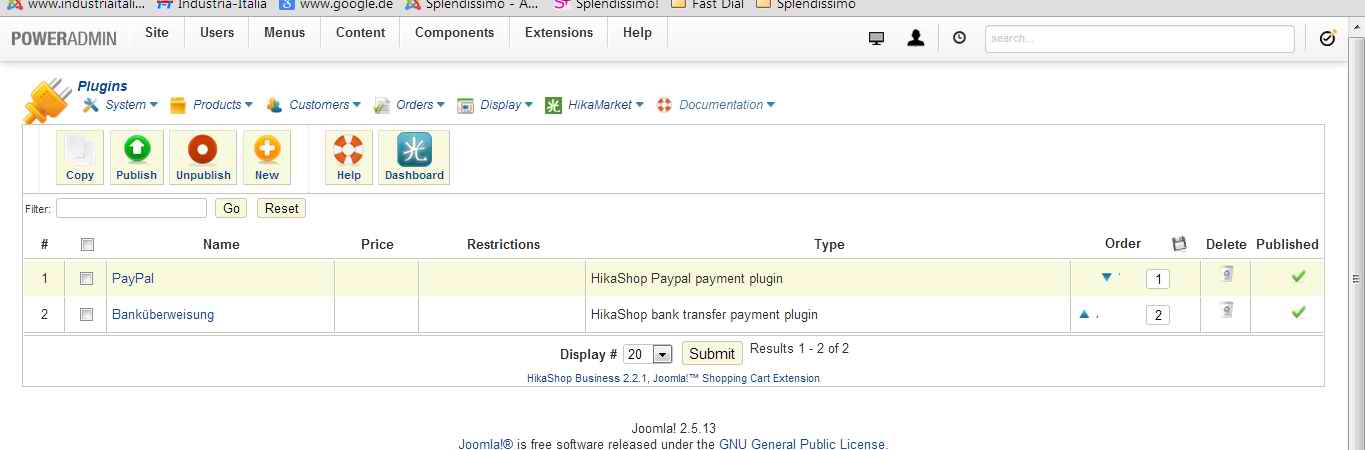
Banküberweisung is the german word for bank transfer.
Concerning the email: How i can I find out, if this is the right email?
What defines the language of the email? If I know it I can create the email message in english and so you can ubderstand if this is the right email message.
Thank you
Lutz
the first answer: Yes I use the payment plugin.
Banküberweisung is the german word for bank transfer.
Concerning the email: How i can I find out, if this is the right email?
What defines the language of the email? If I know it I can create the email message in english and so you can ubderstand if this is the right email message.
Thank you
Lutz
Please Log in or Create an account to join the conversation.

Less
More
- Posts: 12953
- Thank you received: 1778
13 years 2 months ago #122700
by Mohamed Thelji
Replied by Mohamed Thelji on topic Information bank data
Hi,
1. If you want to add the bank data through your order creation email, you'll just have to use the "Bank account information" option of your Bank transfer payment method.
2. I think that your customer email language will be defined by your customer language.
1. If you want to add the bank data through your order creation email, you'll just have to use the "Bank account information" option of your Bank transfer payment method.
2. I think that your customer email language will be defined by your customer language.
Please Log in or Create an account to join the conversation.
13 years 2 months ago #122710
by Lutz
Replied by Lutz on topic Information bank data
Dear Mohamed,
thank you for your answer,
look, I think I have done everything:
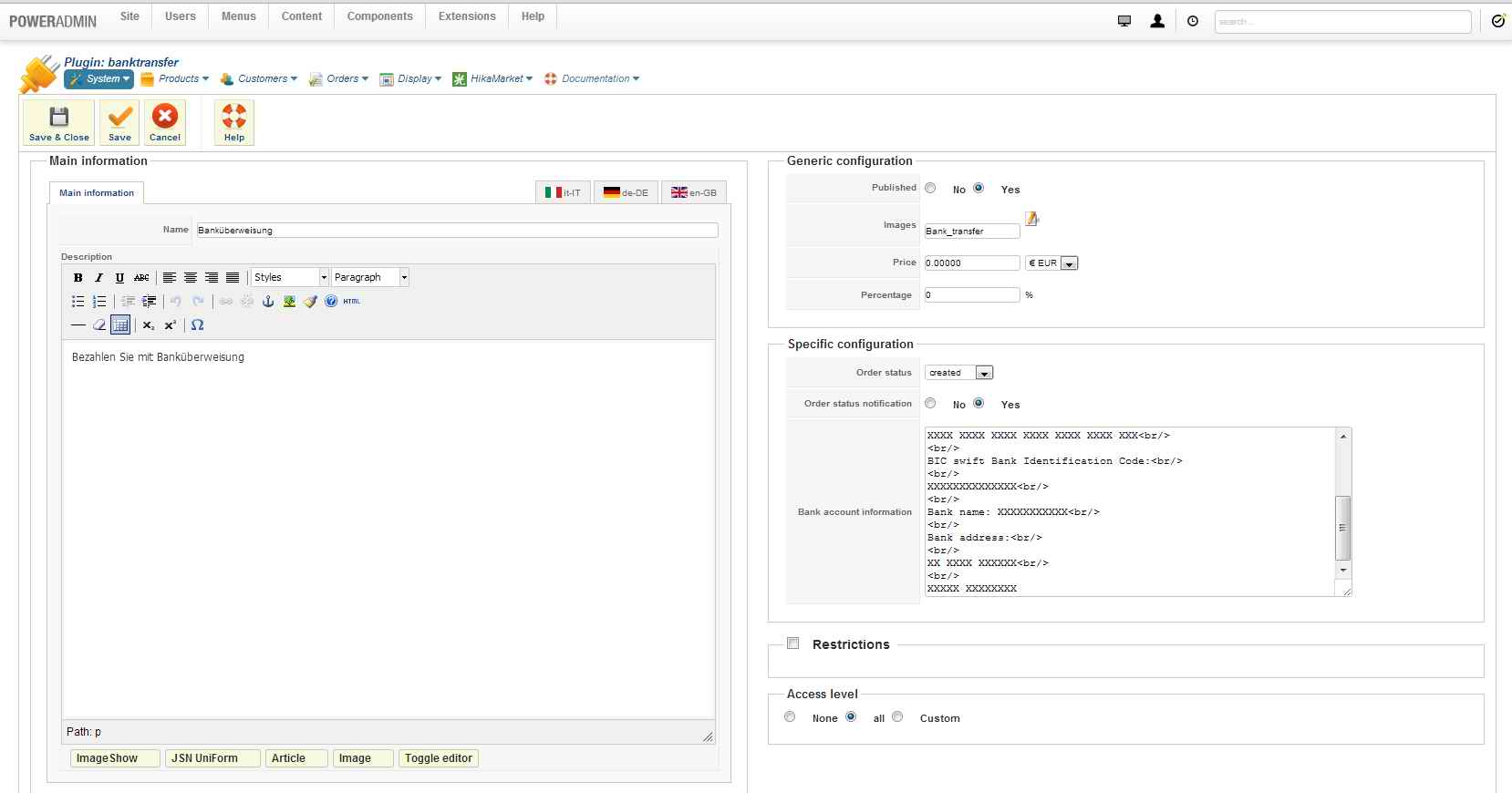
But the information is not enclosed at the emial.
Thank you for your help
thank you for your answer,
look, I think I have done everything:
But the information is not enclosed at the emial.
Thank you for your help
Please Log in or Create an account to join the conversation.
13 years 2 months ago #122993
by Jerome
Jerome - Obsidev.com
HikaMarket & HikaSerial developer / HikaShop core dev team.
Replied by Jerome on topic Information bank data
Hi,
Can you send me an access to the backend of your website. I want to check some element and try to reproduce your problem.
I am currently working on a new design of the emails including new templating feature. So currently my local websites are not a good reference for making email tests because I use a quite different system in HikaShop.
In the same time, I want to reproduce your configuration in my local website in order to see if the new system will have the same problem, and fix it in both (your website and in the next HikaShop package).
Regards,
Jerome - Obsidev.com
HikaMarket & HikaSerial developer / HikaShop core dev team.
Please Log in or Create an account to join the conversation.
13 years 2 months ago #123045
by Jerome
Jerome - Obsidev.com
HikaMarket & HikaSerial developer / HikaShop core dev team.
Replied by Jerome on topic Information bank data
Hi,
Okay, I found it.
I was not simple because I didn't have access to your HikaShop configuration but I figure it out.
Please change your HikaShop configuration in order to set the "Payment confirmed order status" status to "confirmed" not "created".
www.hikashop.com/support/documentation/5...nfig.html#main_order
By setting "created" you broke the rest of the algorithms. We can't considered that the order is created if it has a confirmed status. So in this case, we do not display the bank information.. Because the order is already confirmed so has been already paid.
Regards,
Jerome - Obsidev.com
HikaMarket & HikaSerial developer / HikaShop core dev team.
Please Log in or Create an account to join the conversation.
13 years 2 months ago #123255
by Lutz
Replied by Lutz on topic Information bank data
Hi Jerome,
thank you very much for your help.
Now it works great.
Best regards
Lutz
thank you very much for your help.
Now it works great.
Best regards
Lutz
Please Log in or Create an account to join the conversation.
Time to create page: 0.090 seconds