
- Posts: 57
- Thank you received: 2
World Pay
- expertbeginner
-
 Topic Author
- Offline
Less
More
13 years 5 months ago #101139
by expertbeginner
World Pay was created by expertbeginner
Hi,
As you will probably know, WorldPay have implemented some changes to the URLs used to process payments and need to be changed by the 30th April - the existing settings will stop working after this date.
I've made the necessary changes at the Hikashop end and checked the settings at WorldPay, but have found that when the payment process is cancelled on WorldPay the call back to the site is not working. I've not tried completing a transaction, yet. I'm going to attempt that in a test environment once it's been set up.
The shop sends a confirmation email to the customer with the contents : "Your order will be processed as soon as we receive your payment."
Has anyone else encountered this, and if so how was it resolved.
Thanks in anticipation.
Martyn.
As you will probably know, WorldPay have implemented some changes to the URLs used to process payments and need to be changed by the 30th April - the existing settings will stop working after this date.
I've made the necessary changes at the Hikashop end and checked the settings at WorldPay, but have found that when the payment process is cancelled on WorldPay the call back to the site is not working. I've not tried completing a transaction, yet. I'm going to attempt that in a test environment once it's been set up.
The shop sends a confirmation email to the customer with the contents : "Your order will be processed as soon as we receive your payment."
Has anyone else encountered this, and if so how was it resolved.
Thanks in anticipation.
Martyn.
Please Log in or Create an account to join the conversation.

13 years 4 months ago #101319
by nicolas
Hi,
The newest version of HikaShop include the new URLs to WorldPay.
The email that you're receiving is the order creation email, not the order confirmation email which is only sent once the orders are confirmed.
So once you setup properly worldpay to confirm orders after the purchase, you will get the confirmation email as you need.
The order creation email can potentially be deactivated via the menu System>Emails in the Business edition.
The newest version of HikaShop include the new URLs to WorldPay.
The email that you're receiving is the order creation email, not the order confirmation email which is only sent once the orders are confirmed.
So once you setup properly worldpay to confirm orders after the purchase, you will get the confirmation email as you need.
The order creation email can potentially be deactivated via the menu System>Emails in the Business edition.
Please Log in or Create an account to join the conversation.
- expertbeginner
-
Topic Author
- Offline
Less
More
- Posts: 57
- Thank you received: 2
13 years 4 months ago #101329
by expertbeginner
Replied by expertbeginner on topic World Pay
Hi Nicolas,
Thanks for the response.
I've updated to the latest version of Hikashop and have made several purchases (in test mode) but the call back is just not happening - on both successful and failed payments.
With parameters turned on I'm seeing the following (sensitive data has been anonymised):
The settings at WorldPay haven't been changed:
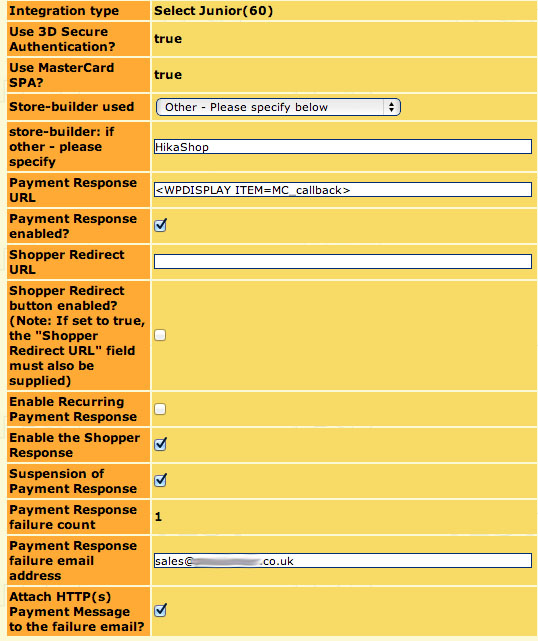
As the call-back isn't being made then the order remains at a 'Created' status and is having to be manually moved to 'Confirmed'.
Any thoughts, ideas, or suggestions will be gratefully received.
Thanks,
Martyn.
Thanks for the response.
I've updated to the latest version of Hikashop and have made several purchases (in test mode) but the call back is just not happening - on both successful and failed payments.
With parameters turned on I'm seeing the following (sensitive data has been anonymised):
Code:
Array
(
[instId] => 277530
[cartId] => 75
[amount] => 25.004
[currency] => GBP
[desc] =>
[MC_callback] => http://xxxx.co.uk/index.php?option=com_hikashop&ctrl=checkout&task=notify¬if_payment=bf_rbsbusinessgateway&tmpl=component&lang=en
[name] => Axxx, Mxxx
[address] => 1xx,
Sxxx
[postcode] => Sx xxx
[country] => GB
[email] => mxx@sxxxx.co.uk
[tel] => 0xxx0
[testMode] => 100
[C_item_name_1] => Pop
[C_item_number_1] => 1167704
[C_quantity_1] => 1
[C_amount_1] => 20
[C_item_name_2] => Shipping
[C_amount_2] => 5
[C_quantity_2] => 1
[item_number_2] => manual
[C_discount_amount_cart] => 0
)
The settings at WorldPay haven't been changed:
As the call-back isn't being made then the order remains at a 'Created' status and is having to be manually moved to 'Confirmed'.
Any thoughts, ideas, or suggestions will be gratefully received.
Thanks,
Martyn.
Please Log in or Create an account to join the conversation.
13 years 4 months ago #101408
by nicolas
Hi,
Then, make sure that your website is accessible (not restricted via htaccess, online, not in maintenance, menus with public access level) so that WorldPay is able to trigger HikaShop for the notification.
Also, you can turn on the debug option of the plugin and look in the payment log file in the Files section of the configuration for information about what is going on during the notification process. If the file is empty after a test in debug mode, it means that the worldpay plugin is not receiving any notification from WorldPay and that it might either be an issue on your worldpay account or on your joomla configuration or server configuration which blocks the notification before reaching Hikashop.
Then, make sure that your website is accessible (not restricted via htaccess, online, not in maintenance, menus with public access level) so that WorldPay is able to trigger HikaShop for the notification.
Also, you can turn on the debug option of the plugin and look in the payment log file in the Files section of the configuration for information about what is going on during the notification process. If the file is empty after a test in debug mode, it means that the worldpay plugin is not receiving any notification from WorldPay and that it might either be an issue on your worldpay account or on your joomla configuration or server configuration which blocks the notification before reaching Hikashop.
Please Log in or Create an account to join the conversation.
- expertbeginner
-
Topic Author
- Offline
Less
More
- Posts: 57
- Thank you received: 2
13 years 4 months ago - 13 years 4 months ago #101441
by expertbeginner
Replied by expertbeginner on topic World Pay
Hi Nicolas,
Again, thanks for the response.
I've managed to get a hold of a call-back failure email from my client:
Error reported: Callback to xxxxx.co.uk/index.php?task=notify&tmpl=c...&option=com_hikashop : NOT OK, recevied HTTP status: 403
(index.php?task=notify&tmpl=component¬if_payment=bf_rbsbusinessgateway&ctrl=checkout&lang=en&option=com_hikashop: NOT OK, recevied HTTP status: 403)
Server Reference: mm2imscs4p:callbackFailureEmail-3589:MerchReq-793-66
Any ideas as to where/why the 403 (forbidden) is being generated?
Regards,
Martyn.
Again, thanks for the response.
I've managed to get a hold of a call-back failure email from my client:
Error reported: Callback to xxxxx.co.uk/index.php?task=notify&tmpl=c...&option=com_hikashop : NOT OK, recevied HTTP status: 403
(index.php?task=notify&tmpl=component¬if_payment=bf_rbsbusinessgateway&ctrl=checkout&lang=en&option=com_hikashop: NOT OK, recevied HTTP status: 403)
Server Reference: mm2imscs4p:callbackFailureEmail-3589:MerchReq-793-66
Any ideas as to where/why the 403 (forbidden) is being generated?
Regards,
Martyn.
Last edit: 13 years 4 months ago by expertbeginner.
Please Log in or Create an account to join the conversation.
13 years 4 months ago #101463
by nicolas
Hi,
A 403 error means that the website is in maintenance or that there is a problem with the menu item/SEF.
Try to turn off the SEF in the joomla configuration and if it works then it's definitely a problem with the menu item which is not correct.
In that case, make sure that a hikashop menu item is selected in the "force a menu during checkout" option of the configuration and change the line:
to:
in the file plugins/hikashoppayment/bf_rbsbusinessgateway.php
And that will force the menu and should avoid the issue.
A 403 error means that the website is in maintenance or that there is a problem with the menu item/SEF.
Try to turn off the SEF in the joomla configuration and if it works then it's definitely a problem with the menu item which is not correct.
In that case, make sure that a hikashop menu item is selected in the "force a menu during checkout" option of the configuration and change the line:
Code:
$vars['MC_callback'] = HIKASHOP_LIVE.'index.php?option=com_hikashop&ctrl=checkout&task=notify¬if_payment=' . $method->payment_type . '&tmpl=component&lang='.$locale;
to:
Code:
global $Itemid;
$url_itemid='';
if(!empty($Itemid)){
$url_itemid='&Itemid='.$Itemid;
}
$vars['MC_callback'] = HIKASHOP_LIVE.'index.php?option=com_hikashop&ctrl=checkout&task=notify¬if_payment=' . $method->payment_type . '&tmpl=component&lang='.$locale.$url_itemid;
And that will force the menu and should avoid the issue.
Please Log in or Create an account to join the conversation.
- expertbeginner
-
Topic Author
- Offline
Less
More
- Posts: 57
- Thank you received: 2
13 years 4 months ago #101487
by expertbeginner
Replied by expertbeginner on topic World Pay
Hi,
Sorry to be the harbinger of bad news but none of the suggested remedies has worked.
I've just attempted a live transaction and cancelled the payment on WorldPay. The callback failure email is received. I've pasted the call-back url from the email into the address bar.
I don't get the 403 that WorldPay refers to but do get a blank page with the following source:
Any other thoughts or suggestions gratefully received.
Regards,
Martyn.
Sorry to be the harbinger of bad news but none of the suggested remedies has worked.
I've just attempted a live transaction and cancelled the payment on WorldPay. The callback failure email is received. I've pasted the call-back url from the email into the address bar.
I don't get the 403 that WorldPay refers to but do get a blank page with the following source:
Code:
<!DOCTYPE html PUBLIC "-//W3C//DTD XHTML 1.0 Transitional//EN" "http://www.w3.org/TR/xhtml1/DTD/xhtml1-transitional.dtd">
<html xmlns="http://www.w3.org/1999/xhtml" xml:lang="en-gb" lang="en-gb" dir="ltr">
<head>
<base href="http://www.peaklander.co.uk/index.php" />
<meta http-equiv="content-type" content="text/html; charset=utf-8" />
<meta name="generator" content="Joomla! - Open Source Content Management" />
<title>Peaklander</title>
<link rel="stylesheet" href="/media/com_hikashop/css/frontend_custom.css?v=212" type="text/css" />
<script src="/media/com_hikashop/js/hikashop.js?v=212" type="text/javascript"></script>
<link rel="stylesheet" href="/templates/system/css/general.css" type="text/css" />
<link rel="stylesheet" href="/templates/system/css/template.css" type="text/css" />
<!-- Google Analytics for Joomla 1.6 by Analytics For Joomla v1.0 | http://www.analyticsforjoomla.com/ -->
<script type="text/javascript">
var _gaq = _gaq || [];
_gaq.push(['_setAccount', 'UA-28377986-1']);
_gaq.push(['_trackPageview']);
(function() {
var ga = document.createElement('script'); ga.type = 'text/javascript'; ga.async = true;
ga.src = ('https:' == document.location.protocol ? 'https://ssl' : 'http://www') + '.google-analytics.com/ga.js';
var s = document.getElementsByTagName('script')[0]; s.parentNode.insertBefore(ga, s);
})();
</script>
<!-- End of Google Analytics for Joomla 1.6 by Analytics For Joomla v1.0 -->
</head>
<body class="contentpane">
<div id="system-message-container">
</div>
</body>
</html>
Any other thoughts or suggestions gratefully received.
Regards,
Martyn.
Please Log in or Create an account to join the conversation.

13 years 4 months ago #101674
by Jerome
Jerome - Obsidev.com
HikaMarket & HikaSerial developer / HikaShop core dev team.
Also helping the HikaShop support team when having some time or couldn't sleep.
By the way, do not send me private message, use the "contact us" form instead.
Hi,
The call-back url is not the only information required.
When worldpay call the url, it send some data by "POST" (like when you submit a form). So, the information are not only in the url.
Without the parameters given by POST, the page can't know which order is concerned, etc. So the blank page is logical.
Regards,
The call-back url is not the only information required.
When worldpay call the url, it send some data by "POST" (like when you submit a form). So, the information are not only in the url.
Without the parameters given by POST, the page can't know which order is concerned, etc. So the blank page is logical.
Regards,
Jerome - Obsidev.com
HikaMarket & HikaSerial developer / HikaShop core dev team.
Also helping the HikaShop support team when having some time or couldn't sleep.
By the way, do not send me private message, use the "contact us" form instead.
Please Log in or Create an account to join the conversation.
- expertbeginner
-
Topic Author
- Offline
Less
More
- Posts: 57
- Thank you received: 2
13 years 4 months ago #101678
by expertbeginner
Replied by expertbeginner on topic World Pay
Hi,
I appreciate that, but it doesn't explain why WorldPay is getting/reporting a 403 Error.
Correct me if I'm wrong but a 403 is a 'forbidden' access - which will be generated, as a result of the URL, regardless of whether there is any POST or GET data.
Again, any suggestions as to where/why the 403 is being generated/reported would be greatly appreciated.
All the directories on the server are set at 755 and files set at 644 for permissions. There is no .htaccess file either.
Thanks
I appreciate that, but it doesn't explain why WorldPay is getting/reporting a 403 Error.
Correct me if I'm wrong but a 403 is a 'forbidden' access - which will be generated, as a result of the URL, regardless of whether there is any POST or GET data.
Again, any suggestions as to where/why the 403 is being generated/reported would be greatly appreciated.
All the directories on the server are set at 755 and files set at 644 for permissions. There is no .htaccess file either.
Thanks
Please Log in or Create an account to join the conversation.
13 years 4 months ago #101719
by Jerome
Jerome - Obsidev.com
HikaMarket & HikaSerial developer / HikaShop core dev team.
Also helping the HikaShop support team when having some time or couldn't sleep.
By the way, do not send me private message, use the "contact us" form instead.
Hi,
Looking at the source code of this BrainForge plugin, I see a source of 403:
Did you receive an email from your website with that kind of message (IP refused) ?
There are two options "Notification hostname" and "IPs" that you can empty if you want to not check the worldpay ips.
If these values are wrong, it will explain why the notification is refused.
Regards,
Looking at the source code of this BrainForge plugin, I see a source of 403:
Code:
if ($hostError > 0) {
$mailer->setSubject(JText::sprintf('NOTIFICATION_REFUSED_FOR_THE_ORDER','Worldpay Business Gateway').' '.JText::sprintf('IP_NOT_VALID',hikashop::encode($dbOrder)));
$body = str_replace('<br/>',"\r\n",JText::sprintf('NOTIFICATION_REFUSED_FROM_IP','Worldpay Business Gateway',$ip,'See Hostname / IPs defined in configuration'))."\r\n\r\n".JText::sprintf('CHECK_DOCUMENTATION',HIKASHOP_HELPURL.'payment-rbsworldpay-error#ip').$order_text;
$mailer->setBody($body);
$mailer->Send();
JError::raiseError( 403, JText::_( 'Access Forbidden' ));
return false;
}
There are two options "Notification hostname" and "IPs" that you can empty if you want to not check the worldpay ips.
If these values are wrong, it will explain why the notification is refused.
Regards,
Jerome - Obsidev.com
HikaMarket & HikaSerial developer / HikaShop core dev team.
Also helping the HikaShop support team when having some time or couldn't sleep.
By the way, do not send me private message, use the "contact us" form instead.
Please Log in or Create an account to join the conversation.
- expertbeginner
-
Topic Author
- Offline
Less
More
- Posts: 57
- Thank you received: 2
13 years 4 months ago #101775
by expertbeginner
Replied by expertbeginner on topic World Pay
Hi,
The (shop) website is only producing order created emails, it's not generating the notification refused one referred to in your response. The email referring to the 403 is being send by World Pay.
WorldPay does send an email stating that the ip address is not on the approved list when, and only when, the payment is cancelled on their page. The call back fails still fails, though.
I've currently got debugging turned on but there is nothing in the log.
Cheers,
Martyn.
The (shop) website is only producing order created emails, it's not generating the notification refused one referred to in your response. The email referring to the 403 is being send by World Pay.
WorldPay does send an email stating that the ip address is not on the approved list when, and only when, the payment is cancelled on their page. The call back fails still fails, though.
I've currently got debugging turned on but there is nothing in the log.
Cheers,
Martyn.
Please Log in or Create an account to join the conversation.
- expertbeginner
-
Topic Author
- Offline
Less
More
- Posts: 57
- Thank you received: 2
13 years 4 months ago #101940
by expertbeginner
Replied by expertbeginner on topic World Pay
Hi,
I've cleared out the 'Notification hostname' contents - there are no IPs listed.
Tried a transaction and it was successful in every way - notification, hand-back etc - which leads to the contents of the 'Notification hostname' contents being incorrect.
What is the format of the contents of that area - the contents removed was
Is this correct? I'm assuming (which I don't like to do) the backslashes are escape characters. Are they required by the code or are they unnecessary?
From WorldPay:
Thanks,
Martyn.
I've cleared out the 'Notification hostname' contents - there are no IPs listed.
Tried a transaction and it was successful in every way - notification, hand-back etc - which leads to the contents of the 'Notification hostname' contents being incorrect.
What is the format of the contents of that area - the contents removed was
\.outbound\.worldpay\.com
Is this correct? I'm assuming (which I don't like to do) the backslashes are escape characters. Are they required by the code or are they unnecessary?
From WorldPay:
What changes do I need to make?
If your system receives automatic updates from WorldPay when shoppers make payments on your website or by telephone and you choose to restrict domain names, please ensure that you are using the following domain names:
*.outbound.worldpay.com
*.worldpay.com
If you use IP addresses instead of domain names to submit http, XML or Remote Administration requests to WorldPay, please change your connection to use domain-name-based URLs instead.
Thanks,
Martyn.
Please Log in or Create an account to join the conversation.
13 years 4 months ago #102227
by nicolas
Hi,
Now you're saying that you're not receiving payment notification emails from the website.
So it is normal that your log file stays empty.
It will only fill if you receive payment notifications.
The simplest is to leave both the hostname and the IPs fields empty in the plugin. That way, it won't check the hostname nor the IPs of the worldpay server and you should not see anymore that 403 error.
Now you're saying that you're not receiving payment notification emails from the website.
So it is normal that your log file stays empty.
It will only fill if you receive payment notifications.
The simplest is to leave both the hostname and the IPs fields empty in the plugin. That way, it won't check the hostname nor the IPs of the worldpay server and you should not see anymore that 403 error.
Please Log in or Create an account to join the conversation.
- expertbeginner
-
Topic Author
- Offline
Less
More
- Posts: 57
- Thank you received: 2
13 years 4 months ago #102255
by expertbeginner
That's the crux of this thread, isn't it? Postings 1 & 2 refer. How could we be getting payment payment notifications from the website if the call-back was failing? Without the call-back the website doesn't know whether the payment was successful or not, or does it?
I'd be grateful to know the format of the text in the hostname field, in preference of 'secure' over 'simple'. Are the periods escaped or are the '\' characters unnecessary and the cause of the issue?
Many thanks,
Martyn.
Replied by expertbeginner on topic World Pay
Now you're saying that you're not receiving payment notification emails from the website.
That's the crux of this thread, isn't it? Postings 1 & 2 refer. How could we be getting payment payment notifications from the website if the call-back was failing? Without the call-back the website doesn't know whether the payment was successful or not, or does it?
Isn't that opening a security hole, though? The site will then happily accept a call back from anyone purporting to be WorldPay!The simplest is to leave both the hostname and the IPs fields empty in the plugin.
I'd be grateful to know the format of the text in the hostname field, in preference of 'secure' over 'simple'. Are the periods escaped or are the '\' characters unnecessary and the cause of the issue?
Many thanks,
Martyn.
Please Log in or Create an account to join the conversation.
13 years 4 months ago #102539
by nicolas
Payment notifications are normally sent even if the callback is failing as long as the callback is received, even if it fails validation.
It's not just about receiving it, but also about validating it, by ip, by hash, by hostname, etc.
It doesn't open a security hole if you don't check the IP. There are several layers of verifications, IPs being one of them. But just one layer (the hash check) is enough for security.
The \ are normal as far as I can see but please note that I'm not the developer of that plugin. That plugin was done by a third party developer who was kind enough to share it back with us so that we can include it by default in HikaShop so that any can use it. Thus, that's why I told you to empty that field so that the check is avoided. Again, as for the IPs check, even if you don't have it, the notifications will still be secured by the hash check.
It's not just about receiving it, but also about validating it, by ip, by hash, by hostname, etc.
It doesn't open a security hole if you don't check the IP. There are several layers of verifications, IPs being one of them. But just one layer (the hash check) is enough for security.
The \ are normal as far as I can see but please note that I'm not the developer of that plugin. That plugin was done by a third party developer who was kind enough to share it back with us so that we can include it by default in HikaShop so that any can use it. Thus, that's why I told you to empty that field so that the check is avoided. Again, as for the IPs check, even if you don't have it, the notifications will still be secured by the hash check.
Please Log in or Create an account to join the conversation.
Time to create page: 0.262 seconds