

- Posts: 136
- Thank you received: 1
Re: Facebook Login Connect
14 years 3 months ago #54338
by jacorr27
Facebook Login Connect was created by jacorr27
Hi there,
Is anyone successfully using a facebook login connect module with hikashop?
I'm getting some disgruntled emails about the login process and wondered if I could make things easier for the end user?
Thanks in advance.
Is anyone successfully using a facebook login connect module with hikashop?
I'm getting some disgruntled emails about the login process and wondered if I could make things easier for the end user?
Thanks in advance.
Please Log in or Create an account to join the conversation.

14 years 3 months ago #54359
by nicolas
Replied by nicolas on topic Re: Facebook Login Connect
We have a piece of documentation which explains that here:
www.hikashop.com/en/support/documentatio...tworks.html#facebook
www.hikashop.com/en/support/documentatio...tworks.html#facebook
Please Log in or Create an account to join the conversation.
14 years 2 months ago #56626
by jacorr27
Replied by jacorr27 on topic Re: Facebook Login Connect
Working like a charm. Thank you!
Please Log in or Create an account to join the conversation.

Less
More
- Posts: 66
- Thank you received: 2
13 years 10 months ago #72614
by ilovekratom
Replied by ilovekratom on topic Re: Facebook Login Connect
I checked out the documentation for facebook connect. There are several extensions will put facebook connect on your site. Will there be a conflict if an extension is used other than JFBConnect? The reason I ask is because I'm on a very limited budget for site launch and I would like to add this feature (Facebook Connect). Is there something special about the JFBConnect extension that is necessary to work with Hikashop? Please advise. Thank you 
Please Log in or Create an account to join the conversation.
13 years 10 months ago #72908
by nicolas
Replied by nicolas on topic Re: Facebook Login Connect
The documentation already explains how to add JFBConnect to the HikaShop registration form. There is nothing else to do.
I don't know about other potential extensions to do that.
I don't know about other potential extensions to do that.
Please Log in or Create an account to join the conversation.
Less
More
- Posts: 66
- Thank you received: 2
13 years 10 months ago #74322
by ilovekratom
Replied by ilovekratom on topic Re: Facebook Login Connect
With JFBConnect, it adds the option on the login page as well as the registration form. I noticed that if you click the Facebook login that it lets you do this and then flips you to their page where it asks you to register with the site. I checked the user accounts and it did record the new account in Joomla from logging in with Facebook, which is good. The problem is that it's confusing from the user side because it still asks for you to register or login before checking out. Am I missing something or a setting? If they use the Facebook connect, it should only ask for the remaining account information such as address, etc. since their account is created by using the Facebook connect. Let me know your thoughts on this. Thanks.
Please Log in or Create an account to join the conversation.
13 years 10 months ago #74346
by nicolas
Replied by nicolas on topic Re: Facebook Login Connect
Maybe there is an option in JFBConnect to automatically login after the account has been created.
That should be handled by JFBConnect as it's something on their end, like HikaShop does the auto login after registration when you use HikaShop's registration.
That should be handled by JFBConnect as it's something on their end, like HikaShop does the auto login after registration when you use HikaShop's registration.
Please Log in or Create an account to join the conversation.
7 years 1 month ago #310231
by Reev3r
Replied by Reev3r on topic Re: Facebook Login Connect
Hi,
I know I'm late to the party, but I found the following plugin that will also work as for Facebook login:
storejextensions.org/extensions/instant_facebook_login.html
It's cheaper than JFBConnect (and doesn't have a frustrating subscription fee), but I felt the feature list was still pretty extensive.
The only issue I've run into is that my checkout process has 4 steps and when you log in with a facebook account in Step 2, I can't seem to get it to load back into step 2 (it kicks back to the beginning of the checkout process).
I did a lot of searching around, so I thought I'd share my findings here.
I know I'm late to the party, but I found the following plugin that will also work as for Facebook login:
storejextensions.org/extensions/instant_facebook_login.html
It's cheaper than JFBConnect (and doesn't have a frustrating subscription fee), but I felt the feature list was still pretty extensive.
The only issue I've run into is that my checkout process has 4 steps and when you log in with a facebook account in Step 2, I can't seem to get it to load back into step 2 (it kicks back to the beginning of the checkout process).
I did a lot of searching around, so I thought I'd share my findings here.
Please Log in or Create an account to join the conversation.

Less
More
- Posts: 12953
- Thank you received: 1778
7 years 1 month ago #310242
by Mohamed Thelji
Replied by Mohamed Thelji on topic Re: Facebook Login Connect
Hello,
Can you show us some screenshots of how you configured your checkout workflow via "Hikashop->System->Configuration->Checkout" ? So that we can have more information to understand your issue ? Thank you.
Kind regards,
Mohamed Thelji.
Can you show us some screenshots of how you configured your checkout workflow via "Hikashop->System->Configuration->Checkout" ? So that we can have more information to understand your issue ? Thank you.
Kind regards,
Mohamed Thelji.
Please Log in or Create an account to join the conversation.
7 years 1 month ago #310267
by Reev3r
Replied by Reev3r on topic Re: Facebook Login Connect
Thanks for offering to look into this. Below is a break down of the setup.
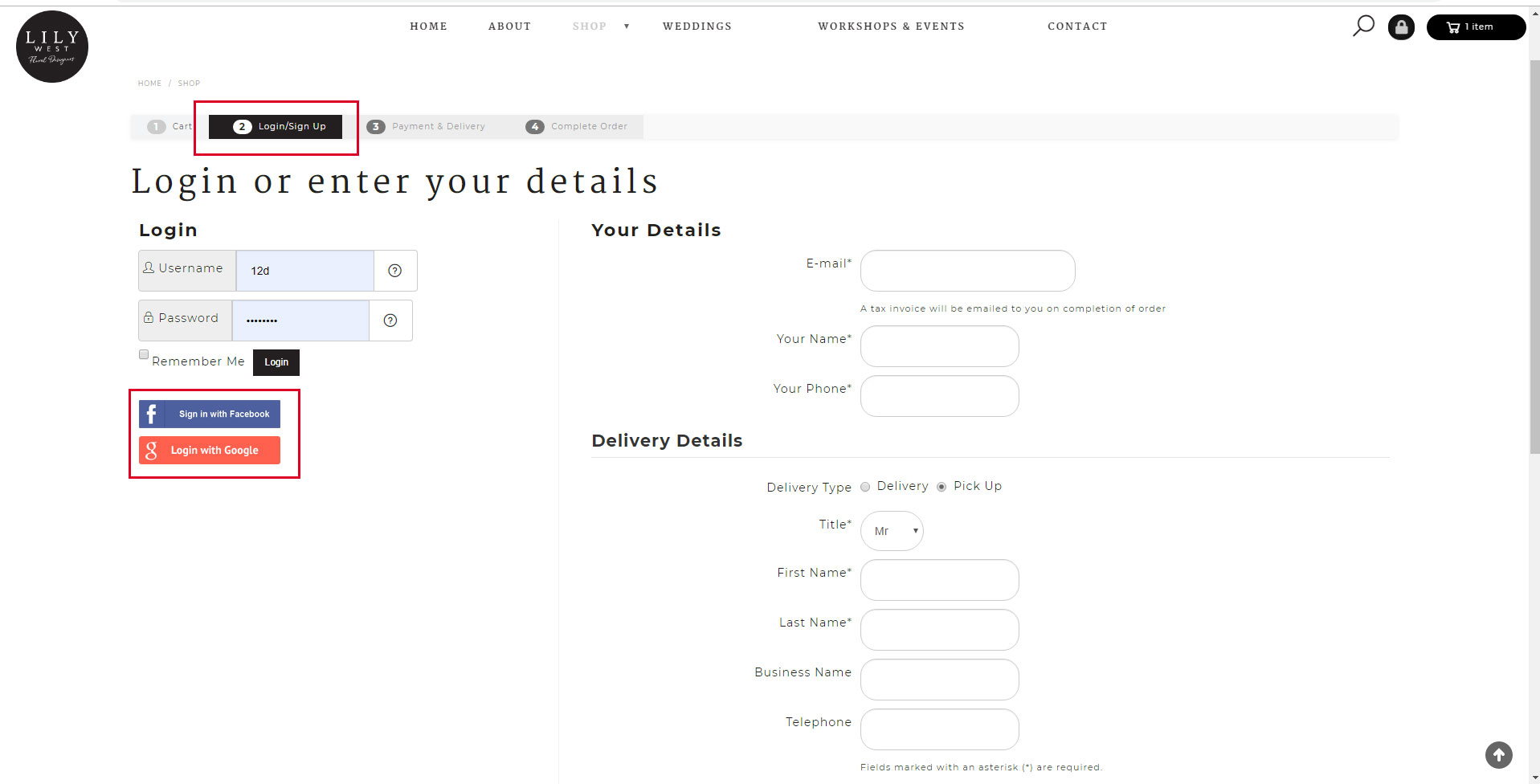
This is where the facebook login module is loaded on Step 2:
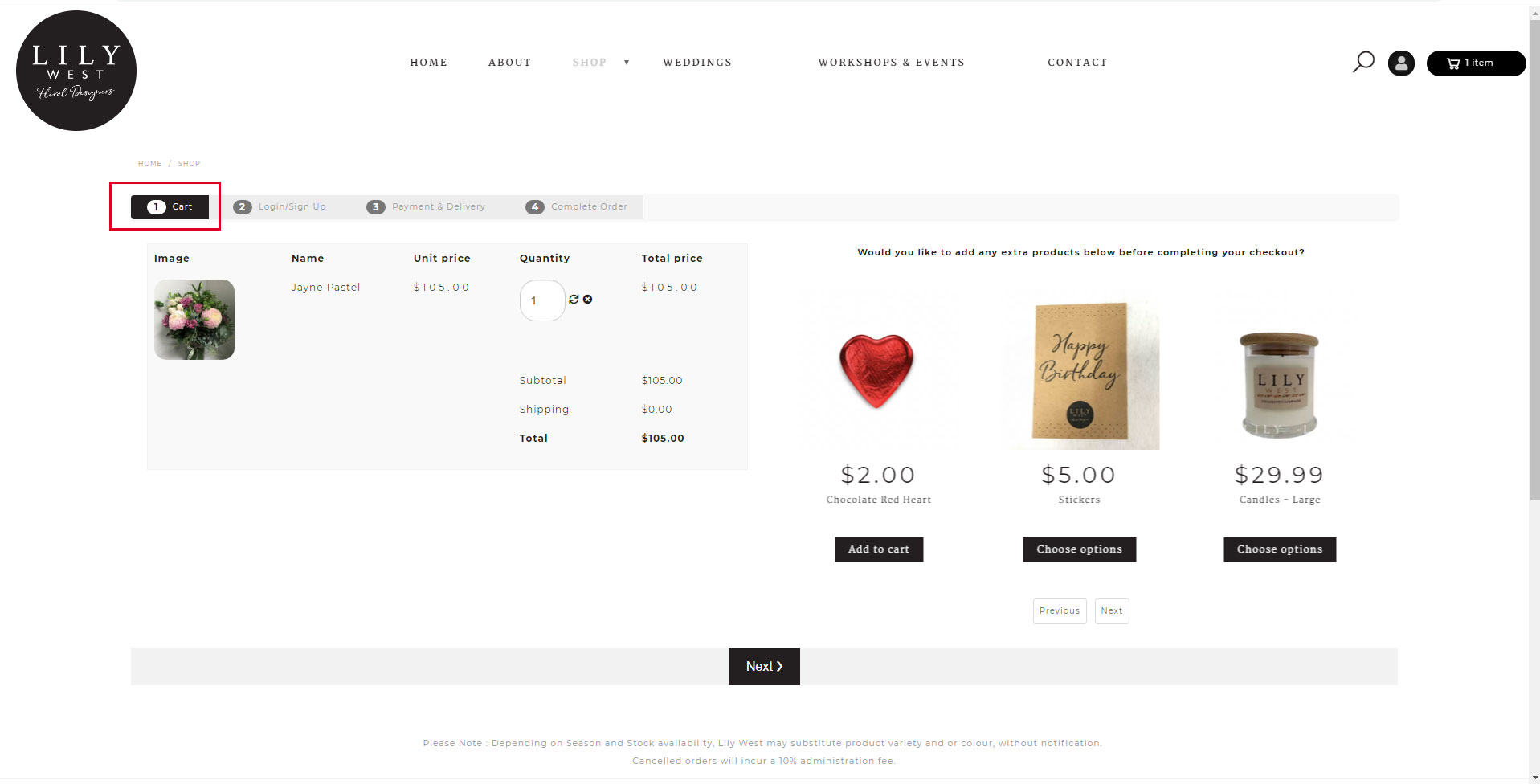
Once a user has logged in they are kicked back to Step 1:
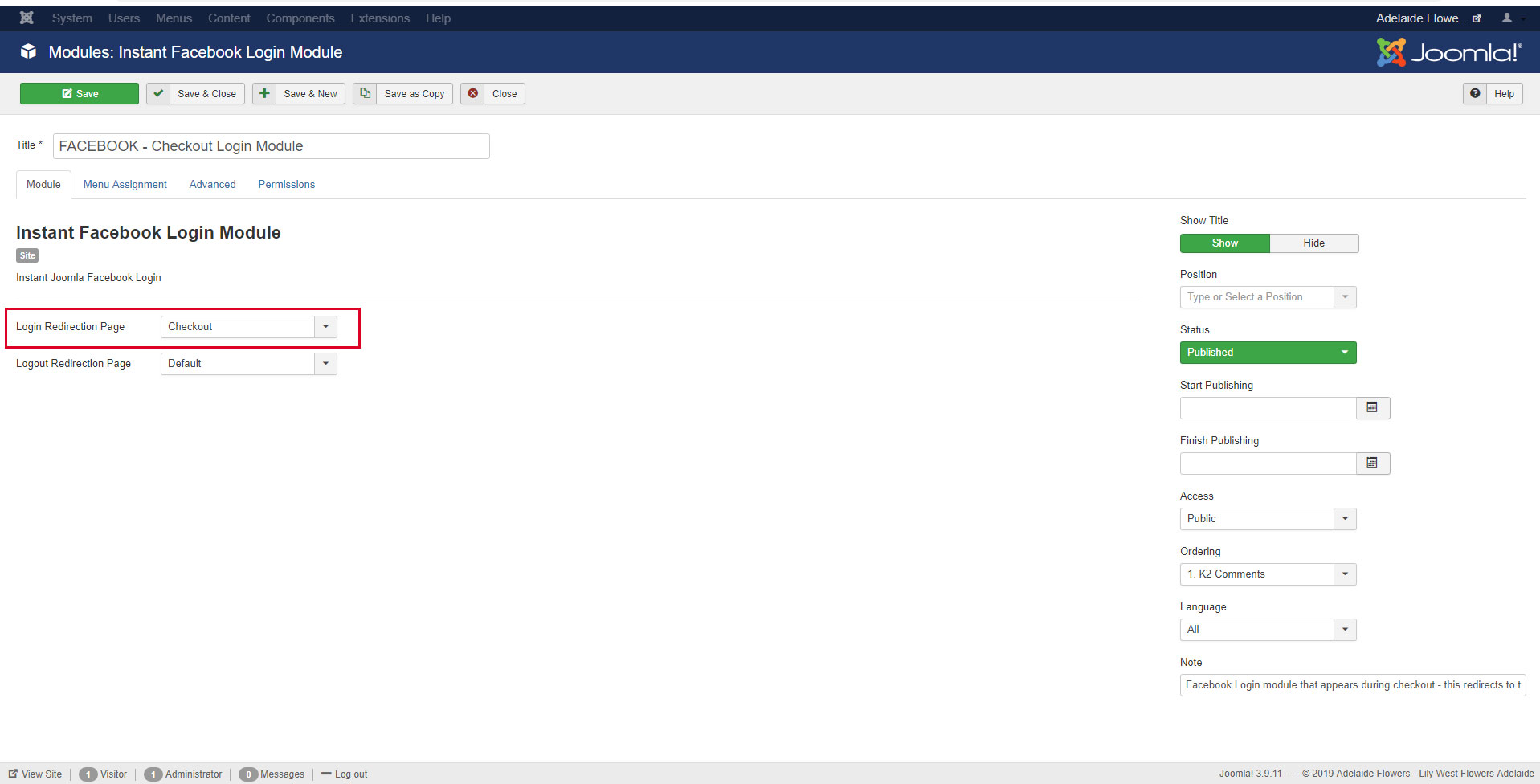
I have set the login module to redirect to the Menu item "Checkout" which links to the hikashop checkout menu - alternatively setting this to "Default" redirects to the main shop page once a user has logged in:
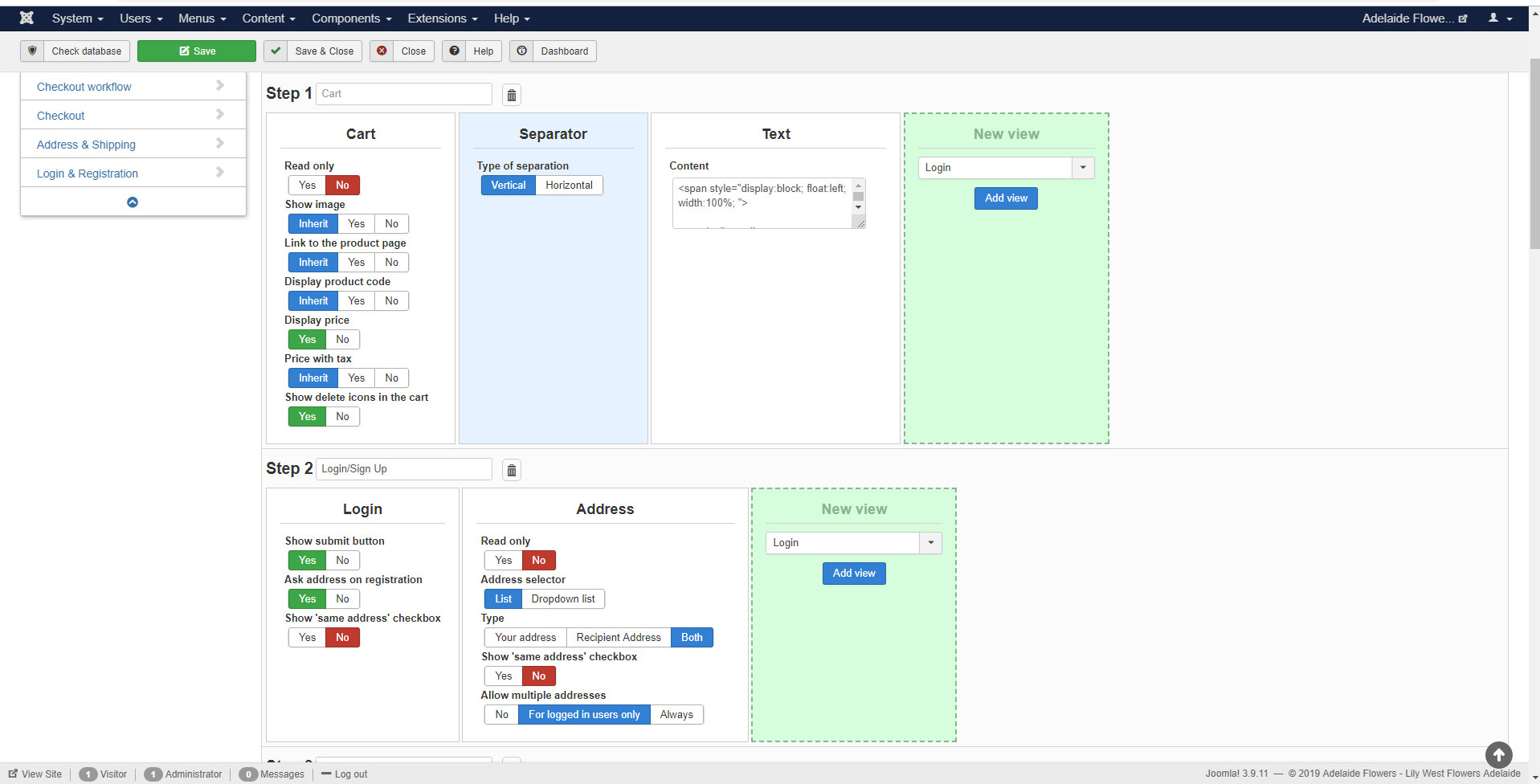
This is a breakdown of the checkout workflow:
This is how I call the Facebook Login module into the checkout - using "modules anywhere" to add the module to "checkout/sub_block_loginn_form.php":
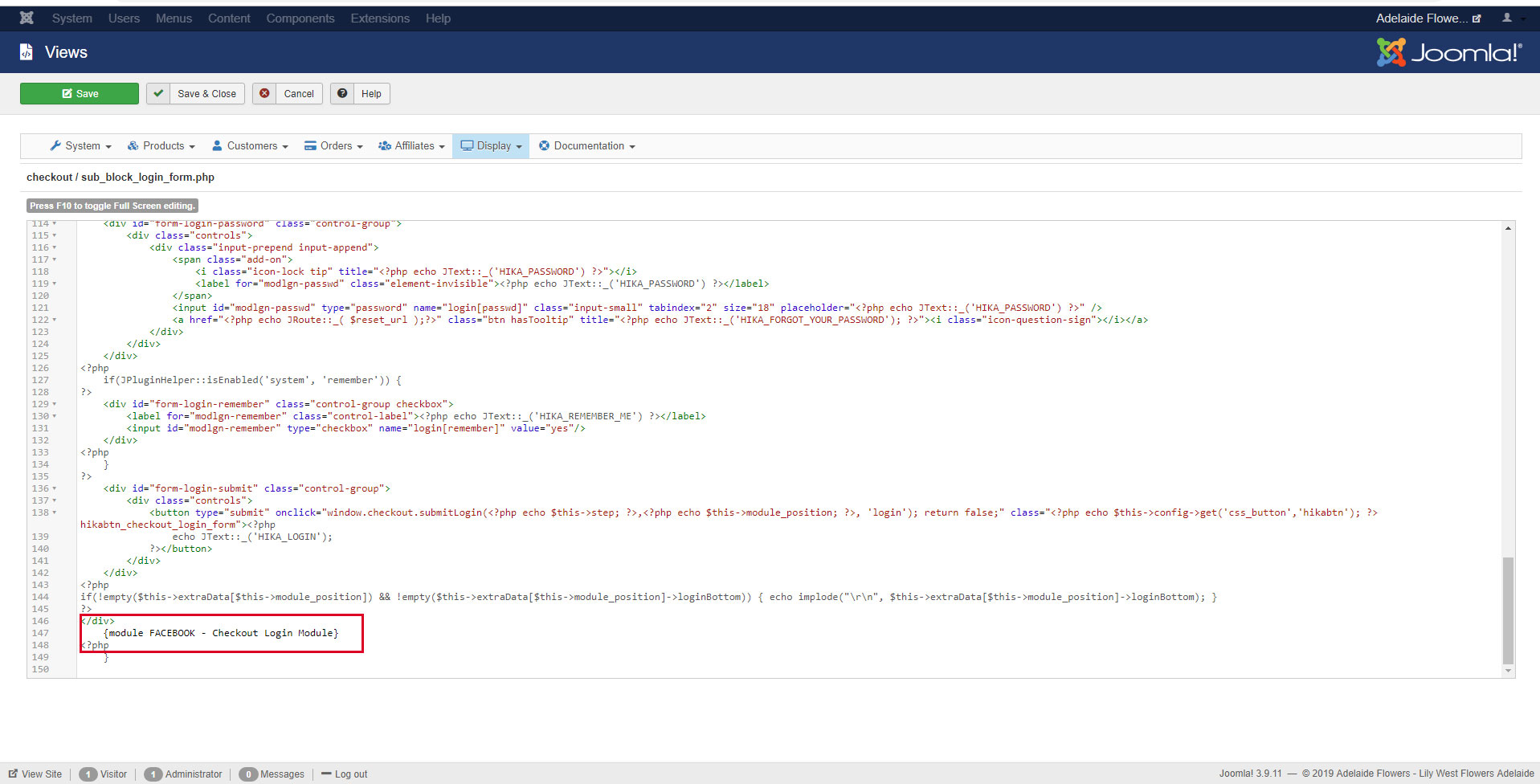
Any assistance would be appreciated.
thanks,
This is where the facebook login module is loaded on Step 2:
Once a user has logged in they are kicked back to Step 1:
I have set the login module to redirect to the Menu item "Checkout" which links to the hikashop checkout menu - alternatively setting this to "Default" redirects to the main shop page once a user has logged in:
This is a breakdown of the checkout workflow:
This is how I call the Facebook Login module into the checkout - using "modules anywhere" to add the module to "checkout/sub_block_loginn_form.php":
Any assistance would be appreciated.
thanks,
Please Log in or Create an account to join the conversation.
7 years 4 weeks ago #310271
by nicolas
Replied by nicolas on topic Re: Facebook Login Connect
Hi,
The issue is with the "login redirection page" you selected in the plugin. This "checkout" you selected is I suppose a menu item of the type HikaShop checkout. In that case, it means that it's redirecting to the main page of the checkout, and thus the first one.
What you should do is create a menu item of the type "external URL" in a hidden menu via the Joomla menu manager. And in it, enter the URL of the second step of your checkout.
Then, select that menu item in the "login redirection page" setting of the plugin so that it can redirect to the second step after the login.
The issue is with the "login redirection page" you selected in the plugin. This "checkout" you selected is I suppose a menu item of the type HikaShop checkout. In that case, it means that it's redirecting to the main page of the checkout, and thus the first one.
What you should do is create a menu item of the type "external URL" in a hidden menu via the Joomla menu manager. And in it, enter the URL of the second step of your checkout.
Then, select that menu item in the "login redirection page" setting of the plugin so that it can redirect to the second step after the login.
Please Log in or Create an account to join the conversation.
7 years 4 weeks ago #310274
by Reev3r
Replied by Reev3r on topic Re: Facebook Login Connect
Hi,
Thank you for the suggestion.
I set up the URL link to direct to :
/adelaide-flower-delivery/checkout/cid-2.html
But when the page reloads it goes to a broken link:
/?Itemid=640
(for some reason it doesn't go to the URL and instead tries to load the menu item ID).
So, unfortunately, that did not resolve the issue.
Thank you for the suggestion.
I set up the URL link to direct to :
/adelaide-flower-delivery/checkout/cid-2.html
But when the page reloads it goes to a broken link:
/?Itemid=640
(for some reason it doesn't go to the URL and instead tries to load the menu item ID).
So, unfortunately, that did not resolve the issue.
Please Log in or Create an account to join the conversation.
7 years 4 weeks ago #310276
by nicolas
Replied by nicolas on topic Re: Facebook Login Connect
Hi,
If the itemid is changed, it's probably that the URL that you entered in the external URL menu item doesn't correspond to the menu item you selected in the "force a menu on checkout" setting of the HIkaShop configuration, or something like that.
I think the solution is still the correct one, but the URL you need to enter in your menu item needs to be different.
Now I don't know the URL of your website so I couldn't check what URLs are used on your checkout so I can't give you the precise URL you would need to use.
Also, cid-2 means that you want to display the third step of the checkout (cid-0 is the first step). So I would recommend to rather use cid-1 so that the customer can see the address view after logging in.
If the itemid is changed, it's probably that the URL that you entered in the external URL menu item doesn't correspond to the menu item you selected in the "force a menu on checkout" setting of the HIkaShop configuration, or something like that.
I think the solution is still the correct one, but the URL you need to enter in your menu item needs to be different.
Now I don't know the URL of your website so I couldn't check what URLs are used on your checkout so I can't give you the precise URL you would need to use.
Also, cid-2 means that you want to display the third step of the checkout (cid-0 is the first step). So I would recommend to rather use cid-1 so that the customer can see the address view after logging in.
Please Log in or Create an account to join the conversation.
7 years 4 weeks ago #310300
by Reev3r
Replied by Reev3r on topic Re: Facebook Login Connect
Hi,
Below is a link to the current site (it's still under development, so isnt technically "live" yet)
www.lilywest.com.au/new/
I tried redirecting to adelaide-flower-delivery/checkout/cid-1.html with the same error result.
Thanks,
Below is a link to the current site (it's still under development, so isnt technically "live" yet)
www.lilywest.com.au/new/
I tried redirecting to adelaide-flower-delivery/checkout/cid-1.html with the same error result.
Thanks,
Please Log in or Create an account to join the conversation.
7 years 4 weeks ago #310311
by nicolas
Replied by nicolas on topic Re: Facebook Login Connect
Hi,
Mmm. That should work. Note that you're doing your tests in a subfolder of your website domain name.
So I think that the issue might be that you should enter /new/adelaide-flower-delivery/checkout/cid-1.html in the external URL.
I can't check on that as France is blocked on your live website and thus I can't see what happens when I try to access www.lilywest.com.au/adelaide-flower-deli.../checkout/cid-1.html
If that's not it, then maybe you want to enter the full URL in the external URL menu item.
Mmm. That should work. Note that you're doing your tests in a subfolder of your website domain name.
So I think that the issue might be that you should enter /new/adelaide-flower-delivery/checkout/cid-1.html in the external URL.
I can't check on that as France is blocked on your live website and thus I can't see what happens when I try to access www.lilywest.com.au/adelaide-flower-deli.../checkout/cid-1.html
If that's not it, then maybe you want to enter the full URL in the external URL menu item.
Please Log in or Create an account to join the conversation.
7 years 4 weeks ago #310323
by Reev3r
Replied by Reev3r on topic Re: Facebook Login Connect
Hi,
Thanks again for the suggestion. I tried both "/new" and the full url " www.lilywest.com.au/new/adelaide-flower-.../checkout/cid-2.html " but both results in the same broken "/?Itemid=640" url return.
I havent tried placing the site outside the subfolder yet ( I can try this once the site is live) I might also contact the facebook login developers and see if they have information on the topic.
I have unblocked Europe from the site, so you are free to investigate if you like.
thanks again for your help.
Thanks again for the suggestion. I tried both "/new" and the full url " www.lilywest.com.au/new/adelaide-flower-.../checkout/cid-2.html " but both results in the same broken "/?Itemid=640" url return.
I havent tried placing the site outside the subfolder yet ( I can try this once the site is live) I might also contact the facebook login developers and see if they have information on the topic.
I have unblocked Europe from the site, so you are free to investigate if you like.
thanks again for your help.
Please Log in or Create an account to join the conversation.
7 years 4 weeks ago #310329
by nicolas
Replied by nicolas on topic Re: Facebook Login Connect
Hi,
Well, I checked the problem on your website. From what I can see the problem is the way the plugin construct the redirection URL.
Apparently, it doesn't work properly with the way the external URL menu item is configured (or maybe it doesn't handle that type of menu item properly).
I'm afraid that this will require modifying something in the code of the facebook connect plugin you're using. I would recommend to first contact them and see if they can look into it.
Well, I checked the problem on your website. From what I can see the problem is the way the plugin construct the redirection URL.
Apparently, it doesn't work properly with the way the external URL menu item is configured (or maybe it doesn't handle that type of menu item properly).
I'm afraid that this will require modifying something in the code of the facebook connect plugin you're using. I would recommend to first contact them and see if they can look into it.
Please Log in or Create an account to join the conversation.
Time to create page: 0.282 seconds