

- Posts: 17
- Thank you received: 2
some of the product does not show next/prev button
14 years 2 months ago #55937
by Yuji
some of the product does not show next/prev button was created by Yuji
myfinaltouchinc.com
username:custo2
password:custo2
I encountered problems in my products on tops categories.
The last 2 item does not show next/prev button when I clicked the item.
and also with the shadowbox when i clicked the image it won't appear on shadow box.
can you send me details on how can i fixed this?
username:custo2
password:custo2
I encountered problems in my products on tops categories.
The last 2 item does not show next/prev button when I clicked the item.
and also with the shadowbox when i clicked the image it won't appear on shadow box.
can you send me details on how can i fixed this?
Please Log in or Create an account to join the conversation.

14 years 2 months ago #55974
by nicolas
Replied by nicolas on topic Re: some of the product does not show next/prev button
For your first problem, I don't know and we don't have the problem.
Could you try to turn on the debug mode of the joomla configuration so that we can see the queries on the product pages ?
Also, can you check that all your products have a valid ordering value in the "ordering" column in the products listing of HikaShop ?
For the shadowbox, the problem is that you have a javascript error with the nivooslider module you're using. Same error as this one:
www.hikashop.com/en/forum/3-bug-report/49686-voting-stars.html
I can recommend you to try to use another shadowbox system for the images:
www.hikashop.com/en/support/documentatio...ox-media-player.html
But I can't guarantee that it will work better.
Could you try to turn on the debug mode of the joomla configuration so that we can see the queries on the product pages ?
Also, can you check that all your products have a valid ordering value in the "ordering" column in the products listing of HikaShop ?
For the shadowbox, the problem is that you have a javascript error with the nivooslider module you're using. Same error as this one:
www.hikashop.com/en/forum/3-bug-report/49686-voting-stars.html
I can recommend you to try to use another shadowbox system for the images:
www.hikashop.com/en/support/documentatio...ox-media-player.html
But I can't guarantee that it will work better.
Please Log in or Create an account to join the conversation.
14 years 2 months ago #56187
by Yuji
Replied by Yuji on topic Re: some of the product does not show next/prev button
I was tried to used shadow box, but it does not work if I trigered my variant changer javascript, i used another javascript to open all the images in new pop-up window,
I just want to know which code handles the update characteristic/variants because everytime I change the value in my product page i want only change product image and data excluding the add to cart input
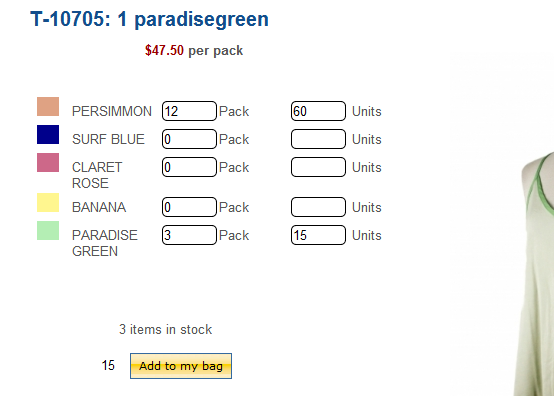
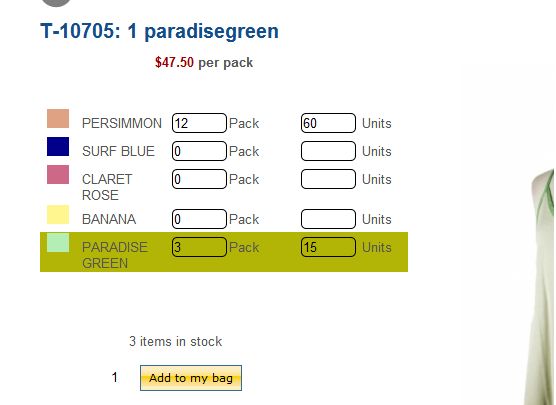
because everytime I Mouseover I notice it refreshes including the add to cart quantity~ i just want to know what to delete to exclude that area from changing-
my characteristic div was hidden
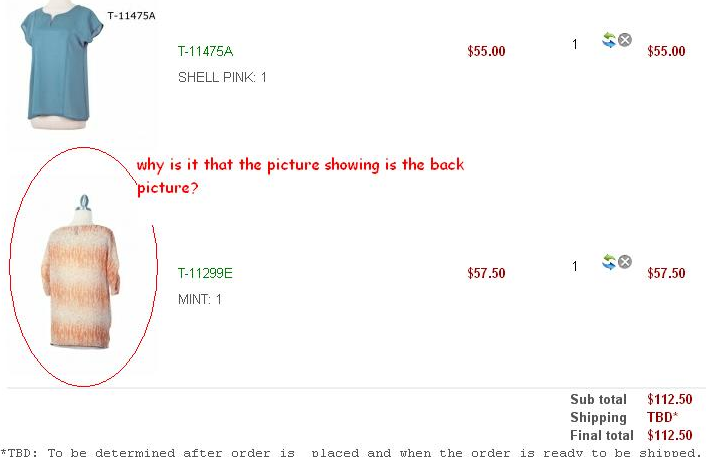
I also notice during my check out tests, the back image of the product is the one shown in cart area how to avoid that?
I just want to know which code handles the update characteristic/variants because everytime I change the value in my product page i want only change product image and data excluding the add to cart input
because everytime I Mouseover I notice it refreshes including the add to cart quantity~ i just want to know what to delete to exclude that area from changing-
my characteristic div was hidden
I also notice during my check out tests, the back image of the product is the one shown in cart area how to avoid that?
Please Log in or Create an account to join the conversation.
14 years 2 months ago #56224
by nicolas
Replied by nicolas on topic Re: some of the product does not show next/prev button
The js of the characteristics is in the file administrator/components/com_hikashop/types/characteristic.php
For the image in the cart, I didn't had the problem with the products I tried on your website. It must be a problem with that product. Please double check its images.
For the image in the cart, I didn't had the problem with the products I tried on your website. It must be a problem with that product. Please double check its images.
The following user(s) said Thank You: Yuji
Please Log in or Create an account to join the conversation.
14 years 2 days ago #67073
by Yuji
Replied by Yuji on topic Re: some of the product does not show next/prev button
Which PHP file do I need to override to be able to update my next/prev buttons for our website?
this is the website that has multiple custom fields per color of the product.
this is the website that has multiple custom fields per color of the product.
Please Log in or Create an account to join the conversation.
14 years 2 days ago #67154
by nicolas
Replied by nicolas on topic Re: some of the product does not show next/prev button
We cannot login anymore on your website so we can't check that.
Please Log in or Create an account to join the conversation.
14 years 2 days ago - 14 years 2 days ago #67159
by Yuji
Replied by Yuji on topic Re: some of the product does not show next/prev button
Thank you for the response I just update the whole version of the hikashop business edition, and override my previous changes
the updates really works and the item and arrow does not jump from one category to another the products unlike before, Thank you
the updates really works and the item and arrow does not jump from one category to another the products unlike before, Thank you
Last edit: 14 years 2 days ago by Yuji.
Please Log in or Create an account to join the conversation.
Time to create page: 0.222 seconds