

- Posts: 35
- Thank you received: 0
Dynamic Joomla menus from HikaShop Prod. Cat.
14 years 2 months ago #58732
by evolution
Dynamic Joomla menus from HikaShop Prod. Cat. was created by evolution
Hi,
I’m looking for a way to have my Joomla menu structure dynamically populated from my HikaShop product codes.
Let’s say that these are my product categories:
Cat1\Cat1A\Cat1A1
Cat1\Cat1A\Cat1A2
Cat1\Cat1B\Cat1B1
Cat1\Cat1B\Cat1B2
. . . . . . .
Cat8\Cat8Z\Cat8Z8
Cat8\Cat8Z\Cat8Z9
On my Joomla main menu, I want to see:
Home | Cat 1 | Cat 2 | etc | Cat 8
When I mouse-over “Cat 1”, I get a drop-down menu with “Cat1A, Cat1B” etc, etc.
When I add “Cat 9”, I want my Joomla menu to automatically become populated with the new category and sub-categories.
I know that I can create the menu structure manually in Joomla and then match those menus manually with appropriate Joomla Product/Category listing modules, but I see this as a very time-consuming option and I am looking for a more intelligent way to do this.
I’m looking for a way to have my Joomla menu structure dynamically populated from my HikaShop product codes.
Let’s say that these are my product categories:
Cat1\Cat1A\Cat1A1
Cat1\Cat1A\Cat1A2
Cat1\Cat1B\Cat1B1
Cat1\Cat1B\Cat1B2
. . . . . . .
Cat8\Cat8Z\Cat8Z8
Cat8\Cat8Z\Cat8Z9
On my Joomla main menu, I want to see:
Home | Cat 1 | Cat 2 | etc | Cat 8
When I mouse-over “Cat 1”, I get a drop-down menu with “Cat1A, Cat1B” etc, etc.
When I add “Cat 9”, I want my Joomla menu to automatically become populated with the new category and sub-categories.
I know that I can create the menu structure manually in Joomla and then match those menus manually with appropriate Joomla Product/Category listing modules, but I see this as a very time-consuming option and I am looking for a more intelligent way to do this.
Please Log in or Create an account to join the conversation.

14 years 2 months ago #58796
by nicolas
Replied by nicolas on topic Re: Dynamic Joomla menus from HikaShop Prod. Cat.
Hi,
You can that with three solutions.
The first one is to create a category listing module as explained here:
www.hikashop.com/en/support/documentatio...ml#categories_module
You will find a example of result in the bottom left area of our demo website. It uses an accordion effect.
There is an integration between maximenu and HikaShop for that:
www.joomlack.fr/en/Joomla-extensions/Men...ximenu-hikashop.html
There is an accordion module for something similar to the first possibility here:
extensions.joomla.org/extensions/extensi...hop-extensions/21225
You can that with three solutions.
The first one is to create a category listing module as explained here:
www.hikashop.com/en/support/documentatio...ml#categories_module
You will find a example of result in the bottom left area of our demo website. It uses an accordion effect.
There is an integration between maximenu and HikaShop for that:
www.joomlack.fr/en/Joomla-extensions/Men...ximenu-hikashop.html
There is an accordion module for something similar to the first possibility here:
extensions.joomla.org/extensions/extensi...hop-extensions/21225
Please Log in or Create an account to join the conversation.
14 years 2 months ago #58857
by evolution
Replied by evolution on topic Re: Dynamic Joomla menus from HikaShop Prod. Cat.
Thanks Nicolas,
I tried that, but on my system when I select "Display | Content Modules | New" I get a different screen (attached).
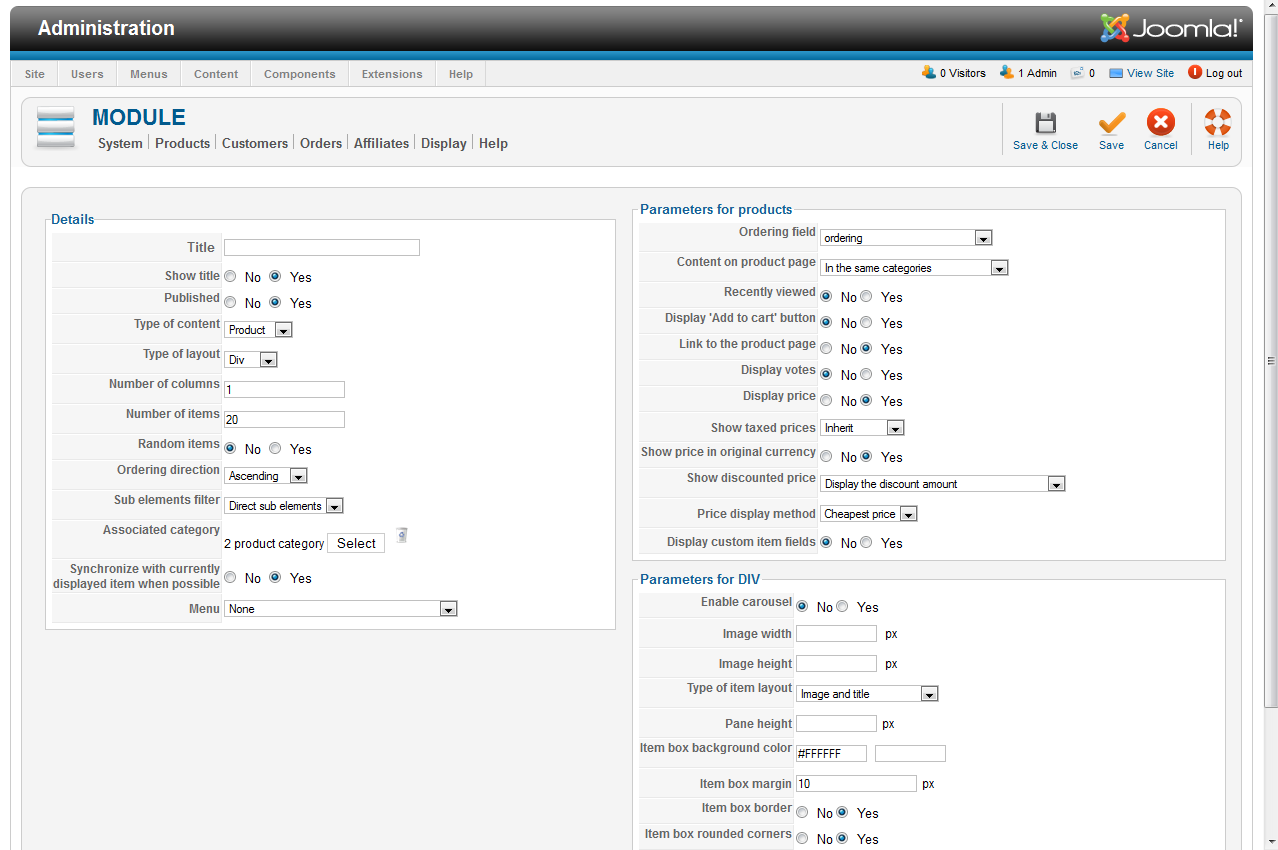
Your example looks more like my "Display | Content Menus | New".
I have version HikaShop v1.5.8 with Joomla v2.5.6.
Is there some configuration setting I may be missing?
Regards.
I tried that, but on my system when I select "Display | Content Modules | New" I get a different screen (attached).
Your example looks more like my "Display | Content Menus | New".
I have version HikaShop v1.5.8 with Joomla v2.5.6.
Is there some configuration setting I may be missing?
Regards.
Please Log in or Create an account to join the conversation.
14 years 2 months ago #58863
by nicolas
Replied by nicolas on topic Re: Dynamic Joomla menus from HikaShop Prod. Cat.
You need to configure your module in the same way as the module in our demo website. There is a link to it in the tutorial I gave you.
For example, you need to select "category" in "type of content", "list" in "type of layout", and turn off the "synchronize with currently displayed item when possible".
For example, you need to select "category" in "type of content", "list" in "type of layout", and turn off the "synchronize with currently displayed item when possible".
Please Log in or Create an account to join the conversation.
14 years 2 months ago #58866
by evolution
Replied by evolution on topic Re: Dynamic Joomla menus from HikaShop Prod. Cat.
Thanks Nicolas,
I will give that a try, but I'm trying to get the menu at the top of the page to be generated dynamically, not the category module at the bottom left of your demo site.
Regards.
I will give that a try, but I'm trying to get the menu at the top of the page to be generated dynamically, not the category module at the bottom left of your demo site.
Regards.
Please Log in or Create an account to join the conversation.
14 years 2 months ago #58870
by nicolas
Replied by nicolas on topic Re: Dynamic Joomla menus from HikaShop Prod. Cat.
Then you should try the maximenu CK solution I proposed.
Please Log in or Create an account to join the conversation.
14 years 2 months ago #58872
by evolution
Replied by evolution on topic Re: Dynamic Joomla menus from HikaShop Prod. Cat.
Thanks Nicolas.
Please Log in or Create an account to join the conversation.
Time to create page: 0.163 seconds