

- Posts: 7
- Thank you received: 0
Facebook buttons dont show in Chrome
14 years 1 month ago - 14 years 1 month ago #59181
by ag0g0girl
Facebook buttons dont show in Chrome was created by ag0g0girl
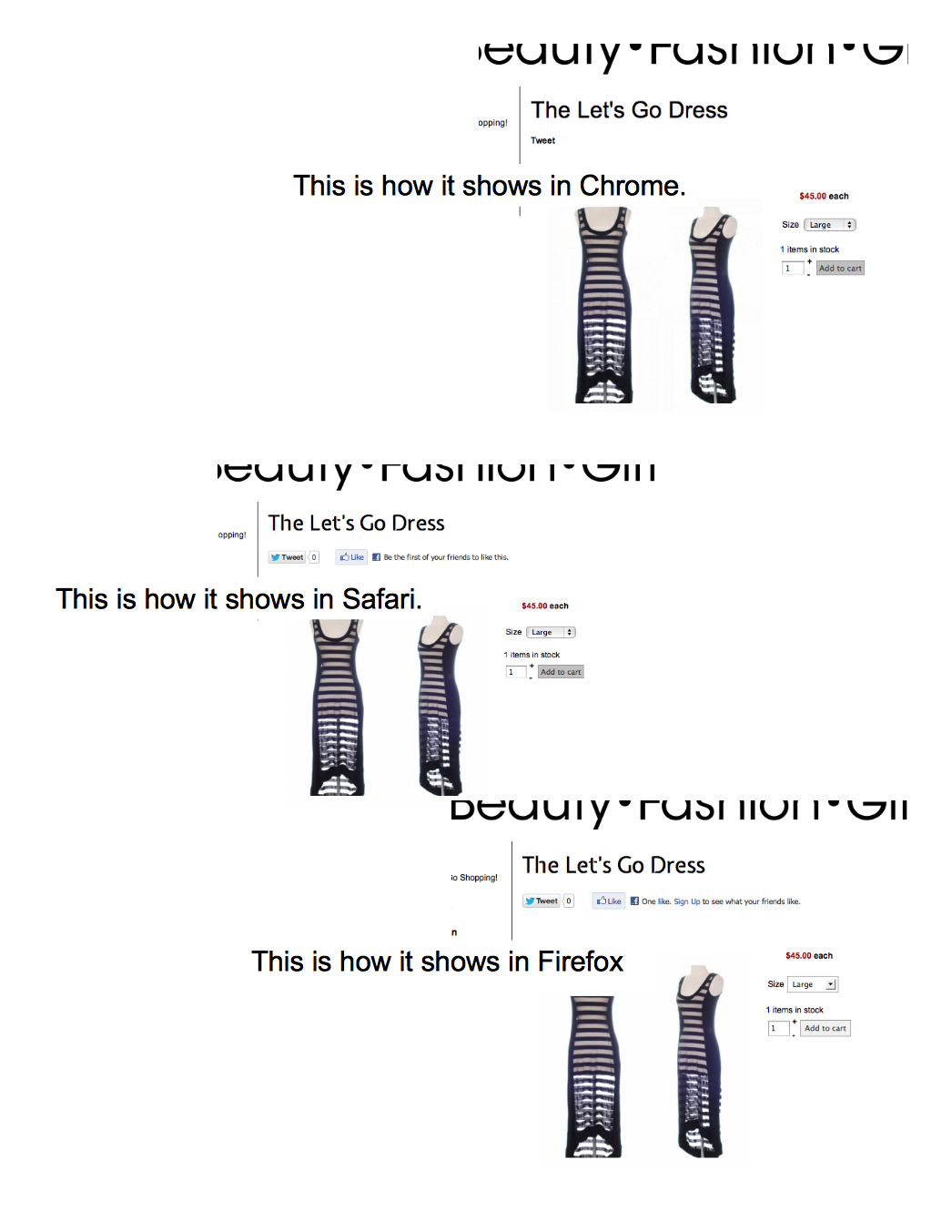
Before I attempt to put my shop into a facebook app, I just wanted to make sure the facebook button would show. I see now that the social networking plugin doesnt show the same on Chrome. I tried it in Safari, and it shows up. Is this a bug or have I dont something wrong? Site is here
http:/highstreetchick.com
Last edit: 14 years 1 month ago by ag0g0girl. Reason: Ad url
Please Log in or Create an account to join the conversation.

14 years 1 month ago #59229
by nicolas
Replied by nicolas on topic Re: Facebook buttons dont show in Chrome
Hi,
I tried with chrome and it's displaying fine for me. Maybe it's a problem of cache/cookies on your browser. You should try to clear them.
I tried with chrome and it's displaying fine for me. Maybe it's a problem of cache/cookies on your browser. You should try to clear them.
Please Log in or Create an account to join the conversation.
14 years 1 month ago #59243
by ag0g0girl
Replied by ag0g0girl on topic Re: Facebook buttons dont show in Chrome
I dont think so. I clear my cache a lot cause I am always working on the sites. I cleared the cache on Joomla too. I see that on the iphone version of Chrome tho.
Are you on a PC or a Mac?
Are you on a PC or a Mac?
Please Log in or Create an account to join the conversation.
14 years 1 month ago #59246
by nicolas
Replied by nicolas on topic Re: Facebook buttons dont show in Chrome
I'm on a PC.
Please Log in or Create an account to join the conversation.
14 years 1 month ago #59261
by ag0g0girl
Replied by ag0g0girl on topic Re: Facebook buttons dont show in Chrome
Whew, I'm on a Mac.
Thx
Thx
Please Log in or Create an account to join the conversation.
Less
More
- Posts: 20
- Thank you received: 0
13 years 10 months ago #73349
by AcresPetProducts
Replied by AcresPetProducts on topic Re: Facebook buttons dont show in Chrome
Hello
We are also having this same issue although across all browsers.
Our cache is cleared and we have tried from multiple computers.
The Hikashop Social Plugin is enabled and configured as per documentation.
It simply does not show Facebook on any of our product pages at all.
Have we missed something at all?
You can see (or more accurately not see) the facebook issue on any of the products on our website: www.acrespetproducts.com
Many thanks for your anticipated support.
All the best
Acres
We are also having this same issue although across all browsers.
Our cache is cleared and we have tried from multiple computers.
The Hikashop Social Plugin is enabled and configured as per documentation.
It simply does not show Facebook on any of our product pages at all.
Have we missed something at all?
You can see (or more accurately not see) the facebook issue on any of the products on our website: www.acrespetproducts.com
Many thanks for your anticipated support.
All the best
Acres
Please Log in or Create an account to join the conversation.
13 years 10 months ago #73607
by nicolas
Replied by nicolas on topic Re: Facebook buttons dont show in Chrome
Hi,
That's not the same issue. Your issue is that the plugin is not configured properly so it does not do anything while the issue of ag0g0girl is coming from a browser specific display issue.
In your case, it comes from the URL of the button itself which is not correct. You will have to replace the code:
if($plugin->params==1) $options.='font=lucida%2Bgrande&';
to:
if($plugin->params==1) $options.='font=lucida%20grande&';
in the file plugins/content/hikashopsocial/hikashopsocial.php to fix it.
That's not the same issue. Your issue is that the plugin is not configured properly so it does not do anything while the issue of ag0g0girl is coming from a browser specific display issue.
In your case, it comes from the URL of the button itself which is not correct. You will have to replace the code:
if($plugin->params==1) $options.='font=lucida%2Bgrande&';
to:
if($plugin->params==1) $options.='font=lucida%20grande&';
in the file plugins/content/hikashopsocial/hikashopsocial.php to fix it.
The following user(s) said Thank You: AcresPetProducts
Please Log in or Create an account to join the conversation.
Less
More
- Posts: 20
- Thank you received: 0
13 years 10 months ago #73637
by AcresPetProducts
Replied by AcresPetProducts on topic Re: Facebook buttons dont show in Chrome
Hi Nicolas
Thanks for the reply.
I've updated the hikashopsocial.php as below but the Facebook icon is still not showing on the site.
I've attached screenshot of the Hikashop Social Networks Plugin configuration page for reference. I've removed the Facebook admin number from view but it is entered correctly.
All the best
Acres
Thanks for the reply.
I've updated the hikashopsocial.php as below but the Facebook icon is still not showing on the site.
I've attached screenshot of the Hikashop Social Networks Plugin configuration page for reference. I've removed the Facebook admin number from view but it is entered correctly.
All the best
Acres
Please Log in or Create an account to join the conversation.
13 years 10 months ago #73705
by nicolas
Replied by nicolas on topic Re: Facebook buttons dont show in Chrome
I'm sorry but I'm seeing the button on your website:
www.acrespetproducts.com/index.php/compo...ood-3kg-bag?Itemid=0
www.acrespetproducts.com/index.php/compo...ood-3kg-bag?Itemid=0
The following user(s) said Thank You: AcresPetProducts
Please Log in or Create an account to join the conversation.
Less
More
- Posts: 20
- Thank you received: 0
13 years 10 months ago #73838
by AcresPetProducts
Replied by AcresPetProducts on topic Re: Facebook buttons dont show in Chrome
Hi there
Yes I see it now - our fault - we were looking at it in Chrome on this occasion.
For some reason it doesn't show in Chrome but in all other browsers no problem.
All the best
Yes I see it now - our fault - we were looking at it in Chrome on this occasion.
For some reason it doesn't show in Chrome but in all other browsers no problem.
All the best
Please Log in or Create an account to join the conversation.
13 years 10 months ago #73839
by nicolas
Replied by nicolas on topic Re: Facebook buttons dont show in Chrome
I'm using chrome and can see it too.
Please Log in or Create an account to join the conversation.
Less
More
- Posts: 20
- Thank you received: 0
13 years 10 months ago #73848
by AcresPetProducts
Replied by AcresPetProducts on topic Re: Facebook buttons dont show in Chrome
We can see it now. Was very odd.
Thank you very much.
A similar related/non-related issue now has shown up:
We have enabled the carousel feature for our products which you can see on the homepage. When we click through from there on the first Dot - 15kg bag of Dog Food - you can see that the Facebook is Liked 1 time. If you then click through to the product from the main menu - "Acres Complete Dog Food - ORDER here" and then on the 15kg bag it is liked 0 times.
Looking at the url's for both they are slightly different but do point to the same product. What is happening here and how do we correct it so that the likes are calculated on the product regardless of where it is linking from?
Many thanks for your help so far - it has been really great thanks! We are most impressed with the product and the support!
All the best
Acres
Thank you very much.
A similar related/non-related issue now has shown up:
We have enabled the carousel feature for our products which you can see on the homepage. When we click through from there on the first Dot - 15kg bag of Dog Food - you can see that the Facebook is Liked 1 time. If you then click through to the product from the main menu - "Acres Complete Dog Food - ORDER here" and then on the 15kg bag it is liked 0 times.
Looking at the url's for both they are slightly different but do point to the same product. What is happening here and how do we correct it so that the likes are calculated on the product regardless of where it is linking from?
Many thanks for your help so far - it has been really great thanks! We are most impressed with the product and the support!
All the best
Acres
Please Log in or Create an account to join the conversation.
13 years 10 months ago #74100
by nicolas
Replied by nicolas on topic Re: Facebook buttons dont show in Chrome
Hi,
That's because the current menu is different so it produces different URLs.
In each module of HikaShop, you can select the menu which should be used for the products. There, make sure that you select your product/category listing menu and it will result in the same URL and thus facebook will only see one page.
That's because the current menu is different so it produces different URLs.
In each module of HikaShop, you can select the menu which should be used for the products. There, make sure that you select your product/category listing menu and it will result in the same URL and thus facebook will only see one page.
Please Log in or Create an account to join the conversation.
Less
More
- Posts: 20
- Thank you received: 0
12 years 10 months ago #130772
by AcresPetProducts
Replied by AcresPetProducts on topic Re: Facebook buttons dont show in Chrome
Hi Nicolas
I've struggled with this for some time now. I've changed the product category to product category/category but it still shows 2 different URL's.
If we select from the menu it will show this link:
/acres-complete-dog-food-product-list/product/1-acres-complete-dog-food-15kg-bag
If we select from the Carousel it will show this link:
/component/hikashop/product/1-acres-complete-dog-food-15kg-bag?Itemid=0
I can't figure this out I'm afraid. I've tried doing this on my own but I'm at a loss to see what I am doing wrong.
If you could please help.
Many thanks
I've struggled with this for some time now. I've changed the product category to product category/category but it still shows 2 different URL's.
If we select from the menu it will show this link:
/acres-complete-dog-food-product-list/product/1-acres-complete-dog-food-15kg-bag
If we select from the Carousel it will show this link:
/component/hikashop/product/1-acres-complete-dog-food-15kg-bag?Itemid=0
I can't figure this out I'm afraid. I've tried doing this on my own but I'm at a loss to see what I am doing wrong.
If you could please help.
Many thanks
Please Log in or Create an account to join the conversation.

12 years 10 months ago #130830
by Xavier
Replied by Xavier on topic Re: Facebook buttons dont show in Chrome
Hi,
In the Carousel module options, you have to select the menu "acres-complete-dog-food-product-list" in the "menu" option.
In the Carousel module options, you have to select the menu "acres-complete-dog-food-product-list" in the "menu" option.
Please Log in or Create an account to join the conversation.
Less
More
- Posts: 20
- Thank you received: 0
12 years 10 months ago - 12 years 10 months ago #130870
by AcresPetProducts

That's brilliant thank you!
So easy when you know where and how!!
Much appreciated...
Replied by AcresPetProducts on topic Re: Facebook buttons dont show in Chrome
That's brilliant thank you!
So easy when you know where and how!!
Much appreciated...
Last edit: 12 years 10 months ago by AcresPetProducts.
Please Log in or Create an account to join the conversation.
Time to create page: 0.285 seconds