

- Posts: 20
- Thank you received: 0
Shadowbox works on everything except variants
13 years 10 months ago - 13 years 10 months ago #75091
by further
Shadowbox works on everything except variants was created by further
I have set up Shadowbox Media Player plugin to Get Images to cycle through with arrows when the larger image popsup as you suggested in the documentation
at this link
and it is working great on products that do not have additional variants.
On products that do have variants when you switch to one of the other options and the new images come up when you click on them they do not use the Shadowbox ... they simply open on a blank screen. You can see what I mean on this page .
My Joomla and Hikashop are up to date ... Joomla! 2.5.7 Stable and Hikashop 2.0.0
You will notice that the first image works when you get to the page but if you switch the variant for Pattern to one of the other ones then those images do not function correctly on the clicked popup. Any ideas as to what is causing that?
Also just noticed that the main image is showing 1 of 12 because it is cycling through the images for every variant rather than just the 2 images for the main product.
On products that do have variants when you switch to one of the other options and the new images come up when you click on them they do not use the Shadowbox ... they simply open on a blank screen. You can see what I mean on this page .
My Joomla and Hikashop are up to date ... Joomla! 2.5.7 Stable and Hikashop 2.0.0
You will notice that the first image works when you get to the page but if you switch the variant for Pattern to one of the other ones then those images do not function correctly on the clicked popup. Any ideas as to what is causing that?
Also just noticed that the main image is showing 1 of 12 because it is cycling through the images for every variant rather than just the 2 images for the main product.
Last edit: 13 years 10 months ago by further. Reason: just noticed an additional issue
Please Log in or Create an account to join the conversation.

13 years 10 months ago #75351
by nicolas
Replied by nicolas on topic Re: Shadowbox works on everything except variants
The shadowbox Media Player cannot work with dynamically loaded images. So either you don't use that extension and use the default shadowbox of joomla, or you need to have all your images on the main product and you will need to edit the file "show" of the view "product" via the menu Display->Views and remove the code:
$this->setLayout('show_block_img');
echo $this->loadTemplate();
$this->setLayout('show_block_img');
echo $this->loadTemplate();
Please Log in or Create an account to join the conversation.
13 years 10 months ago #75422
by further
Replied by further on topic Re: Shadowbox works on everything except variants
Ok ... thanks. I think I will revert back to the default instead since I have lots of characteristics in operation.
Please Log in or Create an account to join the conversation.
12 years 7 months ago #142340
by sacou0
Replied by sacou0 on topic Shadowbox works on everything except variants
Hello.
Sorry to bump such an old thread but has there been any progress in this area?
Thanks
Sorry to bump such an old thread but has there been any progress in this area?
Thanks
Please Log in or Create an account to join the conversation.

12 years 7 months ago #142347
by Jerome
Jerome - Obsidev.com
HikaMarket & HikaSerial developer / HikaShop core dev team.
Also helping the HikaShop support team when having some time or couldn't sleep.
By the way, do not send me private message, use the "contact us" form instead.
Replied by Jerome on topic Shadowbox works on everything except variants
Hi,
www.hikashop.com/support/support/documen...ashop-changelog.html
HikaShop 2.2.3 have a native integration with Shadowbox.
Regards,
www.hikashop.com/support/support/documen...ashop-changelog.html
HikaShop 2.2.3 have a native integration with Shadowbox.
Regards,
Jerome - Obsidev.com
HikaMarket & HikaSerial developer / HikaShop core dev team.
Also helping the HikaShop support team when having some time or couldn't sleep.
By the way, do not send me private message, use the "contact us" form instead.
Please Log in or Create an account to join the conversation.
12 years 7 months ago #142354
by sacou0
Replied by sacou0 on topic Shadowbox works on everything except variants
Hi Jerome.
Thank you for your quick reply.
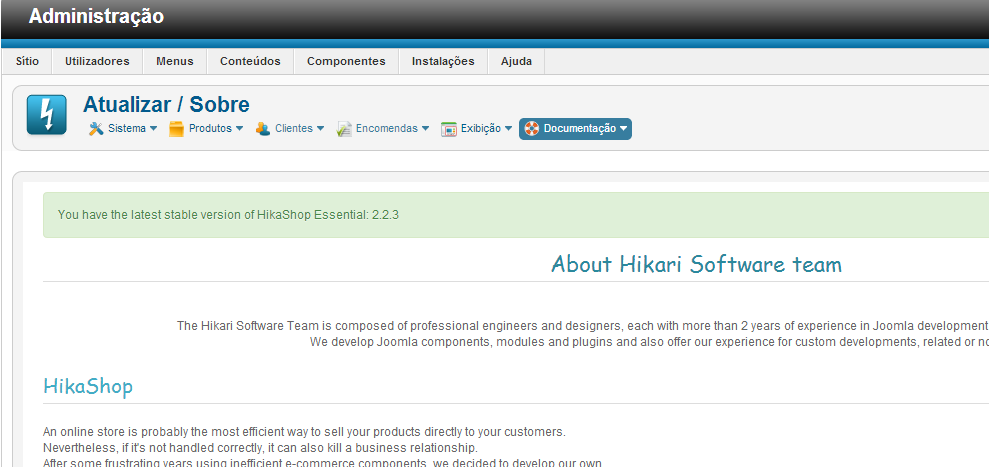
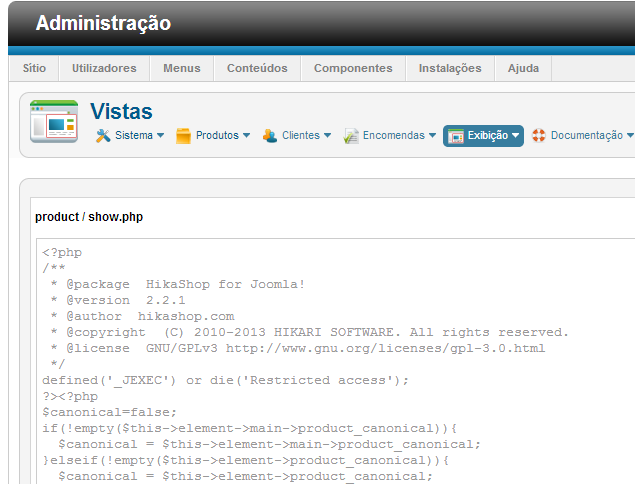
In fact we are using version 2.2.3 as you can see from the screenshot below, yet most of our .php files are from version 2.2.1
We did start out by testing the free version 2.2.1 and proceeded to purchase the essential version after testing.
When we installed essential version it automatically updated to version 2.2.3
Are we missing something here?
Thank you for your quick reply.
In fact we are using version 2.2.3 as you can see from the screenshot below, yet most of our .php files are from version 2.2.1
We did start out by testing the free version 2.2.1 and proceeded to purchase the essential version after testing.
When we installed essential version it automatically updated to version 2.2.3
Are we missing something here?
Please Log in or Create an account to join the conversation.
12 years 7 months ago #142406
by Jerome
Jerome - Obsidev.com
HikaMarket & HikaSerial developer / HikaShop core dev team.
Also helping the HikaShop support team when having some time or couldn't sleep.
By the way, do not send me private message, use the "contact us" form instead.
Replied by Jerome on topic Shadowbox works on everything except variants
Hi,
When you create a view override, you override the current view file.
So when you update, you keep your overrides. It is the base of the feature of the overrides.
So if you have an override for a view originally made in HikaShop 2.2.1, the used file will stay the same and the version indicate from "when" you made your override.
You can remove your override and restore the original file (at this moment, from the current version : 2.2.3) or you can patch your override if you want to keep your modifications.
Regards,
When you create a view override, you override the current view file.
So when you update, you keep your overrides. It is the base of the feature of the overrides.
So if you have an override for a view originally made in HikaShop 2.2.1, the used file will stay the same and the version indicate from "when" you made your override.
You can remove your override and restore the original file (at this moment, from the current version : 2.2.3) or you can patch your override if you want to keep your modifications.
Regards,
Jerome - Obsidev.com
HikaMarket & HikaSerial developer / HikaShop core dev team.
Also helping the HikaShop support team when having some time or couldn't sleep.
By the way, do not send me private message, use the "contact us" form instead.
Please Log in or Create an account to join the conversation.
Time to create page: 0.197 seconds