

- Posts: 15
- Thank you received: 0
Checkout workflow and recaptcha
13 years 3 months ago #107817
by brynseion
Checkout workflow and recaptcha was created by brynseion
I have the following checkout workflow in Hikashop - login,address,coupon_cart,payment_status_confirm,end
But what is happening is that login and address display on the same page. Not a terrible problem except I want to use Recaptcha and that only has the position options of after password or email which positions it in between login and address. I have gone round in circles trying to resolve but because it is not doing what I think it should be doing (ie login and address to display on different pages), I cannot find a solution - perhaps I need to upgrade to resolve this?
Any help gratefully received - many thanks.
But what is happening is that login and address display on the same page. Not a terrible problem except I want to use Recaptcha and that only has the position options of after password or email which positions it in between login and address. I have gone round in circles trying to resolve but because it is not doing what I think it should be doing (ie login and address to display on different pages), I cannot find a solution - perhaps I need to upgrade to resolve this?
Any help gratefully received - many thanks.
Please Log in or Create an account to join the conversation.

Less
More
- Posts: 12953
- Thank you received: 1778
13 years 3 months ago #107823
by Mohamed Thelji
Replied by Mohamed Thelji on topic Checkout workflow and recaptcha
Hi,
Upgrading your Hikashop version should be a good thing to do , but I think that the solution would just be to add another step through you checkout workflow ("Hikashop->System->Configuration->'checkout'").
Hope this will help you a little.
Upgrading your Hikashop version should be a good thing to do
, but I think that the solution would just be to add another step through you checkout workflow ("Hikashop->System->Configuration->'checkout'").Hope this will help you a little.
Please Log in or Create an account to join the conversation.
13 years 3 months ago #107832
by brynseion
Replied by brynseion on topic Checkout workflow and recaptcha
Sorry Mohamed but I don't know what you mean by 'another step'. These are the only steps I need - login,address,coupon_cart,payment_status_confirm,end - but I want login on one page (with Recaptcha) and then the next page for Address and so on....The other pages work fine. Hope that makes sense....
chris
chris
Please Log in or Create an account to join the conversation.
Less
More
- Posts: 12953
- Thank you received: 1778
13 years 3 months ago #107837
by Mohamed Thelji
Replied by Mohamed Thelji on topic Checkout workflow and recaptcha
Sure, but I just wanted you to add another step to your checkout workflow, so you'll just have to :
- Go to "Hikashop->System->Configuration->'Checkout'"
- Set the "Advanced checkout workflow edition" option to YES
- Add another step and put your address, coupon_cart, payment_status_confirm, end on it .
.
- Go to "Hikashop->System->Configuration->'Checkout'"
- Set the "Advanced checkout workflow edition" option to YES
- Add another step and put your address, coupon_cart, payment_status_confirm, end on it
. Please Log in or Create an account to join the conversation.
13 years 3 months ago #107859
by brynseion
Replied by brynseion on topic Checkout workflow and recaptcha
Are you suggesting adding in an empty step? I have tried that and it just disappears when I save and the configuration goes back to what it was before. Have you heard of anyone else having this problem?
Thanks for help to date but would be really grateful if you had any other ideas to try - thanks.
Chris
Thanks for help to date but would be really grateful if you had any other ideas to try - thanks.
Chris
Please Log in or Create an account to join the conversation.

13 years 3 months ago #107922
by Xavier
Replied by Xavier on topic Checkout workflow and recaptcha
Hi,
To move the recaptcha where you want, you can edit the plugin and replace, for example, the line:
By:
To place it after the vat field.
To move the recaptcha where you want, you can edit the plugin and replace, for example, the line:
Code:
$components['com_hikashop'] = array('view' => array('checkout','user'),'viewvar' => 'ctrl', 'lengthafter' => 500 , 'tdclass' => 'key', 'email' => 'data\[register\]\[email_confirm\]','password' => 'data\[register\]\[password2\]');
Code:
$components['com_hikashop'] = array('view' => array('checkout','user'),'viewvar' => 'ctrl', 'lengthafter' => 500 , 'tdclass' => 'key', 'email' => 'data\[register\]\[email_confirm\]','password' => 'data\[address\]\[address_vat\]');
To place it after the vat field.
Please Log in or Create an account to join the conversation.
13 years 3 months ago #107940
by brynseion
Replied by brynseion on topic Checkout workflow and recaptcha
That's great - thanks Xavier.
My ideal would be however one page - login + recaptcha / next page - address, etc. Is there no way I can get this in Hikashop? Just to remind you that this is my configuration - login,address,coupon_cart,payment_status_confirm,end - so it ought to be happening, surely? Please advise....thanks.
chris
My ideal would be however one page - login + recaptcha / next page - address, etc. Is there no way I can get this in Hikashop? Just to remind you that this is my configuration - login,address,coupon_cart,payment_status_confirm,end - so it ought to be happening, surely? Please advise....thanks.
chris
Please Log in or Create an account to join the conversation.

13 years 3 months ago #108026
by nicolas
Replied by nicolas on topic Checkout workflow and recaptcha
That is already the case with your checkout workflow.
you have the login/registration forms on the first step, and the address selection on the second step.
you have the login/registration forms on the first step, and the address selection on the second step.
Please Log in or Create an account to join the conversation.
13 years 3 months ago #108108
by brynseion
Replied by brynseion on topic Checkout workflow and recaptcha
Yes I know that is what SHOULD be happening but the login and address are both appearing on the same page with the recaptcha in the middle! This is what I am trying to resolve. I am sending a screenshot where you see the login/registration followed by recaptcha and then you see the address all on the same page which is not what should be happening.
Please can you let me know if I can resolve it - many thanks.
chris
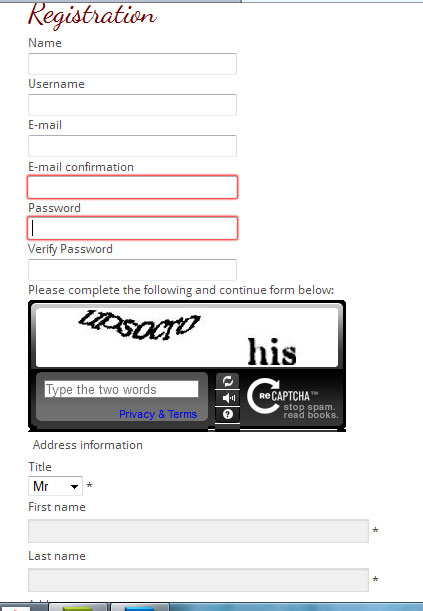
Please can you let me know if I can resolve it - many thanks.
chris
Please Log in or Create an account to join the conversation.
Less
More
- Posts: 12953
- Thank you received: 1778
13 years 3 months ago #108133
by Mohamed Thelji
Replied by Mohamed Thelji on topic Checkout workflow and recaptcha
We can't see the address fields through your screenshots, but aren't you talking about the address information that are into your registration form ?
Please Log in or Create an account to join the conversation.
13 years 3 months ago #108441
by brynseion
Replied by brynseion on topic Checkout workflow and recaptcha
Okay, maybe the best idea is for me to spell out what I want and perhaps you could tell me how to get it?
Page 1 - Login or Register (login OR name / username / email / email confirmation / password / password confirmation / recaptcha)
Page 2 - Address (title / first name / last name / address / etc plus one or two additional fields)
All the other pages are fine. My layout - login,address,coupon_cart,payment_status_confirm,end - is not getting me the layout I want. My question is, can I get the layout I want with Hikashop or do I have to upgrade? Many thanks for your help.
Chris
Page 1 - Login or Register (login OR name / username / email / email confirmation / password / password confirmation / recaptcha)
Page 2 - Address (title / first name / last name / address / etc plus one or two additional fields)
All the other pages are fine. My layout - login,address,coupon_cart,payment_status_confirm,end - is not getting me the layout I want. My question is, can I get the layout I want with Hikashop or do I have to upgrade? Many thanks for your help.
Chris
Please Log in or Create an account to join the conversation.
13 years 3 months ago #108573
by nicolas
Replied by nicolas on topic Checkout workflow and recaptcha
There is no option to do that.
The address fields are automatically displayed on the registration form as they are part of the form itself.
Upgrading won't change that.
And as I already said, the address selection view is correctly displaying on the second step of your checkout (I'm not talking about the address fields of the registration form but the address selection area).
The address fields are automatically displayed on the registration form as they are part of the form itself.
Upgrading won't change that.
And as I already said, the address selection view is correctly displaying on the second step of your checkout (I'm not talking about the address fields of the registration form but the address selection area).
Please Log in or Create an account to join the conversation.
13 years 3 months ago #108865
by brynseion
Replied by brynseion on topic Checkout workflow and recaptcha
Thanks Nicolas for your reply. Seems I cannot configure it exactly as preferred but that's ok - have resolved the Recaptcha issue. Thanks to all for your patience and help anyway.
Chris
Chris
Please Log in or Create an account to join the conversation.

12 years 10 months ago #133077
by publitec
Replied by publitec on topic Checkout workflow and recaptcha
Hi,
I have the same issue. Can you please specify the file to edit. Thanks!
I have the same issue. Can you please specify the file to edit. Thanks!
Xavier wrote: Hi,
To move the recaptcha where you want, you can edit the plugin and replace, for example, the line:By:Code:$components['com_hikashop'] = array('view' => array('checkout','user'),'viewvar' => 'ctrl', 'lengthafter' => 500 , 'tdclass' => 'key', 'email' => 'data\[register\]\[email_confirm\]','password' => 'data\[register\]\[password2\]');Code:$components['com_hikashop'] = array('view' => array('checkout','user'),'viewvar' => 'ctrl', 'lengthafter' => 500 , 'tdclass' => 'key', 'email' => 'data\[register\]\[email_confirm\]','password' => 'data\[address\]\[address_vat\]');
To place it after the vat field.
Please Log in or Create an account to join the conversation.
12 years 10 months ago #133192
by nicolas
Replied by nicolas on topic Checkout workflow and recaptcha
It's plugins/system/recaptcha/recaptcha.php
Please Log in or Create an account to join the conversation.
Time to create page: 0.288 seconds