

- Posts: 40
- Thank you received: 0
Social Network Plugin
13 years 3 months ago - 13 years 3 months ago #110804
by Woxxx
Social Network Plugin was created by Woxxx
Hi,
Since I installed KA Social Comments the integrated Hikashop Social Network Plugin fails. When I set the plugin as XFBML the Facebook button disappears and I get following message: The href URL must be absolute. If I leave the plugin with Tag type IFRAME the fb-button appears but doesn´t work. I tried to put my fb user name and ID. In both cases it doesn´t work. I have the last version of Hikashop. Can you explain me how to solve the problem please? Thank you
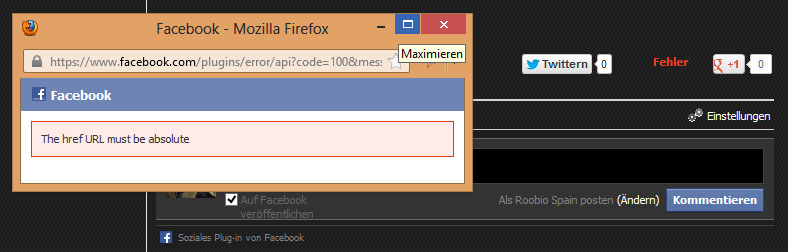
Since I installed KA Social Comments the integrated Hikashop Social Network Plugin fails. When I set the plugin as XFBML the Facebook button disappears and I get following message: The href URL must be absolute. If I leave the plugin with Tag type IFRAME the fb-button appears but doesn´t work. I tried to put my fb user name and ID. In both cases it doesn´t work. I have the last version of Hikashop. Can you explain me how to solve the problem please? Thank you
Last edit: 13 years 3 months ago by Woxxx.
Please Log in or Create an account to join the conversation.

13 years 3 months ago #110840
by Eliot
Replied by Eliot on topic Social Network Plugin
Hi there,
I checked some forum and it looks like it's a common issue.
I think you can fix it by editing the file hikashopsocial.php in Plugins/content/hikashopsocial and change the line:
to:
I checked some forum and it looks like it's a common issue.
I think you can fix it by editing the file hikashopsocial.php in Plugins/content/hikashopsocial and change the line:
Code:
$url=urlencode(hikashop_currentURL('',false));
to:
Code:
$url=hikashop_currentURL('',false);
Please Log in or Create an account to join the conversation.
13 years 3 months ago #111025
by Woxxx
Replied by Woxxx on topic Social Network Plugin
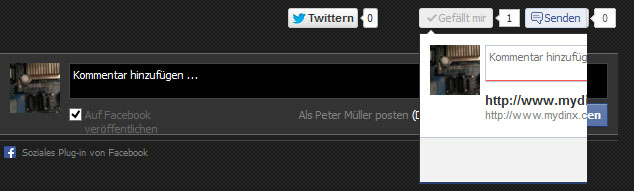
Thank you. One thing more please. Now with XFBML it works fine but now there is a comment field. I can´t find option in backend to turn this function off. If I leave the plugin in IFRAME mode the comment field don´t appears but the like button funcion seems not work.
Please Log in or Create an account to join the conversation.
13 years 3 months ago #111030
by Eliot
Replied by Eliot on topic Social Network Plugin
Hi there,
What do you mean by a comment field? Could please post a screenshot or a link?
What do you mean by a comment field? Could please post a screenshot or a link?
Please Log in or Create an account to join the conversation.
13 years 3 months ago #111073
by Woxxx
Replied by Woxxx on topic Social Network Plugin
Sorry, this is what I mean.
Please Log in or Create an account to join the conversation.
13 years 3 months ago #111076
by Eliot
Replied by Eliot on topic Social Network Plugin
The display of this box isn't relevant to Hikashop.
It's the Facebook API which display this and we have no control on it since it's not an option.
However, if it's display this, you probably have a css issue.
It's the Facebook API which display this and we have no control on it since it's not an option.
However, if it's display this, you probably have a css issue.
Please Log in or Create an account to join the conversation.
13 years 3 months ago #111082
by Woxxx
Replied by Woxxx on topic Social Network Plugin
Thank you. I will take a look for that.
Please Log in or Create an account to join the conversation.
13 years 3 months ago #111115
by Woxxx
Replied by Woxxx on topic Social Network Plugin
I cant´t solve the problem. Looks that I have to buy other KA plugin to get work the buttons and replace with the hika social plugin.
Please Log in or Create an account to join the conversation.
13 years 3 months ago #111117
by Eliot
Replied by Eliot on topic Social Network Plugin
Could you please give me a link to your website?
Please Log in or Create an account to join the conversation.
13 years 3 months ago #111119
by Woxxx
Replied by Woxxx on topic Social Network Plugin
Please Log in or Create an account to join the conversation.
13 years 3 months ago #111140
by Eliot
Replied by Eliot on topic Social Network Plugin
There is indeed a strange max-with: 100%; on the facebook iframe.
However since it's in the iframe I have no solution to override this in css.
However since it's in the iframe I have no solution to override this in css.
Please Log in or Create an account to join the conversation.
13 years 3 months ago #111145
by Woxxx
Replied by Woxxx on topic Social Network Plugin
Hi,
In the Javaskript Plugin from social comments I have options to enable or disable the FB XMLNS tag. Would this be helpful?

In the Javaskript Plugin from social comments I have options to enable or disable the FB XMLNS tag. Would this be helpful?
Please Log in or Create an account to join the conversation.
13 years 3 months ago #111241
by Eliot
Replied by Eliot on topic Social Network Plugin
Hi,
I honestly don't know, I would just suggest to try the different possibilities.
I honestly don't know, I would just suggest to try the different possibilities.
Please Log in or Create an account to join the conversation.
Time to create page: 0.334 seconds