
- Posts: 84
- Thank you received: 0
Google shopping export file
- davideventurini
-
 Topic Author
- Offline
Less
More
13 years 1 month ago #119643
by davideventurini
Google shopping export file was created by davideventurini
Hello, i'm using hikashop essential 2.1.1 and try to export the xml file using the plugin for Google Shopping.
Here I have some questions to solve:
-There is a way to export it automatically with canonical url for products?
-How can I set the parameter "google product category" that google suggest?This is not obbligatory but google give a warning if not present
-How can I exclude from the exporting all the products out of stock?
Thank you
Here I have some questions to solve:
-There is a way to export it automatically with canonical url for products?
-How can I set the parameter "google product category" that google suggest?This is not obbligatory but google give a warning if not present
-How can I exclude from the exporting all the products out of stock?
Thank you
Please Log in or Create an account to join the conversation.
- davideventurini
-
Topic Author
- Offline
Less
More
- Posts: 84
- Thank you received: 0
13 years 1 month ago #119659
by davideventurini
Replied by davideventurini on topic Google shopping export file
Another issue is with multiple image file.
"If you have multiple different images of the item, submit the main image using this attribute, and include all other images in the 'additional image link' attribute."
support.google.com/merchants/answer/188494?hl=en
Right now the only tag the plugin use is image_link for all images.
Thank you
"If you have multiple different images of the item, submit the main image using this attribute, and include all other images in the 'additional image link' attribute."
support.google.com/merchants/answer/188494?hl=en
Right now the only tag the plugin use is image_link for all images.
Thank you
Please Log in or Create an account to join the conversation.

13 years 1 month ago #119806
by nicolas
Replied by nicolas on topic Google shopping export file
Hi,
Canonical url support for Google products has been added in HikaShop 2.2.0
The google category support can be done by entering in the "Category" option of the plugin the column name of a custom product field which contains the google category of each product. You can create such field via the menu Display->custom fields.
There is no option to exclude out of stock products. We'll look at adding that.
There is indeed an issue with the multiple images file. I've added a fix on our end and it will be available in next release. In the mean time, if you want it I can send you a new install package of the plugin which includes the fix. That will also avoid you to update all HikaShop just for the canonical url support in the plugin. If interested, please send a request via our contact form with a link to this thread.
Canonical url support for Google products has been added in HikaShop 2.2.0
The google category support can be done by entering in the "Category" option of the plugin the column name of a custom product field which contains the google category of each product. You can create such field via the menu Display->custom fields.
There is no option to exclude out of stock products. We'll look at adding that.
There is indeed an issue with the multiple images file. I've added a fix on our end and it will be available in next release. In the mean time, if you want it I can send you a new install package of the plugin which includes the fix. That will also avoid you to update all HikaShop just for the canonical url support in the plugin. If interested, please send a request via our contact form with a link to this thread.
Please Log in or Create an account to join the conversation.
- davideventurini
-
Topic Author
- Offline
Less
More
- Posts: 84
- Thank you received: 0
13 years 1 month ago #119825
by davideventurini
Replied by davideventurini on topic Google shopping export file
Thanks a lot for the support, I'll write you a message.
Thanks
Thanks
Please Log in or Create an account to join the conversation.
- davideventurini
-
Topic Author
- Offline
Less
More
- Posts: 84
- Thank you received: 0
13 years 1 month ago #119852
by davideventurini
Replied by davideventurini on topic Google shopping export file
The plugin is working good with the new version of Hikashop, thank you.
About the "Category" field I tried to set it for example "Abbigliamento e accessori > Abbigliamento" as google explained and it works correctly, the same string for ALL products is written in the xml file.
What can I do if some of my products has different category?
You explained me something about Display->custome fields but I did not understand very well, sorry.
Thank you
About the "Category" field I tried to set it for example "Abbigliamento e accessori > Abbigliamento" as google explained and it works correctly, the same string for ALL products is written in the xml file.
What can I do if some of my products has different category?
You explained me something about Display->custome fields but I did not understand very well, sorry.
Thank you
Please Log in or Create an account to join the conversation.

13 years 1 month ago #119868
by Eliot
Replied by Eliot on topic Google shopping export file
Hi there,
The thing with the category is that you have to create a product custom fields. Call it for example google_category Once it's done, you have to edit your products and set this custom field to the category you want ( "Abbigliamento e accessori > Abbigliamento" for example but each product can have a different category).
Then, you just have to type the name of the custom field in the category option of the google product plugin, in this case: google_category. The plugin will automatically get the value of this custom field for each product.
Note that you can use the mass action system to set the custom field value for multiple product at once.
The thing with the category is that you have to create a product custom fields. Call it for example google_category Once it's done, you have to edit your products and set this custom field to the category you want ( "Abbigliamento e accessori > Abbigliamento" for example but each product can have a different category).
Then, you just have to type the name of the custom field in the category option of the google product plugin, in this case: google_category. The plugin will automatically get the value of this custom field for each product.
Note that you can use the mass action system to set the custom field value for multiple product at once.
Please Log in or Create an account to join the conversation.
- davideventurini
-
Topic Author
- Offline
Less
More
- Posts: 84
- Thank you received: 0
13 years 1 month ago #119963
by davideventurini
Replied by davideventurini on topic Google shopping export file
Hello, thank you, I'm able to create the custom fields and use it but I found a difficult to use the mass action.
What I need is to replace the google_category custom filed for all the product in the category with id=14.
What am I did wrong?
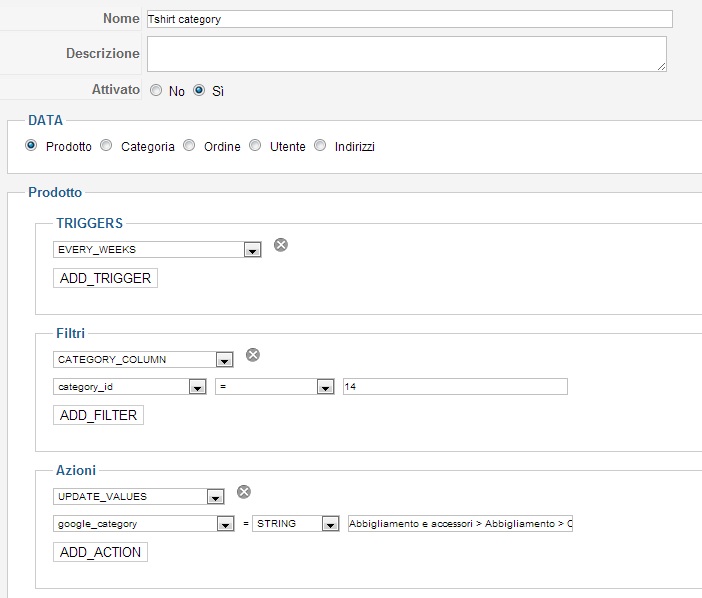
What I need is to replace the google_category custom filed for all the product in the category with id=14.
What am I did wrong?
Please Log in or Create an account to join the conversation.
13 years 1 month ago #119977
by Eliot
Replied by Eliot on topic Google shopping export file
Your mass action looks good except that you don't need the trigger (just hit the gray cross to delete it).
I think you just need to click on the process button and your products should have the right value for this custom field .
.
I think you just need to click on the process button and your products should have the right value for this custom field
. Please Log in or Create an account to join the conversation.
- davideventurini
-
Topic Author
- Offline
Less
More
- Posts: 84
- Thank you received: 0
13 years 1 month ago #119980
by davideventurini
Replied by davideventurini on topic Google shopping export file
Hi, onestly I already did your suggestion but without success.
I removed the trigger and click process but the value google_category is still empty as you see in attached.
There is a way to have a look to log file of this mass process?
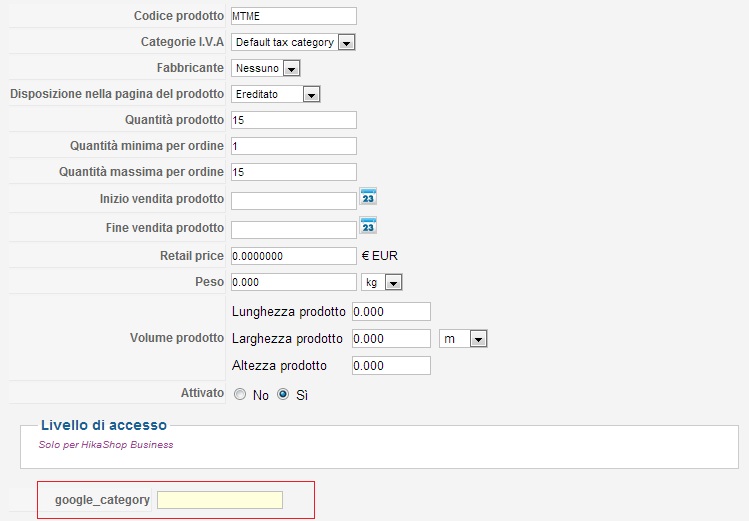
I removed the trigger and click process but the value google_category is still empty as you see in attached.
There is a way to have a look to log file of this mass process?
Please Log in or Create an account to join the conversation.
- davideventurini
-
Topic Author
- Offline
Less
More
- Posts: 84
- Thank you received: 0
13 years 1 month ago #119985
by davideventurini
Replied by davideventurini on topic Google shopping export file
I also update the language file and the filter find the correct number of products
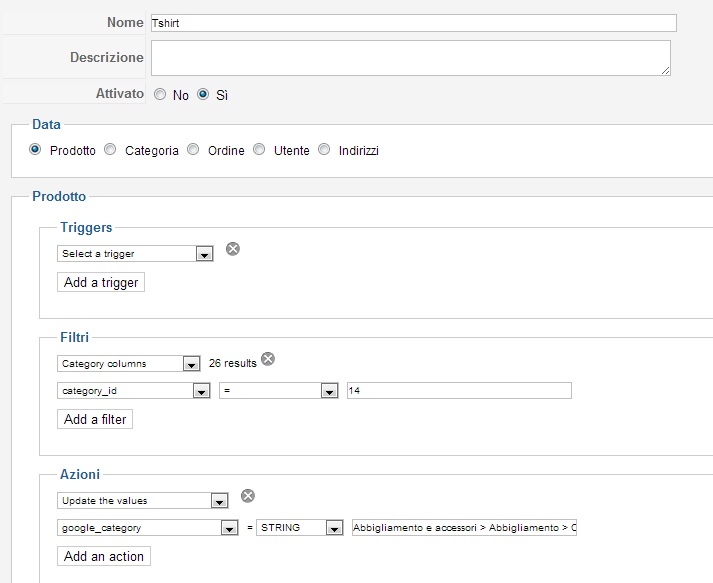
Please Log in or Create an account to join the conversation.
13 years 1 month ago #120003
by Eliot
Replied by Eliot on topic Google shopping export file
Hi there,
It's indeed a bug we just fixed. To do so, just replace this code:
By this one:
In the file plugins/hikashop/massaction_product.php
It's indeed a bug we just fixed. To do so, just replace this code:
Code:
$db = JFactory::getDBO();
JArrayHelper::toInteger($ids);
$query .= 'SET hk_'.$alias[0].'.'.$action['type'].' = '.$value.' ';
$query .= 'WHERE hk_'.$current.'.'.$current.'_id IN ('.implode(',',$ids).')';
$db->setQuery($query);
$db->query();
By this one:
Code:
if(!in_array($alias[0],array('product,price'))){
$hk = 'product';
}else{
$hk = $alias[0];
}
$db = JFactory::getDBO();
JArrayHelper::toInteger($ids);
$query .= 'SET hk_'.$hk.'.'.$action['type'].' = '.$value.' ';
$query .= 'WHERE hk_'.$current.'.'.$current.'_id IN ('.implode(',',$ids).')';
$db->setQuery($query);
$db->query();
In the file plugins/hikashop/massaction_product.php
Please Log in or Create an account to join the conversation.
- davideventurini
-
Topic Author
- Offline
Less
More
- Posts: 84
- Thank you received: 0
13 years 1 month ago #120015
by davideventurini
Replied by davideventurini on topic Google shopping export file
If I understood correctly the file should be
plugins/hikashop/massaction_product/massaction_product.php
and here the code I change but without result, the custome fields is still empty
I attached also all folders inside the plugins to better check
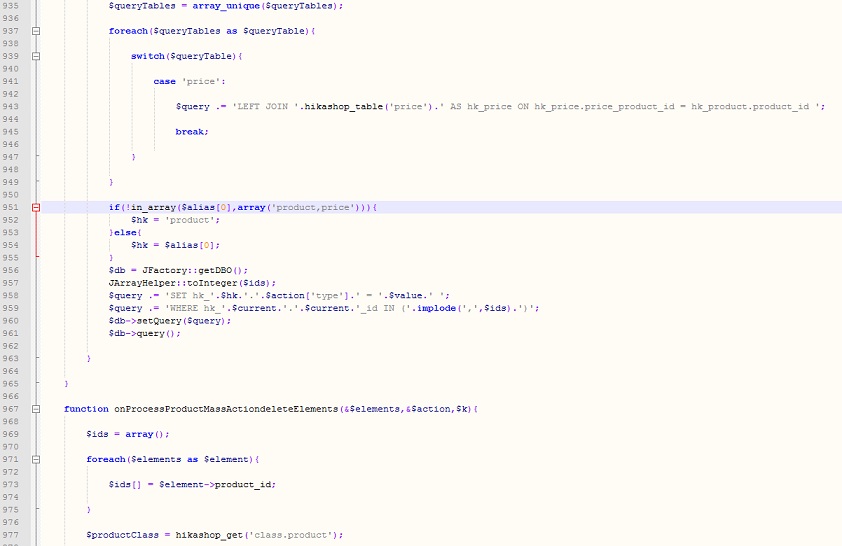
plugins/hikashop/massaction_product/massaction_product.php
and here the code I change but without result, the custome fields is still empty
I attached also all folders inside the plugins to better check
Please Log in or Create an account to join the conversation.
13 years 1 month ago #120041
by Eliot
Replied by Eliot on topic Google shopping export file
You are editing the right file but I guess it's easier if I give you the file
Attachment not found
Please Log in or Create an account to join the conversation.
- davideventurini
-
Topic Author
- Offline
Less
More
- Posts: 84
- Thank you received: 0
13 years 1 month ago #120046
by davideventurini
Replied by davideventurini on topic Google shopping export file
Nothing to do, the problem still remain.
I compare the 2 files and are the same, except comments.
I tried also to use string to replace without >, nothing happen.
I compare the 2 files and are the same, except comments.
I tried also to use string to replace without >, nothing happen.
Please Log in or Create an account to join the conversation.
13 years 1 month ago #120066
by Eliot
Replied by Eliot on topic Google shopping export file
Hum, could you please turn on the debug mode in the Joomla configuration and tell us if you have any error message?
If so, just post it here. If nothing is displayed, please send us a backend access so we can take a look at this issue.
If so, just post it here. If nothing is displayed, please send us a backend access so we can take a look at this issue.
Please Log in or Create an account to join the conversation.
- davideventurini
-
Topic Author
- Offline
Less
More
- Posts: 84
- Thank you received: 0
13 years 1 month ago #120159
by davideventurini
Replied by davideventurini on topic Google shopping export file
Thank you, i wrote you a pm
Please Log in or Create an account to join the conversation.
13 years 1 month ago - 13 years 1 month ago #120188
by Eliot
Replied by Eliot on topic Google shopping export file
Edit: I'm still looking.
Could you provide us a FTP access so we can do some test on the mass action system?
Could you provide us a FTP access so we can do some test on the mass action system?
Last edit: 13 years 1 month ago by Eliot.
Please Log in or Create an account to join the conversation.
- davideventurini
-
Topic Author
- Offline
Less
More
- Posts: 84
- Thank you received: 0
13 years 1 month ago #120191
by davideventurini
Replied by davideventurini on topic Google shopping export file
Check your private msg, thanks
Please Log in or Create an account to join the conversation.

13 years 1 month ago #120470
by Xavier
Replied by Xavier on topic Google shopping export file
Hi,
I have corrected the problem on your end.
It was a check which should not be there.
I have corrected the problem on your end.
It was a check which should not be there.
The following user(s) said Thank You: davideventurini
Please Log in or Create an account to join the conversation.
- davideventurini
-
Topic Author
- Offline
Less
More
- Posts: 84
- Thank you received: 0
13 years 1 month ago #120536
by davideventurini
Replied by davideventurini on topic Google shopping export file
Hello, which was the check?
Please Log in or Create an account to join the conversation.
Time to create page: 0.412 seconds