

- Posts: 23
- Thank you received: 0
product code in pdf invoice
12 years 1 month ago - 12 years 3 weeks ago #165987
by ip-studio
product code in pdf invoice was created by ip-studio
-- url of the page with the problem -- : local
-- HikaShop version -- : 2.3.2
-- Joomla version -- : 3.3.2
-- PHP version -- : 5.5.11
-- Browser(s) name and version -- : Firefox 31.0
Hi
I use the pdf invoice plugin.
I'd like to display the product code in my pdf invoice.
I'd lke to have the product code with the product name.
I do have the product code in the email but not in the pdf invoice.
What do I need to add?
Thanks in advance
-- HikaShop version -- : 2.3.2
-- Joomla version -- : 3.3.2
-- PHP version -- : 5.5.11
-- Browser(s) name and version -- : Firefox 31.0
Hi
I use the pdf invoice plugin.
I'd like to display the product code in my pdf invoice.
I'd lke to have the product code with the product name.
I do have the product code in the email but not in the pdf invoice.
What do I need to add?
Thanks in advance
Last edit: 12 years 3 weeks ago by ip-studio.
Please Log in or Create an account to join the conversation.

Less
More
- Posts: 12953
- Thank you received: 1778
12 years 1 month ago #166004
by Mohamed Thelji
Replied by Mohamed Thelji on topic product code in pdf invoice
Hello,
Note that the display of the PDF invoice is customizable through the file: "plugins/hikashop/attachinvoice/attachinvoice/invoice.php".
Note that the display of the PDF invoice is customizable through the file: "plugins/hikashop/attachinvoice/attachinvoice/invoice.php".
Please Log in or Create an account to join the conversation.
12 years 1 month ago #166088
by ip-studio
Replied by ip-studio on topic product code in pdf invoice
Hi,
Yes I've already customized the invoice but I'm not really good with php coding... So I'm wondering if someone already did that by the past and could give me the piece of code to add in the file.
Yes I've already customized the invoice but I'm not really good with php coding... So I'm wondering if someone already did that by the past and could give me the piece of code to add in the file.
Please Log in or Create an account to join the conversation.

12 years 1 month ago - 12 years 1 month ago #166097
by Xavier
Replied by Xavier on topic product code in pdf invoice
Hi,
In that file you just have to add:
After:
In that file you just have to add:
Code:
echo $product->order_product_code;
Code:
<?php echo implode('<br/>',$this->str_split_unicode(strip_tags($product->order_product_name),50));
Last edit: 12 years 1 month ago by nicolas.
Please Log in or Create an account to join the conversation.

12 years 1 month ago #166568
by river
Replied by river on topic product code in pdf invoice
This solution does not work,
I tried implementing
on line life below, and after....
....and both times it gives me an error.
Any solution ?
I tried implementing
Code:
echo $product->order_product_name
....and both times it gives me an error.
Any solution ?
Please Log in or Create an account to join the conversation.

12 years 1 month ago #166573
by nicolas
Replied by nicolas on topic product code in pdf invoice
Indeed the code of Xavier was not correct. I've fixed it.
Please Log in or Create an account to join the conversation.
12 years 1 month ago #167967
by ip-studio
Replied by ip-studio on topic product code in pdf invoice
Thank you Xavier and Nicolas, that works perfectly!
Please Log in or Create an account to join the conversation.
11 years 10 months ago #178474
by river
Replied by river on topic product code in pdf invoice
I downloaded the latest version of the "Attach Invoice to the order confirmation e-mail" plugin in order to bulk print invoices from the back-end.
But I need the Product Code to display in these invoices ?
It use to work with an earlier version like described in this thread. But not with the latest version.
But I need the Product Code to display in these invoices ?
It use to work with an earlier version like described in this thread. But not with the latest version.
Please Log in or Create an account to join the conversation.
11 years 10 months ago #178479
by ip-studio
Replied by ip-studio on topic product code in pdf invoice
Hi
Just add :
echo $product->order_product_code;
where you except to see the code in plugins/hikashop/attachinvoice/attachinvoice/invoice.php
Just add :
echo $product->order_product_code;
where you except to see the code in plugins/hikashop/attachinvoice/attachinvoice/invoice.php
Please Log in or Create an account to join the conversation.
11 years 10 months ago #178480
by Xavier
Replied by Xavier on topic product code in pdf invoice
Hi,
Are you sure that you are editing the file correctly, that there is no other override ?
The given code must still be working, there was no changes in the plugin.
You have maybe added the code at teh wrong place, please try to change the code position and not in a if condition.
Are you sure that you are editing the file correctly, that there is no other override ?
The given code must still be working, there was no changes in the plugin.
You have maybe added the code at teh wrong place, please try to change the code position and not in a if condition.
Please Log in or Create an account to join the conversation.
10 years 9 months ago #223734
by river
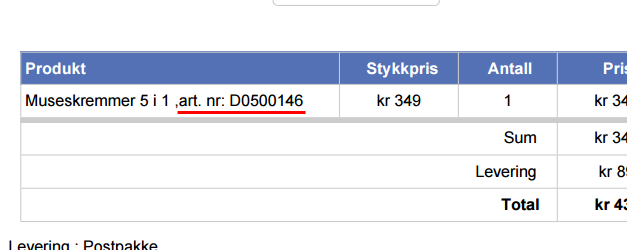
This works fine, and my product code(red underlined) is displaying like this in the invoice:
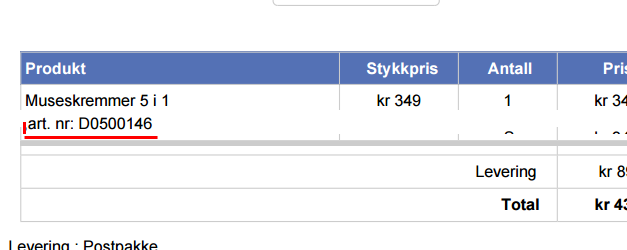
I need it do display like this (red underline), on a separate line.
Any advice on how to fix this ?
Replied by river on topic product code in pdf invoice
ip-studio wrote: Hi
Just add :
echo $product->order_product_code;
where you except to see the code in plugins/hikashop/attachinvoice/attachinvoice/invoice.php
This works fine, and my product code(red underlined) is displaying like this in the invoice:
I need it do display like this (red underline), on a separate line.
Any advice on how to fix this ?
Please Log in or Create an account to join the conversation.
10 years 9 months ago #223765
by nicolas
Replied by nicolas on topic product code in pdf invoice
You can do like that:
echo '<br/>'.$product->order_product_code;
echo '<br/>'.$product->order_product_code;
Please Log in or Create an account to join the conversation.
10 years 9 months ago - 10 years 9 months ago #223888
by river
Replied by river on topic product code in pdf invoice
It works perfect. One last question:
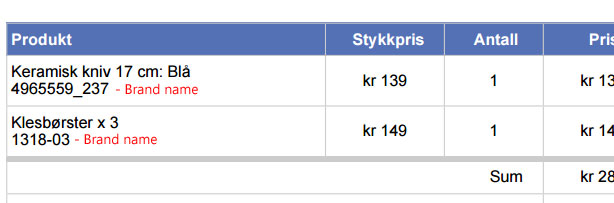
It is possible to include the brand name of the product in the invoice. Plese see image on how I want it to look (brand name is illustrated with red)
Any advice on how to do this ?
It is possible to include the brand name of the product in the invoice. Plese see image on how I want it to look (brand name is illustrated with red)
Any advice on how to do this ?
Last edit: 10 years 9 months ago by river.
Please Log in or Create an account to join the conversation.
10 years 9 months ago #223912
by nicolas
Replied by nicolas on topic product code in pdf invoice
It's more complex:
Code:
$productClass = hikashop_get('class.product');
$productData = $productClass->get($product->product_id);
$categoryClass = hikashop_get('class.category');
$category = $categoryClass->get($productData->product_manufacturer_id);
echo $category->category_name;
The following user(s) said Thank You: river
Please Log in or Create an account to join the conversation.
10 years 9 months ago #223963
by river
Replied by river on topic product code in pdf invoice
Perfect ....it works, Tnx a lot !
Please Log in or Create an account to join the conversation.
10 years 7 months ago #228528
by river
Note: Hikashop version: 2.6
OK this works fine, but I have a little problem.
When the products has Characteristics/with variants the brand name does not display.
When the product has no variants the brand name display's just fine.
In the product with variants I use different product codes. i.e:
Original product code: 660021_01
Variant a product code: 660021
Variant b product code: 660022
The invoice is displaying the correct product code, but I am missing the brand name with the products with "variants"
Any advice ?
Replied by river on topic product code in pdf invoice
nicolas wrote: It's more complex:
Code:$productClass = hikashop_get('class.product'); $productData = $productClass->get($product->product_id); $categoryClass = hikashop_get('class.category'); $category = $categoryClass->get($productData->product_manufacturer_id); echo $category->category_name;
Note: Hikashop version: 2.6
OK this works fine, but I have a little problem.
When the products has Characteristics/with variants the brand name does not display.
When the product has no variants the brand name display's just fine.
In the product with variants I use different product codes. i.e:
Original product code: 660021_01
Variant a product code: 660021
Variant b product code: 660022
The invoice is displaying the correct product code, but I am missing the brand name with the products with "variants"
Any advice ?
Please Log in or Create an account to join the conversation.
10 years 7 months ago #228574
by nicolas
Replied by nicolas on topic product code in pdf invoice
It's more complex in that case:
Code:
$productClass = hikashop_get('class.product');
$productData = $productClass->get($product->product_id);
if($productData->product_parent_id){
$parentProductData = $productClass->get($product->product_parent_id);
$productData->product_manufacturer_id = $parentProductData->product_manufacturer_id;
}
$categoryClass = hikashop_get('class.category');
$category = $categoryClass->get($productData->product_manufacturer_id);
echo $category->category_name;
Please Log in or Create an account to join the conversation.
10 years 7 months ago #229723
by river
Replied by river on topic product code in pdf invoice
Very nice, it works ! tnx a lot 
Please Log in or Create an account to join the conversation.
10 years 4 months ago #239857
by river
Replied by river on topic product code in pdf invoice
Note: Hikashop 2.6.1
OK I will just continue using this thread since I am probarly the only person with this request.
It is possible to include the product quantity or a message saying: "Product on stock" in the product invoice.
Like this:
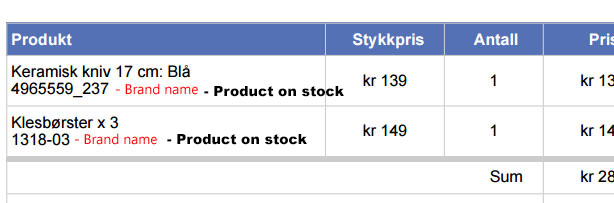
I only need this message to be displayed if the quantity of the product is 1 or above.
I have some products the have Quantity: Unlimited, but on these products I do not need the message to be displayed since these products are not in my own warehouse.
Looking forward to hear from you.
OK I will just continue using this thread since I am probarly the only person with this request.
It is possible to include the product quantity or a message saying: "Product on stock" in the product invoice.
Like this:
I only need this message to be displayed if the quantity of the product is 1 or above.
I have some products the have Quantity: Unlimited, but on these products I do not need the message to be displayed since these products are not in my own warehouse.
Looking forward to hear from you.
Please Log in or Create an account to join the conversation.
10 years 4 months ago #239861
by nicolas
Replied by nicolas on topic product code in pdf invoice
Hi,
You can do like that:
You can do like that:
Code:
$productClass = hikashop_get('class.product');
$productData = $productClass->get($product->product_id);
if($productData->product_quantity>0) echo 'Product on stock';
Please Log in or Create an account to join the conversation.
Time to create page: 0.353 seconds