

- Posts: 11
- Thank you received: 2
User Registration State population
13 years 4 months ago - 13 years 4 months ago #103402
by rcfoultz
User Registration State population was created by rcfoultz
When users go to the registration and select a Country, the state does not populate the dropdown list of states.
The only thing shown is a *
How can I make a default value for the state and have the state populate when the country is selected?
I have the field Country set to zone Countries
and I have the City field set to Zone States, but no states every populate when you select a country.
how can I fix this
Thank you
Attached is a screen shot of the user registration
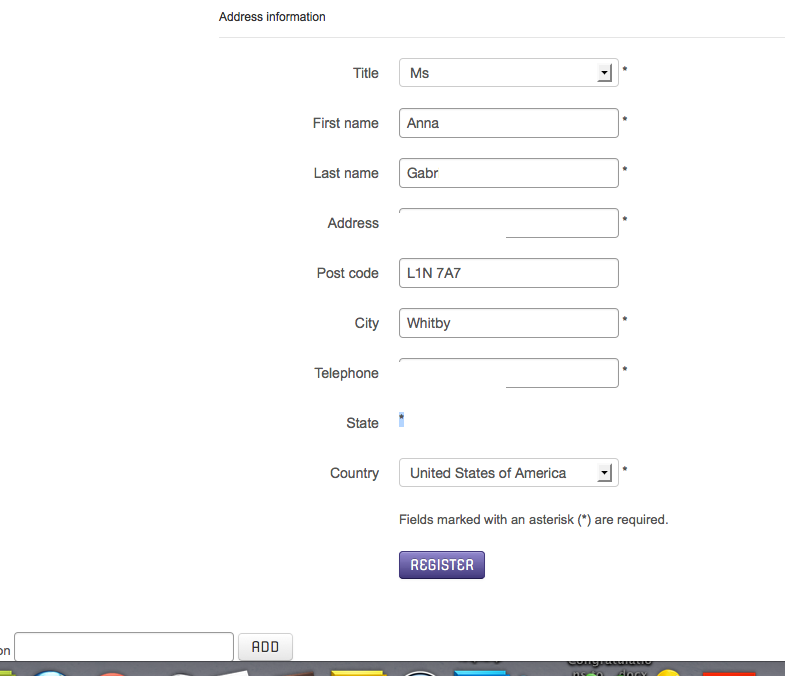
The only thing shown is a *
How can I make a default value for the state and have the state populate when the country is selected?
I have the field Country set to zone Countries
and I have the City field set to Zone States, but no states every populate when you select a country.
how can I fix this
Thank you
Attached is a screen shot of the user registration
Last edit: 13 years 4 months ago by rcfoultz. Reason: move image
Please Log in or Create an account to join the conversation.

13 years 4 months ago #103412
by Jerome
Jerome - Obsidev.com
HikaMarket & HikaSerial developer / HikaShop core dev team.
Replied by Jerome on topic User Registration State population
Hi,
Please edit the "country" address custom field and re-save it in order to store a good default value.
Explanations:
I think the default country stored in the database is currently unpublished in your store. So the states are not accessible for HikaShop, that's why there is no drop down list.
In the country list it is quite same thing, the list does not contains any other country than "United States of America", so the default country could not be found by HikaShop. At this moment, the first element in the list is displayed.
Regards,
Please edit the "country" address custom field and re-save it in order to store a good default value.
Explanations:
I think the default country stored in the database is currently unpublished in your store. So the states are not accessible for HikaShop, that's why there is no drop down list.
In the country list it is quite same thing, the list does not contains any other country than "United States of America", so the default country could not be found by HikaShop. At this moment, the first element in the list is displayed.
Regards,
Jerome - Obsidev.com
HikaMarket & HikaSerial developer / HikaShop core dev team.
Please Log in or Create an account to join the conversation.
13 years 4 months ago #103424
by rcfoultz
Replied by rcfoultz on topic User Registration State population
Thankyou again for your help and quick reply,
I had to remove the field address_state
and recreate it, then the dropdown list populated.
I had to remove the field address_state
and recreate it, then the dropdown list populated.
Please Log in or Create an account to join the conversation.
Time to create page: 0.190 seconds