

- Posts: 80
- Thank you received: 8
Multiple product prices
12 years 2 weeks ago #170919
by bp54
Multiple product prices was created by bp54
-- url of the page with the problem -- : not yet published
-- HikaShop version -- : Latest
-- Joomla version -- : 3
-- PHP version -- : 5.6
-- Browser(s) name and version -- : Chrome
-- Error-message(debug-mod must be tuned on) -- : None
Hi,
I have a kind of a presales question that I did not find in this forum.
We have a company that is selling products to end users and to resellers.
We would like to give every product a price for end users and a second (lower price) for resellers.
We could have Resellers to log in to Joomla and become meber of a reseller group. So based on this membership Resellers should see the lowest price then and the rest of the world should only see the highest price.
One of the solutions that I see is with a discount per product and use of ACL but because there are lots of diiferent discounts for Resellers, this would be rather complex.
Thanks in advance for any suggestion?
-- HikaShop version -- : Latest
-- Joomla version -- : 3
-- PHP version -- : 5.6
-- Browser(s) name and version -- : Chrome
-- Error-message(debug-mod must be tuned on) -- : None
Hi,
I have a kind of a presales question that I did not find in this forum.
We have a company that is selling products to end users and to resellers.
We would like to give every product a price for end users and a second (lower price) for resellers.
We could have Resellers to log in to Joomla and become meber of a reseller group. So based on this membership Resellers should see the lowest price then and the rest of the world should only see the highest price.
One of the solutions that I see is with a discount per product and use of ACL but because there are lots of diiferent discounts for Resellers, this would be rather complex.
Thanks in advance for any suggestion?
Please Log in or Create an account to join the conversation.

12 years 2 weeks ago #170922
by Xavier
Replied by Xavier on topic Multiple product prices
Hi,
When editing a product, for the price part you can set many prices.
These prices can be restricted on user groups, so you can have one price for resellers and another one for "the rest of the world".
Hope this is what you was looking for.
When editing a product, for the price part you can set many prices.
These prices can be restricted on user groups, so you can have one price for resellers and another one for "the rest of the world".
Hope this is what you was looking for.
Please Log in or Create an account to join the conversation.
12 years 2 weeks ago #170995
by bp54
Replied by bp54 on topic Multiple product prices
Hi Xavier,
Thanks for your prompt response. This is exactly what I am looking for.
I am using the Essential version now and I know that I can enter multiple prices for a product. It looked to me that this is used when customers buy a certain amount of products and get a discount then.
Is the option of entering multiple prices and restrict them on user groups in the Business edition? If so then we will upgrade to the Business edition. If not, I don't see where/how to configure this.
Regards,
Benny.
Thanks for your prompt response. This is exactly what I am looking for.
I am using the Essential version now and I know that I can enter multiple prices for a product. It looked to me that this is used when customers buy a certain amount of products and get a discount then.
Is the option of entering multiple prices and restrict them on user groups in the Business edition? If so then we will upgrade to the Business edition. If not, I don't see where/how to configure this.
Regards,
Benny.
Please Log in or Create an account to join the conversation.

12 years 2 weeks ago #171024
by nicolas
Replied by nicolas on topic Multiple product prices
Hi,
Yes, to restrict prices to user groups, you need to use the "access level" icon of the prices and that is only available with the Business edition.
If you have the Essential edition, you can upgrade to the Business edition here:
www.hikashop.com/extensions/upgrade-my-version.html
Yes, to restrict prices to user groups, you need to use the "access level" icon of the prices and that is only available with the Business edition.
If you have the Essential edition, you can upgrade to the Business edition here:
www.hikashop.com/extensions/upgrade-my-version.html
Please Log in or Create an account to join the conversation.
12 years 2 weeks ago #171160
by bp54
Replied by bp54 on topic Multiple product prices
Hi Nicolas,
I did install Business edition. Now in the product details I can show both prices (Gross and Net) for Partners that have logged in. Now I would like the lowest price to be preceeded by the text "Your net price is:". Is this possible and where do I put this text?
Regards, Benny.
I did install Business edition. Now in the product details I can show both prices (Gross and Net) for Partners that have logged in. Now I would like the lowest price to be preceeded by the text "Your net price is:". Is this possible and where do I put this text?
Regards, Benny.
Please Log in or Create an account to join the conversation.
12 years 1 week ago #171302
by Xavier
Replied by Xavier on topic Multiple product prices
Hi,
You can add a translation override for the key "PRICE_BEGINNING".
Or directly edit the view "product / listing_price" in order to have the desired display.
You can add a translation override for the key "PRICE_BEGINNING".
Or directly edit the view "product / listing_price" in order to have the desired display.
Please Log in or Create an account to join the conversation.
12 years 1 week ago #171305
by bp54
Replied by bp54 on topic Multiple product prices
Hi Xavier,
When I make the translation override it gives me the same string for the Gross Price as well as for the Net Price.
What I would like to do is;
No preceeding text for the first price
Preceeding text for the second price that is only showed to logged in users.
So a logged in user should see both prices with the preceedig text only before the second price...
When I make the translation override it gives me the same string for the Gross Price as well as for the Net Price.
What I would like to do is;
No preceeding text for the first price
Preceeding text for the second price that is only showed to logged in users.
So a logged in user should see both prices with the preceedig text only before the second price...
Please Log in or Create an account to join the conversation.
12 years 1 week ago #171311
by nicolas
Replied by nicolas on topic Multiple product prices
Hi,
Yes, translation overrides won't allow you to do that.
You'll need to edit the file "listing_price" of the view "product" for your frontend template via the menu Display>Views and add custom code in it to be able to do that.
Yes, translation overrides won't allow you to do that.
You'll need to edit the file "listing_price" of the view "product" for your frontend template via the menu Display>Views and add custom code in it to be able to do that.
Please Log in or Create an account to join the conversation.
12 years 1 week ago #172006
by bp54
Replied by bp54 on topic Multiple product prices
I'm not much of a php programmer but as far as i see, the PRICE_BEGINNING is displayed outside of the loop. I don't see how I can make it depend on ACL or on the second price in the row. Could you please give a hint?
Please Log in or Create an account to join the conversation.
12 years 1 week ago #172072
by Xavier
Replied by Xavier on topic Multiple product prices
Hi,
You can do a php check on the price_access, if it's the price for logged in users display the message.
Something like:
in the foreach.
You can do a php check on the price_access, if it's the price for logged in users display the message.
Something like:
Code:
if($price->price_access != 'all')
echo 'Your net price is:';
The following user(s) said Thank You: bp54
Please Log in or Create an account to join the conversation.
12 years 1 week ago - 12 years 1 week ago #172080
by bp54
Replied by bp54 on topic Multiple product prices
Many thanks Xavier. The problem has almost been solved.
I inserted line 57 (bold line)
foreach($this->row->prices as $k => $price){
if($price->price_access != 'all') echo '<br/>Uw nettoprijs: ';
if($first)$first=false;
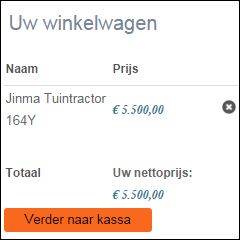
Everything looks fine now except for the Total line in the shopping Cart where this string ('<br/>Uw nettoprijs: ') is still inserted. Also when not logged in.
Any clue?
I inserted line 57 (bold line)
foreach($this->row->prices as $k => $price){
if($price->price_access != 'all') echo '<br/>Uw nettoprijs: ';
if($first)$first=false;
Everything looks fine now except for the Total line in the shopping Cart where this string ('<br/>Uw nettoprijs: ') is still inserted. Also when not logged in.
Any clue?
Last edit: 12 years 1 week ago by bp54. Reason: One issue left
Please Log in or Create an account to join the conversation.
12 years 1 week ago #172155
by nicolas
Replied by nicolas on topic Multiple product prices
Try like that then:
if($price->price_access != 'all' && !empty($this->element)) echo '<br/>Uw nettoprijs: ';
if($price->price_access != 'all' && !empty($this->element)) echo '<br/>Uw nettoprijs: ';
Please Log in or Create an account to join the conversation.
12 years 1 week ago #172187
by bp54
Replied by bp54 on topic Multiple product prices
I tried it but it does not change anything. It looks like when printing the Total line in the Cart, there is no check on ACL...???
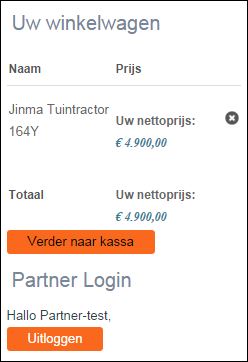
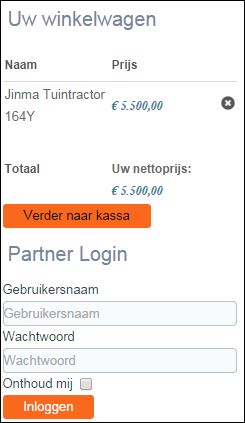
I have added an image where not logged in. Here you see that the string is not present in the detail line but it is in the total line.
In the second image. you see that the string is present for each line. It would be okay with me when in the Cart this string would not be printed at all. So that it would only be printed on the product detail page.
Regards, Benny.
I have added an image where not logged in. Here you see that the string is not present in the detail line but it is in the total line.
In the second image. you see that the string is present for each line. It would be okay with me when in the Cart this string would not be printed at all. So that it would only be printed on the product detail page.
Regards, Benny.
Please Log in or Create an account to join the conversation.
12 years 1 week ago #172201
by Xavier
Replied by Xavier on topic Multiple product prices
Hi,
Thanks to use:
Thanks to use:
Code:
if($price->price_access != 'all' && $this->params->get('from','content') != module)
echo 'Your net price is:';
The following user(s) said Thank You: bp54
Please Log in or Create an account to join the conversation.
12 years 1 week ago #172337
by bp54
Replied by bp54 on topic Multiple product prices
Hi Xavier,
Thanks so much. It works like a charm. Great support!
Regards, Benny.
Thanks so much. It works like a charm. Great support!
Regards, Benny.
Please Log in or Create an account to join the conversation.
Less
More
- Posts: 35
- Thank you received: 1
11 years 10 months ago - 11 years 10 months ago #181640
by curtisbollington
Hi Nicolas
I have Public prices and Wholesale prices.
I'd like to display only one price (the Public price) on Product-Listings, and then both the Public and Wholesale prices on the detail page when the wholesale users are logged-in.
This is so the wholesaler can quickly see the Public Price.
At the moment the Wholesaler sees listings with the Wholesale price.
I don't understand how to make the Public price show to a Wholesaler on the Product-Listing, then both prices (Public and Wholesale) on the Product Page.
Product page is fine, but the Listing currently shows Wholesale prices when a wholesaler is logged-in.
What can I do to make the Listing show the Public price when a Wholesale user is logged-in?
Replied by curtisbollington on topic Multiple product prices
nicolas wrote: Hi,
Yes, to restrict prices to user groups, you need to use the "access level" icon of the prices and that is only available with the Business edition.
If you have the Essential edition, you can upgrade to the Business edition here:
www.hikashop.com/extensions/upgrade-my-version.html
Hi Nicolas
I have Public prices and Wholesale prices.
I'd like to display only one price (the Public price) on Product-Listings, and then both the Public and Wholesale prices on the detail page when the wholesale users are logged-in.
This is so the wholesaler can quickly see the Public Price.
At the moment the Wholesaler sees listings with the Wholesale price.
I don't understand how to make the Public price show to a Wholesaler on the Product-Listing, then both prices (Public and Wholesale) on the Product Page.
Product page is fine, but the Listing currently shows Wholesale prices when a wholesaler is logged-in.
What can I do to make the Listing show the Public price when a Wholesale user is logged-in?
Last edit: 11 years 10 months ago by curtisbollington. Reason: oops
Please Log in or Create an account to join the conversation.
11 years 10 months ago #181649
by nicolas
Replied by nicolas on topic Multiple product prices
Hi,
There is no option to do that.
On any page of the shop, the prices are loaded from the database based on the access level of the current user.
So in the view which display the product, only the price of the user groups of the current user are available for display.
So you'll have to customize the "listing_img_title" file of the "product" view via the menu Display>Views with custom code to load the public price from the database with a MySQL query in order to display it instead of the price loaded by HikaShop.
If you're a developer, that should not be a problem, otherwise, I would recommend to hire one for that small job via either our commercial jobs forum or by contacting our partners:
www.hikashop.com/home/our-partners.html
There is no option to do that.
On any page of the shop, the prices are loaded from the database based on the access level of the current user.
So in the view which display the product, only the price of the user groups of the current user are available for display.
So you'll have to customize the "listing_img_title" file of the "product" view via the menu Display>Views with custom code to load the public price from the database with a MySQL query in order to display it instead of the price loaded by HikaShop.
If you're a developer, that should not be a problem, otherwise, I would recommend to hire one for that small job via either our commercial jobs forum or by contacting our partners:
www.hikashop.com/home/our-partners.html
Please Log in or Create an account to join the conversation.
Less
More
- Posts: 35
- Thank you received: 1
11 years 10 months ago #181704
by curtisbollington
Replied by curtisbollington on topic Multiple product prices
Thanks Nicolas
Happy to give that a go to develop my own skills a little bit further, but would struggle with forming the query statement.
Would you be able to start me off?
Happy to give that a go to develop my own skills a little bit further, but would struggle with forming the query statement.
Would you be able to start me off?
Please Log in or Create an account to join the conversation.

11 years 9 months ago #181913
by Jerome
Jerome - Obsidev.com
HikaMarket & HikaSerial developer / HikaShop core dev team.
Also helping the HikaShop support team when having some time or couldn't sleep.
By the way, do not send me private message, use the "contact us" form instead.
Replied by Jerome on topic Multiple product prices
Hi,
You have to load the prices in the table #__hikashop_price for the product_id you're currently displaying.
www.hikashop.com/support/support/documen...ize-the-display.html
Regards,
You have to load the prices in the table #__hikashop_price for the product_id you're currently displaying.
www.hikashop.com/support/support/documen...ize-the-display.html
Regards,
Jerome - Obsidev.com
HikaMarket & HikaSerial developer / HikaShop core dev team.
Also helping the HikaShop support team when having some time or couldn't sleep.
By the way, do not send me private message, use the "contact us" form instead.
Please Log in or Create an account to join the conversation.
Less
More
- Posts: 35
- Thank you received: 1
11 years 9 months ago #182007
by curtisbollington
Replied by curtisbollington on topic Multiple product prices
Thanks Jerome
How would I reference the Public price for the current product, rather than the price the logged-in user would normally see?
How would I reference the Public price for the current product, rather than the price the logged-in user would normally see?
Please Log in or Create an account to join the conversation.
Time to create page: 0.405 seconds