
- Posts: 37
- Thank you received: 0
Module class suffix not working?
15 years 8 months ago #5568
by recedo
Module class suffix not working? was created by recedo
Trying to get my head around how this component works with modules at the moment, so this may be me doing something wrong but as far as I can see the module class suffixes don't work...
I have added a "related products" module under the product details and added the module class suffix "box3" to it under the Joomla Module Options, however no changes appear on the frontend.
Simon
I have added a "related products" module under the product details and added the module class suffix "box3" to it under the Joomla Module Options, however no changes appear on the frontend.
Simon
Please Log in or Create an account to join the conversation.

15 years 8 months ago #5569
by nicolas
Replied by nicolas on topic Re: Module class suffix not working?
I invite you to read that post which explains why that is the case and what you can do about it :
www.hikashop.com/support/forum/2-general...ix.html?lang=en#4058
www.hikashop.com/support/forum/2-general...ix.html?lang=en#4058
Please Log in or Create an account to join the conversation.
15 years 8 months ago - 15 years 8 months ago #5580
by recedo
Replied by recedo on topic Re: Module class suffix not working?
Thanks for the link - although this doesn't seem to be working for me.
I have made the changes as described in the post you linked to and now all it seems to do is add the title twice.
I am trying to use the module class suffix of "title2", which I have added to the module options inside joomla. Other modules using this suffix are displayed as such;
The code that is being outputted from this module is;
Any advice? I only want this styling on the module when it is used at the bottom of the product view to show related products so don't really want to start editing the module itself.
I am afraid I am running on localhost at the moment so cannot provide a link for you.
I look forward to your response.
Regards
Simon
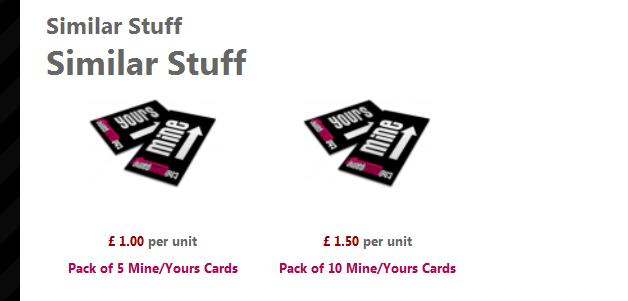
I have made the changes as described in the post you linked to and now all it seems to do is add the title twice.
I am trying to use the module class suffix of "title2", which I have added to the module options inside joomla. Other modules using this suffix are displayed as such;
Code:
<div class="title2">
<div class="rt-block">
<div class="rt-module-surround">
<div class="module-title"><h2 class="title">Who's Online</h2></div>
<div class="rt-module-inner">
<div class="module-content">
We have 1 member online <div class="clear"></div>
</div>
</div>
</div>
</div>
</div>
The code that is being outputted from this module is;
Code:
<div style="clear: both;" id="hikashop_submodules" class="hikashop_submodules">
<div class="moduletabletitle2">
<h3>Similar Stuff</h3>
<div class="hikashop_module">
<div class="hikashop_category_information" id="hikashop_category_information_module_239">
<h1>
Similar Stuff
</h1>
<div class="hikashop_products_listing">
<div style="clear: both;" class="hikashop_products">
<div style="width: 32%;" class="hikashop_product">
<div class="hikashop_container">
<div class="hikashop_subcontainer">
<div class="hikashop_product_image" style="height: 128px; text-align: center; clear: both;">
<a href="/tmg2/index.php?option=com_hikashop&ctrl=product&task=show&cid=7&name=pack-of-5-mineyours-cards&Itemid=115&category_pathway=0">
<img height="89" width="128" alt="Pack of 5 Mine/Yours Cards" src="/tmg2/media/com_hikashop/upload/thumbnail/tmg-cards_2930.png" smartload="2"> </a>
</div>
<span class="hikashop_product_price_full">
<span class="hikashop_product_price">£ 1.00</span> per unit</span><span class="hikashop_product_name">
<a href="/tmg2/index.php?option=com_hikashop&ctrl=product&task=show&cid=7&name=pack-of-5-mineyours-cards&Itemid=115&category_pathway=0">
Pack of 5 Mine/Yours Cards </a>
</span>
</div>
</div>
</div>
<div style="width: 32%;" class="hikashop_product">
<div class="hikashop_container">
<div class="hikashop_subcontainer">
<div class="hikashop_product_image" style="height: 128px; text-align: center; clear: both;">
<a href="/tmg2/index.php?option=com_hikashop&ctrl=product&task=show&cid=8&name=pack-of-10-mineyours-cards&Itemid=115&category_pathway=0">
<img height="89" width="128" alt="Pack of 10 Mine/Yours Cards" src="/tmg2/media/com_hikashop/upload/thumbnail/tmg-cards_496.png"> </a>
</div>
<span class="hikashop_product_price_full">
<span class="hikashop_product_price">£ 1.50</span> per unit</span><span class="hikashop_product_name">
<a href="/tmg2/index.php?option=com_hikashop&ctrl=product&task=show&cid=8&name=pack-of-10-mineyours-cards&Itemid=115&category_pathway=0">
Pack of 10 Mine/Yours Cards </a>
</span>
</div>
</div>
</div>
</div> </div>
<div style="clear: both;" class="hikashop_submodules">
</div>
</div></div> </div>
</div>
Any advice? I only want this styling on the module when it is used at the bottom of the product view to show related products so don't really want to start editing the module itself.
I am afraid I am running on localhost at the moment so cannot provide a link for you.
I look forward to your response.
Regards
Simon
Last edit: 15 years 8 months ago by recedo. Reason: Formatting
Please Log in or Create an account to join the conversation.
15 years 8 months ago #5581
by nicolas
Replied by nicolas on topic Re: Module class suffix not working?
I see that the title2 is correctly appended to the class name. But what you want is to add a space at the beginning so that it's recognized as another class and not becoming a suffix of the class moduletable
Please Log in or Create an account to join the conversation.
15 years 8 months ago #5583
by recedo
Replied by recedo on topic Re: Module class suffix not working?
Yes - at least I think this is what I need to do!
Basically what I want to do is apply a module class suffix through the module manager so that any modules displayed inside the component itself display exactly the same as they would if displayed in a 'normal' module position.
I hope this can be achieved in order to keep the same style across the site.
Regards
Simon
Basically what I want to do is apply a module class suffix through the module manager so that any modules displayed inside the component itself display exactly the same as they would if displayed in a 'normal' module position.
I hope this can be achieved in order to keep the same style across the site.
Regards
Simon
Please Log in or Create an account to join the conversation.
15 years 8 months ago #5585
by nicolas
Replied by nicolas on topic Re: Module class suffix not working?
Then why don't you do it ? 
In your module class suffix option, just add a space a the beginning and that should do it
In your module class suffix option, just add a space a the beginning and that should do it
Please Log in or Create an account to join the conversation.
15 years 8 months ago #5587
by recedo
Replied by recedo on topic Re: Module class suffix not working?
Sorry - think I misunderstood the post!
Added the space but still no difference - It is still displaying as in the screenshot - with two titles...
To me the problem seems to be the difference between the containing DIVS - if you look at a standard module it starts;
whereas your module starts;
Added the space but still no difference - It is still displaying as in the screenshot - with two titles...
To me the problem seems to be the difference between the containing DIVS - if you look at a standard module it starts;
Code:
<div class="title2">
<div class="rt-block">
<div class="rt-module-surround">
<div class="module-title"><h2 class="title">Who's Online</h2></div>
whereas your module starts;
Code:
<div class="moduletabletitle2">
<h3>Similar Stuff</h3>
<div class="hikashop_module">
<div class="hikashop_category_information" id="hikashop_category_information_module_239">
<h1>
Similar Stuff
</h1>
<div class="hikashop_products_listing">
Please Log in or Create an account to join the conversation.
15 years 8 months ago #5589
by recedo
Replied by recedo on topic Re: Module class suffix not working?
on a side note - if I disable show title of the module it removes both titles!
Please Log in or Create an account to join the conversation.
15 years 8 months ago #5591
by nicolas
Replied by nicolas on topic Re: Module class suffix not working?
The code
is not created by HikaShop but generated by joomla (or your template). HikaShop doesn't have any control over it. Did you try the different style possibilities explained in the other post ? In the other post, the style I put in the code is xhtml, but as I said, that is normally defined by the template. You might need to set one of the other values or even a special style defined by your template which we can't know from here.
The fact that you have twice the title is normal in such case. Normally, without the xhtml style, there is no title added by joomla. So HikaShop add the title itself. Now joomla adds the title and HikaShop as well.
But you can easily remove the one from HikaShop. You can just edit the file listing of the view product via the menu Display->Views and remove the echo $name; near the top.
Code:
<div class="moduletabletitle2">
<h3>Similar Stuff</h3>
The fact that you have twice the title is normal in such case. Normally, without the xhtml style, there is no title added by joomla. So HikaShop add the title itself. Now joomla adds the title and HikaShop as well.
But you can easily remove the one from HikaShop. You can just edit the file listing of the view product via the menu Display->Views and remove the echo $name; near the top.
Please Log in or Create an account to join the conversation.
15 years 8 months ago - 15 years 8 months ago #5592
by recedo
Replied by recedo on topic Re: Module class suffix not working?
Right - this makes more sense.
I am using a template by rockettheme using the gantry framework.
Look at their documentation ( www.gantry-framework.org/documentation/j...ing-module-positions ), it appears that modules are displayed like this;
<div id="rt-exampleposition">
<?php echo $gantry->displayModules('example','standard','standard'); ?>
<div class="clear"></div>
</div>
explained as;
displayModules(positionname,modulelayouttype,modulechromelayout);
Do you have any idea how I would transfer this to HikaShop?
Simon
I am using a template by rockettheme using the gantry framework.
Look at their documentation ( www.gantry-framework.org/documentation/j...ing-module-positions ), it appears that modules are displayed like this;
<div id="rt-exampleposition">
<?php echo $gantry->displayModules('example','standard','standard'); ?>
<div class="clear"></div>
</div>
explained as;
displayModules(positionname,modulelayouttype,modulechromelayout);
Do you have any idea how I would transfer this to HikaShop?
Simon
Last edit: 15 years 8 months ago by recedo. Reason: code not displaying correctly
Please Log in or Create an account to join the conversation.
15 years 8 months ago - 15 years 8 months ago #5593
by nicolas
Replied by nicolas on topic Re: Module class suffix not working?
So based on that page (
www.gantry-framework.org/documentation/j...custom-module-chrome
) you need to open the file templates/YOUR_TEMPLATE/html/modules.php and look for the functions modChrome_*. The end of the functions name is the name of the style.
So if you see a function modChrome_example with the html you're interested in, you will want to replace "xhtml" in the code of the post I talked about in my first message by "example".
That way, joomla will use that chrome/style to display the hikashop modules. You will want to test that modification in the file show of the view product which is where your related module is loaded by hikashop with the code echo JModuleHelper::renderModule($module);.
So, for that example, you would replace it by: echo JModuleHelper::renderModule($module,array('style'=>'example'));
So if you see a function modChrome_example with the html you're interested in, you will want to replace "xhtml" in the code of the post I talked about in my first message by "example".
That way, joomla will use that chrome/style to display the hikashop modules. You will want to test that modification in the file show of the view product which is where your related module is loaded by hikashop with the code echo JModuleHelper::renderModule($module);.
So, for that example, you would replace it by: echo JModuleHelper::renderModule($module,array('style'=>'example'));
Last edit: 15 years 8 months ago by nicolas.
Please Log in or Create an account to join the conversation.
15 years 8 months ago #5594
by recedo
Replied by recedo on topic Re: Module class suffix not working?
Thanks!
Worked a treat using
echo JModuleHelper::renderModule($module,array('style'=>'standard'));
Had to fiddle with the templates a little, removing some divs, changing classes etc but this was the big problem.
Still playing with the component but don't see any reason why I won't be leaving you a good review on JED
Hopefully this will help some other using Rockettheme's Gantry powered templates!
Take it easy
Simon
Worked a treat using
echo JModuleHelper::renderModule($module,array('style'=>'standard'));
Had to fiddle with the templates a little, removing some divs, changing classes etc but this was the big problem.
Still playing with the component but don't see any reason why I won't be leaving you a good review on JED
Hopefully this will help some other using Rockettheme's Gantry powered templates!
Take it easy
Simon
Please Log in or Create an account to join the conversation.
15 years 8 months ago #5595
by nicolas
Replied by nicolas on topic Re: Module class suffix not working?
Glad that it worked
Please Log in or Create an account to join the conversation.
Time to create page: 0.225 seconds