

- Posts: 66
- Thank you received: 0
centralizing the quantity field
14 years 1 month ago #59970
by luizarios
centralizing the quantity field was created by luizarios
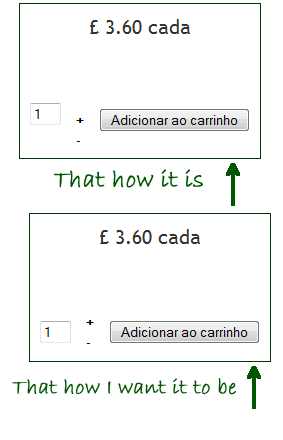
I am trying to center the quantity field so that it is between the + and - symbols (attached image shows how it should be versus how it is).
Using Firefox I found the property changing this is
html, body, div, span, applet, object, iframe, h1, h2, h3, h4, h5, h6, p, blockquote, pre, a, abbr, acronym, address, big, cite, code, del, dfn, em, img, ins, kbd, q, s, samp, small, strike, strong, sub, sup, tt, var, b, u, i, center, dl, dt, dd, ol, ul, li, fieldset, form, label, legend, table, caption, tbody, tfoot, thead, tr, th, td, article, aside, canvas, details, embed, figure, figcaption, footer, header, hgroup, menu, nav, output, ruby, section, summary, time, mark, audio, video {
border: 0 none;
font: ;
margin: 0;
padding: 0;
vertical-align: baseline;
}
now if I simply delete the vertical align property it would change the whole page so I can't do it, any idea how I can change just the quantity field? Many thanks
Using Firefox I found the property changing this is
html, body, div, span, applet, object, iframe, h1, h2, h3, h4, h5, h6, p, blockquote, pre, a, abbr, acronym, address, big, cite, code, del, dfn, em, img, ins, kbd, q, s, samp, small, strike, strong, sub, sup, tt, var, b, u, i, center, dl, dt, dd, ol, ul, li, fieldset, form, label, legend, table, caption, tbody, tfoot, thead, tr, th, td, article, aside, canvas, details, embed, figure, figcaption, footer, header, hgroup, menu, nav, output, ruby, section, summary, time, mark, audio, video {
border: 0 none;
font: ;
margin: 0;
padding: 0;
vertical-align: baseline;
}
now if I simply delete the vertical align property it would change the whole page so I can't do it, any idea how I can change just the quantity field? Many thanks
Please Log in or Create an account to join the conversation.

14 years 1 month ago #60038
by nicolas
Replied by nicolas on topic Re: centralizing the quantity field
You should try to add that CSS:
.hikashop_product_page td{vertical-align:middle !important;}
.hikashop_product_page td{vertical-align:middle !important;}
The following user(s) said Thank You: luizarios
Please Log in or Create an account to join the conversation.
14 years 1 month ago #60067
by luizarios
Replied by luizarios on topic Re: centralizing the quantity field
it worked  thanks
thanks Please Log in or Create an account to join the conversation.
Time to create page: 0.170 seconds