

- Posts: 13
- Thank you received: 0
Increase/decrease space
14 years 1 week ago - 14 years 1 week ago #65686
by kooky
Increase/decrease space was created by kooky
Hi,
I want to increase the space between product information and the comments.
Also add space between discount and the new price in the categories page and between the old price and the new price in the product's page.
I also want to decrease space between image and title in categories page.
In the attachemnts I show you exactly where I need to do the changes.
Please advise.
Thank you
I want to increase the space between product information and the comments.
Also add space between discount and the new price in the categories page and between the old price and the new price in the product's page.
I also want to decrease space between image and title in categories page.
In the attachemnts I show you exactly where I need to do the changes.
Please advise.
Thank you
Last edit: 14 years 1 week ago by kooky.
Please Log in or Create an account to join the conversation.

14 years 1 week ago #65695
by melisari
Replied by melisari on topic Re: Increase/decrease space
i am not an expert, but i believe you can do that in the css template of hikashop (think its name is frontend_default.css
if you dont know about css, you better ask for help or keep a copy in your computer in case you do something wrong (thats what i do)
you can find the frontend_default.css in the control panel of hikashop - configuration - display - css, just make click in the little icon with the pencil
if you need some help about how to change something, you can do what i do: with firefox, make a right click with your mouse in the space or element you want to change, and then choose, inspect element (in spanish you read "inspeccionar elemento") the screen will change to show you a right banner with all the css of the element and you will be able to play around and change things. Dont worry, you wont affect the real website.
firefox needs to be on date, of course.
Hope this help!
Sue.
if you dont know about css, you better ask for help or keep a copy in your computer in case you do something wrong (thats what i do)
you can find the frontend_default.css in the control panel of hikashop - configuration - display - css, just make click in the little icon with the pencil
if you need some help about how to change something, you can do what i do: with firefox, make a right click with your mouse in the space or element you want to change, and then choose, inspect element (in spanish you read "inspeccionar elemento") the screen will change to show you a right banner with all the css of the element and you will be able to play around and change things. Dont worry, you wont affect the real website.
firefox needs to be on date, of course.
Hope this help!
Sue.
Please Log in or Create an account to join the conversation.
14 years 1 week ago #65696
by kooky
Thank you for your interest.
I'm not a css expert at all. To do that on my own it will cost me minimum 2 days of searching and testing and painfull headache. That's why I'm asking for help by the experts. All I need to know is which lines to change in order to get the result I want.
For the ones that designed it, I think it's just 5 minutes work.
Thank again.
Kiki
Replied by kooky on topic Re: Increase/decrease space
melisari wrote: i am not an expert, but i believe you can do that in the css template of hikashop (think its name is frontend_default.css
if you dont know about css, you better ask for help or keep a copy in your computer in case you do something wrong (thats what i do)
you can find the frontend_default.css in the control panel of hikashop - configuration - display - css, just make click in the little icon with the pencil
if you need some help about how to change something, you can do what i do: with firefox, make a right click with your mouse in the space or element you want to change, and then choose, inspect element (in spanish you read "inspeccionar elemento") the screen will change to show you a right banner with all the css of the element and you will be able to play around and change things. Dont worry, you wont affect the real website.
firefox needs to be on date, of course.
Hope this help!
Sue.
Thank you for your interest.
I'm not a css expert at all. To do that on my own it will cost me minimum 2 days of searching and testing and painfull headache. That's why I'm asking for help by the experts. All I need to know is which lines to change in order to get the result I want.
For the ones that designed it, I think it's just 5 minutes work.
Thank again.
Kiki
Please Log in or Create an account to join the conversation.
14 years 1 week ago #65829
by kooky
Replied by kooky on topic Re: Increase/decrease space
Hi,
Where can I find the css lines to move the comments a little lower?
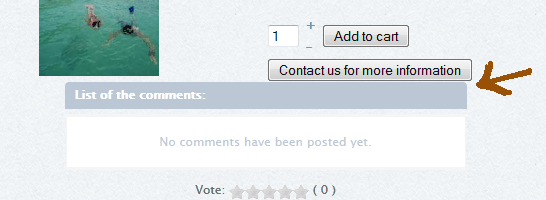
Thanks
Where can I find the css lines to move the comments a little lower?
Thanks
Please Log in or Create an account to join the conversation.

14 years 1 week ago #65834
by nicolas
Replied by nicolas on topic Re: Increase/decrease space
You can add such CSS:
#hikashop_product_vote_listing{ padding-top: 20px !important; }
in the front end CSS file of HikaShop that you can edit via the Display tab of the configuration of Hikashop.
#hikashop_product_vote_listing{ padding-top: 20px !important; }
in the front end CSS file of HikaShop that you can edit via the Display tab of the configuration of Hikashop.
Please Log in or Create an account to join the conversation.

12 years 11 months ago #126234
by viki667
Laadukas moderni kulmasohva, valkoinen kulmasohva tai iso kulmasohva: ModerniKoti
Replied by viki667 on topic Increase/decrease space
Hello
Can anybody tell how to change the space between these two (product pic and price)?
thank you so much for a great component hikashop team
Can anybody tell how to change the space between these two (product pic and price)?
thank you so much for a great component hikashop team
Laadukas moderni kulmasohva, valkoinen kulmasohva tai iso kulmasohva: ModerniKoti
Please Log in or Create an account to join the conversation.

12 years 11 months ago - 12 years 11 months ago #126290
by Xavier
Replied by Xavier on topic Increase/decrease space
Hi,
You probably have to set a height on the class: hikashop_product_image
Or set a negative margin on the previous class or on the class: hikashop_product_price_full
Thanks to follow this tutorial for customizing the layout:
www.hikashop.com/support/documentation/1...ize-the-display.html
You probably have to set a height on the class: hikashop_product_image
Or set a negative margin on the previous class or on the class: hikashop_product_price_full
Thanks to follow this tutorial for customizing the layout:
www.hikashop.com/support/documentation/1...ize-the-display.html
Last edit: 12 years 11 months ago by Xavier.
The following user(s) said Thank You: viki667
Please Log in or Create an account to join the conversation.
Time to create page: 0.213 seconds