

- Posts: 115
- Thank you received: 0
search and filter problem
13 years 10 months ago #73365
by itye2012
search and filter problem was created by itye2012
1) my website has 2 ways of shopping. 1 is via products and another via categories
2) When you shop using the products here www.britishfoodabroad.co.uk/index.php/products there is a search button on the right and you can search through all products and it works great
3) However when you shop by browsing through the categories eg this page : www.britishfoodabroad.co.uk/index.php/sh...y/category/420-heinz
the search button appears again. This works but only within the category you are in. Eg if you type in tomato when you are within the category here for example www.britishfoodabroad.co.uk/index.php/sh...y/category/420-heinz it will correctly find tomato within this category. However if you type in Beans it wont find any even though there are beans on the site. It seems to be only searching within the category it is currently.
The search on the left still works okay and searches through all products. How can i get the search module in the category page to indicate that it is only to search within this category?
The problem I have is that if I change the heading the search on the left of the page will also change? This is causing confusion
2) When you shop using the products here www.britishfoodabroad.co.uk/index.php/products there is a search button on the right and you can search through all products and it works great
3) However when you shop by browsing through the categories eg this page : www.britishfoodabroad.co.uk/index.php/sh...y/category/420-heinz
the search button appears again. This works but only within the category you are in. Eg if you type in tomato when you are within the category here for example www.britishfoodabroad.co.uk/index.php/sh...y/category/420-heinz it will correctly find tomato within this category. However if you type in Beans it wont find any even though there are beans on the site. It seems to be only searching within the category it is currently.
The search on the left still works okay and searches through all products. How can i get the search module in the category page to indicate that it is only to search within this category?
The problem I have is that if I change the heading the search on the left of the page will also change? This is causing confusion
Please Log in or Create an account to join the conversation.

13 years 10 months ago #73428
by Xavier
Replied by Xavier on topic Re: search and filter problem
Hi,
To indicate that it's only search in the current category, you can edit the view "product / filter" in HikaShop > Display > Views and add your text after the line:
Because the Fieldset is only used in the page and not in the module.
To indicate that it's only search in the current category, you can edit the view "product / filter" in HikaShop > Display > Views and add your text after the line:
Code:
<legend><?php echo JText::_('FILTERS'); ?></legend>
Because the Fieldset is only used in the page and not in the module.
Please Log in or Create an account to join the conversation.
13 years 10 months ago #73532
by itye2012
Replied by itye2012 on topic Re: search and filter problem
That worked great! How do i change or amend the label filters ?
Please Log in or Create an account to join the conversation.
13 years 10 months ago #73559
by Xavier
Replied by Xavier on topic Re: search and filter problem
Hi,
To change the label, you can override the translation in HikaShop > Configuration > Languages, and replace the text between the quotes for the text "FILTERS"
To change the label, you can override the translation in HikaShop > Configuration > Languages, and replace the text between the quotes for the text "FILTERS"
Please Log in or Create an account to join the conversation.
13 years 10 months ago #73659
by itye2012
Replied by itye2012 on topic Re: search and filter problem
Thanks again..that worked..one more thing on my page here :
www.britishfoodabroad.co.uk/index.php/sh...tegory/316-flahavans
How can I move the search box down a little as it is a little squashed against the text above reading : "Use this Search Box to search within the current Category and the Search box on the Left to search through all products on the British Food Abroad Website"
Thanks for all your help
www.britishfoodabroad.co.uk/index.php/sh...tegory/316-flahavans
How can I move the search box down a little as it is a little squashed against the text above reading : "Use this Search Box to search within the current Category and the Search box on the Left to search through all products on the British Food Abroad Website"
Thanks for all your help
Please Log in or Create an account to join the conversation.
13 years 10 months ago #73981
by Xavier
Replied by Xavier on topic Re: search and filter problem
Hi,
You can apply this property in the Frontend CSS File in HikaShop > Configuration > Display:
You can apply this property in the Frontend CSS File in HikaShop > Configuration > Display:
Code:
.hikashop_filter_Search_Categories_for_Products{
margin-top: 10px;
}
The following user(s) said Thank You: itye2012
Please Log in or Create an account to join the conversation.
13 years 10 months ago #74510
by itye2012
Replied by itye2012 on topic Re: search and filter problem
sorry not sure exactly where i need to look to insert the code you supplied, which view or file would I need to amend?
Thanks
Thanks
Please Log in or Create an account to join the conversation.
13 years 10 months ago #74544
by Xavier
Replied by Xavier on topic Re: search and filter problem
Hi,
You can add/edit this property in the file Frontend css file in HikaShop > Configuration > Display.
Or in your template css file.
You can add/edit this property in the file Frontend css file in HikaShop > Configuration > Display.
Or in your template css file.
The following user(s) said Thank You: itye2012
Please Log in or Create an account to join the conversation.
13 years 10 months ago #75314
by itye2012
Replied by itye2012 on topic Re: search and filter problem
sorry still cant get it to work
Please Log in or Create an account to join the conversation.
13 years 10 months ago #75318
by Xavier
Replied by Xavier on topic Re: search and filter problem
Hi,
In Joomla > Extenstions > Template manager, edit the file "template.css" of your current template and add the property:
at the end of the file.
In Joomla > Extenstions > Template manager, edit the file "template.css" of your current template and add the property:
Code:
.hikashop_filter_Search_Categories_for_Products{
margin-top: 10px !important;
}
Please Log in or Create an account to join the conversation.
13 years 10 months ago #76961
by itye2012
Replied by itye2012 on topic Re: search and filter problem
how can i change the color of the filter button from orange?
Also can you confirm if I did this correctly, I changed the label of the filter button from "Filter" to "Search" by editing the language file setting ,FILTER="Search", is this ok?
Also can you confirm if I did this correctly, I changed the label of the filter button from "Filter" to "Search" by editing the language file setting ,FILTER="Search", is this ok?
Please Log in or Create an account to join the conversation.
13 years 10 months ago #76990
by Xavier
Replied by Xavier on topic Re: search and filter problem
To change the color of you button, you have to change the file button.png in your template image folder.
Yes, changing the text in the language file is the good way to do that.
Yes, changing the text in the language file is the good way to do that.
The following user(s) said Thank You: itye2012
Please Log in or Create an account to join the conversation.

13 years 9 months ago - 13 years 9 months ago #80145
by djundi
Replied by djundi on topic search and filter problem
Hi friends, i have a problem with filter columns. First time when i created filters, thinks gone ok. But, when i open for second time some filter, for example "prod_ram" in field for filter columns no show number ? When i created them, in this field have number in drop down to chose....And situation is same, when i try to make new filter.....
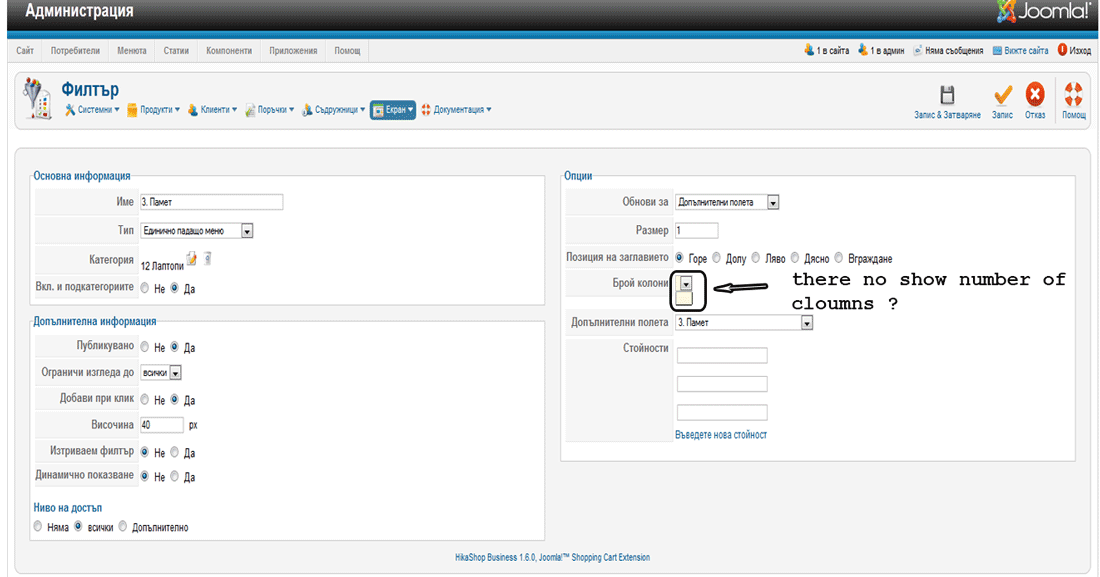
Last edit: 13 years 9 months ago by djundi.
Please Log in or Create an account to join the conversation.

13 years 9 months ago #80231
by nicolas
Replied by nicolas on topic search and filter problem
I'm sorry but we don't speak russian. Could you do your screenshot in English please ?
Please Log in or Create an account to join the conversation.
13 years 9 months ago #80249
by djundi
Replied by djundi on topic search and filter problem
No problem Nicolas, now think is ok 
Apropo this is Bulgarian
I made mistake, but now is ok
Apropo this is Bulgarian
I made mistake, but now is ok
Please Log in or Create an account to join the conversation.
Time to create page: 0.320 seconds