

- Posts: 10
- Thank you received: 0
How to change the width of the quantity field
13 years 3 months ago #110165
by turnag
How to change the width of the quantity field was created by turnag
I have upgraded to the latest HikaShop Business version 2.1.3; is there a way to change the width of the coupon and quantity boxes (they are way too wide)? The site where I am having this problem is:
www.rideeasyleather.com/
.
Please Log in or Create an account to join the conversation.

Less
More
- Posts: 12953
- Thank you received: 1778
13 years 3 months ago #110187
by Mohamed Thelji
Replied by Mohamed Thelji on topic How to change the width of the quantity field
Hi,
Can you show me where do you exactly have your problem through some screenshots for example ? thanks.
Can you show me where do you exactly have your problem through some screenshots for example ? thanks.
Please Log in or Create an account to join the conversation.
13 years 3 months ago #110303
by turnag
Replied by turnag on topic How to change the width of the quantity field
Here is a screen shot of the checkout screen, notice the width of the quantity field. I would like to change the width.
Please Log in or Create an account to join the conversation.

13 years 3 months ago #110304
by nicolas
Replied by nicolas on topic How to change the width of the quantity field
That's because of the code:
of the file
www.rideeasyleather.com/templates/ride01/css/template.css
of your template. Remove it and it will display with the 10px width that you set in your HikaShop frontend CSS.
Code:
media="screen"
input[type="text"], input[type="password"], input[type="email"], input[type="url"], textarea {
width: 100%;
padding: 4px 0;
color: #3D5166 !important;
font-size: 13px;
font-family: Arial, 'Arial Unicode MS', Helvetica, Sans-Serif;
font-weight: normal;
font-style: normal;
text-shadow: none;
}
The following user(s) said Thank You: turnag
Please Log in or Create an account to join the conversation.
13 years 3 months ago #110323
by turnag
Replied by turnag on topic How to change the width of the quantity field
Thanks a bunch this corrected the problem.
Please Log in or Create an account to join the conversation.
12 years 7 months ago #144918
by aemont
Replied by aemont on topic How to change the width of the quantity field
Greetings!
Newbie here.
Don't know if you need the following information, but just in case.
Artisteer 4.0 Template
Joomla 3.2
PHP 5.4.3
SQL 5.5.24
First of all I am extremely impressed with the forum and documentation, so much better than your competitor.
I followed your instructions but then it changed all the input fields in the checkout area and not just the quantity.
Is there an area where I can change only the quantity input field width?
Thanks a bunch!
Ann
Newbie here.
Don't know if you need the following information, but just in case.
Artisteer 4.0 Template
Joomla 3.2
PHP 5.4.3
SQL 5.5.24
First of all I am extremely impressed with the forum and documentation, so much better than your competitor.
I followed your instructions but then it changed all the input fields in the checkout area and not just the quantity.
Is there an area where I can change only the quantity input field width?
Thanks a bunch!
Ann
Please Log in or Create an account to join the conversation.
Less
More
- Posts: 12953
- Thank you received: 1778
12 years 7 months ago #144939
by Mohamed Thelji
Replied by Mohamed Thelji on topic How to change the width of the quantity field
Hello Ann,
I think that using this kind of CSS code will probably do the job :
I think that using this kind of CSS code will probably do the job :
Code:
.hikashop_cart_product_quantity_value input {
width: 20px !important;
}
Please Log in or Create an account to join the conversation.
9 years 5 months ago - 9 years 5 months ago #267848
by bluetooth
Replied by bluetooth on topic How to change the width of the quantity field
Dear sir,
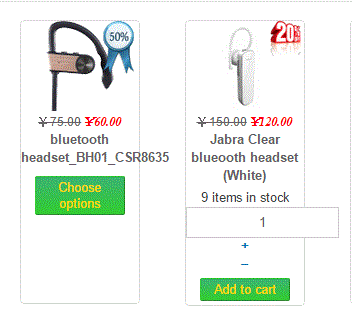
Now the code had been updated. How can I could set the width of the quantity field?
My quantity field is very long?
Website Link
Now the code had been updated. How can I could set the width of the quantity field?
My quantity field is very long?
Website Link
Last edit: 9 years 5 months ago by bluetooth.
Please Log in or Create an account to join the conversation.

9 years 5 months ago #267849
by Jerome
Jerome - Obsidev.com
HikaMarket & HikaSerial developer / HikaShop core dev team.
Also helping the HikaShop support team when having some time or couldn't sleep.
By the way, do not send me private message, use the "contact us" form instead.
Replied by Jerome on topic How to change the width of the quantity field
Hello,
Please read the Mohamed message just above yours.
He already gave all required explanations.
Please understand that the input width is currently set by your template and not by HikaShop ; so the display issue you have is not related to HikaShop CSS or support.
Regards,
Please read the Mohamed message just above yours.
He already gave all required explanations.
Please understand that the input width is currently set by your template and not by HikaShop ; so the display issue you have is not related to HikaShop CSS or support.
Regards,
Jerome - Obsidev.com
HikaMarket & HikaSerial developer / HikaShop core dev team.
Also helping the HikaShop support team when having some time or couldn't sleep.
By the way, do not send me private message, use the "contact us" form instead.
The following user(s) said Thank You: bluetooth
Please Log in or Create an account to join the conversation.
9 years 5 months ago #267893
by bluetooth
Replied by bluetooth on topic How to change the width of the quantity field
Yes,your are right and I found that. Thank you very much.
Please Log in or Create an account to join the conversation.
Time to create page: 0.278 seconds