
- Posts: 6
- Thank you received: 0
Gaps in product listing
- kershawj42
-
 Topic Author
- Offline
Less
More
13 years 2 months ago #112653
by kershawj42
Gaps in product listing was created by kershawj42
Hi,
Enjoying working with Hikashop and have learnt from this forum. I'm having some trouble with the display of products within and accessed from a category listing.
So I have categories and sub-categories, boys clothing -> suits/shirts that sort of thing.
I have a page which loads a hikashop content module. Type of content is category, layout is div, no. of columns is set to 3 and number of items 20. Associated category is top level (product category) and menu is categories listing.
I then see the two top level categories - no problem. I click on one and I then see the three categories under that, no problem. I click on one of them and I get a list of the products on that category. All working except in the one sub-category which has five products I seem to have a gap where two products could fit?
I tried disabling bootstrap on that page and they list on top of each other with no gaps so guess it's going to be down to my template and bootstrap, but I checked in firebug and it all seems fine?
Any ideas?
Thanks
Enjoying working with Hikashop and have learnt from this forum. I'm having some trouble with the display of products within and accessed from a category listing.
So I have categories and sub-categories, boys clothing -> suits/shirts that sort of thing.
I have a page which loads a hikashop content module. Type of content is category, layout is div, no. of columns is set to 3 and number of items 20. Associated category is top level (product category) and menu is categories listing.
I then see the two top level categories - no problem. I click on one and I then see the three categories under that, no problem. I click on one of them and I get a list of the products on that category. All working except in the one sub-category which has five products I seem to have a gap where two products could fit?
I tried disabling bootstrap on that page and they list on top of each other with no gaps so guess it's going to be down to my template and bootstrap, but I checked in firebug and it all seems fine?
Any ideas?
Thanks
Please Log in or Create an account to join the conversation.

Less
More
- Posts: 12953
- Thank you received: 1778
13 years 2 months ago #112659
by Mohamed Thelji
Replied by Mohamed Thelji on topic Gaps in product listing
Hi,
We'll need more information like a little screenshot of the problem that you are having for example, and a link to your page will probably help us to know that's a CSS issue or not.
thanks .
.
We'll need more information like a little screenshot of the problem that you are having for example, and a link to your page will probably help us to know that's a CSS issue or not.
thanks
. Please Log in or Create an account to join the conversation.
- kershawj42
-
Topic Author
- Offline
Less
More
- Posts: 6
- Thank you received: 0
13 years 2 months ago #112662
by kershawj42
Replied by kershawj42 on topic Gaps in product listing
Thanks for coming back so quick.
There should now be a screen shot attached to this post.
Here is a temporary link to the site I'm using to develop the site: tinyurl.com/kq74788
Regards
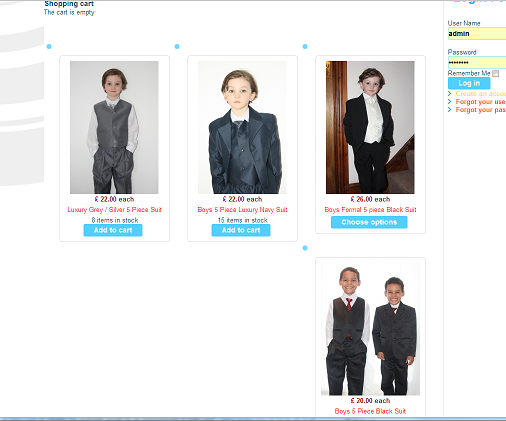
There should now be a screen shot attached to this post.
Here is a temporary link to the site I'm using to develop the site: tinyurl.com/kq74788
Regards
Please Log in or Create an account to join the conversation.

13 years 2 months ago #112682
by Eliot
Replied by Eliot on topic Gaps in product listing
Hi there,
This is just a small css isue.
Since your product title are somethimes longer it "pushes" the product under the top ones.
Adding a css rule like this one in your front end css file should do the job (System>Configuration>Display>css):
This is just a small css isue.
Since your product title are somethimes longer it "pushes" the product under the top ones.
Adding a css rule like this one in your front end css file should do the job (System>Configuration>Display>css):
Code:
div.hikashop_container {
height: 400px;
}
The following user(s) said Thank You: Mel, kershawj42
Please Log in or Create an account to join the conversation.
Less
More
- Posts: 12953
- Thank you received: 1778
13 years 2 months ago #112683
by Mohamed Thelji
Replied by Mohamed Thelji on topic Gaps in product listing
I don't know why but setting the font-size to 16 px is fixing the problem, so you'll just have to use this kind of CSS code :
Code:
.art-post {
font-size: 16px !important;
}
The following user(s) said Thank You: kershawj42
Please Log in or Create an account to join the conversation.
Time to create page: 0.235 seconds