

- Posts: 54
- Thank you received: 0
Paypal integration issues
15 years 3 months ago #20133
by appliance
Paypal integration issues was created by appliance
Hi-
Everything has been moving fairly smoothly, but I'm having a couple issues.
1-Shipping address information is not populating from the shopping cart to Paypal
2-Packing slip information in Paypal does not include details. It just states the total cost including shipping. This problem is exacerbated by the fact that I am getting the following error whenever I try to print a packing invoice from Hikashop: Fatal error: Call to a member function getFields() on a non-object in /hermes/bosweb/web144/b1443/ipg.thedeligrocerycom/administrator/components/com_hikashop/views/order/view.html.php on line 350
Any ideas? My website is www.thedeligrocery.com . Thanks for your help!
-Jeremiah
Everything has been moving fairly smoothly, but I'm having a couple issues.
1-Shipping address information is not populating from the shopping cart to Paypal
2-Packing slip information in Paypal does not include details. It just states the total cost including shipping. This problem is exacerbated by the fact that I am getting the following error whenever I try to print a packing invoice from Hikashop: Fatal error: Call to a member function getFields() on a non-object in /hermes/bosweb/web144/b1443/ipg.thedeligrocerycom/administrator/components/com_hikashop/views/order/view.html.php on line 350
Any ideas? My website is www.thedeligrocery.com . Thanks for your help!
-Jeremiah
Please Log in or Create an account to join the conversation.

15 years 3 months ago #20136
by nicolas
Replied by nicolas on topic Re: Paypal integration issues
1. Please check that you didn't the the address option of the paypal plugin to "no address". Otherwise, the address is not sent to paypal.
2. Please check that you didn't the the send order details option of the paypal plugin to "no". Otherwise, the order information is not sent to paypal.
For the invoice printing, you need to redownload HikaShop from our website and install it over your current version. That should fix the problem.
2. Please check that you didn't the the send order details option of the paypal plugin to "no". Otherwise, the order information is not sent to paypal.
For the invoice printing, you need to redownload HikaShop from our website and install it over your current version. That should fix the problem.
Please Log in or Create an account to join the conversation.
15 years 3 months ago #20141
by appliance
Replied by appliance on topic Re: Paypal integration issues
Thanks-I changed the details option so hopefully that will start working. I have the address set to "shipping address" but it's not coming over. I'm also running v1.5.2 which it says is the latest stable version. Thanks.
Please Log in or Create an account to join the conversation.
15 years 3 months ago #20153
by nicolas
Replied by nicolas on topic Re: Paypal integration issues
I can see that the address information is sent to paypal on your website. Could you try to activate the address override option of the plugin ?
Please Log in or Create an account to join the conversation.
15 years 3 months ago #20178
by appliance
Replied by appliance on topic Re: Paypal integration issues
Thanks. I have put on the override, but am not sure how to test it. Right now though, my primary concern is printing some shipping invoices. I'm running the latest version of the software, but I'm still getting that error. Could it be Chrome?
Please Log in or Create an account to join the conversation.
15 years 3 months ago #20179
by appliance
Replied by appliance on topic Re: Paypal integration issues
Just tried it in Firefox and got the same result.
Please Log in or Create an account to join the conversation.
15 years 3 months ago #20180
by nicolas
Replied by nicolas on topic Re: Paypal integration issues
You need to redownload HikaShop from our website and install it over your current version. That should fix the problem.
That was a bug in the first build of the latest version version. Since then, we generated a new build which fixes the problem of the invoice.
That was a bug in the first build of the latest version version. Since then, we generated a new build which fixes the problem of the invoice.
Please Log in or Create an account to join the conversation.
15 years 3 months ago #20235
by appliance
Replied by appliance on topic Re: Paypal integration issues
Okay, but I have Essential. I can't seem to download it through the backend since it thinks I have the latest version, and I can't download it off the site without paying for it again. Do I just re-install the free version?
Please Log in or Create an account to join the conversation.
15 years 3 months ago #20238
by appliance
Replied by appliance on topic Re: Paypal integration issues
Okay, I really needed to print these invoices so I just installed the starter version but now it over-wrote the Essential edition. How can I get the Essential edition back?
Please Log in or Create an account to join the conversation.
15 years 3 months ago #20249
by nicolas
Replied by nicolas on topic Re: Paypal integration issues
You can redownload the latest Essential edition install package in your order details page on our website. You can access it via the menu Your account->Your orders when logged in.
Please Log in or Create an account to join the conversation.
15 years 3 months ago #20290
by appliance
Replied by appliance on topic Re: Paypal integration issues
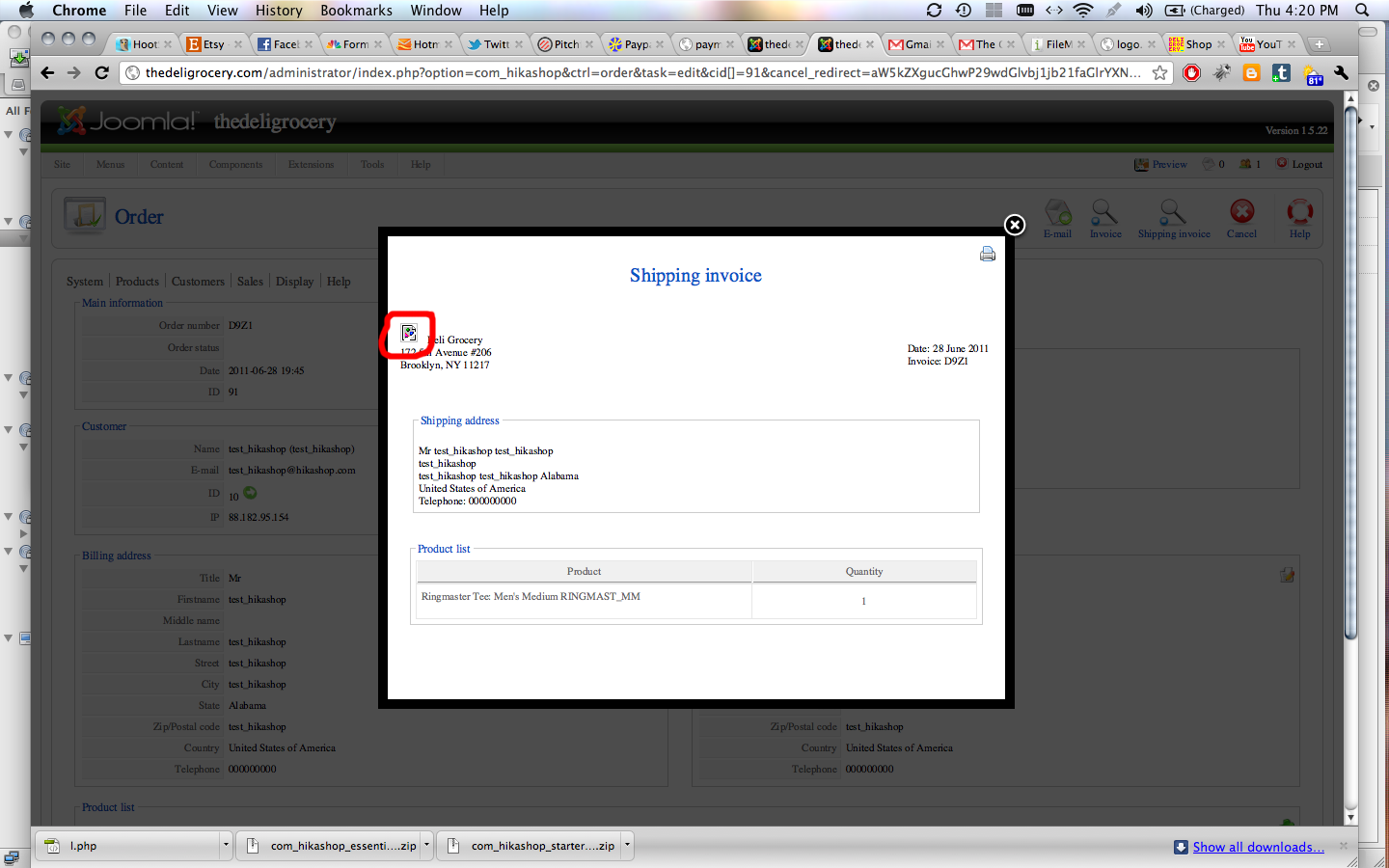
Okay, thanks that worked. Now how do I replace the broken image symbol in the shipping invoice with my logo?
Please Log in or Create an account to join the conversation.
15 years 3 months ago #20302
by nicolas
Replied by nicolas on topic Re: Paypal integration issues
You need to upload your logo in the folder media/com_hikashop/images/payment/ via FTP and then edit your payment method and select your logo in the images options.
Please Log in or Create an account to join the conversation.
15 years 3 months ago #20336
by appliance
Replied by appliance on topic Re: Paypal integration issues
I can't see where in Payment Methods I can change the image. At the very least I need to get rid of the broken image that is there. I tried putting a url into the HEADER_IMAGE field but nothing showed up. Thanks!
Please Log in or Create an account to join the conversation.
15 years 3 months ago #20347
by nicolas
Replied by nicolas on topic Re: Paypal integration issues
You need to go to the menu System->Payment methods, then click on your payment method. On the right of the screen, you should see that:
www.hikashop.com/media/doc/payment_paypal_form_extended.png
The second option is the "images" option that you should configure.
www.hikashop.com/media/doc/payment_paypal_form_extended.png
The second option is the "images" option that you should configure.
Please Log in or Create an account to join the conversation.
15 years 3 months ago #20351
by appliance
Replied by appliance on topic Re: Paypal integration issues
Okay, but I'm trying to replace the broken image circled below.
Please Log in or Create an account to join the conversation.
15 years 3 months ago #20352
by nicolas
Replied by nicolas on topic Re: Paypal integration issues
That's different then. For the invoice, you should edit the file invoice of the view order via the menu Display->Views and remove/change the code:
<div style="float:left;width=100px;margin-right:10px">
<img src="<?php echo HIKASHOP_IMAGES.'logo.png';?>" />
</div>
<div style="float:left;width=100px;margin-right:10px">
<img src="<?php echo HIKASHOP_IMAGES.'logo.png';?>" />
</div>
Please Log in or Create an account to join the conversation.
15 years 3 months ago #20353
by appliance
Replied by appliance on topic Re: Paypal integration issues
Thanks. I figured it out.
Please Log in or Create an account to join the conversation.

15 years 2 months ago #22630
by ClickWebDesign
Replied by ClickWebDesign on topic Re: Paypal integration issues
Hi Nicolas,
Am I correct that you have released multiple versions with the same revision number (1.5.2)? I would like to see new revision numbers when new builds are done so I know to upgrade. Also rather than doing a reinstall which overwrites all the files is it possible to have upgrade patches to only modify the files that are changed. This would avoid a lot of rework & testing for me!
To fix the invoice fatal error I have just overwritten the view.html.php file. Hopefully this is the only change I need - seems to have done the trick:)
BTW I have two clients running hikashop now and they both love it!
Thanks
Chris
Am I correct that you have released multiple versions with the same revision number (1.5.2)? I would like to see new revision numbers when new builds are done so I know to upgrade. Also rather than doing a reinstall which overwrites all the files is it possible to have upgrade patches to only modify the files that are changed. This would avoid a lot of rework & testing for me!
To fix the invoice fatal error I have just overwritten the view.html.php file. Hopefully this is the only change I need - seems to have done the trick:)
BTW I have two clients running hikashop now and they both love it!
Thanks
Chris
Please Log in or Create an account to join the conversation.
15 years 2 months ago #22636
by nicolas
Replied by nicolas on topic Re: Paypal integration issues
We only unlock the update to the latest version once we know there are no major issues and we don't do new builds after that so if you update via the update menu of HikaShop you will always have the latest stable build.
We could provide a zip with all the modified files. However, there are several issues with that:
1. We also modify the database structure on each update and that needs to be done unless you will have lots of errors. If you just update the files, you would have to do that manually where if you just install the new package via the joomla installer, hikashop does that automatically.
2. For 1.5.2 we modified 100% of the files and for 1.5.3, we modified a big chunk of the files.
3. We would have to build a tool to generate that zip and that takes time
4. Our goal is to provide overrides and plugins systems so that you don't have to modify any core files of hikashop
5. If you modify views, emails, translations or CSS via the interfaces we provide in HikaShop or make plugins for it, these modifications are not overwritten when you update so you should be able to update easily. There is not much left to modify, except if you want to add big chunk of features in HikaShop for your own use.
We could provide a zip with all the modified files. However, there are several issues with that:
1. We also modify the database structure on each update and that needs to be done unless you will have lots of errors. If you just update the files, you would have to do that manually where if you just install the new package via the joomla installer, hikashop does that automatically.
2. For 1.5.2 we modified 100% of the files and for 1.5.3, we modified a big chunk of the files.
3. We would have to build a tool to generate that zip and that takes time
4. Our goal is to provide overrides and plugins systems so that you don't have to modify any core files of hikashop
5. If you modify views, emails, translations or CSS via the interfaces we provide in HikaShop or make plugins for it, these modifications are not overwritten when you update so you should be able to update easily. There is not much left to modify, except if you want to add big chunk of features in HikaShop for your own use.
Please Log in or Create an account to join the conversation.
15 years 1 month ago #23952
by ClickWebDesign
Replied by ClickWebDesign on topic Re: Paypal integration issues
Ok, I was a bit confused with some of the text above & the site I was working on saying I had the latest version (It since prompts to upgrade to 1.5.3).
This has caught me out:
"5. If you modify views, emails, translations or CSS via the interfaces we provide in HikaShop or make plugins for it, these modifications are not overwritten when you update so you should be able to update easily. There is not much left to modify, except if you want to add big chunk of features in HikaShop for your own use. "
I have modified the views & CSS via FTP. What do you think is the best approach here? Sorry to be a pain!
Thanks
Chris
This has caught me out:
"5. If you modify views, emails, translations or CSS via the interfaces we provide in HikaShop or make plugins for it, these modifications are not overwritten when you update so you should be able to update easily. There is not much left to modify, except if you want to add big chunk of features in HikaShop for your own use. "
I have modified the views & CSS via FTP. What do you think is the best approach here? Sorry to be a pain!
Thanks
Chris
Please Log in or Create an account to join the conversation.
Time to create page: 0.298 seconds