

- Posts: 20
- Thank you received: 0
Change fields in orders backend
14 years 9 months ago #34343
by kurtsnow
Change fields in orders backend was created by kurtsnow
I use HikaShop for wholesale orders. Our sales person enters orders for all our sales. He is listed as the customer for all the orders in the backend under "Customer". Is there a way to replace the "customer" field with the billing company field instead?
Please Log in or Create an account to join the conversation.

14 years 9 months ago #34387
by nicolas
Replied by nicolas on topic Re: Change fields in orders backend
Hi,
You need to edit the file "form" of the view "order" for your back end template via the menu Display->Views and change the line:
<?php echo $this->order->customer->name.' ('.$this->order->customer->username.')'; ?>
to:
<?php echo $this->order->billing_address->address_firstname.' '.$this->order->billing_address->address_lastname; ?>
You need to edit the file "form" of the view "order" for your back end template via the menu Display->Views and change the line:
<?php echo $this->order->customer->name.' ('.$this->order->customer->username.')'; ?>
to:
<?php echo $this->order->billing_address->address_firstname.' '.$this->order->billing_address->address_lastname; ?>
Please Log in or Create an account to join the conversation.
14 years 9 months ago #34435
by kurtsnow
Replied by kurtsnow on topic Re: Change fields in orders backend
I followed your instructions, but it did not change the field. I still see "customer" listed in the back menu. Please see attached image. Instead of customer, I need the name of the company that is billed. I do not know anything about PHP, but your code referenced first name and last name, which is not what I need.
Please Log in or Create an account to join the conversation.
14 years 9 months ago #34485
by nicolas
Replied by nicolas on topic Re: Change fields in orders backend
Which field are you talking about ? Are you sure that you edited the correct file ?
Could you do a screenshot ? The screenshot you attached to your message doesn't seem to be the correct one.
Indeed that code is for the customer address first and last names. For the company name it's similar:
<?php echo $this->order->billing_address->address_company; ?>
Could you do a screenshot ? The screenshot you attached to your message doesn't seem to be the correct one.
Indeed that code is for the customer address first and last names. For the company name it's similar:
<?php echo $this->order->billing_address->address_company; ?>
Please Log in or Create an account to join the conversation.
14 years 8 months ago #34571
by kurtsnow
Replied by kurtsnow on topic Re: Change fields in orders backend
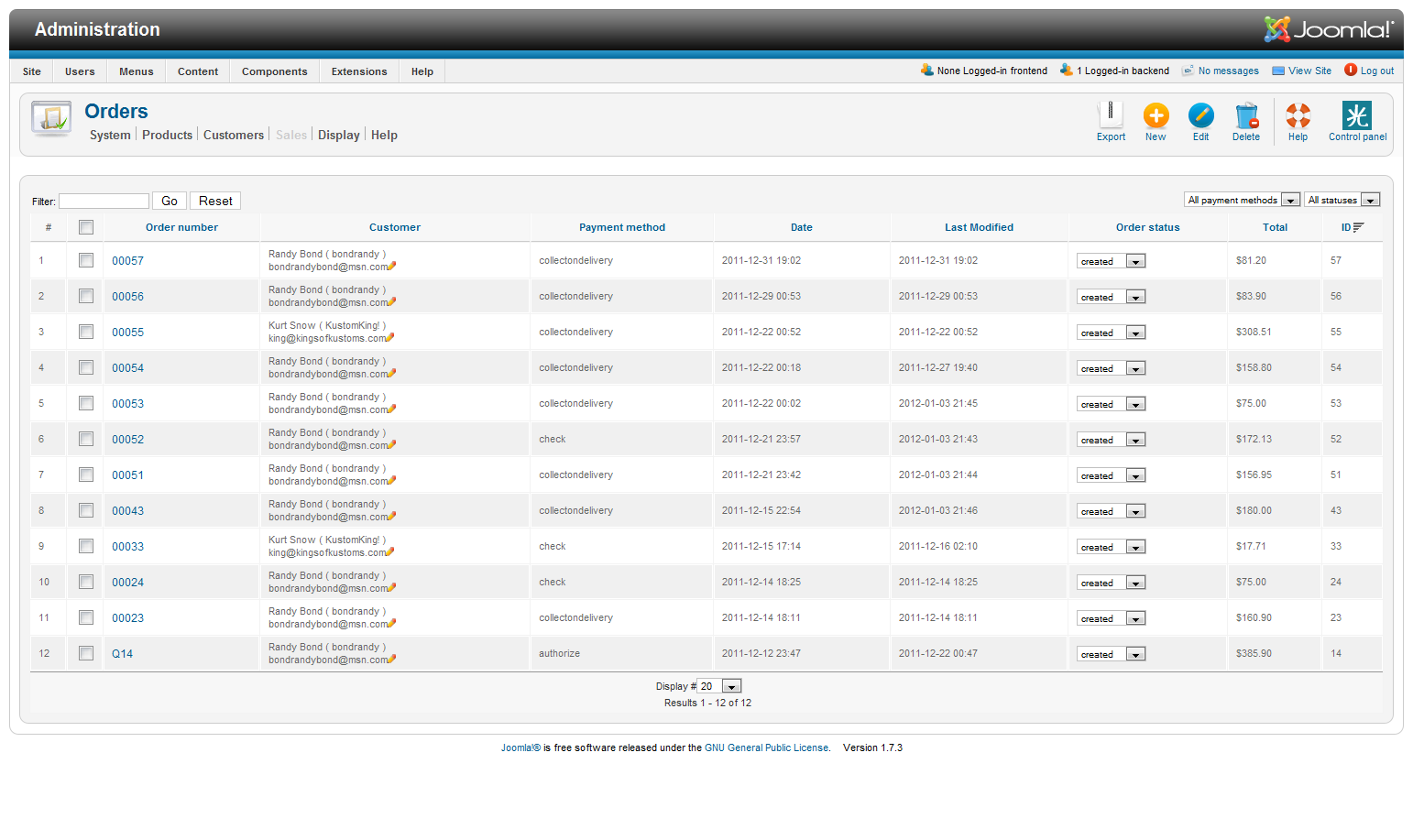
Sorry about hta, I did not uplaod the wrong image file. Here is the correct one.
Please Log in or Create an account to join the conversation.
14 years 8 months ago #34572
by kurtsnow
Replied by kurtsnow on topic Re: Change fields in orders backend
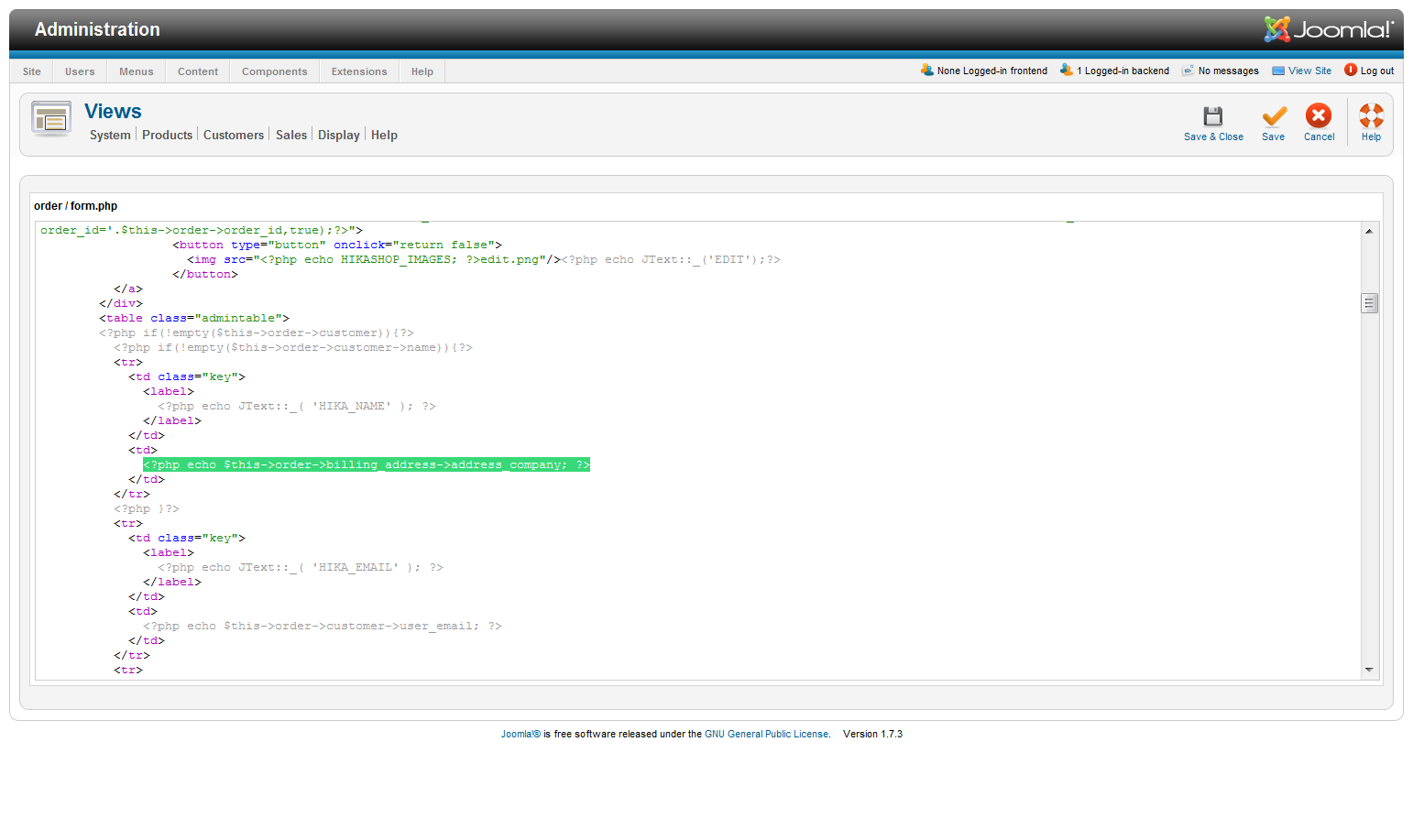
Also, here is a screenshot of where I placed the code.
Please Log in or Create an account to join the conversation.
14 years 8 months ago #34600
by nicolas
Replied by nicolas on topic Re: Change fields in orders backend
Ah now I see.
I thought that you were talking about the customer information on the order details page.
For the orders listing, it's more difficult to do as that information is not loaded on the listing.
You would have to first load it with a MySQL query and then you would be able to display the address company.
You can do that in the file "listing" of the view "order" of the back end via the menu Display->Views
I thought that you were talking about the customer information on the order details page.
For the orders listing, it's more difficult to do as that information is not loaded on the listing.
You would have to first load it with a MySQL query and then you would be able to display the address company.
You can do that in the file "listing" of the view "order" of the back end via the menu Display->Views
Please Log in or Create an account to join the conversation.
14 years 8 months ago #34689
by kurtsnow
Replied by kurtsnow on topic Re: Change fields in orders backend
I do not know how to do that. I tried changing the existing code, which did not work. So, I replaced the original code. And now, the listing does not appear at all. I get this error message: "Parse error: syntax error, unexpected '<' in /home/kurtsnow/public_html/kingsofkustoms.com/administrator/templates/bluestork/html/com_hikashop/order/listing.php on line 116" I checked line 116 and I cannot figure out the problem.
Please Log in or Create an account to join the conversation.
14 years 8 months ago #34746
by nicolas
Replied by nicolas on topic Re: Change fields in orders backend
If you want to revert your changes, please go in the menu Display->Views and click on the delete icon in the "remove customization" column for the view file you edited and your modifications will be reverted and it should work again.
Please Log in or Create an account to join the conversation.
14 years 8 months ago #34953
by kurtsnow
Replied by kurtsnow on topic Re: Change fields in orders backend
Thanks. It now displays fine. So, back to my original problem. How do I ...
"load it with a MySQL query and then you would be able to display the address company.
You can do that in the file "listing" of the view "order" of the back end via the menu Display->Views"
"load it with a MySQL query and then you would be able to display the address company.
You can do that in the file "listing" of the view "order" of the back end via the menu Display->Views"
Please Log in or Create an account to join the conversation.
14 years 8 months ago #34985
by nicolas
Replied by nicolas on topic Re: Change fields in orders backend
You can try something like that:
$addressClass = hikashop_get('class.address');
$address = $addressClass->get($row->order_billing_address_id);
echo $address->address_company;
$addressClass = hikashop_get('class.address');
$address = $addressClass->get($row->order_billing_address_id);
echo $address->address_company;
Please Log in or Create an account to join the conversation.
14 years 8 months ago #34992
by kurtsnow
Replied by kurtsnow on topic Re: Change fields in orders backend
I entered this code:
<?php
$addressClass = hikashop_get('class.address');
$address = $addressClass->get($row->order_billing_address_id);
echo $address->address_company;
?>
to replace this line:
<?php echo $this->order->customer->name.' ('.$this->order->customer->username.')'; ?>
And it does not work
<?php
$addressClass = hikashop_get('class.address');
$address = $addressClass->get($row->order_billing_address_id);
echo $address->address_company;
?>
to replace this line:
<?php echo $this->order->customer->name.' ('.$this->order->customer->username.')'; ?>
And it does not work
Please Log in or Create an account to join the conversation.
14 years 8 months ago #34996
by nicolas
Replied by nicolas on topic Re: Change fields in orders backend
There is no such code in the file "listing" of the view "order" of the back end.
You're not editing the correct view file.
You're not editing the correct view file.
Please Log in or Create an account to join the conversation.
14 years 8 months ago #34998
by kurtsnow
Replied by kurtsnow on topic Re: Change fields in orders backend
And that would be .... ?
Please Log in or Create an account to join the conversation.
14 years 8 months ago #35005
by nicolas
Replied by nicolas on topic Re: Change fields in orders backend
The file "listing" of the view "order" of the back end.
Please Log in or Create an account to join the conversation.
14 years 8 months ago #35064
by kurtsnow
Replied by kurtsnow on topic Re: Change fields in orders backend
That worked. Thank you.
Please Log in or Create an account to join the conversation.
Less
More
- Posts: 608
- Thank you received: 13
14 years 8 months ago #37671
by mohairbears
Replied by mohairbears on topic Re: Change fields in orders backend
Hi, I want to do something similar to this thread.
Can an extra field be inserted to show the shipping cost or shipping method name?
thanks
Can an extra field be inserted to show the shipping cost or shipping method name?
thanks
Please Log in or Create an account to join the conversation.
14 years 8 months ago #37789
by nicolas
Replied by nicolas on topic Re: Change fields in orders backend
Where do you want to display that ?
The listing of orders ? The orders information ? The invoice ? On the front end or the back end ?
The listing of orders ? The orders information ? The invoice ? On the front end or the back end ?
Please Log in or Create an account to join the conversation.
Less
More
- Posts: 608
- Thank you received: 13
14 years 8 months ago #37814
by mohairbears
Replied by mohairbears on topic Re: Change fields in orders backend
Administration, orders, same place as the screen dump higher up this thread.
Please Log in or Create an account to join the conversation.
14 years 8 months ago #37977
by nicolas
Replied by nicolas on topic Re: Change fields in orders backend
Yes you can do that by editing the file "listing" of the view "order" of the back end via the menu Display->Views.
The shipping method information is in $row->order_shipping_id (you will have to load the shipping information from the database to display the name:
$class = hikashop_get('class.shipping');
$shipping = $class->get($row->order_shipping_id);
echo $shipping->shipping_name;
and the shipping cost is in: $row>->order_shipping_price.
The shipping method information is in $row->order_shipping_id (you will have to load the shipping information from the database to display the name:
$class = hikashop_get('class.shipping');
$shipping = $class->get($row->order_shipping_id);
echo $shipping->shipping_name;
and the shipping cost is in: $row>->order_shipping_price.
Please Log in or Create an account to join the conversation.
Time to create page: 0.288 seconds