
- Posts: 67
- Thank you received: 0
Shopping cart issues
- meteomalta
-
 Topic Author
- Offline
Less
More
14 years 7 months ago #39485
by meteomalta
Shopping cart issues was created by meteomalta
After a new client goes to checkout his billing address is blank and if he decides to click on next (at the bottom of checkout) then nothing happens. How can I have an option for a popup to appear for the client to fill in his/her billing address if he/she would not yet have done so? Also, how can I have the option <Use the same address as for billing> to appear BELOW the option to fill in one's billing address rather than to the right? Thanks a lot.
Please Log in or Create an account to join the conversation.

14 years 7 months ago #39695
by nicolas
Replied by nicolas on topic Re: Shopping cart issues
By default in HikaShop, when a new user goes to the checkout, he will have to register, giving all his address information.
If yo do not have that, it means that you change the HikaShop configuration in some way to not have that.
Is that the case ?
Could you do a screenshot of your checkout so that we can see what you have ?
For your second question, that can be done with CSS:
www.hikashop.com/en/support/documentatio...ing.html#address_box
If yo do not have that, it means that you change the HikaShop configuration in some way to not have that.
Is that the case ?
Could you do a screenshot of your checkout so that we can see what you have ?
For your second question, that can be done with CSS:
www.hikashop.com/en/support/documentatio...ing.html#address_box
Please Log in or Create an account to join the conversation.
- meteomalta
-
Topic Author
- Offline
Less
More
- Posts: 67
- Thank you received: 0
14 years 7 months ago - 14 years 7 months ago #39760
by meteomalta
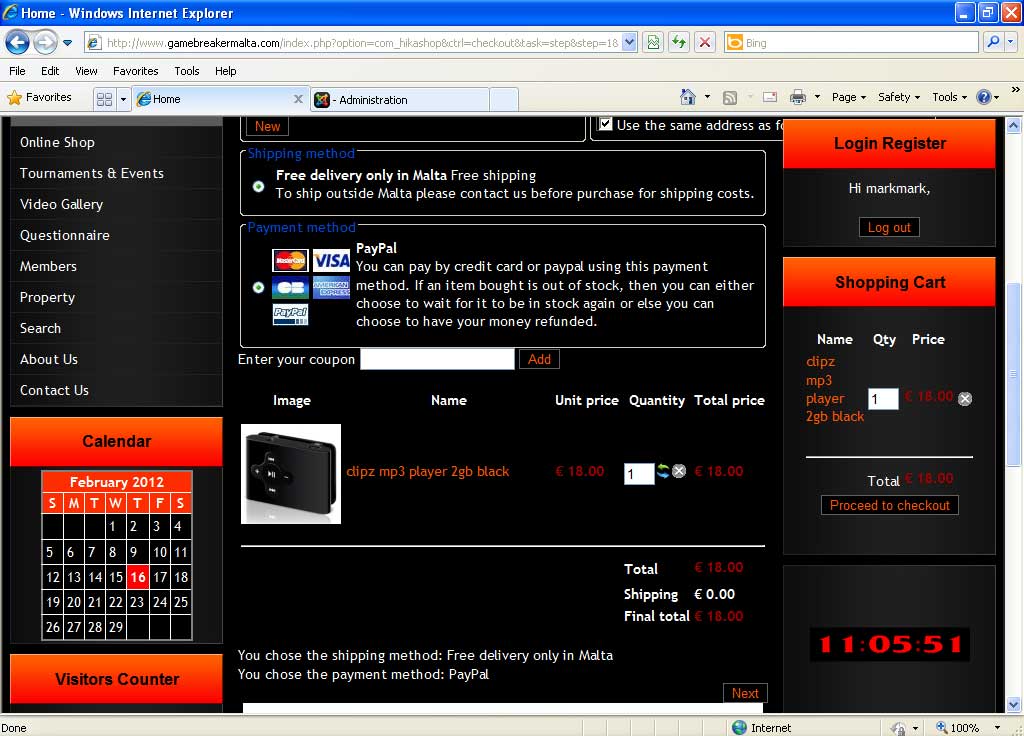
Please find the screenshot attached for the first issue. As you can see there is the New button (top left) and the Next button (bottom right) for any new client. If this new client clicks on Next the page just refreshes itself. I want it to either open a new window for the client to fill in his billing details or else to open a new window with a reminder/nudge to click on New to do so. Now, about the second issue, where do I find this CSS file to amend? Thanks a lot.
Replied by meteomalta on topic Re: Shopping cart issues
Please find the screenshot attached for the first issue. As you can see there is the New button (top left) and the Next button (bottom right) for any new client. If this new client clicks on Next the page just refreshes itself. I want it to either open a new window for the client to fill in his billing details or else to open a new window with a reminder/nudge to click on New to do so. Now, about the second issue, where do I find this CSS file to amend? Thanks a lot.
Last edit: 14 years 7 months ago by meteomalta.
Please Log in or Create an account to join the conversation.
14 years 7 months ago - 14 years 7 months ago #39812
by master_b
сайт з перекладами www.benefit.in.ua
PS. спасибо переводить Webmoney : Z207635098627 R152456839841 или ЯД 410011027999056
Replied by master_b on topic Re: Shopping cart issues
questions to Nicolas about cart parametrs:
1) how to change width of columns (Name, Qty,Price) try use css
.hikashop_cart_module_product_name_title {width:180px;}
.hikashop_cart_module_product_quantity_title {width: 30px;}
.hikashop_cart_module_product_price_title {width:30px;}
but if price have more symbols column will be changed in width why not in height? because name changed in height ...
2) how to move curency type from hikashop_cart_module_product_price_value to title_price_column?
1) how to change width of columns (Name, Qty,Price) try use css
.hikashop_cart_module_product_name_title {width:180px;}
.hikashop_cart_module_product_quantity_title {width: 30px;}
.hikashop_cart_module_product_price_title {width:30px;}
but if price have more symbols column will be changed in width why not in height? because name changed in height ...
2) how to move curency type from hikashop_cart_module_product_price_value to title_price_column?
сайт з перекладами www.benefit.in.ua
PS. спасибо переводить Webmoney : Z207635098627 R152456839841 или ЯД 410011027999056
Last edit: 14 years 7 months ago by master_b.
Please Log in or Create an account to join the conversation.
- meteomalta
-
Topic Author
- Offline
Less
More
- Posts: 67
- Thank you received: 0
14 years 7 months ago #39813
by meteomalta
Replied by meteomalta on topic Re: Shopping cart issues
thanks for your reply but I understood absolutely nothing  can you please read my previous post and send me an easy-to-understand reply? thanks
can you please read my previous post and send me an easy-to-understand reply? thanks Please Log in or Create an account to join the conversation.
14 years 7 months ago #39991
by nicolas
Replied by nicolas on topic Re: Shopping cart issues
Hi,
@meteomalta You don't get the error message telling the user to create a new address because your template does not display joomla messages:
www.hikashop.com/en/support/documentatio...tibility-issues.html
@master_b
1. You should set the width on the value classes, not the title classes. So that one for example:
hikashop_cart_product_name_value
2. That's quite complicated. You would have to remove the call to the listing_price layout, display the price yourself without the hikashop price display function and then display the currency at the top... Clearly not easy.
@meteomalta You don't get the error message telling the user to create a new address because your template does not display joomla messages:
www.hikashop.com/en/support/documentatio...tibility-issues.html
@master_b
1. You should set the width on the value classes, not the title classes. So that one for example:
hikashop_cart_product_name_value
2. That's quite complicated. You would have to remove the call to the listing_price layout, display the price yourself without the hikashop price display function and then display the currency at the top... Clearly not easy.
Please Log in or Create an account to join the conversation.
- meteomalta
-
Topic Author
- Offline
Less
More
- Posts: 67
- Thank you received: 0
14 years 7 months ago #40015
by meteomalta
Replied by meteomalta on topic Re: Shopping cart issues
thanks a lot Nicholas as I managed to solve the issue of the joomla messages. However, I still need to solve the other issue where I want the option <Use the same address as for billing> to appear BELOW the option to fill in one's billing address rather than to the right? I need to know where to find that css file for me to amend it. Thanks again.
Please Log in or Create an account to join the conversation.
14 years 7 months ago #40024
by master_b
сайт з перекладами www.benefit.in.ua
PS. спасибо переводить Webmoney : Z207635098627 R152456839841 или ЯД 410011027999056
Replied by master_b on topic Re: Shopping cart issues
1) isnt work if in any column\row (title\value) width more than i insert in css example:
column Price (30px) and value 100500.00UAH+(delete button) it will be minimum width for this column...
or delete Qty column
2) i think its just change displaying position from one row to another but if its call to sqlbase...
column Price (30px) and value 100500.00UAH+(delete button) it will be minimum width for this column...
or delete Qty column
2) i think its just change displaying position from one row to another but if its call to sqlbase...
сайт з перекладами www.benefit.in.ua
PS. спасибо переводить Webmoney : Z207635098627 R152456839841 или ЯД 410011027999056
Please Log in or Create an account to join the conversation.
- meteomalta
-
Topic Author
- Offline
Less
More
- Posts: 67
- Thank you received: 0
14 years 7 months ago #40025
by meteomalta
Replied by meteomalta on topic Re: Shopping cart issues
nicholas I would appreciate your reply as I can never understand what MasterB is saying
Please Log in or Create an account to join the conversation.
14 years 7 months ago - 14 years 7 months ago #40027
by master_b
сайт з перекладами www.benefit.in.ua
PS. спасибо переводить Webmoney : Z207635098627 R152456839841 или ЯД 410011027999056
Replied by master_b on topic Re: Shopping cart issues
Im asking nicolas about my problems;)
ps. topic about cart issues...
ps. topic about cart issues...
сайт з перекладами www.benefit.in.ua
PS. спасибо переводить Webmoney : Z207635098627 R152456839841 или ЯД 410011027999056
Last edit: 14 years 7 months ago by master_b.
Please Log in or Create an account to join the conversation.
14 years 7 months ago #40226
by nicolas
Replied by nicolas on topic Re: Shopping cart issues
@meteomalta That can be done in the CSS area of the Display tab of the configuration of HikaShop (that's explained in the documentation link I gave you).
@master_b Next time, open a new thread. That way it's easier to follow a thread for others.
Indeed, it will be the minimum width. But if you have spaces in the text, it should put the text on several lines like you have in your cart module. But if you don't have any spaces in the text, it cannot put it on several lines so it uses more space.
@master_b Next time, open a new thread. That way it's easier to follow a thread for others.
Indeed, it will be the minimum width. But if you have spaces in the text, it should put the text on several lines like you have in your cart module. But if you don't have any spaces in the text, it cannot put it on several lines so it uses more space.
Please Log in or Create an account to join the conversation.
- meteomalta
-
Topic Author
- Offline
Less
More
- Posts: 67
- Thank you received: 0
14 years 7 months ago #40258
by meteomalta
Replied by meteomalta on topic Re: Shopping cart issues
ok I finally found the css file but the link you gave me to replace is not there! Here is my CSS file:
<?php
/**
* @package HikaShop for Joomla!
* @version 1.5.6
* @author hikashop.com
* @copyright (C) 2010-2012 HIKARI SOFTWARE. All rights reserved.
* @license GNU/GPLv3 www.gnu.org/licenses/gpl-3.0.html
*/
defined('_JEXEC') or die('Restricted access');
?>
<div class="iframedoc" id="iframedoc"></div>
<form action="index.php?option=<?php echo HIKASHOP_COMPONENT ?>" method="post" name="adminForm" id="adminForm">
<fieldset>
<div class="header" style="float: left;"><?php echo $this->type.'_'.$this->fileName.'.css'; ?></div>
<div class="toolbar" id="toolbar" style="float: right;">
<button type="button" onclick="javascript:submitbutton('savecss'); return false;"><?php echo JText::_('HIKA_SAVE'); ?></button>
</div>
</fieldset>
<textarea style="width:100%" rows="20" name="csscontent" ><?php echo $this->content; ?></textarea>
<input type="hidden" name="option" value="<?php echo HIKASHOP_COMPONENT; ?>" />
<input type="hidden" name="task" value="savecss" />
<input type="hidden" name="tmpl" value="component" />
<input type="hidden" name="ctrl" value="config" />
<input type="hidden" name="file" value="<?php echo $this->type.'_'.$this->fileName; ?>" />
<input type="hidden" name="var" value="<?php echo JRequest::getCmd('var'); ?>" />
<?php echo JHTML::_( 'form.token' ); ?>
</form>
<?php
/**
* @package HikaShop for Joomla!
* @version 1.5.6
* @author hikashop.com
* @copyright (C) 2010-2012 HIKARI SOFTWARE. All rights reserved.
* @license GNU/GPLv3 www.gnu.org/licenses/gpl-3.0.html
*/
defined('_JEXEC') or die('Restricted access');
?>
<div class="iframedoc" id="iframedoc"></div>
<form action="index.php?option=<?php echo HIKASHOP_COMPONENT ?>" method="post" name="adminForm" id="adminForm">
<fieldset>
<div class="header" style="float: left;"><?php echo $this->type.'_'.$this->fileName.'.css'; ?></div>
<div class="toolbar" id="toolbar" style="float: right;">
<button type="button" onclick="javascript:submitbutton('savecss'); return false;"><?php echo JText::_('HIKA_SAVE'); ?></button>
</div>
</fieldset>
<textarea style="width:100%" rows="20" name="csscontent" ><?php echo $this->content; ?></textarea>
<input type="hidden" name="option" value="<?php echo HIKASHOP_COMPONENT; ?>" />
<input type="hidden" name="task" value="savecss" />
<input type="hidden" name="tmpl" value="component" />
<input type="hidden" name="ctrl" value="config" />
<input type="hidden" name="file" value="<?php echo $this->type.'_'.$this->fileName; ?>" />
<input type="hidden" name="var" value="<?php echo JRequest::getCmd('var'); ?>" />
<?php echo JHTML::_( 'form.token' ); ?>
</form>
Please Log in or Create an account to join the conversation.
14 years 7 months ago #40469
by nicolas
Replied by nicolas on topic Re: Shopping cart issues
Hi,
That is not a CSS file but a view file.
The CSS file can be edited in the Display TAB of the configuration and not the Display menu:
www.hikashop.com/media/doc/config_form_main.png
That is not a CSS file but a view file.
The CSS file can be edited in the Display TAB of the configuration and not the Display menu:
www.hikashop.com/media/doc/config_form_main.png
Please Log in or Create an account to join the conversation.
- meteomalta
-
Topic Author
- Offline
Less
More
- Posts: 67
- Thank you received: 0
14 years 7 months ago #40539
by meteomalta
Replied by meteomalta on topic Re: Shopping cart issues
ok thanks a lot - it worked finally phew 
Please Log in or Create an account to join the conversation.
- meteomalta
-
Topic Author
- Offline
Less
More
- Posts: 67
- Thank you received: 0
14 years 7 months ago #40634
by meteomalta
Replied by meteomalta on topic Re: Shopping cart issues
also on the checkout page I would like to change the icon New under Billing Address to Create New Billing Address instead of just the word New. How do I do this please?
Please Log in or Create an account to join the conversation.
- meteomalta
-
Topic Author
- Offline
Less
More
- Posts: 67
- Thank you received: 0
14 years 7 months ago #40811
by meteomalta
Replied by meteomalta on topic Re: Shopping cart issues
can someone help for the above post please?
Please Log in or Create an account to join the conversation.
14 years 7 months ago #41016
by nicolas
Replied by nicolas on topic Re: Shopping cart issues
You can do that with CSS too. We use that CSS on our demo website in order to replace that button with an image:
.hikashop_checkout_address_left_part .button{
color: white;
background-image: url(../images/button_blue_shape2.png);
background-repeat: no-repeat;
background-position: right;
background-color: transparent;
padding-right: 10px;
padding-left: 5px;
padding-top: 2px;
padding-bottom: 2px;
}
.hikashop_checkout_address_left_part .button{
color: white;
background-image: url(../images/button_blue_shape2.png);
background-repeat: no-repeat;
background-position: right;
background-color: transparent;
padding-right: 10px;
padding-left: 5px;
padding-top: 2px;
padding-bottom: 2px;
}
Please Log in or Create an account to join the conversation.
- meteomalta
-
Topic Author
- Offline
Less
More
- Posts: 67
- Thank you received: 0
14 years 6 months ago #41093
by meteomalta
Replied by meteomalta on topic Re: Shopping cart issues
thanks Nicolas but I did not find the above text in my css file - where do I find it please?
Please Log in or Create an account to join the conversation.
14 years 6 months ago #41207
by nicolas
Replied by nicolas on topic Re: Shopping cart issues
There is no such CSS by default. You need to add it.
Please Log in or Create an account to join the conversation.
- meteomalta
-
Topic Author
- Offline
Less
More
- Posts: 67
- Thank you received: 0
14 years 6 months ago #41211
by meteomalta
Replied by meteomalta on topic Re: Shopping cart issues
ok but I need to know what to add in which file to add it please coz I am very confused
Please Log in or Create an account to join the conversation.
Time to create page: 0.369 seconds