
- Posts: 7
- Thank you received: 0
change per unit into per set, per length, per reel
14 years 4 months ago #51395
by cobinet
change per unit into per set, per length, per reel was created by cobinet
Hello,
we are planing to sell products with a hikashop 2.5.
in the product-mask i haven't the possibility to change the phrase "per unit" after the price into one of the other terms mentioned above. A simple translation isn't usefull, because we sell different things per unit, per set, per length (per meter) ot per reel. So is there a possibility to adjust the term seperately for every product?
we are planing to sell products with a hikashop 2.5.
in the product-mask i haven't the possibility to change the phrase "per unit" after the price into one of the other terms mentioned above. A simple translation isn't usefull, because we sell different things per unit, per set, per length (per meter) ot per reel. So is there a possibility to adjust the term seperately for every product?
Please Log in or Create an account to join the conversation.

14 years 4 months ago #51475
by Xavier
Replied by Xavier on topic Re: change per unit into per set, per length, per reel
Hi cobinet,
A way to do that is:
Create a "Custom field" in Hikashop > Display > Custom fields with the table "Product" with the title, for example: "product_per";
In your product configuration page, add "unit" in the "product_per" field.
Then in Hikashop > Display > Views, edit the view: "product / listing_price.php" in the good template.
Here you can replace:
To:
And add custom values for your checks: unit / set / lenght / reel ...
A way to do that is:
Create a "Custom field" in Hikashop > Display > Custom fields with the table "Product" with the title, for example: "product_per";
In your product configuration page, add "unit" in the "product_per" field.
Then in Hikashop > Display > Views, edit the view: "product / listing_price.php" in the good template.
Here you can replace:
Code:
echo JText::_('PER_UNIT');
To:
Code:
if($this->element->product_per == 'unit'){
echo JText::_('PER_UNIT');
}
And add custom values for your checks: unit / set / lenght / reel ...
The following user(s) said Thank You: cobinet
Please Log in or Create an account to join the conversation.
14 years 4 months ago - 14 years 4 months ago #51860
by cobinet
Replied by cobinet on topic Re: change per unit into per set, per length, per reel
I used this Version to solve the Problem:
$mengeneinheit1 = JText::_('PER_UNIT') ;
foreach($this->fields as $fieldName => $oneExtraField) {
if(!empty($this->element->$fieldName)){
if( $this->fieldsClass->show($oneExtraField,$this->element->$fieldName) == 'pro Satz'){
$mengeneinheit1 = JText::_('per pack');}
else if( $this->fieldsClass->show($oneExtraField,$this->element->$fieldName) == 'pro Meter'){
$mengeneinheit1 = JText::_('per meter');}
else if( $this->fieldsClass->show($oneExtraField,$this->element->$fieldName) == 'pro Rolle'){
$mengeneinheit1 = JText::_('per reel');}
}
}
echo $mengeneinheit1;
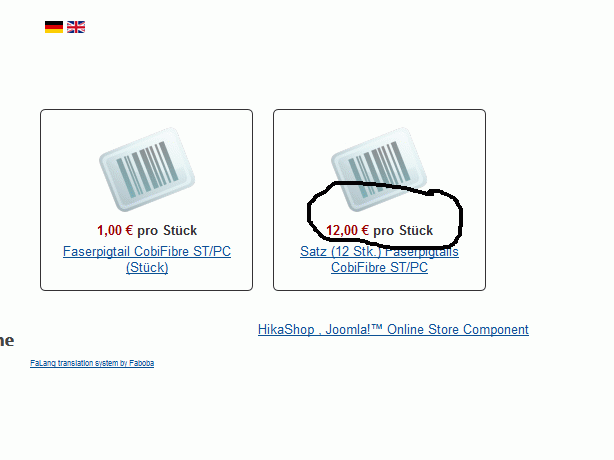
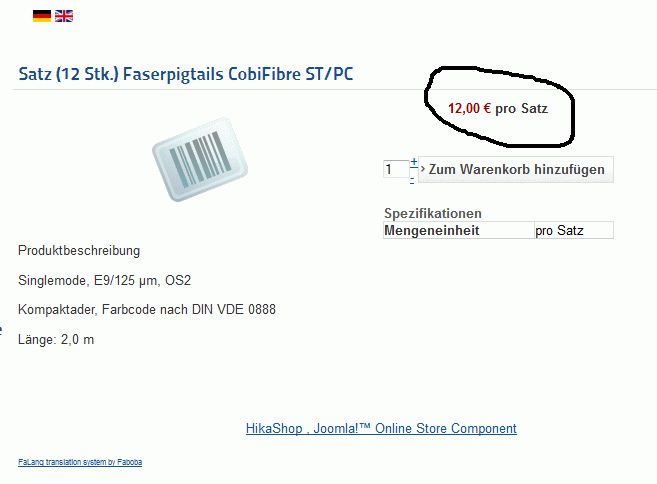
But thre's another Problem.In the product overviews, there is alway mentioned 'PER_UNIT' or my translation 'pro Stück' and not my chosen option (here per_pack). So i need to copy the text in another file, but i coldn't find it. Could you give me a hint.
Here the picture:
Overview
Product Page
$mengeneinheit1 = JText::_('PER_UNIT') ;
foreach($this->fields as $fieldName => $oneExtraField) {
if(!empty($this->element->$fieldName)){
if( $this->fieldsClass->show($oneExtraField,$this->element->$fieldName) == 'pro Satz'){
$mengeneinheit1 = JText::_('per pack');}
else if( $this->fieldsClass->show($oneExtraField,$this->element->$fieldName) == 'pro Meter'){
$mengeneinheit1 = JText::_('per meter');}
else if( $this->fieldsClass->show($oneExtraField,$this->element->$fieldName) == 'pro Rolle'){
$mengeneinheit1 = JText::_('per reel');}
}
}
echo $mengeneinheit1;
But thre's another Problem.In the product overviews, there is alway mentioned 'PER_UNIT' or my translation 'pro Stück' and not my chosen option (here per_pack). So i need to copy the text in another file, but i coldn't find it. Could you give me a hint.
Here the picture:
Overview
Product Page
Last edit: 14 years 4 months ago by cobinet.
Please Log in or Create an account to join the conversation.
14 years 4 months ago - 14 years 4 months ago #51910
by Xavier
Replied by Xavier on topic Re: change per unit into per set, per length, per reel
Hi cobinet,
For the product overviews you need:
$this->row->product_per == 'unit'
For the product overviews you need:
$this->row->product_per == 'unit'
Code:
if($this->element->product_per == 'unit' || $this->row->product_per == 'unit'){
echo JText::_('PER_UNIT');
}
Last edit: 14 years 4 months ago by Xavier.
Please Log in or Create an account to join the conversation.
14 years 3 months ago - 14 years 3 months ago #53602
by Afrosaxon
Replied by Afrosaxon on topic Re: change per unit into per set, per length, per reel
I'm a bit stuck with this, I try create a custom field, but the Table option is set to "address" can't change it too "Product" and add as per Xaviers instructions.
Also I am looking to create instead of the $14.95 each to $14.95 per page
Sorry but getting a bit lost creating this.
Sorry fixed!, got it via the Configuration, languages file, edited that and voila, per page pops up
Also I am looking to create instead of the $14.95 each to $14.95 per page
Sorry but getting a bit lost creating this.
Sorry fixed!, got it via the Configuration, languages file, edited that and voila, per page pops up
Last edit: 14 years 3 months ago by Afrosaxon.
Please Log in or Create an account to join the conversation.
- arens
-

Less
More
- Thank you received: 0
13 years 10 months ago #73836
by arens
Replied by arens on topic Re: change per unit into per set, per length, per reel
Any issue.
How too change order of " per unit" for before the price??
Ex: per unit 345 €
tx
How too change order of " per unit" for before the price??
Ex: per unit 345 €
tx
Please Log in or Create an account to join the conversation.
13 years 10 months ago #73984
by Xavier
Replied by Xavier on topic Re: change per unit into per set, per length, per reel
Hi,
You can override the translation of: "PRICE_BEGINNING" to set: PRICE_BEGINNING="per unit". and the translation of: "PER_UNIT" to PER_UNIT=""
You can override the translation of: "PRICE_BEGINNING" to set: PRICE_BEGINNING="per unit". and the translation of: "PER_UNIT" to PER_UNIT=""
Please Log in or Create an account to join the conversation.
- arens
-
Less
More
- Thank you received: 0
13 years 10 months ago #73995
by arens
Replied by arens on topic Re: change per unit into per set, per length, per reel
Thx Xavier
I solved but i have aproblem in page Checkout appear "precio" in resume products.
See attacha capture
I solved but i have aproblem in page Checkout appear "precio" in resume products.
See attacha capture
Attachment not found
Please Log in or Create an account to join the conversation.
13 years 10 months ago #74121
by Xavier
Replied by Xavier on topic Re: change per unit into per set, per length, per reel
Hi,
You can edit the view "product / listing_price" and add a span tag around the text "echo JText: 'PRICE_BEGINNING');" like:
And then add a property in the frontend css file like:
You can edit the view "product / listing_price" and add a span tag around the text "echo JText:
'PRICE_BEGINNING');" like:
Code:
echo "<span class='hika_price_beginning'>;
echo JText::('PRICE_BEGINNING');
echo "</span>";
And then add a property in the frontend css file like:
Code:
.hikashop_checkout_cart .hika_price_beginning{
display: none;
}
Please Log in or Create an account to join the conversation.
- arens
-
Less
More
- Thank you received: 0
13 years 10 months ago #74257
by arens
Replied by arens on topic Re: change per unit into per set, per length, per reel
Hi Xavier,
i put the code , but a error syntax,
the error:
arse error: syntax error, unexpected '/' in
i write this:
But no dissappear .
The text appear , in the PDF, mail etc.. all
i put the code , but a error syntax,
the error:
arse error: syntax error, unexpected '/' in
i write this:
Code:
echo '<span class="hika_price_beginning">'.JText::_('PRICE_BEGINNING');
But no dissappear .
The text appear , in the PDF, mail etc.. all
Please Log in or Create an account to join the conversation.
13 years 10 months ago #74261
by Xavier
Replied by Xavier on topic Re: change per unit into per set, per length, per reel
Yes I forgot a double quote, try this:
Code:
echo "<span class='hika_price_beginning'>".JText::_('PRICE_BEGINNING')."</span>";
Please Log in or Create an account to join the conversation.
- arens
-
Less
More
- Thank you received: 0
13 years 10 months ago #74266
by arens
Replied by arens on topic Re: change per unit into per set, per length, per reel
I put the code bit no dissapear "Precio"
Please Log in or Create an account to join the conversation.
13 years 10 months ago #74269
by Xavier
Replied by Xavier on topic Re: change per unit into per set, per length, per reel
Do you have set the CSS property ?
Could you give a link to your website ?
Could you give a link to your website ?
Please Log in or Create an account to join the conversation.
- arens
-
Less
More
- Thank you received: 0
13 years 10 months ago #74270
by arens
Replied by arens on topic Re: change per unit into per set, per length, per reel
i put the code in:
checkout / listing_price.php
And dissappear!!
is correct?
i need dissapear in Pdf and mails how too file modified??
checkout / listing_price.php
And dissappear!!
is correct?
i need dissapear in Pdf and mails how too file modified??
Please Log in or Create an account to join the conversation.
13 years 10 months ago #74523
by Xavier
Replied by Xavier on topic Re: change per unit into per set, per length, per reel
Hi,
All the views where "PRICE_BEGINNING" is present are:
"checkout / listing_price", "checkout / shipping", "product / listing_price".
All the views where "PRICE_BEGINNING" is present are:
"checkout / listing_price", "checkout / shipping", "product / listing_price".
Please Log in or Create an account to join the conversation.
13 years 5 months ago #101359
by DFX
Replied by DFX on topic change per unit into per set, per length, per reel
To expand a bit more on the original problem I am having trouble making this change show in the category listing - I assume there is a file I have to add this code to within the category view? I just can't seem to find which one to change.
So far I have added this code:
if($this->element->product_per == '' || $this->row->product_per == ''){
echo JText::_('PER_UNIT');
}
else{
echo $this->element->product_per;
}
to the file "product / listing_price"
I still need this change to show on the category listing; goo.gl/4ZFzg
Thank you for your help.
So far I have added this code:
if($this->element->product_per == '' || $this->row->product_per == ''){
echo JText::_('PER_UNIT');
}
else{
echo $this->element->product_per;
}
to the file "product / listing_price"
I still need this change to show on the category listing; goo.gl/4ZFzg
Thank you for your help.
Please Log in or Create an account to join the conversation.
13 years 5 months ago #101589
by Xavier
Replied by Xavier on topic change per unit into per set, per length, per reel
Hi,
What is the var $this->element->product_per ? a Custom field.
If not, you have to create a custom field with this name.
What is the var $this->element->product_per ? a Custom field.
If not, you have to create a custom field with this name.
Please Log in or Create an account to join the conversation.
13 years 5 months ago #101598
by DFX
Hi,
Yes I have created the custom field 'product_per' and I used the code from your post above.
Thanks again for your help.
Replied by DFX on topic Re: change per unit into per set, per length, per reel
Xavier wrote: Hi cobinet,
For the product overviews you need:
$this->row->product_per == 'unit'
Code:if($this->element->product_per == 'unit' || $this->row->product_per == 'unit'){ echo JText::_('PER_UNIT'); }
Hi,
Yes I have created the custom field 'product_per' and I used the code from your post above.
Thanks again for your help.
Please Log in or Create an account to join the conversation.
Less
More
- Posts: 25
- Thank you received: 8
6 years 5 months ago #317553
by gabriel.robert
Replied by gabriel.robert on topic change per unit into per set, per length, per reel
Hello,
I found this topic to do what I want to do, namely to be able to change the sales unit according to the categories or according to a choice.
but the problem is that this explanation dates from old version of hikashop and no longer goes.
can you tell us how to do the same operation with hikashop verion 4?
I thank you in advance !
I found this topic to do what I want to do, namely to be able to change the sales unit according to the categories or according to a choice.
but the problem is that this explanation dates from old version of hikashop and no longer goes.
can you tell us how to do the same operation with hikashop verion 4?
I thank you in advance !
Please Log in or Create an account to join the conversation.

6 years 5 months ago #317556
by nicolas
Replied by nicolas on topic change per unit into per set, per length, per reel
Hi,
The exact code indeed changed but the principle is still valid.
In the file product / listing_price.php
You have that code:
echo '<span class="hikashop_product_price_per_unit">'.JText::_('PER_UNIT').'</span>';
and you can still replace it with :
echo $this->element->product_per;
where "product_per" is the column name of the custom product field where you've selected / entered the text to have instead of "per unit".
The exact code indeed changed but the principle is still valid.
In the file product / listing_price.php
You have that code:
echo '<span class="hikashop_product_price_per_unit">'.JText::_('PER_UNIT').'</span>';
and you can still replace it with :
echo $this->element->product_per;
where "product_per" is the column name of the custom product field where you've selected / entered the text to have instead of "per unit".
Please Log in or Create an account to join the conversation.
Time to create page: 0.360 seconds