

- Posts: 2
- Thank you received: 0
Configuration of Emails Free version
14 years 1 month ago #63839
by m3a
Configuration of Emails Free version was created by m3a
Hello. I used the premium version before and it offers an option to configure the confirmation emails. For my new site im using the free version buy im having one problem.
Im using 2 payment methods: bank transfer and paypal payment plugin. When the email for received order is sent to clients i did an override including the bank details but now the client who pays with paypal gets that email too.
If i go to database and deactivate the order email then my paypal clients get only the confirmation email after they do payment (which is perfect, i would prefer for them not to get the received order email) but now my bank clients dont get any email at all.
Is there anyway I can manually disable the received order email to paypal clients only? Or any way i can program an email to be sent to bank clients with the bank details?
Hope you can help me with this. Thanks
Im using 2 payment methods: bank transfer and paypal payment plugin. When the email for received order is sent to clients i did an override including the bank details but now the client who pays with paypal gets that email too.
If i go to database and deactivate the order email then my paypal clients get only the confirmation email after they do payment (which is perfect, i would prefer for them not to get the received order email) but now my bank clients dont get any email at all.
Is there anyway I can manually disable the received order email to paypal clients only? Or any way i can program an email to be sent to bank clients with the bank details?
Hope you can help me with this. Thanks
Please Log in or Create an account to join the conversation.

14 years 1 month ago #63985
by nicolas
Replied by nicolas on topic Re: Configuration of Emails Free version
Hi,
There is no option for that. You would have to edit the order creation notification email via the menu System->Emails and add a check to remove the email address of the user based on the payment method. Something like that:
<?php if($data->order_payement_method=='paypal') $data->customer->user_email = ''; ?>
There is no option for that. You would have to edit the order creation notification email via the menu System->Emails and add a check to remove the email address of the user based on the payment method. Something like that:
<?php if($data->order_payement_method=='paypal') $data->customer->user_email = ''; ?>
Please Log in or Create an account to join the conversation.
14 years 1 month ago #64083
by m3a
Replied by m3a on topic Re: Configuration of Emails Free version
Thank you! Well that solution could work but i just convinced my client to upgrade to essentials. Definitely worth it. You have an amazing product! Thanks again
Please Log in or Create an account to join the conversation.
Less
More
- Posts: 18
- Thank you received: 0
14 years 2 weeks ago #66410
by piscitellij
Replied by piscitellij on topic Re: Configuration of Emails Free version
i just bought essential for my first site - and want to customize the order confirmation emails to include company logo and some added text - where do I find the files to change the code, id like to try this first before investing more in the business edition.
Thanks!
Thanks!
Please Log in or Create an account to join the conversation.
14 years 2 weeks ago #66415
by juandress
Replied by juandress on topic Re: Configuration of Emails Free version
Hi friends, I can show all the fields in the user's mail order.
What is the file to modify this.
Thank you.
What is the file to modify this.
Thank you.
Please Log in or Create an account to join the conversation.
14 years 2 weeks ago #66532
by nicolas
Replied by nicolas on topic Re: Configuration of Emails Free version
@piscitellij:
If you want to add some text, you can simply change the existing translations of the emails as explained here:
www.hikashop.com/en/download/languages.html#modify
If you want to add your logo to the email, you will have to edit the order creation/status notification email via the menu System->Emails (business edition) and add the HTML for your logo there. Without the Business edition, you can edit the files in media/com_hikashop/mail but you will loose your modifications when you update, unlike with the edition via the interface.
@juandress:
What fields ? What email ? I don't understand your question. Please give more information so that we can help you.
If you want to add some text, you can simply change the existing translations of the emails as explained here:
www.hikashop.com/en/download/languages.html#modify
If you want to add your logo to the email, you will have to edit the order creation/status notification email via the menu System->Emails (business edition) and add the HTML for your logo there. Without the Business edition, you can edit the files in media/com_hikashop/mail but you will loose your modifications when you update, unlike with the edition via the interface.
@juandress:
What fields ? What email ? I don't understand your question. Please give more information so that we can help you.
Please Log in or Create an account to join the conversation.
14 years 2 weeks ago #66676
by juandress
Replied by juandress on topic Re: Configuration of Emails Free version
Hi Nicolas. My idea is show the current notification mail with all user's fields.
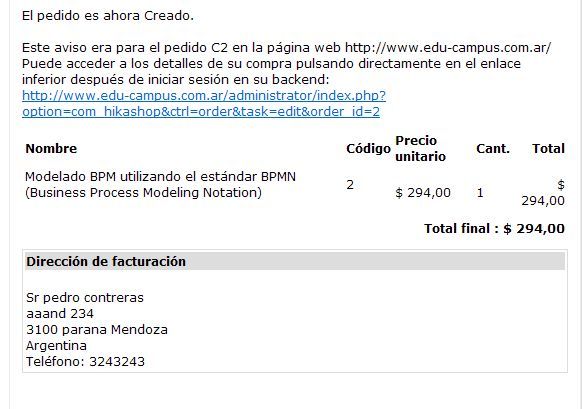
Ex.
all fields including the user_id in the notificacion mail.
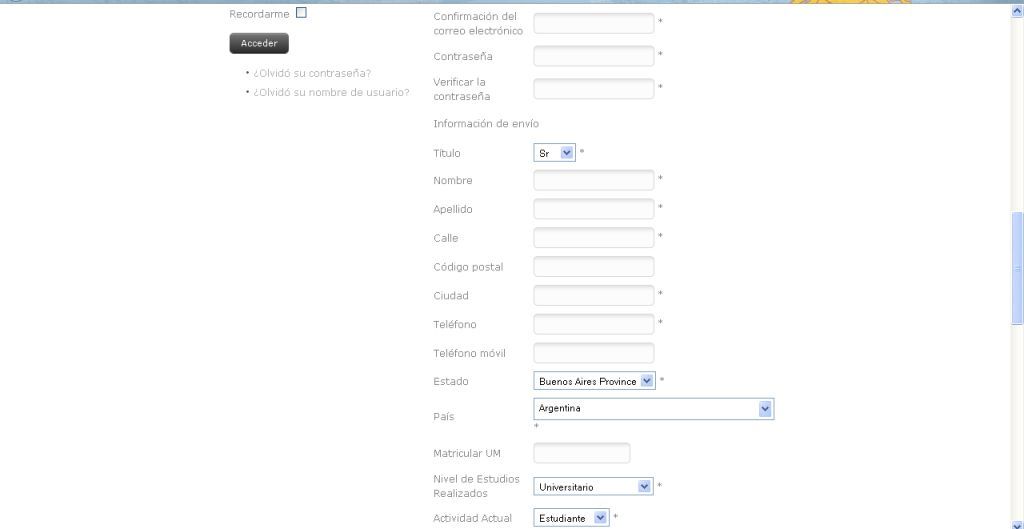
Thank you for quick response.
Regards
Juan
Ex.
all fields including the user_id in the notificacion mail.
Thank you for quick response.
Regards
Juan
Please Log in or Create an account to join the conversation.
14 years 1 week ago #66885
by nicolas
Replied by nicolas on topic Re: Configuration of Emails Free version
These are address custom fields. Not user custom fields.
You can add them to the email by adding the corresponding tags in the "address_template" files via the menu Display->Views of HikaShop.
You can add them to the email by adding the corresponding tags in the "address_template" files via the menu Display->Views of HikaShop.
The following user(s) said Thank You: juandress
Please Log in or Create an account to join the conversation.
14 years 1 week ago - 14 years 1 week ago #66950
by juandress
Replied by juandress on topic Re: Configuration of Emails Free version
Thank you Nicolas, . I add tags {matricula} {estudios} {actividad} but does not show it in the mail. I need something more?
<?php
/**
* @package HikaShop for Joomla!
* @version 1.6.0
* @author hikashop.com
* @copyright (C) 2010-2012 HIKARI SOFTWARE. All rights reserved.
* @license GNU/GPLv3 www.gnu.org/licenses/gpl-3.0.html
*/
defined('_JEXEC') or die('Restricted access');
?>
{address_company}
{address_title} {address_firstname} {address_lastname}
{address_street}
{address_post_code} {address_city} {address_state}{address_country}
{matricula}{estudios}{actividad}
<?php echo JText::sprintf('TELEPHONE_IN_ADDRESS','{address_telephone}');?>
Dirección de facturación
Sr Agustin Font
Alem 455
3100 Parana Entre Ríos
Argentina
Teléfono: 324324324
<?php
/**
* @package HikaShop for Joomla!
* @version 1.6.0
* @author hikashop.com
* @copyright (C) 2010-2012 HIKARI SOFTWARE. All rights reserved.
* @license GNU/GPLv3 www.gnu.org/licenses/gpl-3.0.html
*/
defined('_JEXEC') or die('Restricted access');
?>
{address_company}
{address_title} {address_firstname} {address_lastname}
{address_street}
{address_post_code} {address_city} {address_state}{address_country}
{matricula}{estudios}{actividad}
<?php echo JText::sprintf('TELEPHONE_IN_ADDRESS','{address_telephone}');?>
Dirección de facturación
Sr Agustin Font
Alem 455
3100 Parana Entre Ríos
Argentina
Teléfono: 324324324
Last edit: 14 years 1 week ago by juandress. Reason: It Work!! Thank you!!
Please Log in or Create an account to join the conversation.
14 years 1 week ago #67043
by nicolas
Replied by nicolas on topic Re: Configuration of Emails Free version
There are several address_template files. Please make the changes in all of them.
Please Log in or Create an account to join the conversation.
14 years 1 week ago #67203
by juandress
Replied by juandress on topic Re: Configuration of Emails Free version
Hy Nicolas, the {address_user_id} field is not displayed in the notificacion mail. What is the problem with this field?
Thank you!
Thank you!
Please Log in or Create an account to join the conversation.
14 years 1 week ago #67452
by juandress
Replied by juandress on topic Re: Configuration of Emails Free version
Hi Nicolas, please. I need that {address_user_id}field display in the notification mail template. It very important send the user_id for mail.
Would appreciate a response to this .
Thank you
Would appreciate a response to this .
Thank you
Please Log in or Create an account to join the conversation.
14 years 1 week ago #67668
by nicolas
Replied by nicolas on topic Re: Configuration of Emails Free version
The address_user_id field of the database table is not a custom field.
It's normal that it doesn't display even if you add the tag.
You will have to edit the email via the menu System>Emails (Business edition) and add the code:
<?php echo 'user id: '.$data->order_user_id; ?>
It's normal that it doesn't display even if you add the tag.
You will have to edit the email via the menu System>Emails (Business edition) and add the code:
<?php echo 'user id: '.$data->order_user_id; ?>
Please Log in or Create an account to join the conversation.
Time to create page: 0.242 seconds