

- Posts: 79
- Thank you received: 1
pre order
13 years 6 months ago - 13 years 6 months ago #93375
by Georg
Hi, I sell a vegetable which is only avilable after harvesting.
My customers want to order them at once and I don´t want to lose them bay saying it is not avilable at the moment and they can´t order it. I guess they won´t come back in two weeks....
I would like to make it possible to do an pre order!
What is the right way to do so? What I found out is following...
1) Start of selling
Problem if I write start of selling date in future the customer does see this information only once at the product site, after ordering there is no further information about time of delivery.
2) Avilability
Problem if I write the avilability f.ex. In two weeks the customer does see the information only at the product page
3) ??? Is there any other way to make pre orders possible so that the customer can get good visible informations about the date of delivery in the near future
Hope I could explain it clear.
A soloution could be to write the aproximate delivery date to the order confirmation. But unfortunately I can`t do php things like this
Hope someone has a good idea and would be happy to get help
greetings from bavaria
georg
My customers want to order them at once and I don´t want to lose them bay saying it is not avilable at the moment and they can´t order it. I guess they won´t come back in two weeks....
I would like to make it possible to do an pre order!
What is the right way to do so? What I found out is following...
1) Start of selling
Problem if I write start of selling date in future the customer does see this information only once at the product site, after ordering there is no further information about time of delivery.
2) Avilability
Problem if I write the avilability f.ex. In two weeks the customer does see the information only at the product page
3) ??? Is there any other way to make pre orders possible so that the customer can get good visible informations about the date of delivery in the near future
Hope I could explain it clear.
A soloution could be to write the aproximate delivery date to the order confirmation. But unfortunately I can`t do php things like this
Hope someone has a good idea and would be happy to get help
greetings from bavaria
georg
Last edit: 13 years 6 months ago by Georg.
Please Log in or Create an account to join the conversation.

13 years 6 months ago #93570
by Jerome
Jerome - Obsidev.com
HikaMarket & HikaSerial developer / HikaShop core dev team.
Also helping the HikaShop support team when having some time or couldn't sleep.
By the way, do not send me private message, use the "contact us" form instead.
Hi,
Do you want that the customer could buy the product even if it is not in stock ?
Is so, do you want to put some limitation for some kind of "stock of pre order" ?
I see some HikaShop users make some modification in order to trick the product stock.
HikaShop would display the stock -100. This 100 extra items are for "pre order". It means that when the product is less or equal to 100, some text are displayed differently in the front-end (due to the modifications by view override).
So the user could still buy the product and he knows that it is "pre order".
Regards,
Do you want that the customer could buy the product even if it is not in stock ?
Is so, do you want to put some limitation for some kind of "stock of pre order" ?
I see some HikaShop users make some modification in order to trick the product stock.
HikaShop would display the stock -100. This 100 extra items are for "pre order". It means that when the product is less or equal to 100, some text are displayed differently in the front-end (due to the modifications by view override).
So the user could still buy the product and he knows that it is "pre order".
Regards,
Jerome - Obsidev.com
HikaMarket & HikaSerial developer / HikaShop core dev team.
Also helping the HikaShop support team when having some time or couldn't sleep.
By the way, do not send me private message, use the "contact us" form instead.
Please Log in or Create an account to join the conversation.
13 years 6 months ago #93931
by Georg
Thanks for your help. Seems to be the thing that would suit my needs.
But how do I do this
It means that when the product is less or equal to 100, some text are displayed differently in the front-end (due to the modifications by view override).
Where can I arrange that a text is displayed. That would be a realy good solution.
Regards
Georg
But how do I do this
It means that when the product is less or equal to 100, some text are displayed differently in the front-end (due to the modifications by view override).
Where can I arrange that a text is displayed. That would be a realy good solution.
Regards
Georg
Please Log in or Create an account to join the conversation.

13 years 6 months ago #94031
by nicolas
A good start would be to edit the file "quantity" of the view "product" via the menu Display>Views and change:
to:
and change :
to:
Code:
echo '<span class="hikashop_product_stock_count">'.JText::sprintf('X_ITEMS_IN_STOCK',$this->row->product_quantity).'</span><br/>';
to:
Code:
if($this->row->product_quantity>100){
echo '<span class="hikashop_product_stock_count">'.JText::sprintf('X_ITEMS_IN_STOCK',$this->row->product_quantity-100).'</span><br/>';
}else{
echo 'The product is out of stock. However, you can pre-order it';
}
Code:
echo $this->cart->displayButton(JText::_('ADD_TO_CART'),'add',$this->params,$url,$this->ajax,'',$max,$min);
Code:
if($this->row->product_quantity>100){
echo $this->cart->displayButton(JText::_('ADD_TO_CART'),'add',$this->params,$url,$this->ajax,'',$max,$min);
}else{
echo $this->cart->displayButton('Pre order','add',$this->params,$url,$this->ajax,'',$max,$min);
}
Please Log in or Create an account to join the conversation.
Less
More
- Posts: 256
- Thank you received: 2
10 years 8 months ago #226192
by dancingkazzaf
Replied by dancingkazzaf on topic pre order
Hi Nicolas,
Would you happen to know how to do this on HikaShop 2.5.0 or 2.6.0? The view file has changed and I couldn't make these edits.
Thank you
Would you happen to know how to do this on HikaShop 2.5.0 or 2.6.0? The view file has changed and I couldn't make these edits.
Thank you
Please Log in or Create an account to join the conversation.
10 years 8 months ago #226215
by nicolas
Hi,
The line:
echo '<span class="hikashop_product_stock_count">'.JText::sprintf('X_ITEMS_IN_STOCK',$this->row->product_quantity).'</span><br/>';
Is now:
echo '<span class="hikashop_product_stock_count">'.$text.'<br/></span>';
So similarily, you can replace it with :
if($this->row->product_quantity>100){
echo '<span class="hikashop_product_stock_count">'.$text.'</span><br/>';
}else{
echo 'The product is out of stock. However, you can pre-order it';
}
and replace the lines:
if($this->row->product_quantity == 1 && JText::_('X_ITEM_IN_STOCK') != 'X_ITEM_IN_STOCK')
$text = JText::sprintf('X_ITEM_IN_STOCK', $this->row->product_quantity);
else
$text = JText::sprintf('X_ITEMS_IN_STOCK', $this->row->product_quantity);
with:
if($this->row->product_quantity == 1 && JText::_('X_ITEM_IN_STOCK') != 'X_ITEM_IN_STOCK')
$text = JText::sprintf('X_ITEM_IN_STOCK', $this->row->product_quantity-100);
else
$text = JText::sprintf('X_ITEMS_IN_STOCK', $this->row->product_quantity-100);
The line:
echo '<span class="hikashop_product_stock_count">'.JText::sprintf('X_ITEMS_IN_STOCK',$this->row->product_quantity).'</span><br/>';
Is now:
echo '<span class="hikashop_product_stock_count">'.$text.'<br/></span>';
So similarily, you can replace it with :
if($this->row->product_quantity>100){
echo '<span class="hikashop_product_stock_count">'.$text.'</span><br/>';
}else{
echo 'The product is out of stock. However, you can pre-order it';
}
and replace the lines:
if($this->row->product_quantity == 1 && JText::_('X_ITEM_IN_STOCK') != 'X_ITEM_IN_STOCK')
$text = JText::sprintf('X_ITEM_IN_STOCK', $this->row->product_quantity);
else
$text = JText::sprintf('X_ITEMS_IN_STOCK', $this->row->product_quantity);
with:
if($this->row->product_quantity == 1 && JText::_('X_ITEM_IN_STOCK') != 'X_ITEM_IN_STOCK')
$text = JText::sprintf('X_ITEM_IN_STOCK', $this->row->product_quantity-100);
else
$text = JText::sprintf('X_ITEMS_IN_STOCK', $this->row->product_quantity-100);
The following user(s) said Thank You: dancingkazzaf
Please Log in or Create an account to join the conversation.
Less
More
- Posts: 256
- Thank you received: 2
10 years 8 months ago #226306
by dancingkazzaf
Replied by dancingkazzaf on topic pre order
Thank you for your help, this has worked perfectly!
Please Log in or Create an account to join the conversation.

9 years 10 months ago - 9 years 10 months ago #254450
by flexsus
.ninja { color: black; visibility: hidden; }
In case of fire:
1. git commit
2. git push
3. exit building
Hi
I'm in the exact same situation. Lets say I'm selling ducks and turkeys for Christmas. They will be slaughtered :evil: on the 20th of December and after this date, customers can come and pick them up at my store. I have a 75 walking around, so I will use Product Quantity for this.
It's and old threat - is it still current? Can we expect any new feature on this issue in next version of HikaShop?
I don't quit follow the quantity -100 or, if Quantity is less than...
Would it not be a better approach to add ta Custom Field (checkbox): Pre-order
And then check be if this is set or not, and then do they below trick to show ADD_TO_CART-button even if Available From is set to 20th of December and do trick to show Quantity of 75 too if this is set? And show the Available From date, so that customer know it's a pre-order and Ducks and Turkeys will be ready on this date. And every time 1 is sold, Quantity will be calculated to 1 less?
Regards,
Henrik
I'm in the exact same situation. Lets say I'm selling ducks and turkeys for Christmas. They will be slaughtered :evil: on the 20th of December and after this date, customers can come and pick them up at my store. I have a 75 walking around, so I will use Product Quantity for this.
It's and old threat - is it still current? Can we expect any new feature on this issue in next version of HikaShop?
I don't quit follow the quantity -100 or, if Quantity is less than...
Would it not be a better approach to add ta Custom Field (checkbox): Pre-order
And then check be if this is set or not, and then do they below trick to show ADD_TO_CART-button even if Available From is set to 20th of December and do trick to show Quantity of 75 too if this is set? And show the Available From date, so that customer know it's a pre-order and Ducks and Turkeys will be ready on this date. And every time 1 is sold, Quantity will be calculated to 1 less?
Regards,
Henrik
.ninja { color: black; visibility: hidden; }
In case of fire:
1. git commit
2. git push
3. exit building
Last edit: 9 years 10 months ago by flexsus. Reason: type
Please Log in or Create an account to join the conversation.
9 years 10 months ago - 9 years 10 months ago #254486
by flexsus
.ninja { color: black; visibility: hidden; }
In case of fire:
1. git commit
2. git push
3. exit building
Hi
OK, here is my solution to my situation with pre-order.
I added a Custom Field: pre_order

I added two language strings to /language/overrides/en-GB.override.ini:
I made a View Override of quantity.php and added:
This will show $start_date if pre-order is not set and it will not show add-to-cart button. If pre-order is set then it will move on to normal hikashop flow. Here I then show the pre-order text.
For the add-to-cart button I check if it's pre-order or normal buy:
Feel free to correct me if I missed something. But it seems to be working.
Regards,
Henrik
From commit:
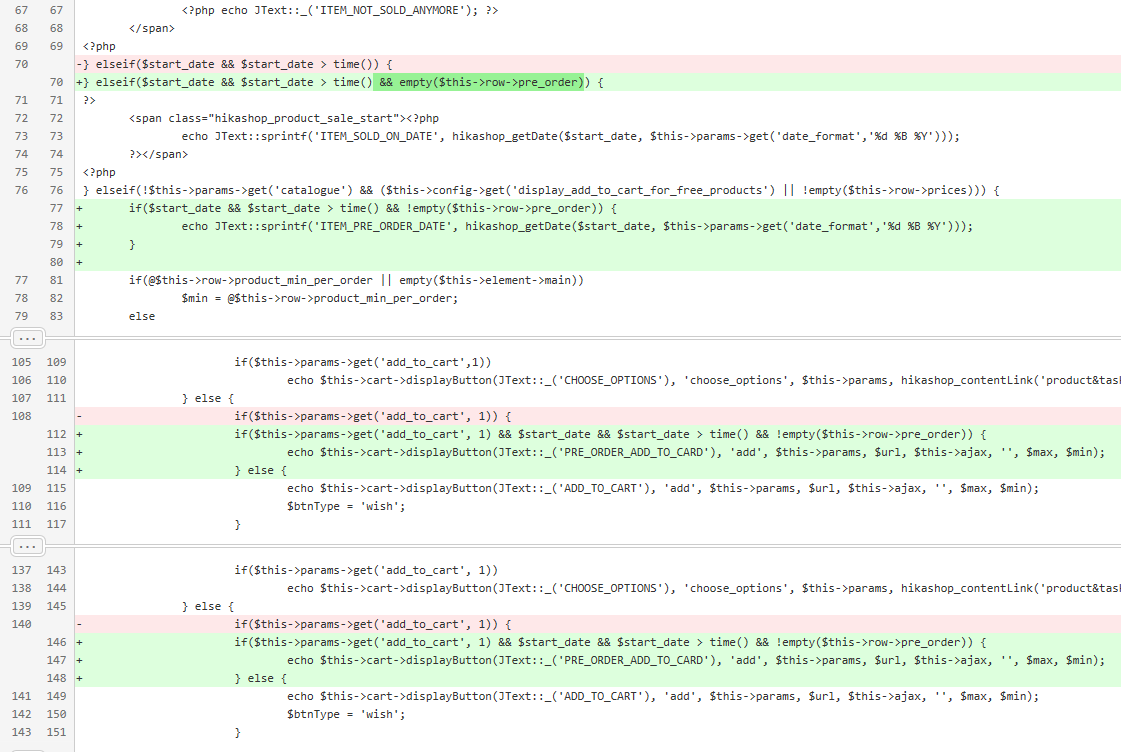
OK, here is my solution to my situation with pre-order.
I added a Custom Field: pre_order
I added two language strings to /language/overrides/en-GB.override.ini:
Code:
ITEM_PRE_ORDER_DATE="<div class="hikashop_product_pre_order"><span>Pre-Order!</span> This item will be available on %s</div>"
PRE_ORDER_ADD_TO_CARD="Pre-Order and add to cart"
I made a View Override of quantity.php and added:
Code:
} elseif($start_date && $start_date > time() && empty($this->row->pre_order)) {
?>
<span class="hikashop_product_sale_start"><?php
echo JText::sprintf('ITEM_SOLD_ON_DATE', hikashop_getDate($start_date, $this->params->get('date_format','%d %B %Y')));
?></span>
<?php
} elseif(!$this->params->get('catalogue') && ($this->config->get('display_add_to_cart_for_free_products') || !empty($this->row->prices))) {
if($start_date && $start_date > time() && !empty($this->row->pre_order)) {
echo JText::sprintf('ITEM_PRE_ORDER_DATE', hikashop_getDate($start_date, $this->params->get('date_format','%d %B %Y')));
}
For the add-to-cart button I check if it's pre-order or normal buy:
Code:
if($this->params->get('add_to_cart', 1) && $start_date && $start_date > time() && !empty($this->row->pre_order)) {
echo $this->cart->displayButton(JText::_('PRE_ORDER_ADD_TO_CARD'), 'add', $this->params, $url, $this->ajax, '', $max, $min);
} else {
echo $this->cart->displayButton(JText::_('ADD_TO_CART'), 'add', $this->params, $url, $this->ajax, '', $max, $min);
$btnType = 'wish';
}
Feel free to correct me if I missed something. But it seems to be working.
Regards,
Henrik
From commit:
.ninja { color: black; visibility: hidden; }
In case of fire:
1. git commit
2. git push
3. exit building
Last edit: 9 years 10 months ago by flexsus. Reason: add repository commit
Please Log in or Create an account to join the conversation.
9 years 10 months ago #254516
by flexsus
.ninja { color: black; visibility: hidden; }
In case of fire:
1. git commit
2. git push
3. exit building
Small correction, if product is sold out, then don't show Pre-Order text. Instead show the NO_STOCK text.
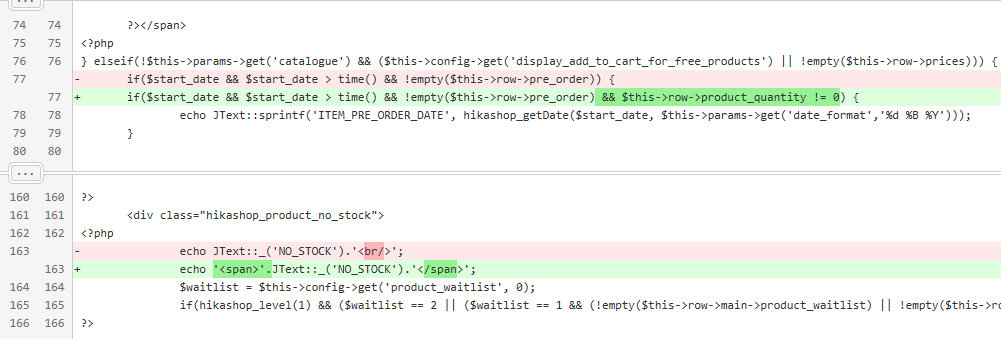
It's working exactly as I would like it :woohoo:
I hope others can use it.
It's working exactly as I would like it :woohoo:
I hope others can use it.
.ninja { color: black; visibility: hidden; }
In case of fire:
1. git commit
2. git push
3. exit building
Please Log in or Create an account to join the conversation.
9 years 10 months ago #254534
by flexsus

Cart will allow product with ITEM_SOLD_ON_DATE, but checkout will not.
I need to find out where to get pass checkout, when product has $start_date set.
Any suggestions is welcome.
.ninja { color: black; visibility: hidden; }
In case of fire:
1. git commit
2. git push
3. exit building
Cart will allow product with ITEM_SOLD_ON_DATE, but checkout will not.
I need to find out where to get pass checkout, when product has $start_date set.
Any suggestions is welcome.
.ninja { color: black; visibility: hidden; }
In case of fire:
1. git commit
2. git push
3. exit building
Please Log in or Create an account to join the conversation.
9 years 10 months ago #254550
by nicolas
Hi,
You'll have to modify the file administrator/components/com_hikashop/classes/cart.php and remove that code:
You'll have to modify the file administrator/components/com_hikashop/classes/cart.php and remove that code:
Code:
if($product->product_sale_start>time()){
$notUsable[$product->cart_product_id]=0;
$app->enqueueMessage(JText::sprintf('PRODUCT_NOT_YET_ON_SALE',$product->product_name),'notice');
continue;
}
The following user(s) said Thank You: flexsus
Please Log in or Create an account to join the conversation.
9 years 10 months ago #254587
by flexsus
.ninja { color: black; visibility: hidden; }
In case of fire:
1. git commit
2. git push
3. exit building
Instead of deleting code, I added check if product_pre_order is set or not.
Then code will still work, if $start_sale_date is in future and pre_order is not set.

If pre_order is set and date is not involved, it will continue.
If pre_order is set and date is in future, it will continue.
So it seems to work the way I would like, that you can pre-order products, but customers is informed that this is a pre-order buy.
Then code will still work, if $start_sale_date is in future and pre_order is not set.
If pre_order is set and date is not involved, it will continue.
If pre_order is set and date is in future, it will continue.
So it seems to work the way I would like, that you can pre-order products, but customers is informed that this is a pre-order buy.
.ninja { color: black; visibility: hidden; }
In case of fire:
1. git commit
2. git push
3. exit building
Please Log in or Create an account to join the conversation.
8 years 10 months ago #281307
by flexsus
.ninja { color: black; visibility: hidden; }
In case of fire:
1. git commit
2. git push
3. exit building
Hi Nicolas
All this about Pre Order I did was working fine before 3.0, but this has changed now. So I will have to re-add my customizations and override quantity.php.
I don't use legacy cart, so could you help me out where to edit, to allow checkout to continue?
I guess this line should be edit?
My suggestion and will this work?
Or did I miss that you have added Pre Order function to Hikashop?
Best regards,
Henrik
All this about Pre Order I did was working fine before 3.0, but this has changed now. So I will have to re-add my customizations and override quantity.php.
I don't use legacy cart, so could you help me out where to edit, to allow checkout to continue?
I guess this line should be edit?
Code:
if(empty($product->product_sale_start) && (int)$parent_product->product_sale_start > 0 && (int)$parent_product->product_sale_start > time()) {
My suggestion and will this work?
Code:
if(empty($product->product_sale_start) && (int)$parent_product->product_sale_start > 0 && (int)$parent_product->product_sale_start > time() && empty($product->product_pre_order)) {
Or did I miss that you have added Pre Order function to Hikashop?
Best regards,
Henrik
.ninja { color: black; visibility: hidden; }
In case of fire:
1. git commit
2. git push
3. exit building
Please Log in or Create an account to join the conversation.
8 years 10 months ago #281328
by Jerome
Jerome - Obsidev.com
HikaMarket & HikaSerial developer / HikaShop core dev team.
Also helping the HikaShop support team when having some time or couldn't sleep.
By the way, do not send me private message, use the "contact us" form instead.
Hello,
What file are you talking about and which version are you using ?
Because the line you mentioned is not in the "product / quantity" view.
Regards,
What file are you talking about and which version are you using ?
Because the line you mentioned is not in the "product / quantity" view.
Regards,
Jerome - Obsidev.com
HikaMarket & HikaSerial developer / HikaShop core dev team.
Also helping the HikaShop support team when having some time or couldn't sleep.
By the way, do not send me private message, use the "contact us" form instead.
Please Log in or Create an account to join the conversation.
8 years 10 months ago #281342
by flexsus
.ninja { color: black; visibility: hidden; }
In case of fire:
1. git commit
2. git push
3. exit building
Hi Jerome
Sorry, no it's not in the product/quantity view. I was referring to Nicolas post #254550 where he told me to change core Hikashop file: administrator/components/com_hikashop/classes/cart.php
I got everything working but found out that I could not pass checkout. Nicolas helped me with that.
I think I know how to edit the new 3.2.1 quantity view. Even thought the code is all new and good looking.
Regards,
Henrik
Sorry, no it's not in the product/quantity view. I was referring to Nicolas post #254550 where he told me to change core Hikashop file: administrator/components/com_hikashop/classes/cart.php
I got everything working but found out that I could not pass checkout. Nicolas helped me with that.
I think I know how to edit the new 3.2.1 quantity view. Even thought the code is all new and good looking.
Regards,
Henrik
.ninja { color: black; visibility: hidden; }
In case of fire:
1. git commit
2. git push
3. exit building
Please Log in or Create an account to join the conversation.
8 years 10 months ago #281355
by nicolas
Hi,
With HikaShop 3.x, you'll have to change/remove the lines:
and:
and:
and:
in that classes/cart.php file.
2 of them are for products without variants (when the product is added to the cart, and when the cart is loaded), and 2 are for products with variants (when the product is added to the cart and when the cart is loaded).
With HikaShop 3.x, you'll have to change/remove the lines:
Code:
if(!$wishlist && empty($msg) && $product['data']->product_sale_start > $now) {
$msg = JText::sprintf('PRODUCT_NOT_YET_ON_SALE', $product['data']->product_name);
}
Code:
if(!$wishlist && empty($msg) && (empty($product['data']->product_sale_start) && $product['data']->parent_product_sale_start > 0 && (int)$product['data']->parent_product_sale_start > $now)) {
$msg = JText::sprintf('PRODUCT_NOT_YET_ON_SALE', $product['data']->product_name);
}
Code:
if(!$wishlist && !empty($product->product_sale_start) && (int)$product->product_sale_start > time()) {
$notUsable[$cart_product_id] = array('id' => $cart_product_id, 'qty' => 0);
$cart->messages[] = array('msg' => JText::sprintf('PRODUCT_NOT_YET_ON_SALE', $errorMessagesProductNames[$cart_product_id]), 'product_id' => $product->product_id, 'type' => 'notice');
continue;
}
Code:
if(empty($product->product_sale_start) && (int)$parent_product->product_sale_start > 0 && (int)$parent_product->product_sale_start > time()) {
$notUsable[$cart_product_id] = array('id' => $cart_product_id, 'qty' => 0);
$cart->messages[] = array('msg' => JText::sprintf('PRODUCT_NOT_YET_ON_SALE', $errorMessagesProductNames[$cart_product_id]), 'product_id' => $product->product_id, 'type' => 'notice');
continue;
}
2 of them are for products without variants (when the product is added to the cart, and when the cart is loaded), and 2 are for products with variants (when the product is added to the cart and when the cart is loaded).
Please Log in or Create an account to join the conversation.

8 years 10 months ago - 8 years 10 months ago #282762
by Kugata
What if i need product quantity more then 100 not less or equal 100 to be changed?
How i need change the code?
nwm
made it work
if($this->row->product_quantity<9000){
echo '<span class="hikashop_product_stock_count">'.$text.'</span><br/>';
}else{
echo '<h4 style="text-align: center;"><span style="color: #3366ff;"><strong>В данный момент товар доступен только по предзаказу!</strong></span></h4>';
}
nicolas wrote: Hi,
The line:
echo '<span class="hikashop_product_stock_count">'.JText::sprintf('X_ITEMS_IN_STOCK',$this->row->product_quantity).'</span><br/>';
Is now:
echo '<span class="hikashop_product_stock_count">'.$text.'<br/></span>';
So similarily, you can replace it with :
if($this->row->product_quantity>100){
echo '<span class="hikashop_product_stock_count">'.$text.'</span><br/>';
}else{
echo 'The product is out of stock. However, you can pre-order it';
}
and replace the lines:
if($this->row->product_quantity == 1 && JText::_('X_ITEM_IN_STOCK') != 'X_ITEM_IN_STOCK')
$text = JText::sprintf('X_ITEM_IN_STOCK', $this->row->product_quantity);
else
$text = JText::sprintf('X_ITEMS_IN_STOCK', $this->row->product_quantity);
with:
if($this->row->product_quantity == 1 && JText::_('X_ITEM_IN_STOCK') != 'X_ITEM_IN_STOCK')
$text = JText::sprintf('X_ITEM_IN_STOCK', $this->row->product_quantity-100);
else
$text = JText::sprintf('X_ITEMS_IN_STOCK', $this->row->product_quantity-100);
What if i need product quantity more then 100 not less or equal 100 to be changed?
How i need change the code?
nwm
made it work
if($this->row->product_quantity<9000){
echo '<span class="hikashop_product_stock_count">'.$text.'</span><br/>';
}else{
echo '<h4 style="text-align: center;"><span style="color: #3366ff;"><strong>В данный момент товар доступен только по предзаказу!</strong></span></h4>';
}
Last edit: 8 years 10 months ago by Kugata.
Please Log in or Create an account to join the conversation.
8 years 5 months ago #291061
by flexsus
.ninja { color: black; visibility: hidden; }
In case of fire:
1. git commit
2. git push
3. exit building
Hi Nicolas
Is this plugin new?
www.hikashop.com/marketplace/product/109...rder-by-obsidev.html
Will it solve my need for allowing my users to preorder a product in Hikashop/Hikamarket and can I then drop the custom field and all the code we have done in this thread?
Regards,
Henrik
Is this plugin new?
www.hikashop.com/marketplace/product/109...rder-by-obsidev.html
Will it solve my need for allowing my users to preorder a product in Hikashop/Hikamarket and can I then drop the custom field and all the code we have done in this thread?
Regards,
Henrik
.ninja { color: black; visibility: hidden; }
In case of fire:
1. git commit
2. git push
3. exit building
Please Log in or Create an account to join the conversation.
Time to create page: 0.525 seconds