
- Posts: 23
- Thank you received: 0
all of the Custom fields won't show up
- artinzaman
-
 Topic Author
- Offline
Less
More
13 years 2 months ago #115410
by artinzaman
all of the Custom fields won't show up was created by artinzaman
Hi everyone,
I have a product with multiple custom fields in the product compression page they are all there but when you go to the product page you can not see them.
Any idea?
Regards
I have a product with multiple custom fields in the product compression page they are all there but when you go to the product page you can not see them.
Any idea?
Regards
Please Log in or Create an account to join the conversation.

Less
More
- Posts: 12953
- Thank you received: 1778
13 years 2 months ago #115428
by Mohamed Thelji
Replied by Mohamed Thelji on topic all of the Custom fields won't show up
Hi,
Can you show me how did you configured them, and check that you published it for the "Front-end" ?
Thanks .
.
Can you show me how did you configured them, and check that you published it for the "Front-end" ?
Thanks
. Please Log in or Create an account to join the conversation.
- artinzaman
-
Topic Author
- Offline
Less
More
- Posts: 23
- Thank you received: 0
13 years 2 months ago - 13 years 2 months ago #115439
by artinzaman
Replied by artinzaman on topic all of the Custom fields won't show up
These are screen shots of the front end I assume the setting should be oK i double checked them but anything special I might consider. I can make a username password for the backend and email to you so you can have look inside
regards
regards
Last edit: 13 years 2 months ago by artinzaman.
Please Log in or Create an account to join the conversation.
Less
More
- Posts: 12953
- Thank you received: 1778
13 years 2 months ago #115444
by Mohamed Thelji
Replied by Mohamed Thelji on topic all of the Custom fields won't show up
Ok, but firstly I have to know what are the custom field that you want to be displaid through your product page.
Ps: You can send me your back-end access through a private message.
Ps: You can send me your back-end access through a private message.
Please Log in or Create an account to join the conversation.

13 years 2 months ago #115472
by Eliot
Replied by Eliot on topic all of the Custom fields won't show up
It looks like the logins you gave us can't acces the administration part.
But before doing so, could you please post an example of your configured screenshot? You may have just forget something here.
But before doing so, could you please post an example of your configured screenshot? You may have just forget something here.
Please Log in or Create an account to join the conversation.
- artinzaman
-
Topic Author
- Offline
Less
More
- Posts: 23
- Thank you received: 0
13 years 2 months ago - 13 years 2 months ago #115488
by artinzaman
Replied by artinzaman on topic all of the Custom fields won't show up
everything user name wise seems to be normal I don't know why you can not login just please make sure if you are checking the back end of idivetrips.com not idivecenter.com
as for the screen shot of the setting I tried to go trough the ones that show up are look same as the ones which don't
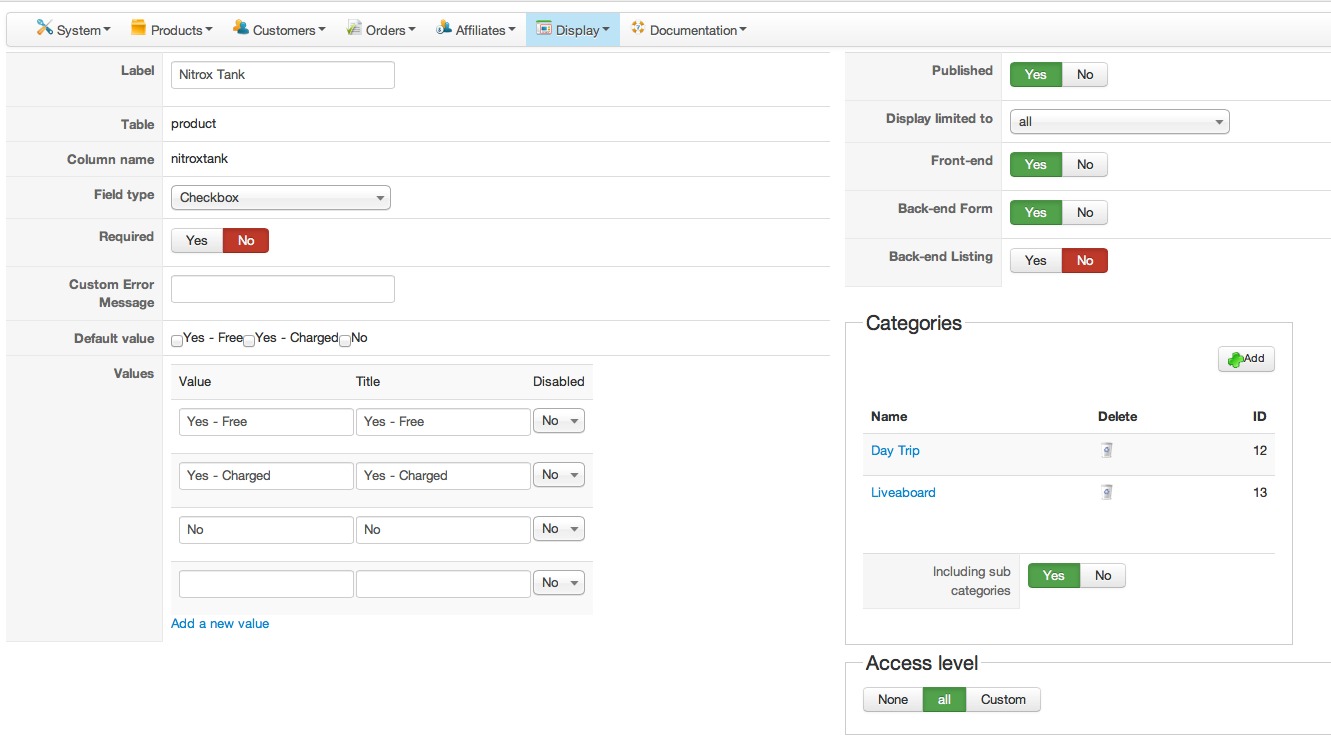
as for the screen shot of the setting I tried to go trough the ones that show up are look same as the ones which don't
Last edit: 13 years 2 months ago by artinzaman.
Please Log in or Create an account to join the conversation.
- artinzaman
-
Topic Author
- Offline
Less
More
- Posts: 23
- Thank you received: 0
13 years 2 months ago #115490
by artinzaman
Replied by artinzaman on topic all of the Custom fields won't show up
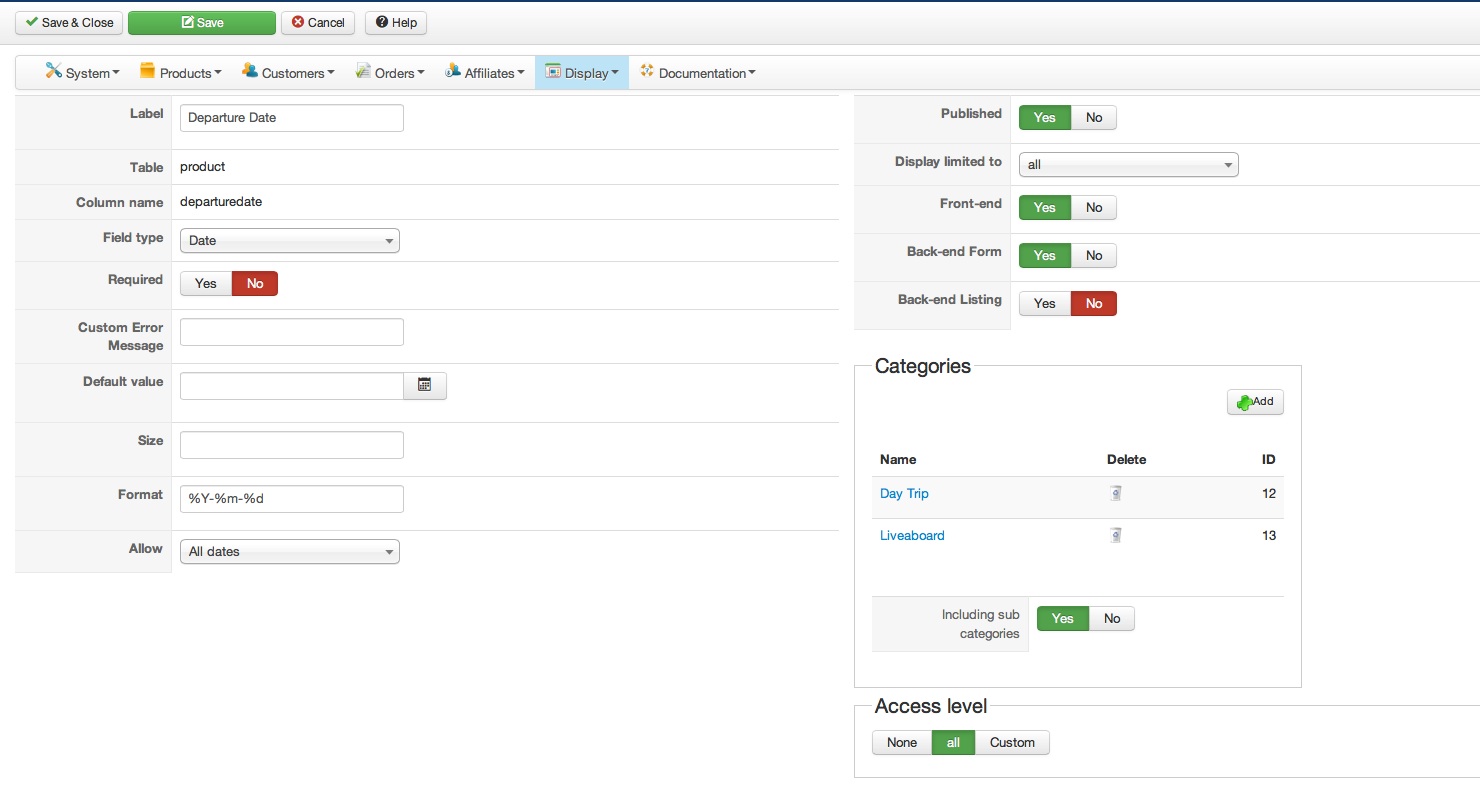
and this is a setting for the one which works
Please Log in or Create an account to join the conversation.
Less
More
- Posts: 12953
- Thank you received: 1778
13 years 2 months ago #115491
by Mohamed Thelji
Replied by Mohamed Thelji on topic all of the Custom fields won't show up
Ok,
If your custom field is in the "product" table the only thing which will be displaid through your product page will be the value of this custom field through the "specification" table.
If you want your customer to SET the value of your custom field you'll have to create a custom field from the "item" table.
If your custom field is in the "product" table the only thing which will be displaid through your product page will be the value of this custom field through the "specification" table.
If you want your customer to SET the value of your custom field you'll have to create a custom field from the "item" table.
Please Log in or Create an account to join the conversation.
- artinzaman
-
Topic Author
- Offline
Less
More
- Posts: 23
- Thank you received: 0
13 years 2 months ago #115493
by artinzaman
Replied by artinzaman on topic all of the Custom fields won't show up
Thanks but that is fixed about that specific trip so it is kind of the specification. later on I was planning to take it off and choose a different approach but thats just to compare somethings show up and some don't.
Then comes the second problem which is when you try to compare the product the price is shown free!!
you can check it out in front end and under liveaboard menu
regards
Then comes the second problem which is when you try to compare the product the price is shown free!!
you can check it out in front end and under liveaboard menu
regards
Please Log in or Create an account to join the conversation.
Less
More
- Posts: 12953
- Thank you received: 1778
13 years 2 months ago #115509
by Mohamed Thelji
Replied by Mohamed Thelji on topic all of the Custom fields won't show up
Did you set more than one price through your product configuration page ?
Please Log in or Create an account to join the conversation.
- artinzaman
-
Topic Author
- Offline
Less
More
- Posts: 23
- Thank you received: 0
13 years 2 months ago #115528
by artinzaman
Replied by artinzaman on topic all of the Custom fields won't show up
yes based on cabin type the price would be different.
any idea on the custom field problem?
regards
any idea on the custom field problem?
regards
Please Log in or Create an account to join the conversation.
- artinzaman
-
Topic Author
- Offline
Less
More
- Posts: 23
- Thank you received: 0
13 years 2 months ago #115621
by artinzaman
Replied by artinzaman on topic all of the Custom fields won't show up
Hi again
wanted to check if there is any update regarding this discussion?
thanks
wanted to check if there is any update regarding this discussion?
thanks
Please Log in or Create an account to join the conversation.
13 years 2 months ago #115679
by Eliot
Replied by Eliot on topic all of the Custom fields won't show up
Hi there,
Indeed, I took a look and it's something we can improve.
So here is the fix, just edit the file view.html.php in components/com_hikashop/views/product/ and change this line:
to this:
It should work
Indeed, I took a look and it's something we can improve.
So here is the fix, just edit the file view.html.php in components/com_hikashop/views/product/ and change this line:
Code:
$currencyClass->getPrices($elements,$cids,$currency_id,$main_currency,$zone_id,$discount_before_tax);
to this:
Code:
$defaultParams = $config->get('default_params');
$detault_display_type=@$defaultParams['price_display_type'];
$currencyClass->getListingPrices($elements,$zone_id,$currency_id,$detault_display_type);
It should work
Please Log in or Create an account to join the conversation.
- artinzaman
-
Topic Author
- Offline
Less
More
- Posts: 23
- Thank you received: 0
13 years 2 months ago #115712
by artinzaman
Replied by artinzaman on topic all of the Custom fields won't show up
Hi
did the same thing now when you go to product page you get a error:
Error: 0 - SQL=SELECT * FROM idt_hikashop_discount WHERE discount_type='discount' AND discount_published=1 AND ( discount_quota>discount_used_times OR discount_quota=0 ) AND discount_start < 1374766220 AND ( discount_end > 1374766220 OR discount_end = 0 ) AND ( discount_product_id IN () OR discount_product_id=0 ) AND ( discount_flat_amount!=0 OR discount_percent_amount!=0 ) AND (discount_access = 'all' OR discount_access LIKE '%,9,%')
You may not be able to visit this page because of:
an out-of-date bookmark/favourite
a search engine that has an out-of-date listing for this site
a mistyped address
you have no access to this page
The requested resource was not found.
An error has occurred while processing your request.
should I change things back to where it was ?
regards
did the same thing now when you go to product page you get a error:
Error: 0 - SQL=SELECT * FROM idt_hikashop_discount WHERE discount_type='discount' AND discount_published=1 AND ( discount_quota>discount_used_times OR discount_quota=0 ) AND discount_start < 1374766220 AND ( discount_end > 1374766220 OR discount_end = 0 ) AND ( discount_product_id IN () OR discount_product_id=0 ) AND ( discount_flat_amount!=0 OR discount_percent_amount!=0 ) AND (discount_access = 'all' OR discount_access LIKE '%,9,%')
You may not be able to visit this page because of:
an out-of-date bookmark/favourite
a search engine that has an out-of-date listing for this site
a mistyped address
you have no access to this page
The requested resource was not found.
An error has occurred while processing your request.
should I change things back to where it was ?
regards
Please Log in or Create an account to join the conversation.
- artinzaman
-
Topic Author
- Offline
Less
More
- Posts: 23
- Thank you received: 0
13 years 2 months ago #115716
by artinzaman
Replied by artinzaman on topic all of the Custom fields won't show up
Here is the file itself maybe you can have a look
This attachment is hidden for guests.
Please log in or register to see it.
Please log in or register to see it.
Please Log in or Create an account to join the conversation.
- artinzaman
-
Topic Author
- Offline
Less
More
- Posts: 23
- Thank you received: 0
13 years 2 months ago #115737
by artinzaman
Replied by artinzaman on topic all of the Custom fields won't show up
Ok now officially I messed up everything  . I put the old line back in the mentioned file but any where I go in the website I see this on top of the page:
/** * @package HikaShop for Joomla! * @version 2.2.0 * @author hikashop.com * @copyright (C) 2010-2013 HIKARI SOFTWARE. All rights reserved. * @license GNU/GPLv3 www.gnu.org/licenses/gpl-3.0.html */ defined('_JEXEC') or die('Restricted access'); ?>
can someone help?
Regards
. I put the old line back in the mentioned file but any where I go in the website I see this on top of the page:/** * @package HikaShop for Joomla! * @version 2.2.0 * @author hikashop.com * @copyright (C) 2010-2013 HIKARI SOFTWARE. All rights reserved. * @license GNU/GPLv3 www.gnu.org/licenses/gpl-3.0.html */ defined('_JEXEC') or die('Restricted access'); ?>
can someone help?
Regards
Please Log in or Create an account to join the conversation.
13 years 2 months ago #115792
by Eliot
Replied by Eliot on topic all of the Custom fields won't show up
Strange behavior for such a small modification!
Well, here the modified file. I would also suggest to reinstall Hikashop if you still have the errors .
.
Well, here the modified file. I would also suggest to reinstall Hikashop if you still have the errors
.
The following user(s) said Thank You: artinzaman
Please Log in or Create an account to join the conversation.
- artinzaman
-
Topic Author
- Offline
Less
More
- Posts: 23
- Thank you received: 0
13 years 2 months ago #115827
by artinzaman
Replied by artinzaman on topic all of the Custom fields won't show up
Hi
Thanks a lot now everything is back to normal but in general I still have the following issues:
1) all the specification which is made by custom fields don't show up in product page I checked everything and all the custom field setting are the same just some show and some don't but in product compare you can see them all.
2) in product compare the price shown as free but as each product have different price range it should at least show price from
3) when you set the variations the quantity of all are unlimited for now but it brings up a 2400 as a quantity which I don't know where it comes from. Is there a way that it doesn't sum the whole quantity of all available options in one big total? or at least do not show anything until the options are selected?
4) is there away you can limit commenting to people who only bought a product and the comment they are allowed to put is for that specific product only ?
Thanks again
Thanks a lot now everything is back to normal but in general I still have the following issues:
1) all the specification which is made by custom fields don't show up in product page I checked everything and all the custom field setting are the same just some show and some don't but in product compare you can see them all.
2) in product compare the price shown as free but as each product have different price range it should at least show price from
3) when you set the variations the quantity of all are unlimited for now but it brings up a 2400 as a quantity which I don't know where it comes from. Is there a way that it doesn't sum the whole quantity of all available options in one big total? or at least do not show anything until the options are selected?
4) is there away you can limit commenting to people who only bought a product and the comment they are allowed to put is for that specific product only ?
Thanks again
Please Log in or Create an account to join the conversation.
13 years 2 months ago #115860
by Eliot
Replied by Eliot on topic all of the Custom fields won't show up
You're welcome
1 - Someone else on the forum has the same issue, it may be a bug, I'll wait to test on his site and keep you aware
2 - You should just change the price display in the main configuration of Hikashop (System>configuration>display)
3 - Where does this quantity is displayed? A link would be perfect for me to see the issue
4 - In the main configuration you can find this option: Choose the access level for votes or comments (System>Configuration>Features>Votes)
1 - Someone else on the forum has the same issue, it may be a bug, I'll wait to test on his site and keep you aware
2 - You should just change the price display in the main configuration of Hikashop (System>configuration>display)
3 - Where does this quantity is displayed? A link would be perfect for me to see the issue
4 - In the main configuration you can find this option: Choose the access level for votes or comments (System>Configuration>Features>Votes)
Please Log in or Create an account to join the conversation.
- artinzaman
-
Topic Author
- Offline
Less
More
- Posts: 23
- Thank you received: 0
13 years 2 months ago #116046
by artinzaman
Replied by artinzaman on topic all of the Custom fields won't show up
Hi
Sorry for delayed response. And thank a lot for your answers.
As for
1) I'm waiting for your information.
2) It did job perfectly well thanks just can I add the word "from" in front of price in compare page?
3) www.idivetrips.com/component/hikashop/pr...2-diverace-t?Itemid= is the link to one product which for now supposed to show unlimited but after setting up the variants the number 24000 came from somewhere which I am not sure but think it is a bug.
4) That one did job just perfect but now the comments show for the product no matter which characteristics? for more product one variant is date and if the comment only shows up under the same date only then makes it pointless because new coming customers will be looking for availability in future and very unlikely to browse to products with passed date.
Regards
Sorry for delayed response. And thank a lot for your answers.
As for
1) I'm waiting for your information.
2) It did job perfectly well thanks just can I add the word "from" in front of price in compare page?
3) www.idivetrips.com/component/hikashop/pr...2-diverace-t?Itemid= is the link to one product which for now supposed to show unlimited but after setting up the variants the number 24000 came from somewhere which I am not sure but think it is a bug.
4) That one did job just perfect but now the comments show for the product no matter which characteristics? for more product one variant is date and if the comment only shows up under the same date only then makes it pointless because new coming customers will be looking for availability in future and very unlikely to browse to products with passed date.
Regards
Please Log in or Create an account to join the conversation.
Time to create page: 0.365 seconds