

- Posts: 10
- Thank you received: 1
"Add to Wishlist" button not working at all
14 years 1 week ago #65625
by TS44
"Add to Wishlist" button not working at all was created by TS44
I recently upgraded to HikaShop 1.6.0 Essential mainly for its wish list functionality. I am running into major issues with the wish list feature, it is not functioning at all. Plugins and modules are enabled.
Although the "notify me when available" button is present, the secondary wish list window only offers name and email without any variants.
There are no save chosen product variants / options.
There is no ability for customer to view / edit / delete / move to basket / copy to basket
There are no wish list basket options or customer comments field.
More importantly the wish list dose not appear after submission of name and email under the administrative back end.
Regards.
Although the "notify me when available" button is present, the secondary wish list window only offers name and email without any variants.
There are no save chosen product variants / options.
There is no ability for customer to view / edit / delete / move to basket / copy to basket
There are no wish list basket options or customer comments field.
More importantly the wish list dose not appear after submission of name and email under the administrative back end.
Regards.
Please Log in or Create an account to join the conversation.

14 years 1 week ago #65781
by Xavier
Replied by Xavier on topic Re: "Add to Wishlist" button not working at all
Hi TS44,
With the wish lists enabled, when a product have no stock, the "Add to wishlist" button is displayed.
When the customer arrive on his wish list, he can manage the name of the wishlist, the sharing type for the wishlist, edit the product quantities, remove products, add them to his cart.
On the wish list listing, he can remove some wish lists, create a new one.
Add a comment field on a wish list seems to be a good idea, I add it in the TODO list.
I think that you have some configuration problems, can you give me some screenshots of your configuration ?
What is the "secondary wish list window" for you ?
And can you explain with more details the "There are no save chosen product variants / options." problem ?
With the wish lists enabled, when a product have no stock, the "Add to wishlist" button is displayed.
When the customer arrive on his wish list, he can manage the name of the wishlist, the sharing type for the wishlist, edit the product quantities, remove products, add them to his cart.
On the wish list listing, he can remove some wish lists, create a new one.
Add a comment field on a wish list seems to be a good idea, I add it in the TODO list.
I think that you have some configuration problems, can you give me some screenshots of your configuration ?
What is the "secondary wish list window" for you ?
And can you explain with more details the "There are no save chosen product variants / options." problem ?
Please Log in or Create an account to join the conversation.
14 years 1 week ago - 14 years 1 week ago #65917
by TS44
Replied by TS44 on topic Re: "Add to Wishlist" button not working at all
Here are some screenshots of the configuration;
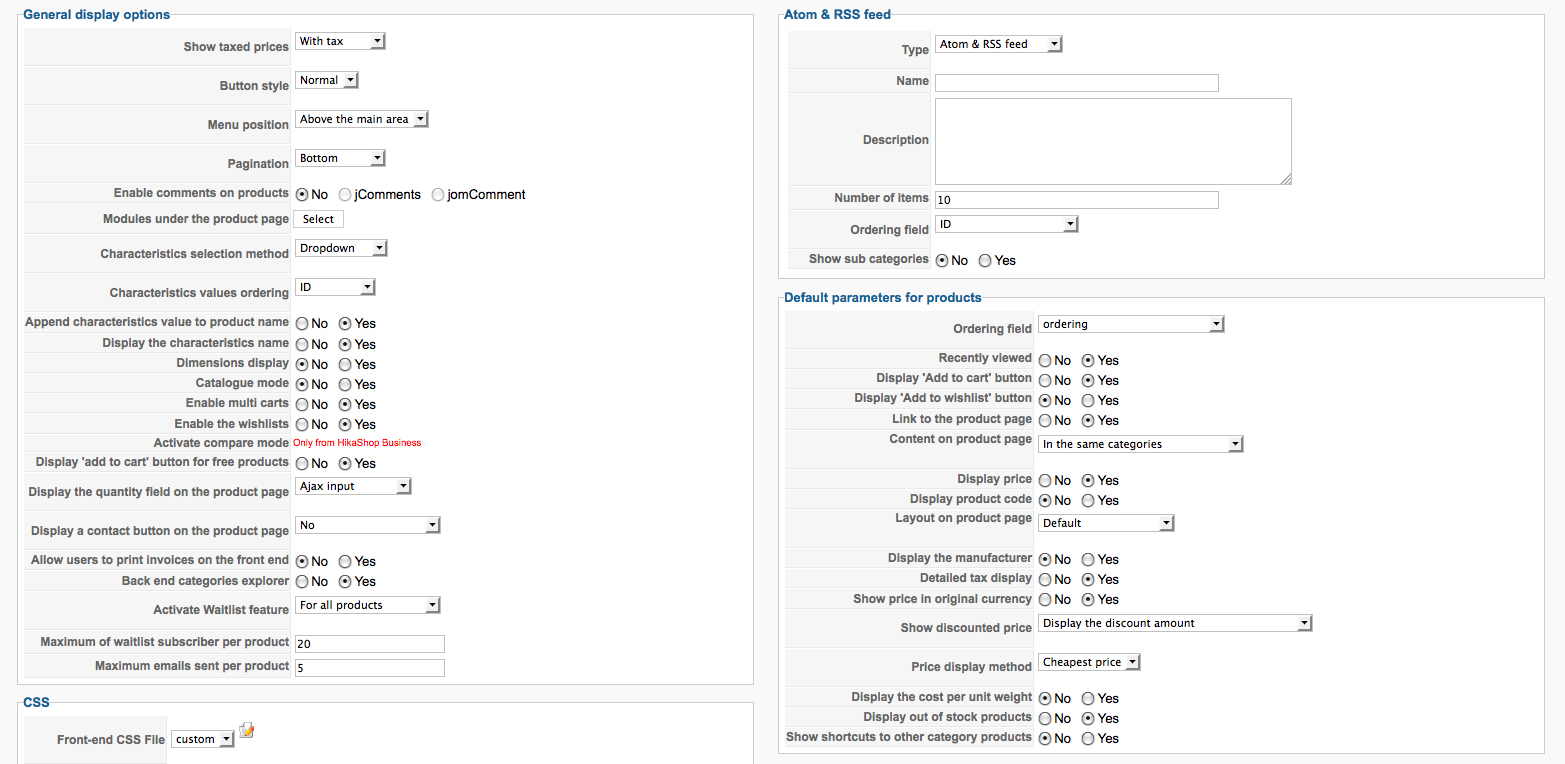
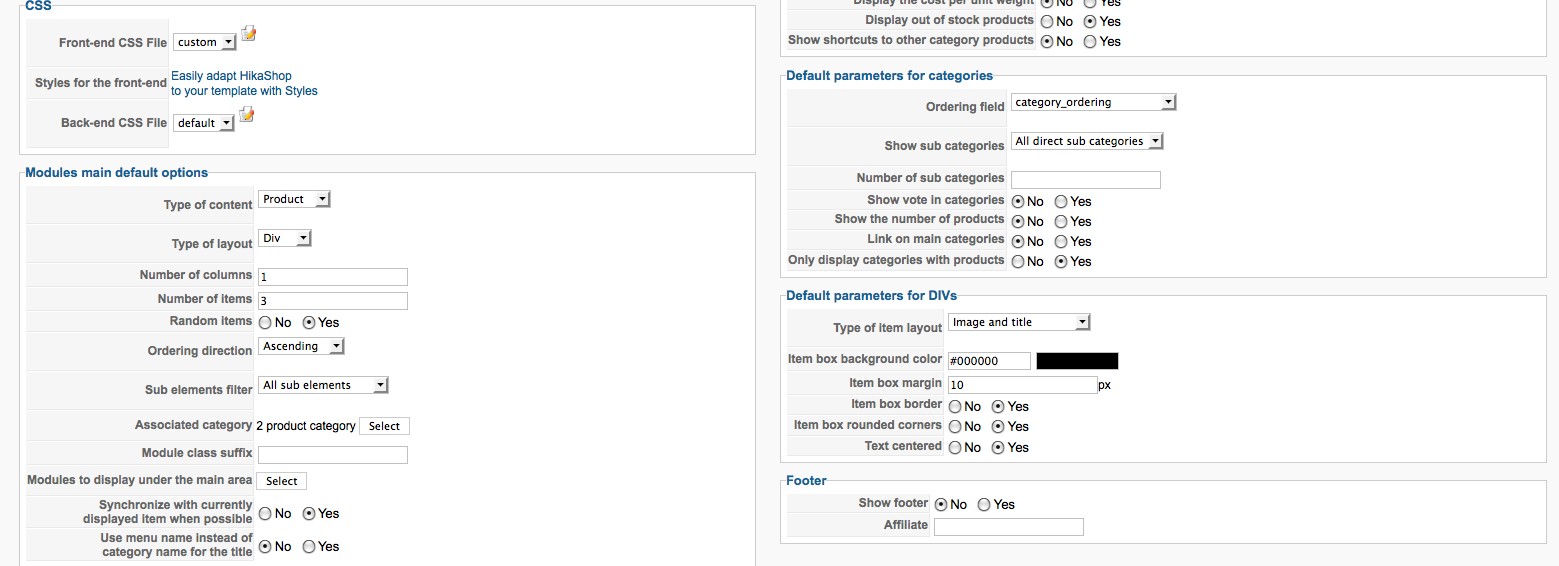
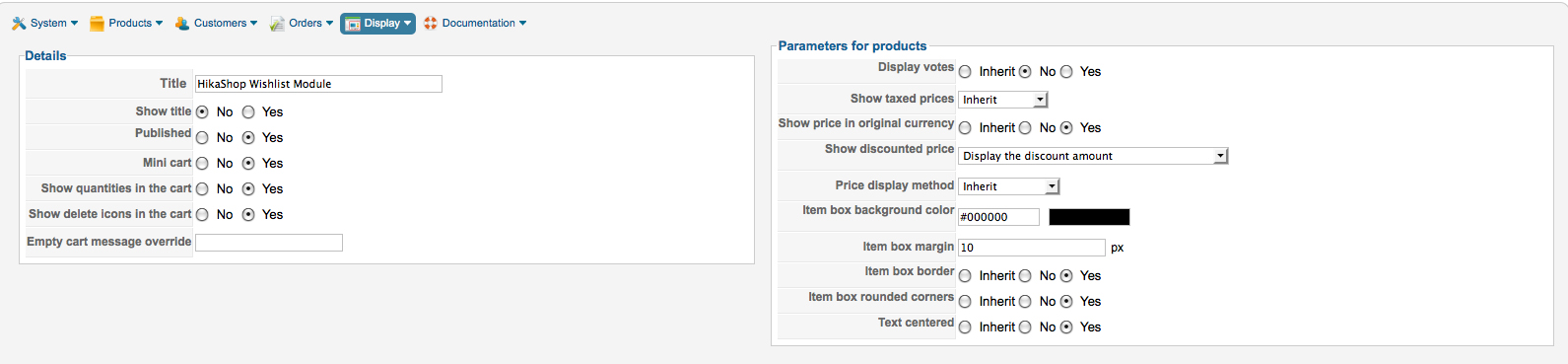
The secondary wish list is just the panel that appears after the add to wish list button is activated. In this window/panel there are no choices to choose product variants such as color, size, etc.
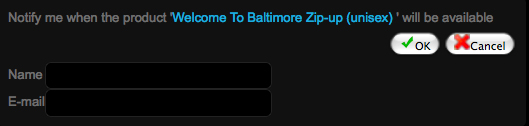
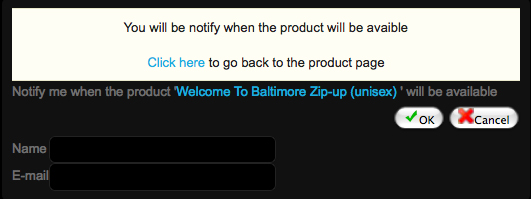
The wish list cart/module remains empty.

Regards
The secondary wish list is just the panel that appears after the add to wish list button is activated. In this window/panel there are no choices to choose product variants such as color, size, etc.
The wish list cart/module remains empty.
Regards
Last edit: 14 years 1 week ago by TS44. Reason: wrong file type
Please Log in or Create an account to join the conversation.
14 years 1 week ago #65919
by TS44
Replied by TS44 on topic Re: "Add to Wishlist" button not working at all
Also error screen produced carries a line of code.
product/116-welcome-to-baltimore-zip-up-unisex-span-class-hikashop-product-variant-subname-black-s-span#
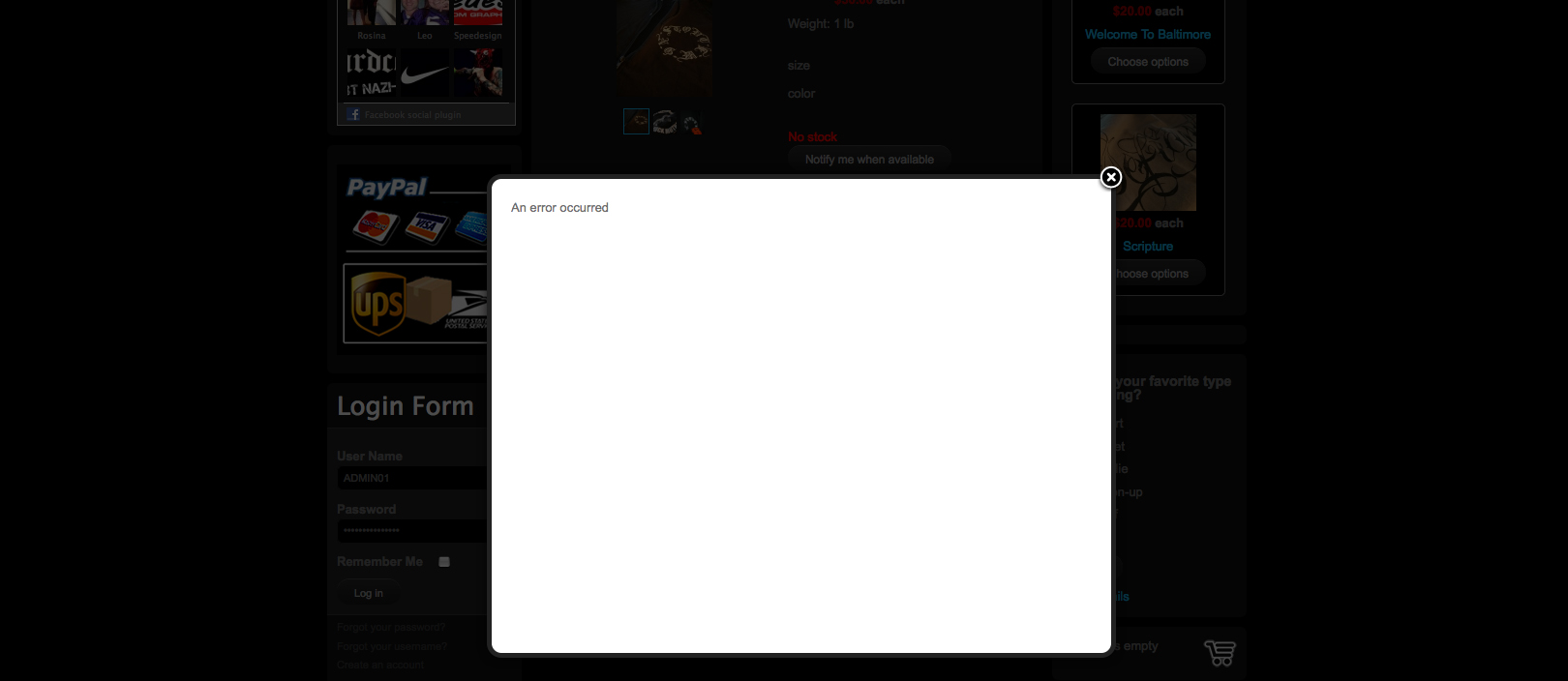
Regards
product/116-welcome-to-baltimore-zip-up-unisex-span-class-hikashop-product-variant-subname-black-s-span#
Regards
Please Log in or Create an account to join the conversation.
14 years 1 week ago #66060
by Xavier
Replied by Xavier on topic Re: "Add to Wishlist" button not working at all
Hi TS44,
First of all, can you try to install the last release from our site hikashop.com ? Because the "an error occured" message in the popup notice has been corrected since the last release.
I think that it will correct the other problem, the add to wishlist button will be displayed too. You can see in HikaShop > Display > Views, in the view "product / quantity" at the end of the file you will see the check for the waitlist feature and the add to wishlist button, the code have to be like that:
First of all, can you try to install the last release from our site hikashop.com ? Because the "an error occured" message in the popup notice has been corrected since the last release.
I think that it will correct the other problem, the add to wishlist button will be displayed too. You can see in HikaShop > Display > Views, in the view "product / quantity" at the end of the file you will see the check for the waitlist feature and the add to wishlist button, the code have to be like that:
Code:
$waitlist = $this->config->get('product_waitlist',0);
if(hikashop_level(1) && ($waitlist==2 || ($waitlist==1 && (!empty($this->element->main->product_waitlist) || !empty($this->element->product_waitlist))))){ ?>
</div><div id="hikashop_product_waitlist_main" class="hikashop_product_waitlist_main">
<?php
$empty='';
jimport('joomla.html.parameter');
$params = new JParameter($empty);
echo $this->cart->displayButton(JText::_('ADD_ME_WAITLIST'),'add_waitlist',$params,hikashop_completeLink('product&task=waitlist&cid='.$this->row->product_id),'window.location=\''.str_replace("'","\'",hikashop_completeLink('product&task=waitlist&cid='.$this->row->product_id)).'\';return false;');
}
if($this->params->get('add_to_wishlist') && $config->get('enable_wishlist', 1)){
echo '<div id="hikashop_add_wishlist">';
echo $this->cart->displayButton(JText::_('ADD_TO_WISHLIST'),'add',$this->params,$url,$wishlistAjax,'',$this->row->product_max_per_order,1,'',false);
echo '</div>';
}
Please Log in or Create an account to join the conversation.
14 years 1 week ago #66085
by TS44
Replied by TS44 on topic Re: "Add to Wishlist" button not working at all
Hello Xavier,
I downloaded the latest release from HikaShop.com on 09/15/12. Has the this issue been corrected since then?
Could there be another problem?
I downloaded the latest release from HikaShop.com on 09/15/12. Has the this issue been corrected since then?
Could there be another problem?
Please Log in or Create an account to join the conversation.
14 years 1 week ago #66087
by TS44
Replied by TS44 on topic Re: "Add to Wishlist" button not working at all
$waitlist = $this->config->get('product_waitlist',0);
if(hikashop_level(1) && ($waitlist==2 || ($waitlist==1 && (!empty($this->element->main->product_waitlist) || !empty($this->element->product_waitlist))))){ ?>
</div><div id="hikashop_product_waitlist_main" class="hikashop_product_waitlist_main">
<?php
$empty='';
jimport('joomla.html.parameter');
$params = new JParameter($empty);
echo $this->cart->displayButton(JText::_('ADD_ME_WAITLIST'),'add_waitlist',$params,hikashop_completeLink('product&task=waitlist&cid='.$this->row->product_id),'window.location=\''.str_replace("'","\'",hikashop_completeLink('product&task=waitlist&cid='.$this->row->product_id)).'\';return false;');
}
if($this->params->get('add_to_wishlist') && $config->get('enable_wishlist', 1)){
echo '<div id="hikashop_add_wishlist">';
echo $this->cart->displayButton(JText::_('ADD_TO_WISHLIST'),'add',$this->params,$url,$wishlistAjax,'',$this->row->product_max_per_order,1,'',false);
echo '</div>';
}
}?>
</div>
<?php
This is the code I have, it looks to mirror the example.
if(hikashop_level(1) && ($waitlist==2 || ($waitlist==1 && (!empty($this->element->main->product_waitlist) || !empty($this->element->product_waitlist))))){ ?>
</div><div id="hikashop_product_waitlist_main" class="hikashop_product_waitlist_main">
<?php
$empty='';
jimport('joomla.html.parameter');
$params = new JParameter($empty);
echo $this->cart->displayButton(JText::_('ADD_ME_WAITLIST'),'add_waitlist',$params,hikashop_completeLink('product&task=waitlist&cid='.$this->row->product_id),'window.location=\''.str_replace("'","\'",hikashop_completeLink('product&task=waitlist&cid='.$this->row->product_id)).'\';return false;');
}
if($this->params->get('add_to_wishlist') && $config->get('enable_wishlist', 1)){
echo '<div id="hikashop_add_wishlist">';
echo $this->cart->displayButton(JText::_('ADD_TO_WISHLIST'),'add',$this->params,$url,$wishlistAjax,'',$this->row->product_max_per_order,1,'',false);
echo '</div>';
}
}?>
</div>
<?php
This is the code I have, it looks to mirror the example.
Please Log in or Create an account to join the conversation.
14 years 1 week ago - 14 years 1 week ago #66163
by Xavier
Replied by Xavier on topic Re: "Add to Wishlist" button not working at all
Hi,
It seem's that you have the last version of HikaShop.
I tried your configuration on my end, and it's working fine.
The "add to wishlist" button appear on the product page, and not on the waitlist subscription page, look at this screenshot:
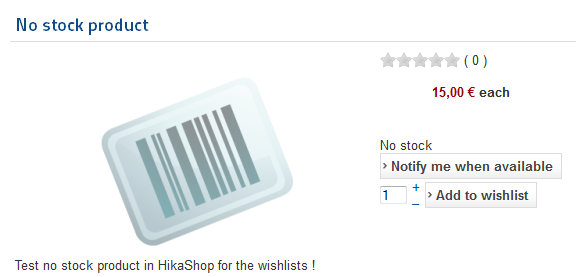
Hope this will help you.
It seem's that you have the last version of HikaShop.
I tried your configuration on my end, and it's working fine.
The "add to wishlist" button appear on the product page, and not on the waitlist subscription page, look at this screenshot:
Hope this will help you.
Last edit: 14 years 1 week ago by Xavier.
Please Log in or Create an account to join the conversation.
14 years 1 week ago #66301
by TS44
Replied by TS44 on topic Re: "Add to Wishlist" button not working at all
Xavier,
The "add to wishlist" button dose not appear on my product page although the "Notify me when available" button dose.
example in screen shot.
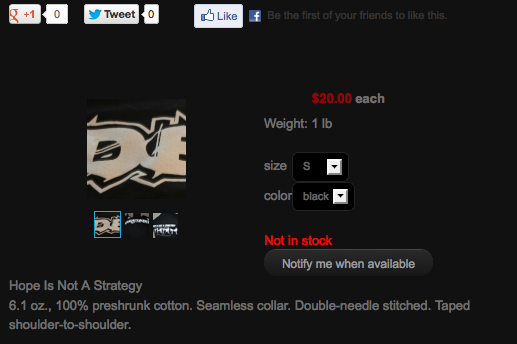
The waitlist subscription page also remains blank as dose the wishlist module.
How should everything be configured?
Than you
The "add to wishlist" button dose not appear on my product page although the "Notify me when available" button dose.
example in screen shot.
The waitlist subscription page also remains blank as dose the wishlist module.
How should everything be configured?
Than you
Please Log in or Create an account to join the conversation.
14 years 1 week ago #66309
by TS44
Replied by TS44 on topic Re: "Add to Wishlist" button not working at all
Xavier,
I triple checked the configuration and enabled the "Add to wishlist" button under "Default parameters for products" after which I ran into a error code.
Fatal error: Call to a member function displayButton() on a non-object in /home/seekwith/public_html/components/com_hikashop/views/product/tmpl/quantity.php on line 18
I edit the file "product / quantity" in HikaShop > Display > View.
Placing the code within the php tag.
<?php
if(!isset($this->cart))
$this->cart = hikashop_get('helper.cart');
Now everything looks to be working fine.
Thank you
I triple checked the configuration and enabled the "Add to wishlist" button under "Default parameters for products" after which I ran into a error code.
Fatal error: Call to a member function displayButton() on a non-object in /home/seekwith/public_html/components/com_hikashop/views/product/tmpl/quantity.php on line 18
I edit the file "product / quantity" in HikaShop > Display > View.
Placing the code within the php tag.
<?php
if(!isset($this->cart))
$this->cart = hikashop_get('helper.cart');
Now everything looks to be working fine.
Thank you
The following user(s) said Thank You: nicolas
Please Log in or Create an account to join the conversation.

14 years 1 week ago #66479
by nicolas
Replied by nicolas on topic Re: "Add to Wishlist" button not working at all
We'll add that on our end.
Please Log in or Create an account to join the conversation.
Time to create page: 0.240 seconds